Crypting with xor allows one to write one function that can encrypt and decrypt a file. In this example a text file is used, but it could be an image file as well. Once you have created the encrypted file you simply send it through the same function again to decrypt it. The password is looped against the file, but you can get tricky and spell forward then backward, odd/even, or every odd character twice and every even character once. This will make it harder for grandma to decipher your secret files.
Text Encryption/Decryption with XOR (Python)
# testing a simple xor encryption/decryption
# tested with Python24      vegaseat    02oct2005

import StringIO
import operator


def cryptXOR(filename, pw):
    """
    cryptXOR(filename, pw) takes the file in filename and xor encrypts/decrypts it against the password pw,
    if the file extension is .txt indicating a normal text file, then an encrypted file with extension .txp
    will be written, if the file extension indicates an encrypted file .txp then a decrypted normal text
    file with extension .txt will be written
    """
    f = open(filename, "rb")  # binary required
    str2 = f.read()
    f.close()
    # create two streams in memory the size of the string str2
    # one stream to read from and the other to write the XOR crypted character to
    sr = StringIO.StringIO(str2)
    sw = StringIO.StringIO(str2)
    # make sure we start both streams at position zero (beginning)
    sr.seek(0)
    sw.seek(0)
    n = 0
    #str3 = ""  # test
    for k in range(len(str2)):
        # loop through password start to end and repeat
        if n >= len(pw) - 1:
            n = 0
        p = ord(pw[n])
        n += 1

        # read one character from stream sr
        c = sr.read(1)
        b = ord(c)
        # xor byte with password byte
        t = operator.xor(b, p)
        z = chr(t)
        # advance position to k in stream sw then write one character
        sw.seek(k)
        sw.write(z)
        #str3 += z  # test
    # reset stream sw to beginning
    sw.seek(0)
    # if filename was a normal text file, stream sw now contains the encrypted text
    # and is written (binary required) to a file ending with .txp
    if filename.endswith('.txt'):
        outfile = filename[:-4] + '.txp'
        f = open(outfile, "wb")
        f.write(sw.read())
        f.close()
        print "File %s written!" % outfile
    # if filename was encrypted text, stream sw now contains normal text
    # and is written to a file ending with .txt
    elif filename.endswith('.txp'):
        outfile = filename[:-4] + '.txt'
        f = open(outfile, "w")
        f.write(sw.read())
        f.close()
        print "File %s written!" % outfile
        #print str3  # test
    else:
        print "File %s does not have proper extension!" % filename

    # clean up
    sr.close()
    sw.close()


# allows cryptXOR() to be used as a module
if __name__ == '__main__':

    str1 = \
'''A list of quotes from Grade School Essays on the History of Classical Music:
"J.S. Bach died from 1750 to the present"
"Agnus Dei was a woman composer famous for her church music."
"Refrain means don't do it.  A refrain in music is the part you better not try  to sing."
"Handel was half German, half Italian, and half English.  He was rather large."
"Henry Purcell is a well-known composer few people have ever heard of."
"An opera is a song of bigly size."
"A harp is a nude piano."
"A virtuoso is a musician with real high morals."
"Music sung by two people at the same time is called a duel."
"I know what a sextet is but I'd rather not say."
"Most authorities agree that music of antiquity was written long ago."
"My favorite composer is opus."
"Probably the most marvelous fugue was between the Hatfields and the McCoys."
"My very best liked piece is the bronze lullaby." '''

    # save the string as a normal text file so we have it
    fout = open("Music101.txt", "w")
    fout.write(str1)
    fout.close()

    # let's use a fixed password for testing
    password = "nixon"

    # encrypt the text file to "Music101.txp" (check with an editor, shows a mess)
    cryptXOR("Music101.txt", password)

    # decrypt the text file back to "Music101.txt" (check with an editor, normal text again)
    cryptXOR("Music101.txp", password)
kylealanhale 0 Newbie Poster
I think that most people would find this a bit more pythonic:
def crypt(text, password):
    old = StringIO.StringIO(text)
    new = StringIO.StringIO(text)

    for position in xrange(len(text)):
        bias = ord(password[position % len(password)])  # Get next bias character from password

        old_char = ord(old.read(1))
        new_char = chr(old_char ^ bias)  # Get new charactor by XORing bias against old character

        new.seek(position)
        new.write(new_char)

    new.seek(0)
    return new.read()
TrustyTony 888 ex-Moderator Team Colleague Featured Poster
The new function is not doing exactly same as old one as it failed to decrypt file crypted with old function.
Usage change also, I changed the input being from file given as first parameter and return to be the (sde)crypted content and changed the example use accordingly to show the both versions from the program, no checking with text editor required:
# testing a simple xor encryption/decryption

import StringIO

def crypt(fn, password):
    text= open(fn, "rb").read()  # binary required
    old = StringIO.StringIO(text)
    new = StringIO.StringIO(text)

    for position in xrange(len(text)):
        bias = ord(password[position % len(password)])  # Get next bias character from password

        old_char = ord(old.read(1))
        new_char = chr(old_char ^ bias)  # Get new charactor by XORing bias against old character

        new.seek(position)
        new.write(new_char)

    new.seek(0)
    return new.read()

# allows cryptXOR() to be used as a module
if __name__ == '__main__':

    str1 = \
'''A list of quotes from Grade School Essays on the History of Classical Music:
"J.S. Bach died from 1750 to the present"
"Agnus Dei was a woman composer famous for her church music."
"Refrain means don't do it.  A refrain in music is the part you better not try  to sing."
"Handel was half German, half Italian, and half English.  He was rather large."
"Henry Purcell is a well-known composer few people have ever heard of."
"An opera is a song of bigly size."
"A harp is a nude piano."
"A virtuoso is a musician with real high morals."
"Music sung by two people at the same time is called a duel."
"I know what a sextet is but I'd rather not say."
"Most authorities agree that music of antiquity was written long ago."
"My favorite composer is opus."
"Probably the most marvelous fugue was between the Hatfields and the McCoys."
"My very best liked piece is the bronze lullaby." '''

    # save the string as a normal text file so we have it
    fout = open("Music101.txt", "w")
    fout.write(str1)
    fout.close()

    # let's use a fixed password for testing
    password = "nixon"

    # encrypt the text file to "Music101.txp"
    open("Music101.txp", 'wb').write(crypt("Music101.txt", password))

    #"Music101.txp" shows a mess
    print(open("Music101.txp",'rb').read())
    print('-'*60)
    # decrypt the text file back and print it
print crypt("Music101.txp", password) Edited by TrustyTony because: Old comment out
TrustyTony 888 ex-Moderator Team Colleague Featured Poster
I feel StringIO is not necessary and the program becomes even more pythonic:
# testing a simple xor encryption/decryption

import StringIO

def crypt(fn, password):
    text= open(fn, "rb").read()  # binary required
    new = ''
    lp = len(password)
    pp = 0 ## position in password

    for old_char in text:
        pp = (pp+1) %lp
        bias = ord(password[pp])  # Get next bias character from password
        new_char = chr(ord(old_char) ^ bias)  # Get new charactor by XORing bias against old character

        new+=new_char

    return new

# allows cryptXOR() to be used as a module
if __name__ == '__main__':
    # let's use a fixed password for testing
    password = "nixon"

    # encrypt the text file to "Music101.txp"
    open("Music101.txp", 'wb').write(crypt("Music101.txt", password))

    #"Music101.txp" shows a mess
    print(open("Music101.txp",'rb').read())
    print('-'*60)
    # decrypt the text file back to "Music101.txt"
print crypt("Music101.txp", password) kylealanhale 0 Newbie Poster
Thank you for integrating that; I was too lazy. However, I feel that it is a bit more flexible left as its own function. In other words, rather than passing in a file object, open the file object outside the function and pass in the read string. That leaves the function usable inline, in case you wanted to encrypt/decrypt any string.
Your second example I believe was a step back. StringIO interaction is known to be much faster than your += string concatenation. It wasn't a bad idea to pull the password-length generation outside of the loop, for performance purposes, but the whole purpose in using a modulo was to remove the need to increment a password-position counter. Finally, using short variable names such as "pp" and "lp" is grossly non-pythonic.
With all of that in mind, my final, non-lazy offering:
'''crypt module

Contains a simple function, "crypt", that will both encrypt and decrypt a string
of text by XORing it with a password or phrase.'''

import StringIO

def crypt(text, password):
    '''Encrypts or decrypts a string of text.

    text: any string
    password: the word or phrase you want to encrypt/decrypt with'''

    old = StringIO.StringIO(text)
    new = StringIO.StringIO(text)
    password_length = len(password)

    for position in xrange(len(text)):
        bias = ord(password[position % password_length])  # Get next bias character from password

        old_char = ord(old.read(1))
        new_char = chr(old_char ^ bias)  # Get new charactor by XORing bias against old character

        new.seek(position)
        new.write(new_char)

    new.seek(0)
    return new.read()

def _file_test():
    '''A testing function'''

    str1 = '''A list of quotes from Grade School Essays on the History of Classical Music:
"J.S. Bach died from 1750 to the present"
"Agnus Dei was a woman composer famous for her church music."
"Refrain means don't do it.  A refrain in music is the part you better not try  to sing."
"Handel was half German, half Italian, and half English.  He was rather large."
"Henry Purcell is a well-known composer few people have ever heard of."
"An opera is a song of bigly size."
"A harp is a nude piano."
"A virtuoso is a musician with real high morals."
"Music sung by two people at the same time is called a duel."
"I know what a sextet is but I'd rather not say."
"Most authorities agree that music of antiquity was written long ago."
"My favorite composer is opus."
"Probably the most marvelous fugue was between the Hatfields and the McCoys."
"My very best liked piece is the bronze lullaby."'''

    plain_text_name = 'Music101.txt'
    encrypted_text_name = 'Music101.enc'

    # Save the string as a normal text file
    file_out = open(plain_text_name, 'w')
    file_out.write(str1)
    file_out.close()

    # Let's use a fixed password for testing
    password = 'Cold Roses'

    # Encrypt the text file
    file_in = open(plain_text_name)
    file_out = open(encrypted_text_name, 'wb')
    file_out.write(crypt(file_in.read(), password))
    file_in.close()
    file_out.close()

    # Encrypted file shows a hot mess
    file_in = open(encrypted_text_name, 'rb')
    print(repr(file_in.read()))
    print('-' * 80)
    file_in.close()

    # Decrypt the recently encrypted text file and print it
    file_in = open(encrypted_text_name)
    print crypt(file_in.read(), password)
    file_in.close()

# Run tests when this file is run as a program instead of being imported
if __name__ == '__main__':
_file_test() TrustyTony 888 ex-Moderator Team Colleague Featured Poster
Does not return the text after decrypting twice: (timing added by me)
Encrypted in 12 ms
'\x02O\x00\rS&O\x1c\x03S2\x1a\x03\x10E!O\x15\x17\x1c.O+\x16A6\nS6\x10+\x00\x03\x08\x00\x17\x1c\x00\x04\n0O\x03\n\x00&\x07\x16E;*\x1c\x18\x0bR+O\x1c\x03S\x00\x03\r\x17S;\x0c\x12\tS\x0e\x1a\x1f\rCheQ/]\x10AL&A1\x07S\x01\x1a&\x0bL\x02R=\x02STDv_L\x10Or\x1b\x1b\x00S3\x1d\t\x17E<\x1bQoQ\x02\x08\x02\x11Sr+\x16\x0cS4\x0e\x1fDAr\x18\x1c\x08\x12-O\x0f\x0bM"\x00\x00\x00\x01c\t\r\tO\'\x1cS\x03\x1c1O\x04\x01Rr\x0c\x1b\x10\x01 \x07L\tU!\x06\x10KQIM>\x01F \x0e\x1a\x0bS.\n\r\nSr\x0b\x1c\x0bT7O\x08\x0b\x00;\x1b]ES\x02O\x1e\x01F \x0e\x1a\x0bS*\x01L\tU!\x06\x10E\x1a0O\x18\x0cEr\x1f\x12\x17\x07c\x16\x03\x11\x000\n\x07\x11\x161O\x02\x0bTr\x1b\x01\x1cSc\x1b\x03DS;\x01\x14KQIM$\x05N6\n\x1fE\x04"\x1cL\x0cA>\tS"\x161\x02\r\n\x0cr\x07\x12\t\x15c&\x18\x05L;\x0e\x1dIS"\x01\x08DH3\x03\x15E6-\x08\x00\rS:ASE;&O\x1b\x05Sr\x1d\x12\x11\x1b&\x1dL\x08A \x08\x16KQIM$\x01N \x16S5\x061\x0c\t\x08Lr\x06\x00E\x12c\x18\t\x08L\x7f\x04\x1d\n\x04-O\x0f\x0bM"\x00\x00\x00\x01c\t\t\x13\x00"\n\x1c\x15\x1f&O\x04\x05V7O\x16\x13\x161O\x04\x01A \x0bS\n\x15mMfFa<O\x1c\x15\x161\x0eL\rSr\x0eS\x16\x1c-\x08L\x0bFr\r\x1a\x02\x1f:O\x1f\rZ7AQoQ\x02O\x04\x05R"O\x1a\x16S"O\x02\x11D7O\x03\x0c\x12-\x00BF*p.S\x13\x1a1\x1b\x19\x0bS=O\x1a\x16S"O\x01\x11S;\x0c\x1a\x04\x1dc\x18\x05\x10Hr\x1d\x16\x04\x1fc\x07\x05\x03Hr\x02\x1c\x17\x12/\x1cBF*p"\x06\x16\x1a O\x1f\x11N5O\x11\x1cS7\x18\x03DP7\x00\x03\t\x16c\x0e\x18DT:\nS\x16\x12.\nL\x10I?\nS\x0c\x00c\x0c\r\x08L7\x0bS\x04S\'\x1a\t\x08\x0epeQ,S(\x01\x03\x13\x00%\x07\x12\x11S"O\x1f\x01X&\n\x07E\x1a0O\x0e\x11Tr&T\x01S1\x0e\x18\x0cE O\x1d\n\x07c\x1c\r\x1d\x0epeQ(\x1c0\x1bL\x05U&\x07\x1c\x17\x1a7\x06\t\x17\x003\x08\x01\x00\x16c\x1b\x04\x05Tr\x02\x06\x16\x1a O\x03\x02\x003\x01\x07\x0c\x026\x06\x18\x1d\x00%\x0e\x00E\x041\x06\x18\x10E<O\x1f\n\x1d$O\r\x03O|MyG>:O\n\x05V=\x1d\x1a\x11\x16c\x0c\x03\tP=\x1c\x16\x17S*\x1cL\x0bP\'\x1c]Gya?\x1e\x0bB3\r\x1f\x1cS7\x07\tDM=\x1c\x07E\x1e"\x1d\x1a\x01L=\x1a\x00E\x156\x08\x19\x01\x00%\x0e\x00E\x11&\x1b\x1b\x01E<O\x07\r\x16c\'\r\x10F;\n\x1f\x01\x00c\x0e\x02\x00\x00&\x07\x16E> ,\x03\x1dS|MyG>:O\x1a\x01R+O\x11\x00\x007O\x00\rK7\x0bS\x15\x1a&\x0c\tDI!O\x07\r\x16c\r\x1e\x0bN(\nS\t\x06/\x03\r\x06Y|M'
--------------------------------------------------------------------------------
A list of q Edited by TrustyTony because: n/a
kylealanhale 0 Newbie Poster
Sure it does. I've tested it a dozen times. If you paste exactly what I posted into a file named "scrypt.py", and type "python scrypt.py" in your terminal/command prompt, it will run the test and output both sides of the encrypted text.
Keep in mind that the text you pasted is a representation of the text, not the text itself. If you save that text to a file and try to decrypt it, it will not work.
As a final test, try this: in your terminal/command prompt, navigate to the directory containing the new "scrypt.py" file, start the Python interpreter (I'm running 2.6.3), and try the following test:
>>> from scrypt import crypt
>>> crypt('hey', 'you')
'\x11\n\x0c'
>>> crypt(crypt('hey', 'you'), 'you')
'hey'
Everything works like a charm.
Cheers!
Edited by kylealanhale because: Added note about python version; fixed typo

jcao219 18 Posting Pro in Training
This method is great for basic cryptography in Python,
however advanced and secure encryptions such as AES offer the best degree of security.
For those of you interested in that, PyCrypto is for you.
kylealanhale 0 Newbie Poster
Ha.. I'm sorry, but I'm not even sure what you're talking about anymore.
I think I proved your bias is working strangly, I added print of bias and here is breaked output:
I think you lack understanding of how the bias (and the modulo operator) is working. I have thoroughly tested that module, and it works exactly the same as the original post, just more efficiently... and the code is prettier. In my opinion. This is all subjective, of course. Some people will like the original post better; I just wanted to post an alternative.
As jcao219 said, there are even better approaches than any of this. However, this is a nice light-weight method if obfuscation is the main goal, and air-tight security isn't really an issue.
TrustyTony 888 ex-Moderator Team Colleague Featured Poster
I understand modulo quite well in basic Algebra level, the bias was only numeric format and showed how much the password had same characters, I expected it to be password index. I did not read the code enough, sorry my mistake.
I run the program with my function included and the result was same from the both of our function, only I do not know why
repr(file_in.read())is
A list of qas representation and what it should be meaning.
For me better to print the contents of file by:
print(list(file_in.read()))The you can see the representation of actual contents of the file without beeps (chr(7)) like my original plain print would do with binary file.
Second mistake in your code, why it did not work, was that mode 'rb' was missing from line 74 in the result check:
file_in = open(encrypted_text_name,'rb')For me it is enough that my code works well enough for me 10x faster than the StringIO:
*** Encrypted in 10 ms StringIO, 1 ms simple *** Edited by TrustyTony because: n/a
kylealanhale 0 Newbie Poster
Extrapolate that to a 10MB file, and then see how the two methods compare.
TrustyTony 888 ex-Moderator Team Colleague Featured Poster
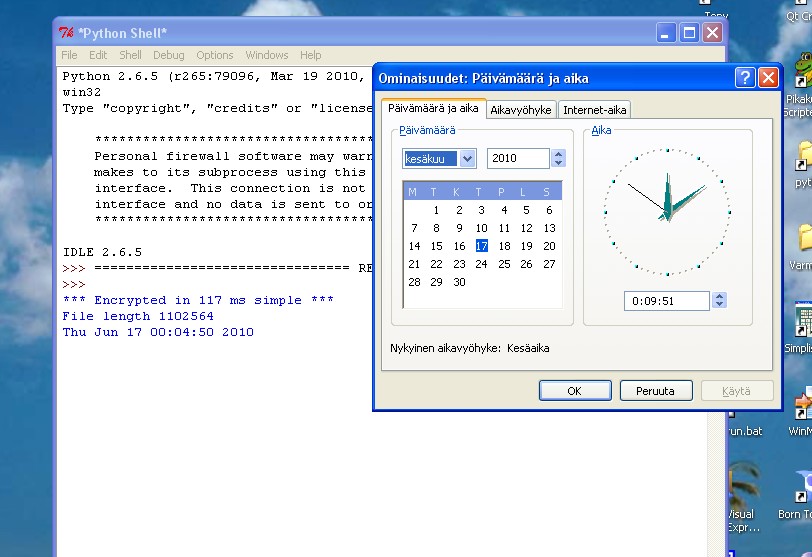
I did test with around 1 MB file and psyco enabled.
My simple version did it in :
*** Encrypted in 131 ms simple ***
File length 1102564
Unfortunately the computer was not free long enough for the StringIO version to do the job. I shut the program after 5 minutes, but I do not know how far the program was as adding progress messages would slow down the code even more.
Edited by TrustyTony because: n/a
kylealanhale 0 Newbie Poster
I don't believe it. A quick search will give you stats like these, which would seem to conflict with your test.
TrustyTony 888 ex-Moderator Team Colleague Featured Poster
Here is the code though basically it has stayed the same minus few refinements:
'''crypt module

Contains a simple function, "crypt", that will both encrypt and decrypt a string
of text by XORing it with a password or phrase.'''
from __future__ import print_function
import StringIO
from time import clock,asctime
#{
try:
    import psyco                        # python specialising compiler
    psyco.full()
except:
    print('Install psyco for faster execution')
    pass
#}

def crypt(text, password):
    '''Encrypts or decrypts a string of text.

    text: any string
    password: the word or phrase you want to encrypt/decrypt with'''

    old = StringIO.StringIO(text)
    new = StringIO.StringIO(text)
    password_length = len(password)

    for position in xrange(len(text)):
        bias = ord(password[position % password_length])  # Get next bias character from password
        old_char = ord(old.read(1))
        new_char = chr(old_char ^ bias)  # Get new charactor by XORing bias against old character

        new.seek(position)
        new.write(new_char)

    new.seek(0)
    return new.read()

def crypt2(password, string_in='',fn=''):
    new = ''
    length_of_password= len(password)
    position_in_password= 0 ## position in password

    for old_char in open(fn, "rb").read() if fn else string_in: # binary required, read() required
        bias = ord(password[position_in_password])  # Get next bias character from password
        new_char = chr(ord(old_char) ^ bias)  # Get new charactor by XORing bias against old character

        new+=new_char
        position_in_password = (position_in_password+1) % length_of_password

    return new

def _file_test():
    plain_text_name = r'c:\fi.txt'
    encrypted_text_name = r'D:\fi.txx'

    # Let's use a fixed password for testing
    password = 'Cold Roses'

    # Encrypt the text file
    t = clock()
    crypted2=crypt2(password,fn=plain_text_name)
    t2 = clock()-t
    print('*** Encrypted in %i ms simple ***' % (1000*t2))

    print('File length',len(crypted2))

    file_in = open(plain_text_name, 'rb')
    file_out = open(encrypted_text_name, 'wb')

    t = clock()
    print(asctime())
    crypted=crypt(file_in.read(), password)
    t1 = clock()-t
    print('*** Encrypted in %i ms StringIO' % (1000*t1))

    file_out.write(crypted)
    file_in.close()
    file_out.close()

# Run tests when this file is run as a program instead of being imported
if __name__ == '__main__':
    _file_test()
    input('Enter') ## prevent output to disapear
fi.txt is dictionary file of Finnish words. You can replace that with your file or English word list list.txt from my one word anagrams snippet.
jcao219 18 Posting Pro in Training
Well, I just traced your two ways of doing things,
and to conclude, tonyjv's method is vastly quicker than the StringIO method,
mostly because the read, write, and seek methods in StringIO take some time when called.
Here is the basic overview of the results:
*** Encrypted in 50 ms simple ***
File length 1013
Wed Jun 16 17:57:12 2010
*** Encrypted in 243 ms StringIO
         17256 function calls in 0.167 CPU seconds

   Ordered by: standard name

   ncalls  tottime  percall  cumtime  percall filename:lineno(function)
        1    0.000    0.000    0.000    0.000 :0(__enter__)
        1    0.000    0.000    0.000    0.000 :0(asctime)
     2026    0.007    0.000    0.007    0.000 :0(chr)
        4    0.000    0.000    0.000    0.000 :0(clock)
        2    0.000    0.000    0.000    0.000 :0(close)
     1015    0.004    0.000    0.004    0.000 :0(isinstance)
     1013    0.003    0.000    0.003    0.000 :0(join)
     1019    0.003    0.000    0.003    0.000 :0(len)
     1014    0.003    0.000    0.003    0.000 :0(max)
     1013    0.003    0.000    0.003    0.000 :0(min)
        3    0.001    0.000    0.001    0.000 :0(open)
     4052    0.014    0.000    0.014    0.000 :0(ord)
        2    0.000    0.000    0.000    0.000 :0(read)
        1    0.043    0.043    0.043    0.043 :0(setprofile)
        1    0.000    0.000    0.000    0.000 :0(write)
        1    0.000    0.000    0.123    0.123 <string>:1(<module>)
     1014    0.011    0.000    0.017    0.000 StringIO.py:119(read)
     1013    0.018    0.000    0.028    0.000 StringIO.py:208(write)
     3041    0.008    0.000    0.008    0.000 StringIO.py:38(_complain_ifclosed)
        2    0.000    0.000    0.000    0.000 StringIO.py:54(__init__)
     1014    0.013    0.000    0.022    0.000 StringIO.py:95(seek)
        1    0.000    0.000    0.167    0.167 profile:0(_file_test())
        0    0.000             0.000          profile:0(profiler)
        1    0.023    0.023    0.100    0.100 tester.py:11(crypt)
        1    0.012    0.012    0.022    0.022 tester.py:32(crypt2)
        1    0.000    0.000    0.123    0.123 tester.py:47(_file_test)
Attached, I have the detailed results.
That ends the debate.
This attachment is potentially unsafe to open. It may be an executable that is capable of making changes to your file system, or it may require specific software to open. Use caution and only open this attachment if you are comfortable working with zip files.
Edited by jcao219 because: n/a
kylealanhale 0 Newbie Poster
Very interesting. Thanks for that. I just looked back at the link I posted earlier; that guy used cStringIO.StringIO. I wonder how making that switch would compare.
nezachem 616 Practically a Posting Shark
> That ends the debate.
Well, as programmers we must realize that the debate never ends. Besides, neither approach looks pythonic enough to me. Since you already have the performance test set up, could you add the following?
def loop(text):
    def looper(t):
        while True:
            for c in t:
                yield c
    return looper(text)

def crypt(text, passwd):
    crypto = []
    for (t, p) in zip(text, loop(passwd)):
        crypto.append(chr(ord(t) ^ ord(p)))
return ''.join(crypto) jcao219 18 Posting Pro in Training
> That ends the debate.
Well, as programmers we must realize that the debate never ends. Besides, neither approach looks pythonic enough to me. Since you already have the performance test set up, could you add the following?
def loop(text):
    def looper(t):
        while True:
            for c in t:
                yield c
    return looper(text)

def crypt(text, passwd):
    crypto = []
    for (t, p) in zip(text, loop(passwd)):
        crypto.append(chr(ord(t) ^ ord(p)))
    return ''.join(crypto)
Of course, I'll do it right now.
Preliminary results:
*** Encrypted in 57 ms simple ***
File length (method 2):1013
*** Encrypted in 258 ms StringIO
File length (StringIO method):1013
*** Encrypted in 64 ms method 3
File length (method 3):780
         21164 function calls in 0.154 CPU seconds

   Ordered by: standard name

   ncalls  tottime  percall  cumtime  percall filename:lineno(function)
        2    0.000    0.000    0.000    0.000 :0(__enter__)
      780    0.002    0.000    0.002    0.000 :0(append)
     2806    0.012    0.000    0.012    0.000 :0(chr)
        6    0.000    0.000    0.000    0.000 :0(clock)
        1    0.000    0.000    0.000    0.000 :0(close)
     1015    0.004    0.000    0.004    0.000 :0(isinstance)
     1014    0.004    0.000    0.004    0.000 :0(join)
     1021    0.003    0.000    0.003    0.000 :0(len)
     1014    0.003    0.000    0.003    0.000 :0(max)
     1013    0.004    0.000    0.004    0.000 :0(min)
        3    0.000    0.000    0.000    0.000 :0(open)
     5612    0.017    0.000    0.017    0.000 :0(ord)
        3    0.000    0.000    0.000    0.000 :0(read)
        1    0.000    0.000    0.000    0.000 :0(setprofile)
        1    0.002    0.002    0.004    0.004 :0(zip)
        1    0.000    0.000    0.153    0.153 <string>:1(<module>)
     1014    0.011    0.000    0.017    0.000 StringIO.py:119(read)
     1013    0.018    0.000    0.028    0.000 StringIO.py:208(write)
     3041    0.008    0.000    0.008    0.000 StringIO.py:38(_complain_ifclosed)
        2    0.000    0.000    0.000    0.000 StringIO.py:54(__init__)
     1014    0.016    0.000    0.025    0.000 StringIO.py:95(seek)
        1    0.000    0.000    0.154    0.154 profile:0(_file_test())
        0    0.000             0.000          profile:0(profiler)
        1    0.024    0.024    0.106    0.106 tester.py:11(crypt)
        1    0.013    0.013    0.024    0.024 tester.py:32(crypt2)
        1    0.000    0.000    0.000    0.000 tester.py:47(loop)
      781    0.002    0.000    0.002    0.000 tester.py:48(looper)
        1    0.009    0.009    0.022    0.022 tester.py:54(crypt3)
1 0.000 0.000 0.153 0.153 tester.py:60(_file_test) Edited by jcao219 because: n/a
kylealanhale 0 Newbie Poster
That is very interesting. Thanks for running those tests. After doing some reading about cStringIO, I did one more modification, and would be interested to see how it stacks up. If you have a minute, jcao219, would you mind giving it one more run-through with this?
from cStringIO import StringIO

def crypt(text, password):
    old_text = StringIO(text)
    new_text = StringIO()
    password_length = len(password)

    for position in xrange(len(text)):
        old_character = ord(old_text.read(1))  # Get the next old character
        bias_character = ord(password[position % password_length])  # Get next bias character from password
        new_character = chr(old_character ^ bias_character)  # Get new charactor by XORing bias against old

        new_text.write(new_character)

    return new_text.getvalue()
Also, just curious... why did the 3rd function's test use fewer characters? Or did I read that wrong?
Edited by kylealanhale because: Fixing typo in code
jcao219 18 Posting Pro in Training
4 Tests
Python 2.6.5
StringIO
crypt took 9243 ms.
File length: 89729


         1256226 function calls in 9.244 CPU seconds

   Ordered by: standard name

   ncalls  tottime  percall  cumtime  percall filename:lineno(function)
        1    0.000    0.000    9.244    9.244 <string>:1(<module>)
    89730    0.545    0.000    0.845    0.000 StringIO.py:119(read)
    89729    3.032    0.000    3.492    0.000 StringIO.py:208(write)
   269189    0.427    0.000    0.427    0.000 StringIO.py:38(_complain_ifclosed)
        2    0.000    0.000    0.000    0.000 StringIO.py:54(__init__)
    89730    0.807    0.000    3.382    0.000 StringIO.py:95(seek)
        1    0.000    0.000    9.244    9.244 tester.py:13(__call__)
        1    1.096    1.096    9.244    9.244 tester.py:21(crypt)
    89729    0.153    0.000    0.153    0.000 {chr}
    89731    0.178    0.000    0.178    0.000 {isinstance}
    89734    0.140    0.000    0.140    0.000 {len}
    89730    0.160    0.000    0.160    0.000 {max}
        1    0.000    0.000    0.000    0.000 {method 'disable' of '_lsprof.Profiler' objects}
    89729    2.274    0.000    2.274    0.000 {method 'join' of 'str' objects}
    89729    0.158    0.000    0.158    0.000 {min}
   179458    0.275    0.000    0.275    0.000 {ord}
        2    0.000    0.000    0.000    0.000 {time.clock}
Tonyjv's
crypt2 took 898 ms.
File length: 89729


         269195 function calls in 0.899 CPU seconds

   Ordered by: standard name

   ncalls  tottime  percall  cumtime  percall filename:lineno(function)
        1    0.000    0.000    0.899    0.899 <string>:1(<module>)
        1    0.000    0.000    0.899    0.899 tester.py:13(__call__)
        1    0.493    0.493    0.899    0.899 tester.py:38(crypt2)
    89729    0.141    0.000    0.141    0.000 {chr}
        2    0.000    0.000    0.000    0.000 {len}
        1    0.000    0.000    0.000    0.000 {method 'disable' of '_lsprof.Profiler' objects}
   179458    0.265    0.000    0.265    0.000 {ord}
        2    0.000    0.000    0.000    0.000 {time.clock}
Nezachem's
crypt3 took 1492 ms.
File length: 89729


         448656 function calls in 1.493 CPU seconds

   Ordered by: standard name

   ncalls  tottime  percall  cumtime  percall filename:lineno(function)
        1    0.000    0.000    1.493    1.493 <string>:1(<module>)
        1    0.001    0.001    1.493    1.493 tester.py:13(__call__)
        1    0.613    0.613    1.492    1.492 tester.py:53(crypt3)
        1    0.000    0.000    0.000    0.000 tester.py:55(loop)
    89730    0.151    0.000    0.151    0.000 tester.py:56(looper)
    89729    0.141    0.000    0.141    0.000 {chr}
        1    0.000    0.000    0.000    0.000 {len}
    89729    0.136    0.000    0.136    0.000 {method 'append' of 'list' objects}
        1    0.000    0.000    0.000    0.000 {method 'disable' of '_lsprof.Profiler' objects}
        1    0.001    0.001    0.001    0.001 {method 'join' of 'str' objects}
   179458    0.267    0.000    0.267    0.000 {ord}
        2    0.000    0.000    0.000    0.000 {time.clock}
        1    0.184    0.184    0.335    0.335 {zip}
cStringIO
crypt4 took 1497 ms.
File length: 89729


         448657 function calls in 1.498 CPU seconds

   Ordered by: standard name

   ncalls  tottime  percall  cumtime  percall filename:lineno(function)
        1    0.000    0.000    1.498    1.498 <string>:1(<module>)
        1    0.000    0.000    1.498    1.498 tester.py:13(__call__)
        1    0.794    0.794    1.498    1.498 tester.py:66(crypt4)
        2    0.000    0.000    0.000    0.000 {cStringIO.StringIO}
    89729    0.144    0.000    0.144    0.000 {chr}
        3    0.000    0.000    0.000    0.000 {len}
        1    0.000    0.000    0.000    0.000 {method 'disable' of '_lsprof.Profiler' objects}
        1    0.000    0.000    0.000    0.000 {method 'getvalue' of 'cStringIO.StringO' objects}
    89729    0.146    0.000    0.146    0.000 {method 'read' of 'cStringIO.StringI' objects}
    89729    0.147    0.000    0.147    0.000 {method 'write' of 'cStringIO.StringO' objects}
   179458    0.267    0.000    0.267    0.000 {ord}
        2    0.000    0.000    0.000    0.000 {time.clock}
If you would like to run the tests yourself, I have attached the testing setup.
Hopefully I set things up correctly.
This attachment is potentially unsafe to open. It may be an executable that is capable of making changes to your file system, or it may require specific software to open. Use caution and only open this attachment if you are comfortable working with zip files.
Edited by jcao219 because: n/a
TrustyTony commented: Nice test function +1
kylealanhale 0 Newbie Poster
Well, I'll be jiggered. It looks like cStringIO is substantially faster than StringIO, but not as fast as concatenation. Wait, was that concatenation done with psyco, or without? If it was done without psyco, then the metrics at http://www.skymind.com/~ocrow/python_string/ are garbage.
jcao219 18 Posting Pro in Training
Well, I'll be jiggered. It looks like cStringIO is substantially faster than StringIO, but not as fast as concatenation. Wait, was that concatenation done with psyco, or without? If it was done without psyco, then the metrics at http://www.skymind.com/~ocrow/python_string/ are garbage.
Without psyco.
Sometime after that article was written in 2004, I think Python updated its concatenation of strings to be faster.
Edited by jcao219 because: n/a
kylealanhale 0 Newbie Poster
Ha.. "Hot Roses"... Nice. Thanks for posting that test. It looks like simple string concatenation is the winner, performance wise, for this function, so you must be right about the performance increase for concatenations.
Because I'm snobbish and like my function, I'm celebrating this discovery with a union of the two:
def crypt(old_text, password):
    new_text = ''
    password_length = len(password)

    for position in xrange(len(old_text)):
        old_character = ord(old_text[position])  # Get the next old character
        bias_character = ord(password[position % password_length])  # Get next bias character from password
        new_character = chr(old_character ^ bias_character)  # Get new charactor by XORing bias against old

        new_text += new_character

    return new_text
I ran a quick test using your testing script, and it looks like it performs identically to tonyjv's. So, it meets my original goal of producing a more pythonic, readable version, with the same or better performance as the original post.
TrustyTony 888 ex-Moderator Team Colleague Featured Poster
Looks like array module could be winner
http://www.python.org/doc/essays/list2str.html
This is straight chr-replacement function, would need to add cycling of password and xor
And The Winner Is...
The next day, I remembered an odd corner of Python: the array module. This happens to have an operation to create an array of 1-byte wide integers from a list of Python integers, and every array can be written to a file or converted to a string as a binary data structure. Here's our function implemented using these operations:import array def f7(list): return array.array('B', list).tostring()
Another version would be using itertools.cycle to password and loop over zip(file,passwordcycle), also map and list comprehenion could be tried. Then it would be fun to experiment not concatenating but using yield for that version.
Of course this is over optimization, but could learn something in process, good way to get feel of the language.
Edited by TrustyTony because: n/a
TrustyTony 888 ex-Moderator Team Colleague Featured Poster
Generally, I would say about this warm up of old thread, that it has been fruitfull.
I do not know but one PM to authors or check through of old code snippets would be usefull. (Also there was one clumsy version of calculator in Python and then I posted recently simple and complete version. Later somebody warmed up the older thread)
Maybe topic directory for Snippets with newest answer on top in each subject or reply message to end of old Snippets superseeded by new code or outdated because of changes in Python.
Edited by TrustyTony because: n/a
TrustyTony 888 ex-Moderator Team Colleague Featured Poster
To celebrate 700 posts and 100 answered threads, here is numerical version of the xor faster than my previous. I also updated the Test function to record to list all decorated tests automatically (nicely done jcao219, would have not known OO enough to do the original myself).
Also itertools version of looping password, but that is slower than my original.
Highlights
My old code performance (PortablePython 2.6.1):
crypt2 took 826 ms.
File length: 89729


         269195 function calls in 0.827 CPU seconds

   Ordered by: standard name

   ncalls  tottime  percall  cumtime  percall filename:lineno(function)
        1    0.000    0.000    0.827    0.827 <string>:1(<module>)
        1    0.000    0.000    0.827    0.827 tester.py:14(__call__)
        1    0.445    0.445    0.827    0.827 tester.py:39(crypt2)
    89729    0.128    0.000    0.128    0.000 {chr}
        2    0.000    0.000    0.000    0.000 {len}
        1    0.000    0.000    0.000    0.000 {method 'disable' of '_lsprof.Profiler' objects}
   179458    0.254    0.000    0.254    0.000 {ord}
        2    0.000    0.000    0.000    0.000 {time.clock}
The new version:
crypt6 took 561 ms.
File length: 89729


         179476 function calls in 0.562 CPU seconds

   Ordered by: standard name

   ncalls  tottime  percall  cumtime  percall filename:lineno(function)
        1    0.000    0.000    0.562    0.562 <string>:1(<module>)
        1    0.001    0.001    0.562    0.562 tester.py:14(__call__)
        1    0.306    0.306    0.561    0.561 tester.py:90(crypt6)
    89729    0.128    0.000    0.128    0.000 {chr}
        2    0.000    0.000    0.000    0.000 {len}
        1    0.000    0.000    0.000    0.000 {method 'disable' of '_lsprof.Profiler' objects}
        1    0.002    0.002    0.002    0.002 {method 'join' of 'str' objects}
    89738    0.126    0.000    0.126    0.000 {ord}
        2    0.000    0.000    0.000    0.000 {time.clock}
@Tester
def crypt6(string_in, password):
length_of_password = len(password)
passwordcodes = [ord(c) for c in password] ## password to numbers
string_as_list=[ord(c) for c in string_in] ## input to numbers
position_in_password= 0 ## position in password
for index,old_code in enumerate(string_as_list):
bias = passwordcodes[position_in_password] # Get next bias from password
# Get new character code by XORing bias against old code
# dangereous inplace replacement list member of list being used in for
# extra care required
string_as_list[index] = old_code ^ bias
position_in_password = (position_in_password+1) % length_of_password
return ''.join([chr(code) for code in string_as_list])Now this has 3 list comprehensions and enumerate, this is Pythonic enough for me;)
This attachment is potentially unsafe to open. It may be an executable that is capable of making changes to your file system, or it may require specific software to open. Use caution and only open this attachment if you are comfortable working with zip files.
Edited by TrustyTony because: misplaced comment
TrustyTony 888 ex-Moderator Team Colleague Featured Poster
And finally uniting with the fine idea of using mod indexing of password when index is available:
@Tester
def crypt7(string_in, password):
    length_of_password = len(password)
    passwordcodes = [ord(c) for c in password] ## password to numbers
    string_as_list=[ord(c) ^ passwordcodes[ind % length_of_password] for ind,c  in enumerate(string_in)]
    assert len(string_as_list),'Empty result'
    return ''.join([chr(code) for code in string_as_list])

"""crypt7 took 529 ms.
File length: 89729


         179477 function calls in 0.529 CPU seconds

   Ordered by: standard name

   ncalls  tottime  percall  cumtime  percall filename:lineno(function)
        1    0.000    0.000    0.529    0.529 <string>:1(<module>)
        1    0.306    0.306    0.528    0.528 tester.py:107(crypt7)
        1    0.001    0.001    0.529    0.529 tester.py:14(__call__)
    89729    0.126    0.000    0.126    0.000 {chr}
        3    0.000    0.000    0.000    0.000 {len}
        1    0.000    0.000    0.000    0.000 {method 'disable' of '_lsprof.Profiler' objects}
        1    0.002    0.002    0.002    0.002 {method 'join' of 'str' objects}
    89738    0.095    0.000    0.095    0.000 {ord}
        2    0.000    0.000    0.000    0.000 {time.clock}
""" jcao219 18 Posting Pro in Training
So here's all 7 tests run on my computer:
crypt took 9141 ms.
File length: 89729


         2512446 function calls in 17.279 CPU seconds

   Ordered by: standard name

   ncalls  tottime  percall  cumtime  percall filename:lineno(function)
        1    0.000    0.000   17.279   17.279 <string>:1(<module>)
   179460    1.070    0.000    1.658    0.000 StringIO.py:119(read)
   179458    5.639    0.000    6.531    0.000 StringIO.py:208(write)
   538378    0.843    0.000    0.843    0.000 StringIO.py:38(_complain_ifclosed)
        4    0.000    0.000    0.000    0.000 StringIO.py:54(__init__)
   179460    1.571    0.000    6.115    0.000 StringIO.py:95(seek)
        2    2.136    1.068   17.278    8.639 comparison.py:5(crypt)
        1    0.000    0.000   17.279   17.279 cryptfunctester.py:12(__call__)
   179458    0.298    0.000    0.298    0.000 {chr}
   179462    0.336    0.000    0.336    0.000 {isinstance}
   179467    0.276    0.000    0.276    0.000 {len}
   179460    0.306    0.000    0.306    0.000 {max}
        1    0.000    0.000    0.000    0.000 {method 'disable' of '_lsprof.Profiler' objects}
   179458    3.955    0.000    3.955    0.000 {method 'join' of 'str' objects}
   179458    0.309    0.000    0.309    0.000 {min}
   358916    0.540    0.000    0.540    0.000 {ord}
        2    0.000    0.000    0.000    0.000 {time.clock}


crypt2 took 881 ms.
File length: 89729


         538384 function calls in 1.779 CPU seconds

   Ordered by: standard name

   ncalls  tottime  percall  cumtime  percall filename:lineno(function)
        1    0.000    0.000    1.779    1.779 <string>:1(<module>)
        2    0.975    0.487    1.779    0.890 comparison.py:22(crypt2)
        1    0.000    0.000    1.779    1.779 cryptfunctester.py:12(__call__)
   179458    0.278    0.000    0.278    0.000 {chr}
        3    0.000    0.000    0.000    0.000 {len}
        1    0.000    0.000    0.000    0.000 {method 'disable' of '_lsprof.Profiler' objects}
   358916    0.526    0.000    0.526    0.000 {ord}
        2    0.000    0.000    0.000    0.000 {time.clock}


crypt3 took 1467 ms.
File length: 89729


         897306 function calls in 2.903 CPU seconds

   Ordered by: standard name

   ncalls  tottime  percall  cumtime  percall filename:lineno(function)
        1    0.000    0.000    2.903    2.903 <string>:1(<module>)
        2    1.196    0.598    2.902    1.451 comparison.py:37(crypt3)
        2    0.000    0.000    0.000    0.000 comparison.py:39(loop)
   179460    0.291    0.000    0.291    0.000 comparison.py:40(looper)
        1    0.001    0.001    2.903    2.903 cryptfunctester.py:12(__call__)
   179458    0.279    0.000    0.279    0.000 {chr}
        1    0.000    0.000    0.000    0.000 {len}
   179458    0.267    0.000    0.267    0.000 {method 'append' of 'list' objects}
        1    0.000    0.000    0.000    0.000 {method 'disable' of '_lsprof.Profiler' objects}
        2    0.003    0.001    0.003    0.001 {method 'join' of 'str' objects}
   358916    0.528    0.000    0.528    0.000 {ord}
        2    0.000    0.000    0.000    0.000 {time.clock}
        2    0.338    0.169    0.629    0.315 {zip}


crypt4 took 1469 ms.
File length: 89729


         897308 function calls in 2.920 CPU seconds

   Ordered by: standard name

   ncalls  tottime  percall  cumtime  percall filename:lineno(function)
        1    0.000    0.000    2.920    2.920 <string>:1(<module>)
        2    1.540    0.770    2.920    1.460 comparison.py:50(crypt4)
        1    0.000    0.000    2.920    2.920 cryptfunctester.py:12(__call__)
        4    0.000    0.000    0.000    0.000 {cStringIO.StringIO}
   179458    0.279    0.000    0.279    0.000 {chr}
        5    0.000    0.000    0.000    0.000 {len}
        1    0.000    0.000    0.000    0.000 {method 'disable' of '_lsprof.Profiler' objects}
        2    0.000    0.000    0.000    0.000 {method 'getvalue' of 'cStringIO.StringO' objects}
   179458    0.287    0.000    0.287    0.000 {method 'read' of 'cStringIO.StringI' objects}
   179458    0.288    0.000    0.288    0.000 {method 'write' of 'cStringIO.StringO' objects}
   358916    0.525    0.000    0.525    0.000 {ord}
        2    0.000    0.000    0.000    0.000 {time.clock}


crypt5 took 1163 ms.
File length: 89729


         717844 function calls in 2.325 CPU seconds

   Ordered by: standard name

   ncalls  tottime  percall  cumtime  percall filename:lineno(function)
        1    0.000    0.000    2.325    2.325 <string>:1(<module>)
        2    1.200    0.600    2.324    1.162 comparison.py:65(crypt5)
        1    0.001    0.001    2.325    2.325 cryptfunctester.py:12(__call__)
   179458    0.278    0.000    0.278    0.000 {chr}
        1    0.000    0.000    0.000    0.000 {len}
   179458    0.267    0.000    0.267    0.000 {method 'append' of 'list' objects}
        1    0.000    0.000    0.000    0.000 {method 'disable' of '_lsprof.Profiler' objects}
        2    0.003    0.001    0.003    0.001 {method 'join' of 'str' objects}
   358916    0.529    0.000    0.529    0.000 {ord}
        2    0.000    0.000    0.000    0.000 {time.clock}
        2    0.048    0.024    0.048    0.024 {zip}


crypt6 took 584 ms.
File length: 89729


         358946 function calls in 1.179 CPU seconds

   Ordered by: standard name

   ncalls  tottime  percall  cumtime  percall filename:lineno(function)
        1    0.000    0.000    1.179    1.179 <string>:1(<module>)
        2    0.636    0.318    1.178    0.589 comparison.py:73(crypt6)
        1    0.001    0.001    1.179    1.179 cryptfunctester.py:12(__call__)
   179458    0.280    0.000    0.280    0.000 {chr}
        3    0.000    0.000    0.000    0.000 {len}
        1    0.000    0.000    0.000    0.000 {method 'disable' of '_lsprof.Profiler' objects}
        2    0.003    0.001    0.003    0.001 {method 'join' of 'str' objects}
   179476    0.259    0.000    0.259    0.000 {ord}
        2    0.000    0.000    0.000    0.000 {time.clock}


crypt7 took 587 ms.
File length: 89729


         358948 function calls in 1.161 CPU seconds

   Ordered by: standard name

   ncalls  tottime  percall  cumtime  percall filename:lineno(function)
        1    0.000    0.000    1.161    1.161 <string>:1(<module>)
        2    0.619    0.310    1.159    0.580 comparison.py:91(crypt7)
        1    0.001    0.001    1.160    1.160 cryptfunctester.py:12(__call__)
   179458    0.278    0.000    0.278    0.000 {chr}
        5    0.000    0.000    0.000    0.000 {len}
        1    0.000    0.000    0.000    0.000 {method 'disable' of '_lsprof.Profiler' objects}
        2    0.002    0.001    0.002    0.001 {method 'join' of 'str' objects}
   179476    0.260    0.000    0.260    0.000 {ord}
        2    0.000    0.000    0.000    0.000 {time.clock}
It shows that the last two methods are very efficient. Nice work tonyjv.
EDIT: The reason my profiler results are double your results is I added a test in my testing module to see if the decrypted text is the same as the original text.
I have attached the updated testing script if you want to see it.
This attachment is potentially unsafe to open. It may be an executable that is capable of making changes to your file system, or it may require specific software to open. Use caution and only open this attachment if you are comfortable working with zip files.
Edited by jcao219 because: n/a
kylealanhale 0 Newbie Poster
Very nice. I especially like the list comprehension version. Smart to pull the password ords first; that sped it up lots.
TrustyTony 888 ex-Moderator Team Colleague Featured Poster
Does consume memory though, better would be to have generators instead of lists, but I am not yet as fluent with generators as with list comprehensions.
Any way to compare the memory usage of functions easily? I see only time measures from profiler output.
Be a part of the DaniWeb community
We're a friendly, industry-focused community of developers, IT pros, digital marketers, and technology enthusiasts meeting, networking, learning, and sharing knowledge.