| | |
div floats and width 100%
Please support our HTML and CSS advertiser: PostgreSQL or MySQL? Compare and contrast the two most popular open source databases
![]() |
•
•
Join Date: Jul 2008
Posts: 95
Reputation:
Solved Threads: 4
Hi people,
I'd very much appreciate some help with my issue here....
i have
currently, the content_area extends beyond the browser's right bounds and a horizontal scroll bar is created by the browser to scroll.
how can I make the content_area stretches and occupy just up to the edge of the browser's viewable client area? (ie, the rest of the empty space to the right. of the left_pane.)
Thanks in advance!
I'd very much appreciate some help with my issue here....
i have
html Syntax (Toggle Plain Text)
<div id='container'> <div id='left_pane_tab' style="float: left;" onclick='toggle(left_pane)'><img src="tab.gif" /></div> <div id='left_pane' style="float: left; display: none"><table style="width: 200px"> ... </table></div> <div id='content_area' style='width: 100%'></div> </div>
currently, the content_area extends beyond the browser's right bounds and a horizontal scroll bar is created by the browser to scroll.
how can I make the content_area stretches and occupy just up to the edge of the browser's viewable client area? (ie, the rest of the empty space to the right. of the left_pane.)
Thanks in advance!
Last edited by peter_budo; Jul 8th, 2008 at 1:03 pm. Reason: Keep It Organized - please use [code] tags
without style sheet how can i edit ...
Thanx,
Shiriyal
http://shiriyal.blogspot.com/
if you problem solved add me as a reputation and mark it mark as solved
Shiriyal
http://shiriyal.blogspot.com/
if you problem solved add me as a reputation and mark it mark as solved
First of all, if you want it to be 100 percent wide, don't float it. Instead, you need a style:
To make an interior tag full width, all tags containing it must be 100% wide, all the way up to the body tag.
Otherwise, it takes 100% of the width of its container, but does not make the container any wider.
HTML and CSS Syntax (Toggle Plain Text)
.wfl {width: 100%;}
To make an interior tag full width, all tags containing it must be 100% wide, all the way up to the body tag.
Otherwise, it takes 100% of the width of its container, but does not make the container any wider.
Last edited by MidiMagic; Jul 10th, 2008 at 11:25 pm.
Daylight-saving time uses more gasoline
•
•
Join Date: Jul 2008
Posts: 95
Reputation:
Solved Threads: 4
•
•
•
•
To make an interior tag full width, all tags containing it must be 100% wide, all the way up to the body tag.
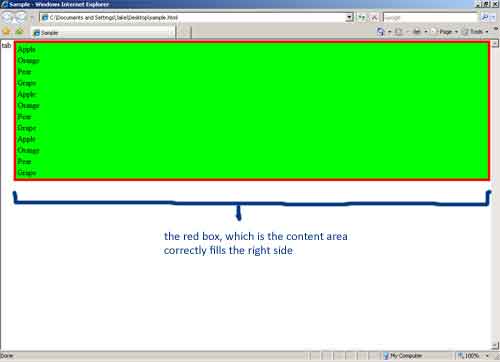
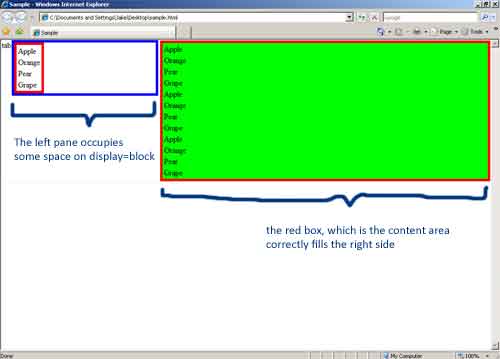
With the following code, the behaviour in IE7 is what I want: The content area stretches to fill the remaining area on the right. The green background correctly fills that area.
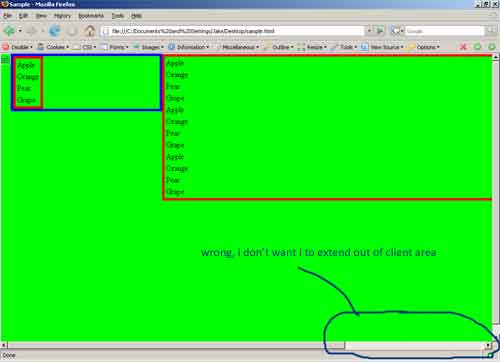
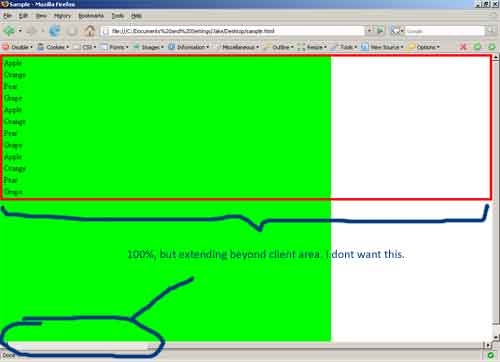
In FF, which is not working, the content area takes the entire client area and the data_table extends beyond the right edge causing a horizontal scroll bar to appear at the bottom.
How do I write it such that it works in FF as well?
HTML and CSS Syntax (Toggle Plain Text)
<html> <head> <title>Sample</title> <style> body { margin: 0px; padding: 0px; width: 100%;} div { border: 1px solid #EEEEEE; } table { border: 5px solid #FF0000; } #container { width: 100%; } #left_pane_tab { float: left; } #left_pane { float: left; display: block; width: 300px; border: 5px solid #0000FF; } #content_area { background: #00FF00; width: 100%; height: 100%; } .data_table { width: 100%; } </style> <script> function toggle(id) { var pane = document.getElementById(id); if(pane.style.display == "block") pane.style.display = "none"; else pane.style.display = "block"; } </script> </head> <body> <div id='container'> <div id='left_pane_tab'> <a href"#" onclick="toggle('left_pane'); return false;" />tab</a> </div> <div id='left_pane'> <table> <tr><td>Apple</td></tr> <tr><td>Orange</td></tr> <tr><td>Pear</td></tr> <tr><td>Grape</td></tr> </table> </div> <div id='content_area'> <table class="data_table"> <tr><td>Apple</td></tr> <tr><td>Orange</td></tr> <tr><td>Pear</td></tr> <tr><td>Grape</td></tr> <tr><td>Apple</td></tr> <tr><td>Orange</td></tr> <tr><td>Pear</td></tr> <tr><td>Grape</td></tr> <tr><td>Apple</td></tr> <tr><td>Orange</td></tr> <tr><td>Pear</td></tr> <tr><td>Grape</td></tr> </table> </div> </div> </body> </html>
Last edited by jakesee; Jul 11th, 2008 at 5:07 am.
It looks like your script is turning some styles on and off. The others might or might not be switched on and off.
Also, you have surrounding styles (margin, border, padding) and size styles (height, width) assigned to the same tag. This causes incompatibilities between IE and FF.
Height of 100% can cause unpredictable results. It isn't really defined for anything except an object inside another container with a defined height.
Also, you have surrounding styles (margin, border, padding) and size styles (height, width) assigned to the same tag. This causes incompatibilities between IE and FF.
Height of 100% can cause unpredictable results. It isn't really defined for anything except an object inside another container with a defined height.
Daylight-saving time uses more gasoline
What are you TRYING to do. It is not clear.
Height is not normally intended to be defined. The entire idea of a web page is to fit the width of the current browser window, and then expand downward as needed until all of the content can be rendered.
The one thing you can NOT do is make a page that exactly fills the browser window. Too many people are pulling their hair out trying to do this. But as long as computers and monitors exist with different screen resolutions, and as long as people can resize their browser windows, and add toolbars to browsers, you are not going to exactly fit your page on one screen.
So you compromise. You let your text expand downward, to flow around your other objects. You use percentage widths or floats to place things. You leave enough whitespace between objects, so the extra space can shrink if a smaller browser window is used. And you don't get mad if your page needs to be scrolled to be read.
Height is not normally intended to be defined. The entire idea of a web page is to fit the width of the current browser window, and then expand downward as needed until all of the content can be rendered.
The one thing you can NOT do is make a page that exactly fills the browser window. Too many people are pulling their hair out trying to do this. But as long as computers and monitors exist with different screen resolutions, and as long as people can resize their browser windows, and add toolbars to browsers, you are not going to exactly fit your page on one screen.
So you compromise. You let your text expand downward, to flow around your other objects. You use percentage widths or floats to place things. You leave enough whitespace between objects, so the extra space can shrink if a smaller browser window is used. And you don't get mad if your page needs to be scrolled to be read.
Last edited by MidiMagic; Jul 14th, 2008 at 5:54 pm.
Daylight-saving time uses more gasoline
![]() |
Similar Threads
- css not working in IE (HTML and CSS)
- Firefox hates my CSS now so does IE (HTML and CSS)
- BUG in Internet Explorer. Please help find a solution! (HTML and CSS)
Other Threads in the HTML and CSS Forum
- Previous Thread: Including music on a webpage
- Next Thread: Whitespace in IE and not in FF
| Thread Tools | Search this Thread |
appointments asp background backgroundcolor beta browser bug calendar cart cgi code codeinjection corporateidentity css design development displayimageinsteadofflash dreamweaver emailmarketing epilepsy explorer firefox flash form format google griefers hackers hitcounter hover html ide ie7 ie8 iframe image images internet internetexplorer intranet iphone javascript jpeg layout macbook maps marketshare microsoft mozilla multimedia navigationbars news offshoreoutsourcingcompany opacity opera optimization pnginie6 positioning problem scroll seo shopping studio swf swf. textcolor timecolor titletags url urlseparatedwords visual visualization web webdevelopment webform website windows7