After spending some time on JSP section of this forum as many before me, I come to the conclusion that we are in need of "proper" tutorial on this topic. This tutorial is not intended to teach you everything from top to bottom, it is just a starting point to show you what we mean by "DO NOT USE JSP FOR DIRECT DATABASE CONNECTIVITY!". In simple terms and examples I will try to explain the basics of MVC model 2. Therefore content has been kept as simple as possible to make it easier for beginners to grasp the basics without getting into a lot of application design jargon. That being said, there are many ways for this application being designed in a better manner and it's left as an exercise to the reader.
Short description
The tutorial will show simple example of a school login system, where after submitting correct user ID and password user is redirected to the next page in accordance with user group assignmentstudent - will see his personal details
teacher - will see his name on the top of the page with table of all students (user ID, first name, last name, email address and phone number)
administrator - will see his name on the top of the page with tables of all teachers and all students (user ID, first name, last name, email address and phone number)
Requirements Knowledge of HTML
Basic knowledge of Java - knowledge of Exception handling is a MUST
Basics of SQL - previous experience with MySQL will be an advantage
Installation of Java on your pc ( Download )
Installation of Tomcat server on your pc or access to some Java web hosting (Tomcat download , recommended configuration in tutorial )
Installation of MySQL Community Server on your machine or access to one through web hosting (MySQL Community Server Download , installation & configuration of the server {please ignore the rest of that guide}). I use this DB as I'm familiar with it and in my opinion is very easy to use. However this example can be applied to any database( doesn't matter if it is Oracle, MS SQL, Access or for these looking for something new without need of DB server SQLite or Derby) with just small adjustment to connection string.
Please download: MySQL Connector/J which is connection driver for Java development
JSTL library , please download binaries in 1.1.2 package (use of the library will be discussed later on)
Your favourite IDE
To develop this example I used jdk1.6.0_05, Tomcat 6.0.16 and MySQL 5.0.45
Model View Controller Model 2
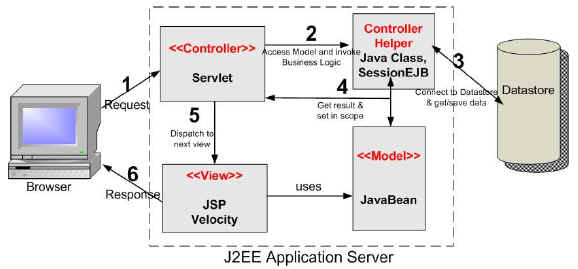
For those of you who never come across MVC Model 2, here is an example
I think the image is self-explanatory, however if you not sure you can find more info at www.java-samples.com .
Instructions
Lets start our little project with a database set up.
Note: All files will be available for download at the end of the tutorial.
CREATE TABLE  `danijsptutorial`.`user` (
  `uid` char(8) NOT NULL,
  `password` varchar(20) NOT NULL,
  `firstName` varchar(30) NOT NULL,
  `lastName` varchar(60) NOT NULL,
  `address1` varchar(100) NOT NULL,
  `address2` varchar(100) default NULL,
  `city` varchar(50) NOT NULL,
  `postCode` varchar(10) NOT NULL,
  `email` varchar(50) default NULL,
  `phone` int(15) default NULL,
  `userGroup` varchar(7) NOT NULL,
  PRIMARY KEY  (`uid`)
)
This is sort of the database solution that will satisfies your teacher for the simple school assignment. However under real deployment it will quickly fall down. The design makes it difficult to assign an user to more then one group. For example at university and PhD candidate is a student but often in same time he is a teacher. Same goes for teacher, I know at least 5 teachers that beside their teaching role keep a close contact with IT admin team and have administrator rights. Beside making changes to user groups there is an issue of extended search time need to go through all record. Therefore following design would be more appropriate.User table, to keep personal info
CREATE TABLE `user` (
  `uid` char(8) NOT NULL,
  `password` varchar(20) NOT NULL,
  `firstName` varchar(30) NOT NULL,
  `lastName` varchar(60) NOT NULL,
  `address1` varchar(100) NOT NULL,
  `address2` varchar(100) default NULL,
  `city` varchar(50) NOT NULL,
  `postCode` varchar(10) NOT NULL,
  `email` varchar(50) default NULL,
  `phone` int(15) default NULL,
  PRIMARY KEY  (`uid`)
)
User group table, to manage number of groups with various privileges
CREATE TABLE `usergroup` (
  `groupid` varchar(10) NOT NULL,
  `groupName` varchar(20) default NOT NULL,
  PRIMARY KEY  (`groupid`)
)
Group mapping table, to associate user with one or more of the groups
CREATE TABLE  `danijsptutorial`.`usergroup_mapping` (
  `uid` char(8) NOT NULL,
  `groupid` varchar(10) NOT NULL,
  KEY `groupid` (`groupid`),
  KEY `uid` (`uid`),
  CONSTRAINT `uid` FOREIGN KEY (`uid`) REFERENCES `user` (`uid`),
  CONSTRAINT `groupid` FOREIGN KEY (`groupid`) REFERENCES `usergroup` (`groupid`)
) ENGINE=InnoDB DEFAULT CHARSET=latin1 ROW_FORMAT=DYNAMIC;
I decided to go for fixed size of user ID (uid) that should be of 8 characters in length. User ID is also unique key (primary key) of the table and the value cannot be NULL when you creating a new record. Then there is a password that can be 20 characters max. As you will see in validation process, I also check that the password is at least 8 characters long to be considered valid for database check out process. The current process require manual data entry, this may satisfies small business but will make unnecessary extra work load on database admins of larger companies.Project folder structure:
daniwebtutorialjsp - folderindex.jsp
student.jsp
teacher.jsp
admin.jsp
css - folderstyle1.css
style2.css
style3.css
img - folderphoto.jpg
WEB-INF - folderweb.xml
classes - folderLoginServlet.java
model - folderDataMannager.java
Validation.java
bean - folderUserBean.java
lib - foldermysql-connector-java-5.1.5-bin.jar
or any other library you need to use (JSLT, JSF etc.)
Login screen - index.jsp.
<%@ page language="java" contentType="text/html"%>
<!DOCTYPE html PUBLIC "-//W3C//DTD XHTML 1.0 Transitional//EN" "http://www.w3.org/TR/xhtml1/DTD/xhtml1-transitional.dtd">
<html xmlns="http://www.w3.org/1999/xhtml">
<head>
<title>Daniweb Tutorial - Login</title>
<link rel="stylesheet" type="text/css" href="css/style1.css" />
</head>
<body>
<div class="error">
<% String e = (String) session.getAttribute("error" );
if(e != null)
{
out.print(e); }%>
</div>
<form method="post" action="controller/login">
<table align="center">
<tr style="border-bottom:none;">
<th class="leftLogo"><DANI</th>
<th class="rightLogo">WEB></th>
</tr>
<tr>
<td class="tdOne">Username : </td>
<td class="tdTwo"><input type="text" id="userName" name="userName" size="15" maxlength="8" /></td>
</tr>
<tr>
<td class="tdOne">Password : </td>
<td class="tdTwo"><input type="password" id="password" name="password" size="15" maxlength="20" /></td>
</tr>
<td colspan="2" align="right"><input type="submit" value="Login" /></td>
</tr>
</table>
</form>
</body>
</html>
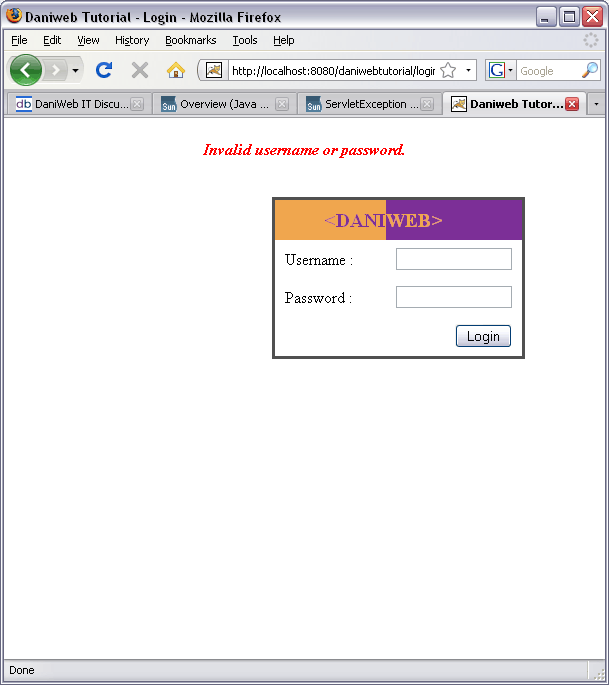
The page holds small form consisting of two input text fields for username and password. There is no on-page validation and data are validated only by servlet, once submit button is pressed. On the line 11 - 15 you can see simple session retrieval, where we check if servlet dispatched any error message. If the first login attempt String value retrieved from the session is null, no error message will show. However if you have been returned back to this page, error message will be displayed above the login form. Login process may fail because you submitted data that did not match criteria of validation process, or one/two of submitted identification entries did not match with the database records.
Now lets assume we have correct login data, we entered them in the login screen and hit the submit button. Forms' action element will send request server which will take decision based upon configurations made in web.xml file located in WEB-INF folder of our project. Here, server will find that the requested need to be passed on LoginServlet. Hiding real destination of the request is common technique know as servlet mapping (nice "how to" tutorial can be found here ). In the web.xml file we declared that if we call controller/login the server will actually use LoginServlet.
<servlet>
       <servlet-name>LoginServlet</servlet-name>
       <servlet-class>LoginServlet</servlet-class>
</servlet>

<servlet-mapping>
       <servlet-name>LoginServlet</servlet-name>
       <url-pattern>/controller/login</url-pattern>
</servlet-mapping>
While we are onweb.xml I will quickly mention that in the same place you can also initialize parameters to be used by your whole project and it is good place to store your database connection data in a similar manner to this
<servlet>
       <init-param>
            <param-name>jdbcDriver</param-name>
            <param-value>com.mysql.jdbc.Driver</param-value>
        </init-param>
        <init-param>
            <param-name>dbURL</param-name>
            <param-value>jdbc:mysql://localhost/danijsptutorial</param-value>
        </init-param>
        <init-param>
            <param-name>dbUserName</param-name>
            <param-value>YOUR_DATABASE_USERNAME</param-value>
        </init-param>
        <init-param>
            <param-name>dbPassword</param-name>
            <param-value>YOUR_DATABASE_PASSWORD</param-value>
        </init-param>
    </servlet>
LoginServlet
public void init(ServletConfig config) throws ServletException
{
    super.init(config);
    dataManager = new DataManager();
        dataManager.setDbURL(config.getInitParameter("dbURL"));
        dataManager.setDbUserName(config.getInitParameter("dbUserName"));
        dataManager.setDbPassword(config.getInitParameter("dbPassword"));
    try
    {
        Class.forName(config.getInitParameter("jdbcDriver"));
    }
    catch (Exception ex)
    {
        System.out.println("Initialize connector string");
        ex.printStackTrace();
    }
}
With the use of theinit() method we can tells the servlet any information about itself and its environment( in our scenario it will be database URL address, name of the driver to be used, plus username and password to the database). Servlet initialisation will provide DataManager, which is Model component, with the database parameters needed by DriverManager. Once driver is loaded, it will register itself with DriverManager and when we call method getConnection() it will return a Connection object for the given database. This will only happend if the driver loaded correctly.
public void doPost(HttpServletRequest request, HttpServletResponse response) throws ServletException, IOException
{
    /*
     * Get user data fro submited form
     */
    String userName = request.getParameter("userName");
    String password = request.getParameter("password");

    if(val.validate(userName, password))
    {
        userBean = new UserBean();
        userBean = dataManager.getUserData(userName, password);

        try
        {
            if(!userBean.getUid().equals(null))
                dbOK = true;
        }
        catch(NullPointerException npe)
        {
            System.out.println("Error on DB return");
            npe.printStackTrace();
            strError = "Invalid username or password.";
            dbOK = false;
        }
    }
    else
    {
        strError = "Invalid username or password.";
        dbOK = false;
    }
        // more code will follow
}
MethoddoPost() starts our "real business". With the use of interface HttpServletRequest we retrieve data submitted by user from the index page. In the if statement we will use boolean outcome of validation process, from val.validate() method of class Validation,as a key for "unlocking" database to our needs.
package model;

public class Validation {

    public Validation() {}

    public boolean validate(String userName, String password)
    {
        if(userName.length() != 8 || (password.length() < 8 || password.length() > 20))
        {
            return false;
        }
        return true;
    }
}
The validation process is very simple. We only check if user ID is exactly 8 characters long and the password in interval of 8 to 20 characters. No extra checks for special characters or characters that have to be part of submitted data. If validation returnsfalse else condition applied with error message set up and dealt with in code later on. However if validation returns true submitted login data are passed to DataMannager method getUserData(). Method should return object type UserBean. In the next step we check if our request returned any data by checking if UserBean object is equal to null or not. Boolean variable dbOK will keep our success or failure with validation process and can also change depending on outcome of our database querying. Lets follow our database request.
DataMannager
public class DataManager
{
    private String dbURL = "";
    private String dbUserName = "";
    private String dbPassword = "";

    public void setDbURL(String dbURL)
    {
        this.dbURL = dbURL;
    }

    public String getDbURL()
    {
        return dbURL;
    }

    public void setDbUserName(String dbUserName)
    {
        this.dbUserName = dbUserName;
    }

    public String getDbUserName()
    {
        return dbUserName;
    }

    public void setDbPassword(String dbPassword)
    {
        this.dbPassword = dbPassword;
    }

    public String getDbPassword()
    {
        return dbPassword;
    }

    /*
     * Open database connection
     */
    public Connection getConnection()
    {
        Connection conn = null;
        try {
          conn = DriverManager.getConnection(getDbURL(), getDbUserName(),
              getDbPassword());
          }
        catch (SQLException e) {
          System.out.println("Could not connect to DB");
          e.printStackTrace();
          }
        return conn;
    }

    /*
     * Close open database connection
     */
    public void putConnection(Connection conn)
    {
        if (conn != null)
        {
            try
            {
                conn.close();
            }
          catch (SQLException e) {
            System.out.println("Enable to close DB connection");
            e.printStackTrace(); }
        }
    }
}
As we can see, the above part is very simple with use of setter and getter methods we store database connectivity data from servlet initialisation for further use and provide methods to open and also close database connection. The request that been sent to servlet for processing in its early stage already initialized variables need it for connection string. The methods in the need of connection will simply call ongetConnection() method to acquire connection "link" with database, getUserData() method is one of them.
/*
* Retrive data of single user
*/
public UserBean getUserData(String userName, String password)
{
    UserBean userBean = new UserBean();
    Connection conn = getConnection();
    if (conn != null)
    {
        ResultSet rs = null;
        Statement stmt = null;
    try
    {
    String strQuery =
    "SELECT u.uid, firstName, lastName, address1, address2, city, postCode, email, phone, ug.groupName as userGroup "
    +"FROM user u, usergroup ug WHERE uid='"+userName+"' AND password='"+password+"' AND groupName IN"
    +" (SELECT groupName FROM usergroup WHERE groupid =(SELECT groupid FROM usergroup_mapping WHERE uid=u.uid))";
        stmt = conn.createStatement();
        rs = stmt.executeQuery( strQuery);

        while(rs.next())
        {
            userBean.setUid(rs.getString("uid"));
            userBean.setFirstName(rs.getString("firstName"));
            userBean.setLastName(rs.getString("lastName"));
            userBean.setAddress1(rs.getString("address1"));
            userBean.setAddress2(rs.getString("address2"));

            userBean.setCity(rs.getString("city"));
            userBean.setPostCode(rs.getString("postCode"));
            userBean.setEmail(rs.getString("email"));
            userBean.setPhone(rs.getInt("phone"));
            userBean.setUserGroup(rs.getString("userGroup"));
        }
    }//end of try
    catch(SQLException ex)
    {
    System.out.println("SQLException:" + ex.getMessage());
    }
    finally
    {
        if (stmt != null)
        {
            try { stmt.close(); }
            catch (SQLException e) { e.printStackTrace();}
        }
        putConnection(conn);
       }//end of finally
   }//end of if
   return userBean;
}
InLoginServlet we made call for getUserData() method. Any retrieved data will be stored in UserBean object. Once we successfully receive new connection to database, we initialize Statement object necessary for query execution and ResultSet interface that will get us the result of the query. The returned result has cursor pointing before the first row of retrieved data and we need to move this cursor one position forward to get first record. This is done with next() method. The most suitable solution for retrieving data, as long as there is something to get, is while statement. It will repeat the routine inside the brackets as long as there is a record to read. Routine performs reading from ResultSet with help of getString() and getInt() methods. Retrieved data are store in the UserBean object. Invocation of Statement object and retrieving of ResultSet can throw SQL exception, therefore we need to run them in safe environment, try-catch clause. After either success of failure in retrieving data from database, we always need to close the Statement with stmt.close() and the Connection with method call putConnection(). Forgetting to do this will result in another set of SQL exceptions. The last thing left is to return whatever is currently in our UserBean object.
Use of classic Statement as seen in above snippet is security liability as it does allow possibility of SQL injection exploits. To avoid the bad fate of easy victim to hackers you should use PreparedStatement. (This security vulnerability is explained in Tomcat - The Definitive Guide , chapter 6 - Tomcat Security, SQL injection pg 152 or pg 27 in linked PDF document.) Secondly SQL in a PreparedStatement is precompiled by the database for faster execution which in large database operation will improve performance. However by warned! This is not always so, malformed query will significantly slow execution and it does not matter if it is Statement or PreparedStatement. Bellow is our getUserData() method with use of PreparedStatement
public UserBean getUserData(String userName, String password)
{
    UserBean userBean = new UserBean();
    Connection conn = getConnection();
    if (conn != null)
    {
        ResultSet rs = null;
        PreparedStatement preparedStatement = null;
    try
    {
        String strQuery =
        "SELECT u.uid, firstName, lastName, address1, address2, city, postCode, email, phone, ug.groupName as userGroup "
        +"FROM user u, usergroup ug WHERE uid=? AND password=? AND groupName IN"
        +" (SELECT groupName FROM usergroup WHERE groupid =(SELECT groupid FROM usergroup_mapping WHERE uid=u.uid))";

        preparedStatement = conn.prepareStatement(strQuery);
        preparedStatement.setString(1,userName);
        preparedStatement.setString(2,password);
        rs = preparedStatement.executeQuery();

        while(rs.next())
        {
            userBean.setUid(rs.getString("uid"));
            userBean.setFirstName(rs.getString("firstName"));
            userBean.setLastName(rs.getString("lastName"));
            userBean.setAddress1(rs.getString("address1"));
            userBean.setAddress2(rs.getString("address2"));
            userBean.setCity(rs.getString("city"));
            userBean.setPostCode(rs.getString("postCode"));
            userBean.setEmail(rs.getString("email"));
            userBean.setPhone(rs.getInt("phone"));
            userBean.setUserGroup(rs.getString("userGroup"));
        }
    }//end of try
    catch(SQLException ex){ex.printStackTrace();}
    finally
    {
        try
        {
            rs.close();
            preparedStatement.close();
        }
            catch (SQLException e) {e.printStackTrace();}
            putConnection(conn);
       }//end of finally
   }//end of if
   return userBean;
}
The question marks in this section of SQL query
FROM user u, usergroup ug WHERE uid=<strong>?</strong> AND password=<strong>?</strong> AND groupName IN
marks the positions where the variables supplied by user will be entered. As you seen in this case I use onlysetString() method
preparedStatement.setString(1,userName);
preparedStatement.setString(2,password);
However PreparedStatement class provide wide range of setter methods to pass on numerous type of variables to the query.
Our SQL query is combination of two different queries
SELECT uid, firstName, lastName, address1, address2, city, postCode, email, phone, ug.groupName as userGroup FROM user WHERE uid=? AND password=?
to obtain basic user data; and
SELECT groupName FROM usergroup WHERE groupid =(SELECT groupid FROM usergroup_mapping WHERE uid=u.uid)
that returns name of the user group our user belongs to.
Back toLoginServlet after query execution.
public void doPost(HttpServletRequest request, HttpServletResponse response) throws ServletException, IOException
{
//Previous discussed section of LoginServlet code here

HttpSession session = request.getSession(true);

if(dbOK)
{
    //redirect to student/teacher/admin pages
    if(userBean.getUserGroup().equals("student"))

    {
        session.setAttribute( "userBean", userBean);
        RequestDispatcher dispatcher = request.getRequestDispatcher("/student.jsp");
        dispatcher.forward( request, response);
    }
    else if(userBean.getUserGroup().equals("teacher"))
    {
        session.setAttribute( "userBean", userBean);
        students = new ArrayList<UserBean>(dataManager.getUsersList("student"));
        session.setAttribute("students", students);
        RequestDispatcher dispatcher = request.getRequestDispatcher("/teacher.jsp");
        dispatcher.forward( request, response);
    }
    else if(userBean.getUserGroup().equals("admin"))
    {
        session.setAttribute( "userBean", userBean);
        students = new ArrayList<UserBean>(dataManager.getUsersList("student"));
        session.setAttribute("students", students);
        teachers = new ArrayList<UserBean>(dataManager.getUsersList("teacher"));
        session.setAttribute("teachers", teachers);
        RequestDispatcher dispatcher = request.getRequestDispatcher("/admin.jsp");
        dispatcher.forward( request, response);
    }
}
else
{
    //Error after DB login checkout, redirect back to index.jsp
    session.setAttribute( "error", strError);

    RequestDispatcher dispatcher = request.getRequestDispatcher("/index.jsp");
    dispatcher.forward( request, response);
}//Close else
}
Now we are on the final leg of our quest. Firstly we make a request for session. Method callgetSession(boolean) will either return existing session associated with this request or, if there is no session and boolean is true , it will create new session for us. Boolean variable dbOK will determin if we move forward or return where we started, go back to login screen with the error on the top of the page.
Lets assume we successfully read data from DB so we take on the "if" part of the route. Here we check to which user group the person login in to system belongs.If it is a student, we set UserBean object to session, set ReguestDispatcher for student view of the page and forward data
If it is teacher we set up the session for user data, run another query similar to our first to get the list of all students (uid, first name, last name, email address and phone number) and forward this list with other session variable to teachers' page view
In case that user is in admin group, we repeat the above steps for teacher and also query database for list of all teachers
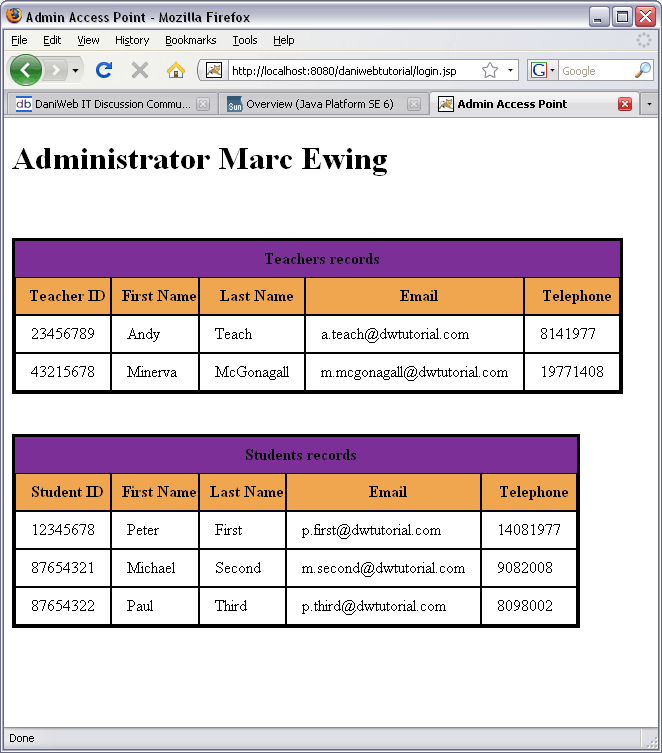
Assuming the request came from administrator we will finally present the user with the retrieved data, in this case admin.jsp
<%@ page contentType="text/html; charset=utf-8" language="java"%>
<%@ page import="java.util.ArrayList"%>
<%@ page import="beans.UserBean"%>
<jsp:useBean id="userBean" class="beans.UserBean" scope="session" />
<jsp:useBean id="students" type="ArrayList<beans.UserBean>" scope="session" />
<jsp:useBean id="teachers" type="ArrayList<beans.UserBean>" scope="session" />
<!DOCTYPE html PUBLIC "-//W3C//DTD XHTML 1.0 Transitional//EN" "http://www.w3.org/TR/xhtml1/DTD/xhtml1-transitional.dtd">
<html xmlns="http://www.w3.org/1999/xhtml">
<head>
<title>Admin Access Point</title>
<link rel="stylesheet"  type="text/css" href="css/style3.css" />
</head>

<body>
<h1>Administrator <%=userBean.getFirstName() %> <%= userBean.getLastName() %></h1>

<table>
    <tr>
        <th colspan="5" style="background-color:#7c2f97;">Teachers records</th>
    </tr>
    <tr style="background-color:#f0a64e;">
        <th class="border">Teacher ID</th>
        <th class="border">First Name</th>
        <th class="border">Last Name</th>
        <th class="border">Email</th>
        <th class="border">Telephone</th>
    </tr>
    <%for(int i=0; i < teachers.size(); i++)
    {
        UserBean user = new UserBean();
        user = (UserBean) teachers.get(i);
        %>
        <tr>
            <td><%= user.getUid() %></td>
            <td><%= user.getFirstName() %></td>
            <td><%= user.getLastName() %></td>
            <td><%= user.getEmail() %></td>
            <td><%= user.getPhone() %></td>
        </tr>
        <%}%>
</table>

<table>
    <tr>
        <th colspan="5" style="background-color:#7c2f97;">Students records</th>
    </tr>
    <tr style="background-color:#f0a64e;">
        <th class="border">Student ID</th>
        <th class="border">First Name</th>
        <th class="border">Last Name</th>
        <th class="border">Email</th>
        <th class="border">Telephone</th>
    </tr>
    <%for(int i=0; i < students.size(); i++)
    {
        UserBean user = new UserBean();
        user = (UserBean) students.get(i);
        %>
        <tr>
            <td><%= user.getUid() %></td>
            <td><%= user.getFirstName() %></td>
            <td><%= user.getLastName() %></td>
            <td><%= user.getEmail() %></td>
            <td><%= user.getPhone() %></td>
        </tr>
        <%}%>
</table>
</body>
</html>
In the first lines we are using JSP directives ( directives are messages to the JSP container that enable us to include content from other resource) to declare content type and import packages as required, in this case ArrayList and the UserBean. The process is followed by retrieval of session objects. Please note that
<jsp:useBean id="students" type="ArrayList<beans.UserBean>" scope="session" />
is a more elegant way of commonly known
<%
HttpSession session = request.getSession( );
ArrayList<beans.UserBean> students = new ArrayList<beans.UserBean>();
session.setAttribute("students", students);
%>
after creating the bean instance, it's just a matter of accessing the student list in the session using ac:forEach tag.
As you see from above code presenting collected data from the database is complicated by opening and closing number of brackets. Often it is difficult to keep track and mistakes are easily made and difficult to correct for beginners.
</tr>
    <%for(int i=0; i < students.size(); i++)
    {
        UserBean user = new UserBean();
        user = (UserBean) students.get(i);
        %>
        <tr>
            <td><%= user.getUid() %></td>
            <td><%= user.getFirstName() %></td>
            <td><%= user.getLastName() %></td>
            <td><%= user.getEmail() %></td>
            <td><%= user.getPhone() %></td>
        </tr>
        <%}%>
With growing amount of data to by displayed, in variety of statements, logic will quickly become very confusing. Can you imagine number of lines to go through if we did not moved all our business logic code (LoginServlet, DataManager, Validation) to server side? Fortunately we can also address to the problem of scriptlets through implementation of JSTL - Java Server Pages Standard Tag Library.Note: At this stage make sure you placed jstl.jar and standard.jar into your lib folder.
The advantages of JSTL over scriptlets are:they enhance readability
they simplify enhancibility and maintainability
it facilitates parallel development wherein even page designers can use JSTL to define the markup while developer deals with implementing the logic. This is made possible because JSTL is valid XML markup, scriptlets are just chunks of Java code
JSTL consists of five tag libraries with following functionalities Core - variable support, flow control, URL management and miscellaneous
(c:catch, c:choose, c:ferEach, c:forTokens, c:if, c:import, c:otherwise, c:out, c:param, c:redirect, c:remove, c:set, c:url and c:when)
i18n - locale, message formatting, and number and date formatting
(fmt:bundle, fmt:formatDate, fmt:formatNumber, fmt:message, fmt:param, fmt:parseDate, fmt:parseNumber, fmt:requestEncoding, fmt:setBundle, fmt:setLocale, fmt:setTimeZone and fmt:timeZone)
Functions - collection length and string manipulation
(fn:contains, fn:containsIgnoreCase, fn:endsWith, fn:escapeXml, fn:indexOf, fn:join, fn:length, fn:replace, fn:split, fn:startsWith, fn:substring, fn:substringAfter, fn:substringBefore, fn:toLowerCase, fn:toUpperCase and fn:trim)
Database - SQL
(sql:dateParam, sql:param, sql:query, sql:setDataSource, sql:transaction and sql:update)
XML - XML core, flow control and transformation
(x:choose, x:forEach, x:if, x:otherwise, x:out, x:param, x:parse, x:set, x:transform and x:when)
Compare these two snippets to display students data
1) without JSTL
<%@ page import="java.util.ArrayList"%>
<%@ page import="beans.UserBean"%>
<jsp:useBean id="students" type="ArrayList<beans.UserBean>" scope="session" />

/* Rest of the code till relevant section */

<table>
    <tr>
        <th colspan="5" style="background-color:#7c2f97;">Students records</th>
    </tr>
    <tr style="background-color:#f0a64e;">
        <th class="border">Student ID</th>
        <th class="border">First Name</th>
        <th class="border">Last Name</th>
        <th class="border">Email</th>
        <th class="border">Telephone</th>
    </tr>
    <%for(int i=0; i < students.size(); i++)
    {
        UserBean user = new UserBean();
        user = (UserBean) students.get(i);
        %>
        <tr>
            <td><%= user.getUid() %></td>
            <td><%= user.getFirstName() %></td>
            <td><%= user.getLastName() %></td>
            <td><%= user.getEmail() %></td>
            <td><%= user.getPhone() %></td>
        </tr>
        <%}%>
</table>
2) with JSTL
<%@taglib prefix="c" uri="http://java.sun.com/jsp/jstl/core"%>


/* Rest of the code till relevant section */


<table>
    <tr>
        <th colspan="5" style="background-color:#7c2f97;">Students records</th>
    </tr>
    <tr style="background-color:#f0a64e;">
        <th class="border">Student ID</th>
        <th class="border">First Name</th>
        <th class="border">Last Name</th>
        <th class="border">Email</th>
        <th class="border">Telephone</th>
    </tr>
    <c:forEach var="student" items="${students}">
        <tr>
            <td>${student.uid}</td>
            <td>${student.firstName}</td>
            <td>${student.lastName}</td>
            <td>${student.email}</td>
            <td>${student.phone}</td>
        </tr>
    </c:forEach>
</table>
JSTL is based on Expression Language (EL) which is similar to HTML or XML syntax and it make it easier for us to access certain type of information. I will not cover all in depth info on this. However I will give you quick info on expressions used in the above example, plus I point you to additional learning resources for you to use.
In the example above we need to retrieve the collection stored in the session object "students" and iterate through to display all wanted data stored in it. JSTL equivalent to well know and used for loop is tag . The tags has two main attributesitems - the collection over which to iterate
var - name of the attribute to expose (make available/accessible) the current item
Note: The order of the attributes is insignificant as they will work either way.
To display attributes of current item, we will call the attributes directly by the names instead of addressing them through getter methods ${student.firstName} .
Only one "ugly" scriplet left in our project and that is inindex.jsp
<% String e = (String) session.getAttribute("error" );
if(e != null)
{
    out.print(e);
}%>
This will be replaced by EL representation ofif statement
<c:if test="${error != null}">
${error}
<c:set var="error" scope="request" value="${null}"/>
</c:if>
The expression will geterror object from the session. It will check if there is any value stored in it, in case the error has been initialised by LoginServlet, our login attempted failed, display the message inside the error object.
Here are some learning resources as promised: JavaServer Pages Standard Tag Library from The J2EE 1.4 Tutorial, books Head First Servlets & JSP by O'Reilly publishing or JSTL in Action by Manning Publications Co.
Big thank you goes to ~s.o.s~ for his worthy comments and help on this topic. In doing so you help me understand things I just implemented "by the book" as touched at school or what I read somewhere.
Thank you ~s.o.s~
Further improvementAdding count to unsuccessful login attempts which once exceeded, will block further attempts for a period of time and may forward a message to administrator
Extending project functionality, adding unique options to each user group, for example student access to enrolled modules, access to module marks, participation in surveys or online tests for selected modules. Teachers adding new study materials for the modules, creating new surveys/exams, adding marks to student personal records etc.
Provide logout process, that will destroy session and invalidate possibility of getting access to previously used/view content by hitting go back button in the browser
To improve performance of database connection where establishing new connection may sometimes take even few second can be helped with implementation of Connection Pooling . If you decide to implement your own Pooling mechanism some tips can be handy or maybe you will give a go to one of already existing Pooling Tools
Lastly, many of us like to keep an eye on our "babies", how do they perform, are there any exception happening; and many other events in web site life cycle. Therefore implementation of logging mechanism is one of must have. For start you may try Apache log4j (some examples )
You can upload attached sql file through database tools such as phpMyAdmin or MySQL Query Browser.
There are 3 admin JSP documents: admin.jsp used by the project
admin_no_jstl.jsp to show page with scriplets
admin_jstl.jsp to show page with the use of JSTL
To see page either with JSTL or without it,save one of the last two documents through "Save as" option in your IDE and give it a name of admin.jsp.
Bellowed attached screen shots shows login page with error message and administrator page view after successful login into system.
Do not forget to change username and password for database access inside the web.xml file!