"System Idle Process"

Closed Thread

Join Date: Oct 2003
Posts: 19
Reputation: WiseBobo is an unknown quantity at this point 
Solved Threads: 0
WiseBobo WiseBobo is offline Offline
Newbie Poster

"System Idle Process"

 
0
  #1
Oct 24th, 2003
First off, I would like to thank the member with the linux-penguin-in-the-car avatar, prcviewer helped me sort out my svchost.exe problems.

However.........

Now I have the 20k memory usage process that is "system idle" completely taking over my cpu. It goes up to 95% and will never come down. I go to run some applications, and the damn thing freezes, repeats sounds, etc, then comes back. I then go to check the "performance" tab, and sure enough, 100%.

The strange thing, IMO, is that in the performance tab, the cpu usage is only at around 2%, while the process list shows system idle using 95% of the cpu. And what is even stranger is that the performance tab only goes to the level of overall cpu usage that the process list shows is when I attempt to run apps (mostly games).

To sum things up, my cpu is being used by system idle process at around 95%, but is not detected by the performance tab, but will detect when my 2% cpu usage game crashes because 95+% is being used by system idle.

Make sense?
Attached Thumbnails
process2.JPG   performance1.JPG  
Quick reply to this message  
Join Date: Oct 2003
Posts: 19
Reputation: WiseBobo is an unknown quantity at this point 
Solved Threads: 0
WiseBobo WiseBobo is offline Offline
Newbie Poster

Re: "System Idle Process"

 
0
  #2
Oct 24th, 2003
Circled in Red is when I attempt to run applications, and blue when the nothing is being ran, besides explorer, etc.

Now, if my cpu, as shown by the process picture, is being mostly used by System Idle, then why is it that the performance tab does not pick it up when nothing is running. (compare the cpu usage with the blue circle).

It is not until I attempt to run something that my cpu usage is all used because 95% is going for system idle, and say around 5% for the game; however, the performance tab will show the lock up, but not the 95% cpu usage of system idle when I stop the game!
Quick reply to this message  
Join Date: Oct 2003
Posts: 766
Reputation: )BIG"B"Affleck can only hope to improve 
Solved Threads: 7
)BIG"B"Affleck's Avatar
)BIG"B"Affleck )BIG"B"Affleck is offline Offline
Banned

Re: "System Idle Process"

 
0
  #3
Oct 24th, 2003
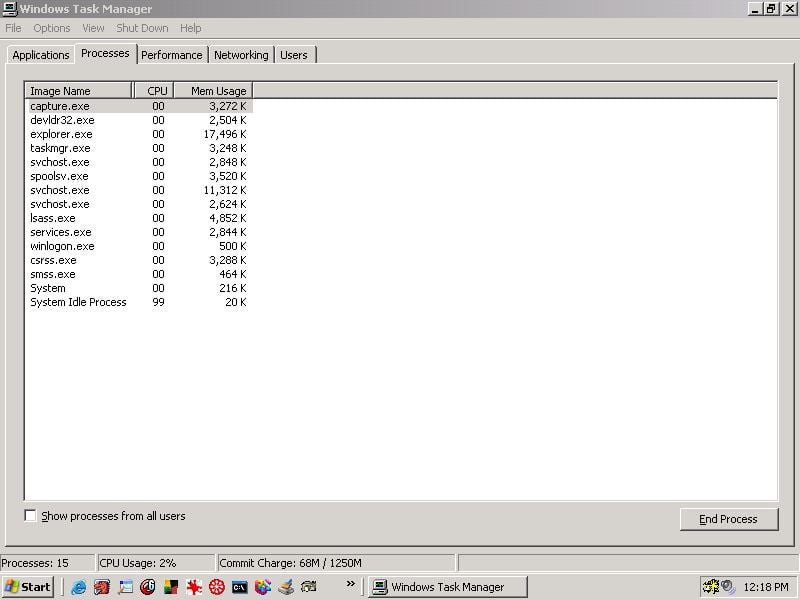
It is not until I attempt to run something that my cpu usage is all used because 95% is going for system idle
Take note of the word that is bold up there. It is perfectly normal for system idle Process to be at 99%. Guess why, your computer isnt using any resources during those times when it's at 99%. This is normal, it just means that you're not running any apps/games etc...
Last edited by )BIG"B"Affleck; Oct 24th, 2003 at 2:20 pm.
Attached Thumbnails
Capture_102.jpg  
Quick reply to this message  
Join Date: Oct 2003
Posts: 19
Reputation: WiseBobo is an unknown quantity at this point 
Solved Threads: 0
WiseBobo WiseBobo is offline Offline
Newbie Poster

Re: "System Idle Process"

 
0
  #4
Oct 24th, 2003
Even when I am running an application?
I run any kind of executable file, it is still at 95%.
Last edited by WiseBobo; Oct 24th, 2003 at 5:46 pm.
Quick reply to this message  
Join Date: Aug 2003
Posts: 9,541
Reputation: caperjack is a splendid one to behold caperjack is a splendid one to behold caperjack is a splendid one to behold caperjack is a splendid one to behold caperjack is a splendid one to behold caperjack is a splendid one to behold caperjack is a splendid one to behold 
Solved Threads: 492
Team Colleague
caperjack's Avatar
caperjack caperjack is offline Offline
Posting Prodigy

Re: "System Idle Process"

 
0
  #5
Oct 24th, 2003
normal , !!!!
Quick reply to this message  
Join Date: Oct 2003
Posts: 766
Reputation: )BIG"B"Affleck can only hope to improve 
Solved Threads: 7
)BIG"B"Affleck's Avatar
)BIG"B"Affleck )BIG"B"Affleck is offline Offline
Banned

Re: "System Idle Process"

 
0
  #6
Oct 24th, 2003
Originally Posted by WiseBobo
Even when I am running an application?
I run any kind of executable file, it is still at 95%.
Go run KAZAA/paintshop Pro and come back an tell the outcome.Dude its normal what are you worried about? Its Not Y2K
. Be more specific on what you want to happend.
Last edited by )BIG"B"Affleck; Oct 24th, 2003 at 8:13 pm.
Quick reply to this message  
Join Date: Oct 2003
Posts: 19
Reputation: WiseBobo is an unknown quantity at this point 
Solved Threads: 0
WiseBobo WiseBobo is offline Offline
Newbie Poster

Re: "System Idle Process"

 
0
  #7
Oct 24th, 2003
When I run any application, the system idle will remain at 95.

I will run Kazaa, Windows media players, Real player, Day of Defeat, etc.

The system idle will remain at 95%, and my other applications will not run correctly because they do not have the correct amount of access to the cpu. I check the cpu usage, and my system idle process is still taking up all the cpu when my system is not idle.

My apps will only continue to work when the system idle dips down to around 88, then back to 95, then everything locks up. It never ends.
Last edited by WiseBobo; Oct 24th, 2003 at 10:07 pm.
Quick reply to this message  
Join Date: Oct 2003
Posts: 766
Reputation: )BIG"B"Affleck can only hope to improve 
Solved Threads: 7
)BIG"B"Affleck's Avatar
)BIG"B"Affleck )BIG"B"Affleck is offline Offline
Banned

Re: "System Idle Process"

 
0
  #8
Oct 24th, 2003
Post screenshots of all your services(alphabetical)
Quick reply to this message  
Join Date: Oct 2003
Posts: 19
Reputation: WiseBobo is an unknown quantity at this point 
Solved Threads: 0
WiseBobo WiseBobo is offline Offline
Newbie Poster

Re: "System Idle Process"

 
0
  #9
Oct 25th, 2003
By posting my processes, it is not going to help anything. I already get rid of all the unecessary crap.

The error/crash only occurs in game, not when I have alt+tabbed out of the game or watching the processes. I can tell you what happens as soon as the crash stops, but I cant get a screenie of it:

When I alt+tab out of any game, and look at the processes, the game will be at say around 10, but the system idle will still be at around 93. But since I alt tabbed, the game will drop back to 3.

Some weird stuff.
Quick reply to this message  
Join Date: Oct 2003
Posts: 766
Reputation: )BIG"B"Affleck can only hope to improve 
Solved Threads: 7
)BIG"B"Affleck's Avatar
)BIG"B"Affleck )BIG"B"Affleck is offline Offline
Banned

Re: "System Idle Process"

 
0
  #10
Oct 25th, 2003
Originally Posted by WiseBobo
The error/crash only occurs in game, not when I have alt+tabbed out of the game or watching the processes.
You need RAM or video card drivers or a better video card or the current video card cant handle the RES you have requsted.
post specs of all your hardware
Quick reply to this message  
Closed Thread

This thread is more than three months old.
Perhaps start a new thread instead?
Message:


Other Threads in the Windows NT / 2000 / XP Forum
Thread Tools Search this Thread


About Us | Contact Us | Advertise | DaniWeb | Acceptable Use Policy | RSS Feed

©2003 - 2009 DaniWeb® LLC