Wrapper div adapt to height of nested div?

Reply

Join Date: Sep 2009
Posts: 5
Reputation: decimo is an unknown quantity at this point 
Solved Threads: 0
decimo decimo is offline Offline
Newbie Poster

Wrapper div adapt to height of nested div?

 
-1
  #1
Sep 16th, 2009
I'm having some problem emulating the behavior of forums running phpBB or IPB.

How do I make a wrapper div of a post maintain a minimum height? Currently, my user info and post content go into two separate divs (floated left and right) but the parent div (the wrapper) only keeps a height of any text within it, i.e. the other two divs just overflow out of it =( I want the wrapper to maintain a minimum height, but if the post content is large, I also want it to adapt to the height of the post content div (or in the case of a window resize where the post text can be 'squeezed' into being really long).
Reply With Quote Quick reply to this message  
Join Date: Aug 2009
Posts: 59
Reputation: Quick_Silver69 is an unknown quantity at this point 
Solved Threads: 2
Quick_Silver69 Quick_Silver69 is offline Offline
Banned

Re: Wrapper div adapt to height of nested div?

 
0
  #2
Sep 16th, 2009
For 100% or "full" height using CSS, I do the following:

First try setting your html and body rules to height:100% on both
(html,body{
height:100%;}. They are auto by default in many browsers, which means to
collapse. Then make your container div height:auto and min-height:100%
(#container {height:auto;min-height:100%;}). That will allow your
content area to fill 100% of the viewport for standardized css browsers,
but content can extend and fill that without breaking through it and
overflowing. Last issue is now with IE. It does not read min-height, and
needs height:100% to work right, and does not fill height with 'auto'.
So, add a hack for IE like this (* html #container{height:100%;}), to
the code above, and you should have IE and Mozilla agents using correct height thats the full length. I have another hack for Safari which also suffers from this problem, if you need that too.


OR OR OR OR OR


A New Solution

Assuming you know how min-height is ’supposed’ to work, would it be all that bold that it’s safe to say that…well… can’t we just do this? (because that’s what I’ve decided to do after throwing IE5.x out the window)

CSS: min-height with !important

selector {
min-height:500px;
height:auto !important;
height:500px;
}


Assuming IE6 will not fix the correct implementation for the !important declaration and assuming that if IE7 does, they’ll also implement min-height correctly since at the pace they’re going they’re fixing CSS like mad crazy cows. Is that too many assumptions? But wouldn’t you agree?
Last edited by Quick_Silver69; Sep 16th, 2009 at 11:04 pm. Reason: updating
Reply With Quote Quick reply to this message  
Join Date: Sep 2009
Posts: 5
Reputation: decimo is an unknown quantity at this point 
Solved Threads: 0
decimo decimo is offline Offline
Newbie Poster

Re: Wrapper div adapt to height of nested div?

 
0
  #3
Sep 16th, 2009
Hey, thanks for the quick reply!

If I understand correctly your solution fills up the whole window with a div (#container?) and increases in height if the contents are large? My problem is kind of different I think. I just tried the following bit of code:

HTML and CSS Syntax (Toggle Plain Text)
  1. <!DOCTYPE html PUBLIC "-//W3C//DTD XHTML 1.0 Transitional//EN" "http://www.w3.org/TR/xhtml1/DTD/xhtml1-transitional.dtd">
  2. <html xmlns="http://www.w3.org/1999/xhtml">
  3. <head>
  4. <title>Poasts Test Site</title>
  5.  
  6. <meta http-equiv="Content-Type" content="text/html; charset=iso-8859-1" />
  7.  
  8. <style>
  9. html,body{
  10. height:100%;
  11. }
  12.  
  13. #container {
  14. height:auto;
  15. min-height:200px;
  16. background-color: #f13;
  17. border: 1px solid #31e;
  18. }
  19. </style>
  20.  
  21. </head>
  22.  
  23.  
  24. <body>
  25.  
  26. <div id="container">
  27. <div id="authorinfo" style="float:left;">
  28. <p>a></p>
  29. <p>a></p>
  30. <p>a></p>
  31. <p>a></p>
  32. <p>a></p>
  33. <p>a></p>
  34. <p>a></p>
  35. <p>a></p>
  36. <p>a></p>
  37. <p>a></p>
  38. </div>
  39.  
  40. <div id="postcontent" style="float:right;">
  41. <p>a></p>
  42. <p>a></p>
  43. <p>a></p>
  44. <p>a></p>
  45. <p>a></p>
  46. <p>a></p>
  47. <p>a></p>
  48. <p>a></p>
  49. <p>a></p>
  50. <p>a></p>
  51. </div>
  52.  
  53. </div>
  54.  
  55. </body>
  56. </html>

The paragraphs shoot right out of the container div =(
The container is a user post (like this) and multiple instances of it will exist in a page. For example, I'm trying to make it's height stick to 200px in case of a small user comment (couple of lines) or increase in height according to the height of a bigger post (many lines). I hope I made sense there Thanks.

EDIT: @New Solution: I'd agree if I understood what was said fully I'm still kind of a noob with css..

This seems to work: I just put the following bit in the bottom:

<div id="cleardiv"></div>

with:

#cleardiv {
clear:both;
}
Last edited by decimo; Sep 16th, 2009 at 11:23 pm. Reason: just tried something
Reply With Quote Quick reply to this message  
Join Date: Jun 2008
Posts: 348
Reputation: Troy III will become famous soon enough Troy III will become famous soon enough 
Solved Threads: 42
Troy III's Avatar
Troy III Troy III is offline Offline
Posting Whiz

Re: Wrapper div adapt to height of nested div?

 
0
  #4
Sep 17th, 2009
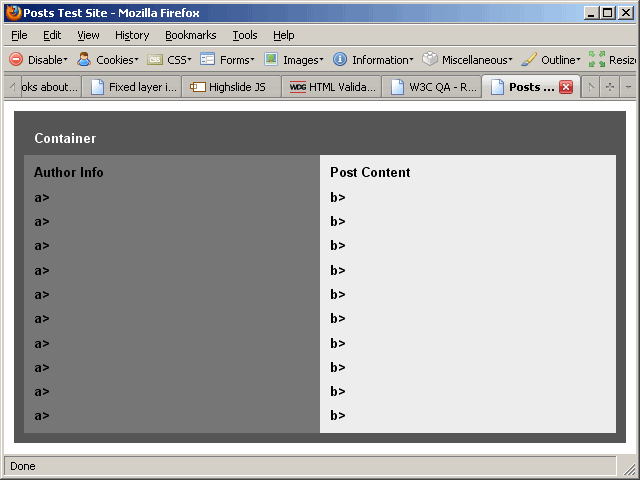
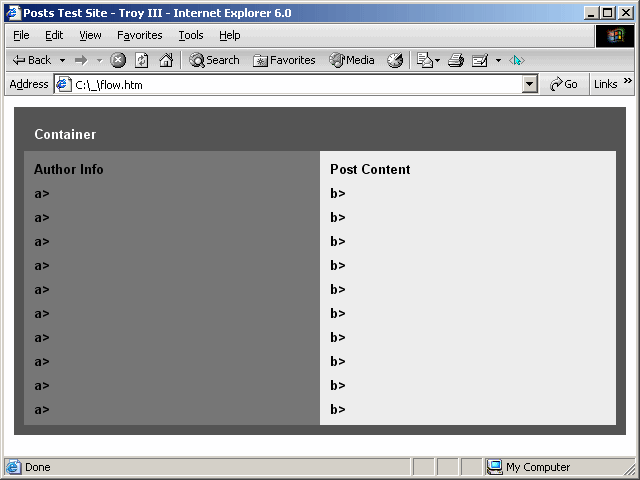
So you would like the contents to be fllowing something like this?
:')\ hmmm...
Attached Thumbnails
IE6.02.png   FX353.png  
Reply With Quote Quick reply to this message  
Join Date: Sep 2009
Posts: 5
Reputation: decimo is an unknown quantity at this point 
Solved Threads: 0
decimo decimo is offline Offline
Newbie Poster

Re: Wrapper div adapt to height of nested div?

 
0
  #5
Sep 18th, 2009
Originally Posted by Troy III View Post
So you would like the contents to be fllowing something like this?
:')\ hmmm...
Well, thanks, yeah I was kind of losing my head over that one. Didn't know about "clear: both;".
Reply With Quote Quick reply to this message  
Join Date: Jun 2008
Posts: 348
Reputation: Troy III will become famous soon enough Troy III will become famous soon enough 
Solved Threads: 42
Troy III's Avatar
Troy III Troy III is offline Offline
Posting Whiz

Re: Wrapper div adapt to height of nested div?

 
0
  #6
Sep 19th, 2009
Originally Posted by Troy III View Post
So you would like the contents to be fllowing something like this?
:')\ hmmm...
Originally Posted by decimo View Post
Well, thanks, yeah I was kind of losing my head over that one. Didn't know about "clear: both;".
I wasn't using FLOATS there at all - no floats in that code. I hate floats. I like inline-blocks a lot better.
Reply With Quote Quick reply to this message  
Join Date: Jan 2007
Posts: 3,203
Reputation: MidiMagic has a spectacular aura about MidiMagic has a spectacular aura about 
Solved Threads: 164
MidiMagic's Avatar
MidiMagic MidiMagic is offline Offline
Nearly a Senior Poster

Re: Wrapper div adapt to height of nested div?

 
0
  #7
Sep 26th, 2009
There is no way to fill the viewport exactly that works on all computers, browsers, window sizes, screen resolutions, and screen aspect ratios. Do not attempt to do this. It is not intended to be done, so it is not part of the W3C standard.

Div is not currently defined to work with 100% height unless the height of its container is defined in some measure other than %. 100 percent of the outermost container is the height of the content, not the viewport. There is no standard way to get the height of the viewport.
Daylight-saving time uses more gasoline
Reply With Quote Quick reply to this message  
Join Date: Jun 2008
Posts: 348
Reputation: Troy III will become famous soon enough Troy III will become famous soon enough 
Solved Threads: 42
Troy III's Avatar
Troy III Troy III is offline Offline
Posting Whiz

Re: Wrapper div adapt to height of nested div?

 
0
  #8
Sep 26th, 2009
Decimos problem was:

1. (to) make a wrapper div of a post maintain a minimum height

2. my user info and post content go into two separate divs (floated left and right) but the parent div (the wrapper) only keeps (its own height) the other two divs just overflow out of it =(
3. I want the wrapper to maintain a minimum height, but if the post content is large, I also want it to adapt to the height of the post content div (or in the case of a window resize where the post text can be 'squeezed' into being really long).

Meaning he wants to prevent the content beading off of its div container in Netscape based UAs.
Not to fill the window but to keep [1] the minimum height of it in all situations.
Reply With Quote Quick reply to this message  
Join Date: Oct 2009
Posts: 3
Reputation: terri1210 is an unknown quantity at this point 
Solved Threads: 0
terri1210 terri1210 is offline Offline
Newbie Poster

Re: Wrapper div adapt to height of nested div?

 
0
  #9
Oct 2nd, 2009
I'm having a similar issue. My wrapper div is not adjusting to the height of the longest column. I've tried the "height: auto;min height 100% and it's not working. Help!

Here's my code:
  1. <head>
  2. <meta http-equiv="Content-Type" content="text/html; charset=UTF-8" />
  3. <title>monzo</title>
  4. <link rel="stylesheet" type="text/css" href="./monzo.css" media="all" />
  5. <!--[if IE]>
  6. <style type="text/css" media="all">.borderitem {border-style:solid;}</style>
  7. <![endif]-->
  8. </head>
  9.  
  10. <body>
  11.  
  12. <img src="images/header.jpg" id="header" alt="Monzo Marketing" />
  13. <br class="clearfloat" />
  14.  
  15. <div id="wrap">
  16.  
  17. <div id="leftbar">
  18. <img src="images/people_hdr.gif" id="people_hdr" alt="" />
  19. <br class="clearfloat" />
  20. </div>
  21.  
  22. <div class="Text" id="textbox">
  23. <p>Content for class "Text" Goes Here </p>
  24. <p>daklfja;ldk f</p>
  25. <p>&nbsp;</p>
  26. <p>&nbsp;</p>
  27. <p>&nbsp;</p>
  28. <p>jlkflakjds;fl </p>
  29. <p>jhlkjj;flakd f;lakdj f</p>
  30. <p>&nbsp;</p>
  31. <p>dklfja;ldadsdlfkjl</p>
  32. </div>
  33.  
  34. <link href="single_four.css" rel="stylesheet" type="text/css" />
  35. <ul id="menu">
  36. <li id="home"><a href="index.html"><b>Home</b></a></li>
  37. <li id="people"><a href="people.html"><b>People</b></a></li>
  38. <li id="services"><a href="services.html"><b>Services</b></a></li>
  39. <li id="clients"><a href="clients.html"><b>Clients</b></a></li>
  40. <li id="work"><a href="work.html"><b>Work</b></a></li>
  41. <li id="contact"><a href="contact.html"><b>Contact&nbsp;Us</b></a></li>
  42. </ul>
  43.  
  44. <div id="bkgd">
  45. </div>
  46.  
  47. <!--end of wrap-->
  48. </div>
  49.  
  50. </body>
  51.  
  52. </html>

And my CSS:
  1. body {
  2. margin:0px;
  3. padding:0px;
  4. }
  5. .p {
  6. padding:0px;
  7. font-size: 36px;
  8. font-family: Verdana, Geneva, sans-serif;
  9. font-weight: inherit;
  10. text-align: left;
  11. color: inherit;
  12. line-height: inherit;
  13. left: 230px;
  14. top: 100px;
  15. display: inline;
  16. margin-top: 0px;
  17. margin-right: 0px;
  18. margin-bottom: 0px;
  19. margin-left: 0px;
  20. position: absolute;
  21. width: 586px;
  22. }
  23. p {
  24. padding-top:0px;
  25. margin-top:0px;
  26. }
  27. img {
  28. border:0px;
  29. }
  30. div {
  31. margin:0px;
  32. padding:0px;
  33. font-family:verdana; font-size:12px;
  34. }
  35. .AbsWrap {
  36. width: 100%;
  37. position: relative;
  38. }
  39. .rowWrap {
  40. width: 100%;
  41. }
  42. .clearfloat {
  43. clear:both;
  44. height:0px;
  45. }
  46. a:link, a:visited{
  47. COLOR:inherit;
  48. text-decoration:inherit;
  49. }
  50.  
  51. #header {
  52. margin-left:0px;
  53. margin-top:0px;
  54. width:900px;
  55. height:143px;
  56. margin-bottom:0px;
  57. float:left;
  58. display:inline;
  59.  
  60. }
  61. #leftbar {
  62. width:210px;
  63. padding-top:0px;
  64. height:auto;
  65. margin-left:0px;
  66. margin-top:0px;
  67. margin-bottom:0px;
  68. float:left;
  69. display:inline;
  70. }
  71. #people_hdr {
  72. margin-left:11px;
  73. margin-top:42px;
  74. width:184px;
  75. height:54px;
  76. margin-bottom:0px;
  77. float:left;
  78. display:inline;
  79.  
  80. }
  81. .Text{
  82. width:586px;
  83. float:none;
  84. display:inline;
  85. font-size:11px;
  86. font-family:Verdana, Geneva, sans-serif;
  87. font-weight: normal;
  88. text-align: left;
  89. color: #333333;
  90. line-height: 120%;
  91. padding-top:1px;
  92. padding-bottom:2px;
  93. position: absolute;
  94. left: 231px;
  95. top: 117px;
  96. margin: 0px;
  97. min-height: 100%;
  98. z-index: 300;
  99. }
  100. #footer {
  101. width:900px;
  102. padding-top:0px;
  103. height:14px;
  104. margin-left:0px;
  105. margin-top:4px;
  106. margin-bottom:0px;
  107. float:left;
  108. display:inline;
  109. clear: both;
  110. }
  111.  
  112. /*thisis nav bar*/
  113.  
  114. #menu {
  115. padding:0;
  116. list-style:none;
  117. height:50px;
  118. background:url(ulback.gif) repeat-x;
  119. margin-top: 0;
  120. margin-right: 0;
  121. margin-bottom: 0;
  122. margin-left: 0px;
  123. position: absolute;
  124. left: 211px;
  125. top: 0px;
  126. z-index: 200;
  127. }
  128. /* ================================================================
  129. This copyright notice must be untouched at all times.
  130.  
  131. The original version of this stylesheet and the associated (x)html
  132. is available at [url]http://www.cssmenus.co.uk[/url]
  133. Copyright (c) 2009- Stu Nicholls. All rights reserved.
  134. This stylesheet and the associated (x)html may be modified in any
  135. way to fit your requirements.
  136. =================================================================== */
  137. #menu li {float:left;}
  138. #menu li a {
  139. display:block;
  140. height:50px;
  141. line-height:25px;
  142. padding:0 20px 0 0;
  143. float:left;
  144. color:#fff;
  145. text-decoration:none;
  146. font-family: Arial, Helvetica, sans-serif;
  147. font-size: 12px;
  148. font-weight: lighter;
  149. font-style: normal;
  150. background-image: url(images/tab_a.gif);
  151. background-repeat: no-repeat;
  152. background-position: right -25px;
  153. }
  154. #menu li a b {
  155. display:block;
  156. height:50px;
  157. float:left;
  158. padding:0 0 0 20px;
  159. cursor:pointer;
  160. background-image: url(images/tab_b.gif);
  161. background-repeat: no-repeat;
  162. background-position: left -25px;
  163. }
  164. #menu li a:hover,
  165. #menu li a:active,
  166. #menu li a:focus,
  167. .home #menu li#home a,
  168. .single #menu li#single a,
  169. .dropdown #menu li#dropdown a,
  170. .dropline #menu li#dropline a,
  171. .flyout #menu li#flyout a,
  172. .support #menu li#support a,
  173. .contact #menu li#contact a
  174. {background:url(tab_a.gif) no-repeat right -10px; line-height:50px; color:#fff;}
  175. #menu li a:hover b,
  176. #menu li a:active b,
  177. #menu li a:focus b,
  178. .home #menu li#home a b,
  179. .single #menu li#single a b,
  180. .dropdown #menu li#dropdown a b,
  181. .dropline #menu li#dropline a b,
  182. .flyout #menu li#flyout a b,
  183. .support #menu li#support a b,
  184. .contact #menu li#contact a b
  185. {background:url(tab_b.gif) no-repeat left -10px; line-height:50px;}
  186.  
  187. #bkgd {
  188. background-color: #FFF;
  189. background-image: url(images/bkgd_1px.jpg);
  190. background-repeat: repeat-x;
  191. width: 690px;
  192. position: absolute;
  193. left: 211px;
  194. top: 0px;
  195. z-index: 100;
  196. height: 300px;
  197. }
  198.  
  199. #wrap {
  200. width:900px;
  201. background-image: url(images/bkgd_tan_wh900px.gif);
  202. background-repeat: repeat-y;
  203. position: absolute;
  204. top: 143
  205. px;
  206. overflow: visible;
  207. height: auto;
  208. min-height: 100%;
  209. }
Last edited by peter_budo; Oct 4th, 2009 at 7:28 am. Reason: Keep It Organized - For easy readability, always wrap programming code within posts in [code] (code blocks).
Reply With Quote Quick reply to this message  
Join Date: Oct 2006
Posts: 13
Reputation: urolicious is an unknown quantity at this point 
Solved Threads: 2
urolicious's Avatar
urolicious urolicious is offline Offline
Newbie Poster
 
0
  #10
Oct 9th, 2009
when i get this kind of problem i find that it's usually due to uncleared floats...
you need to check that you have cleared all your floats.. looks like you haven't cleared div#leftbar
Reply With Quote Quick reply to this message  
Reply

Message:


Similar Threads
Other Threads in the HTML and CSS Forum
Thread Tools Search this Thread


About Us | Contact Us | Advertise | DaniWeb | Acceptable Use Policy | RSS Feed

©2003 - 2009 DaniWeb® LLC