•
•
•
•
What is DaniWeb IT Discussion Community?
You're currently browsing the ASP.NET section within the Web Development category of DaniWeb, a massive community of 361,911 software developers, web developers, Internet marketers, and tech gurus who are all enthusiastic about making contacts, networking, and learning from each other. In fact, there are 2,599 IT professionals currently interacting right now! Registration is free, only takes a minute and lets you enjoy all of the interactive features of the site.
Please support our ASP.NET advertiser: Lunarpages ASP Web Hosting
Views: 18511 | Replies: 3
![]() |
•
•
Join Date: Nov 2005
Location: Mountain View, CA
Posts: 47
Reputation:
Rep Power: 3
Solved Threads: 1
•
•
•
•
Originally Posted by frmsasp
Hello there,
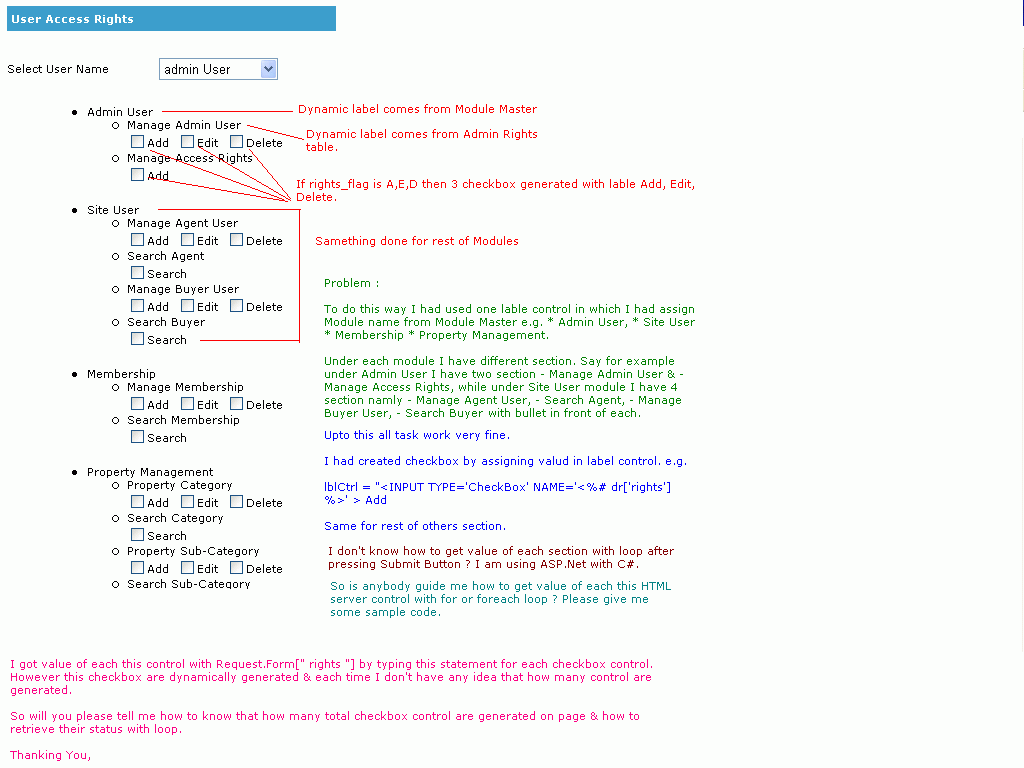
I am using ASP.NET with C# and facing below problem. I am not able to get values of selected checkboxes which are generated dynamically.
Pls have a look at the image attached with the message...
Waiting for your reply....
Thanks,
Paresh
Hi Paresh,
I dont know how you are adding the dynamic controls at the runtime. But while you are create the new Checkbox Object to add to the form, append the same object to a static collection object like Hash Table.
•
•
•
•
protected static Hashtable mRoleCheckBoxList=new Hashtable();
mRoleCheckBoxList.Add(RoleName, NewCheckBox);
Here mRoleCheckBoxList is a global static object of a HashTable.
now when ever you did a postback to the page u can get the values using following.
•
•
•
•
IDictionaryEnumerator RoleCheckBoxEnumerator = mRoleCheckBoxList.GetEnumerator();
while ( RoleCheckBoxEnumerator.MoveNext() )
{
HtmlInputCheckBox RoleCheckBox=(HtmlInputCheckBox)
RoleCheckBoxEnumerator.Value;
string BoxRoleName=(string)RoleCheckBox.Value;
if(RoleName.Equals(BoxRoleName))
{
RoleCheckBox.Checked=true;
break;
}
}
Thanks,
Kedar
The method you are using is depreciated and you should create your controls dynamically using the built in methods.
E.g.
When creating dynamic controls to access there variables on post back you need to re-initialise them.
Essentially recreating them (it sounds stupid)
Here is an example for you.
I see your using C# and im afraid that this is in VB.net from an old project. But its not very difficult to convert.
Just Create a new Website add this as a page and run it. (Again make sure its vb.net)
I understand this will take time to implement as this is completely different from the way yours is currently generating them. But this is the reccomended approach.
P.S.
If you are stuck with having to create your controls through a label then why simply precede all checkbox controls name="" attributtes with something you can pickup on when looping e.g. "Dynamic~[CONTROLNAME]".
I.e.
E.g.
HtmlInputCheckBox cb = new HtmlInputCheckBox(); cb.id = "someid"; cb.value = "your value"; /* Panel1 being a panel or some sort of placeholder on the page */ panel1.Controls.Add(cb);
When creating dynamic controls to access there variables on post back you need to re-initialise them.
Essentially recreating them (it sounds stupid)
Here is an example for you.
I see your using C# and im afraid that this is in VB.net from an old project. But its not very difficult to convert.
Just Create a new Website add this as a page and run it. (Again make sure its vb.net)
<%@ Page Language="VB" Strict="true" %>
<script runat="server">
Protected Sub Page_Load(ByVal sender As Object, ByVal e As System.EventArgs)
Dim enuView As IEnumerator = ViewState.Keys.GetEnumerator
While enuView.MoveNext
Dim strKey As String = enuView.Current.ToString
If strKey.StartsWith("txt~", StringComparison.OrdinalIgnoreCase) Then
createTextBox(strKey, True)
ElseIf strKey.StartsWith("ddl~", StringComparison.OrdinalIgnoreCase) Then
createDropDownList(strKey, True)
End If
End While
End Sub
Protected Sub btnAddTextBox_Click(ByVal sender As Object, ByVal e As System.EventArgs)
Dim strId As String = "txt~" & Format(Now, "HHmmss")
createTextBox(strId, False)
End Sub
Protected Sub btnAddDropDownList_Click(ByVal sender As Object, ByVal e As System.EventArgs)
Dim strId As String = "ddl~" & Format(Now, "HHmmss")
createDropDownList(strId, False)
End Sub
Private Sub createTextBox(ByVal strId As String, ByVal isReturning As Boolean)
Dim txtBox As New TextBox
txtBox.ID = strId ' Set ID before if returning
plcDynamicContent.Controls.Add(txtBox) ' Add to page before changing values else they are not held in viewstate
If Not isReturning Then ' Only set defaults if is new textbox
With txtBox
.Text = "Added at " & Format(Now, "HH:mm:ss")
End With
End If
ViewState(strId) = strId ' Store the ID of the control in viewstate
End Sub
Private Sub createDropDownList(ByVal strId As String, ByVal isReturning As Boolean)
Dim ddlList As New DropDownList
ddlList.ID = strId
plcDynamicContent.Controls.Add(ddlList) ' Add to page before changing values else they are not held in viewstate
If Not isReturning Then ' Only set defaults if is new textbox
With ddlList
.Items.Add(New ListItem("Added at " & Format(Now.AddHours(-1), "HH:mm:ss"), "1")) ' Add some items
.Items.Add(New ListItem("Added at " & Format(Now, "HH:mm:ss"), "2"))
.Items.Add(New ListItem("Added at " & Format(Now.AddHours(1), "HH:mm:ss"), "3"))
.SelectedValue = "2" ' set the selected value
End With
End If
ViewState(strId) = strId ' Store the ID of the control in viewstate
End Sub
</script>
<!DOCTYPE html PUBLIC "-//W3C//DTD XHTML 1.0 Transitional//EN" "http://www.w3.org/TR/xhtml1/DTD/xhtml1-transitional.dtd">
<html xmlns="http://www.w3.org/1999/xhtml" >
<head id="Head1" runat="server">
<title>Dynamic Controls</title>
</head>
<body>
<form id="formDynamic" runat="server">
<asp:scriptmanager id="scriptmanager" runat="server"></asp:scriptmanager>
<asp:panel id="holder" runat="server">
<table align="center" width="700">
<tr>
<td class="header" colspan="2"><h1><a href="../Default.aspx">ASP.net Testing</a> >> Dynamic Controls</h1></td>
</tr>
<tr>
<td colspan="2">
<p>Date: 22/04/2008</p>
<p>Example showing the correct way of creating dynamic controls at runtime and maintaining their viewstate between postbacks.</p>
</td>
</tr>
<tr>
<td><p>Select From the Following:</p></td>
<td><asp:button id="btnAddTextBox" runat="server" cssclass="input" text="Add Text Box" onclick="btnAddTextBox_Click" /> <asp:button id="btnAddDropDownList" runat="server" cssclass="input" text="Add Dropdown List" onclick="btnAddDropDownList_Click" /></td>
</tr>
<tr>
<td colspan="2">
<div style="overflow:scroll;">
<asp:placeholder id="plcDynamicContent" runat="server"></asp:placeholder>
</div>
</td>
</tr>
</table>
</asp:panel>
</form>
</body>
</html>I understand this will take time to implement as this is completely different from the way yours is currently generating them. But this is the reccomended approach.
P.S.
If you are stuck with having to create your controls through a label then why simply precede all checkbox controls name="" attributtes with something you can pickup on when looping e.g. "Dynamic~[CONTROLNAME]".
I.e.
When Autumn Falls [ http://www.whenautumnfalls.co.uk ] &&
Designdotworks [ http://www.designdotworks.co.uk ] Web / Graphic / Software Design
![]() |
•
•
•
•
Currently Active Users Viewing This Thread: 1 (0 members and 1 guests)
•
•
•
•
•
•
•
•
DaniWeb ASP.NET Marketplace
- Listbox help needed!! (VB.NET)
- Looping through listbox items (JavaScript / DHTML / AJAX)
- PHP Checkbox (PHP)
- need Help in store Datagrid item in an array (VB.NET)
- Help with Dynamic Checkbox (PHP)
- How to get value of selected dynamic checkboxes? (ASP.NET)
- recordset from multiple checkbox values (ASP)
Other Threads in the ASP.NET Forum
- Previous Thread: not a member of System.Web.UI.Page
- Next Thread: Button to open a new browser window


Linear Mode