Does anyone know how to do this? I have tables that are generated from asp that i would like to allow clients to download to a .csv file to their pc.
Thanks

Does anyone know how to do this? I have tables that are generated from asp that i would like to allow clients to download to a .csv file to their pc.
Thanks
Jump to Postif you alter the same script that generate the tables, get rid of the <table> and </table>, get rid of all </tr>, replace all instances of </td><td> with a tab, and replace all instances of <tr> wit ha line break, you have a properly formatted csv file (provided there are …
Jump to Posthave you googled this? There's a few useful links there:
http://www.google.com/search?q=asp+generate+csv+file&sourceid=mozilla-search&start=0&start=0&ie=utf-8&oe=utf-8

if you alter the same script that generate the tables, get rid of the <table> and </table>, get rid of all </tr>, replace all instances of </td><td> with a tab, and replace all instances of <tr> wit ha line break, you have a properly formatted csv file (provided there are no tabs or line breaks in your data). You can then make a button that calls a script that generate the file for download.
Do you know how to create headers that force a download?
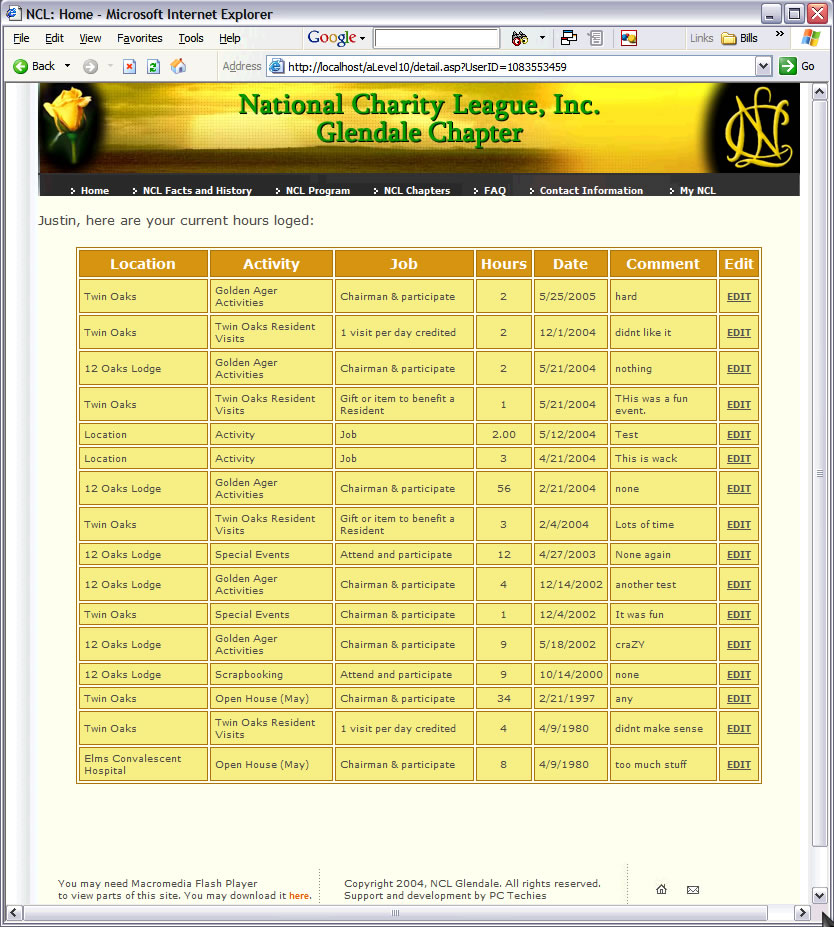
Excuse me for the bloat, I'm using dreamweaver for the asp pages. Here is the actual code for what I am trying to do. This page will display hours so far entered for the user that is logged in. It is using a session variable to know what data to pull. I want to be able to have a link that will allow the client to download this information in excel.
I have attached a sample of the results page.
Thanks for the help.
<%@LANGUAGE="VBSCRIPT" CODEPAGE="1252"%>
<!--#include file="../Connections/conn.asp" -->
<%
Dim Recordset1__MMColParam
Recordset1__MMColParam = "1"
If (Session("userid") <> "") Then
Recordset1__MMColParam = Session("userid")
End If
%>
<%
Dim Recordset1
Dim Recordset1_numRows
Set Recordset1 = Server.CreateObject("ADODB.Recordset")
Recordset1.ActiveConnection = MM_conn_STRING
Recordset1.Source = "SELECT * FROM hoursLog WHERE userID = " + Replace(Recordset1__MMColParam, "'", "''") + " ORDER BY dateAC DESC"
Recordset1.CursorType = 0
Recordset1.CursorLocation = 2
Recordset1.LockType = 1
Recordset1.Open()
Recordset1_numRows = 0
%>
<%
Dim userName__MMColParam
userName__MMColParam = "1"
If (Session("userid") <> "") Then
userName__MMColParam = Session("userid")
End If
%>
<%
Dim userName
Dim userName_numRows
Set userName = Server.CreateObject("ADODB.Recordset")
userName.ActiveConnection = MM_conn_STRING
userName.Source = "SELECT Fname, Lname FROM Users WHERE UserID = " + Replace(userName__MMColParam, "'", "''") + ""
userName.CursorType = 0
userName.CursorLocation = 2
userName.LockType = 1
userName.Open()
userName_numRows = 0
%>
<%
Dim Repeat1__numRows
Dim Repeat1__index
Repeat1__numRows = 15
Repeat1__index = 0
Recordset1_numRows = Recordset1_numRows + Repeat1__numRows
%>
<%
Dim MM_paramName
%>
<%
' *** Go To Record and Move To Record: create strings for maintaining URL and Form parameters
Dim MM_keepNone
Dim MM_keepURL
Dim MM_keepForm
Dim MM_keepBoth
Dim MM_removeList
Dim MM_item
Dim MM_nextItem
' create the list of parameters which should not be maintained
MM_removeList = "&index="
If (MM_paramName <> "") Then
MM_removeList = MM_removeList & "&" & MM_paramName & "="
End If
MM_keepURL=""
MM_keepForm=""
MM_keepBoth=""
MM_keepNone=""
' add the URL parameters to the MM_keepURL string
For Each MM_item In Request.QueryString
MM_nextItem = "&" & MM_item & "="
If (InStr(1,MM_removeList,MM_nextItem,1) = 0) Then
MM_keepURL = MM_keepURL & MM_nextItem & Server.URLencode(Request.QueryString(MM_item))
End If
Next
' add the Form variables to the MM_keepForm string
For Each MM_item In Request.Form
MM_nextItem = "&" & MM_item & "="
If (InStr(1,MM_removeList,MM_nextItem,1) = 0) Then
MM_keepForm = MM_keepForm & MM_nextItem & Server.URLencode(Request.Form(MM_item))
End If
Next
' create the Form + URL string and remove the intial '&' from each of the strings
MM_keepBoth = MM_keepURL & MM_keepForm
If (MM_keepBoth <> "") Then
MM_keepBoth = Right(MM_keepBoth, Len(MM_keepBoth) - 1)
End If
If (MM_keepURL <> "") Then
MM_keepURL = Right(MM_keepURL, Len(MM_keepURL) - 1)
End If
If (MM_keepForm <> "") Then
MM_keepForm = Right(MM_keepForm, Len(MM_keepForm) - 1)
End If
' a utility function used for adding additional parameters to these strings
Function MM_joinChar(firstItem)
If (firstItem <> "") Then
MM_joinChar = "&"
Else
MM_joinChar = ""
End If
End Function
%>
<%
Repeat1__numRows = -1
Repeat1__index = 0
rsLocations_numRows = rsLocations_numRows + Repeat1__numRows
%>
<html>
<head>
<title>NCL: Home</title>
<style>
td{font-family:verdana;font-size:9px;color:4D4D4D}
A {
text-decoration: none;
color:ffffff;
font-size: 9px;
font-family: verdana;
font:900
}
a:visited{color:ffffff}
a:hover{color:#00CC00}
a.gray{color:575757; font-size:9px; font-family:verdana; text-decoration:underline}
a.gray:visited{color:575757}
a.gray2{color:454533; font-size:9px; text-decoration:none}
a.gray2:visited{color:454533}
a.mlia{color:E75E03; font:100; font-size:11px; font-family:arial}
a.mlia:visited{color:E75E03}
td.small2{color:ADC1D5;font-size:10px;font:900;font-family:verdana}
.bold{font:900}
.left{padding-left:20;padding-right:20}
.style5 {color: #FFFFFF; font-weight: bold; font-size: 14px; }
</style>
<meta http-equiv="Content-Type" content="text/html; charset=iso-8859-1">
</head>
<body LEFTMARGIN=0 TOPMARGIN=0 MARGINWIDTH="0" MARGINHEIGHT="0">
<table border="0" cellpadding="0" cellspacing="0" height="100%" width="100%">
<tr valign="top">
<td width="50%" bgcolor="AE760C"></td>
<td height="100%">
<table height="100%" border="0" cellpadding="0" cellspacing="0" bgcolor="fafae9">
<tr valign="top">
<td background="/images/left.gif" rowspan="8"><img src="/images/left.gif" width="32" height="10"></td>
<td height="90" valign="bottom" bgcolor="#333333"><img src="/images/top2.jpg" border="0" width="762" height="90" alt="">
</td>
<td rowspan="8" background="/images/right.gif"><img src="/images/right.gif" width="28" height="10"></td>
</tr>
<tr>
<td width="763" height="21" valign="bottom" background="/images/but_back.jpg" bgcolor="#333333" style="padding-left:30; padding-top:6"><img src="/images/small.gif" border="0" width="4" height="6" hspace="3">
<a href="default.asp">Home</a>
<img src="/images/small.gif" border="0" width="4" height="6" hspace="3">
<a href="history.asp">NCL Facts and History </a>
<img src="/images/small.gif" border="0" width="4" height="6" hspace="3">
<a href="NCLProgram.asp">NCL Program</a>
<img src="/images/small.gif" border="0" width="4" height="6" hspace="3">
<a href="chapters.asp"> NCL Chapters</a>
<img src="/images/small.gif" border="0" width="4" height="6" hspace="3">
<a href="faq.asp"> FAQ</a> <img src="/images/small.gif" border="0" width="4" height="6" hspace="3">
<a href="/contact.asp"> Contact Information </a>
<img src="/images/small.gif" border="0" width="4" height="6" hspace="3">
<a href="/process.asp"> My NCL </a></td>
</tr>
<tr>
<td width="763" valign="top" bgcolor="fafae9"><p><font size="2"> <br>
<%=(userName.Fields.Item("Fname").Value)%>, here are your current hours loged:<br>
</font> </p>
<table width="90%" border="1" align="center" cellpadding="4" cellspacing="2" bordercolor="#AE760C">
<tr bgcolor="#D69417">
<td><div align="center" class="style5">Location</div></td>
<td><div align="center" class="style5">Activity</div></td>
<td><div align="center" class="style5">Job</div></td>
<td><div align="center" class="style5">Hours</div></td>
<td><div align="center" class="style5">Date</div></td>
<td><div align="center" class="style5">Comment</div></td>
<td><div align="center" class="style5">Edit</div></td>
</tr>
<% While ((Repeat1__numRows <> 0) AND (NOT Recordset1.EOF)) %>
<tr bgcolor="#F7EC82">
<td><%=(Recordset1.Fields.Item("location").Value)%></td>
<td><%=(Recordset1.Fields.Item("activity").Value)%></td>
<td><%=(Recordset1.Fields.Item("job").Value)%></td>
<td><div align="center"><%=(Recordset1.Fields.Item("hours").Value)%></div></td>
<td><%=(Recordset1.Fields.Item("dateAC").Value)%></td>
<td><%=(Recordset1.Fields.Item("info").Value)%></td>
<td><div align="center"><A HREF="editHours.asp?<%= MM_keepURL & MM_joinChar(MM_keepURL) & "hoursID=" & Recordset1.Fields.Item("hoursID").Value %>" class="gray">EDIT</A></div></td>
</tr>
<%
Repeat1__index=Repeat1__index+1
Repeat1__numRows=Repeat1__numRows-1
Recordset1.MoveNext()
Wend
%>
</table>
<div align="center"></div>
<div align="center"></div>
<p> </p>
<p> </p>
</td>
</tr>
<tr>
<td valign="top"> <table border="0" cellpadding="0" cellspacing="0">
<tr>
<td valign="middle" style="padding-left:20">You may need Macromedia
Flash Player<br>
to view parts of this site. You may download it <a href="http://www.macromedia.com/shockwave/download/download.cgi?P1_Prod_Version=ShockwaveFlash" class="mlia" style="font:900; font-size:9px">here</a>.</td>
<td><img src="/images/footer1.jpg" border="0" width="12" height="86" alt=""></td>
<td style="padding-left:20; padding-right:20">Copyright 2004,
NCL Glendale. All rights reserved.<br>
Support and development by PC Techies</td>
<td><img src="/images/footer2.jpg" border="0" width="9" height="86" alt=""></td>
<td> <img src="/images/map1.jpg" alt="" width="49" height="86" border="0" usemap="#Map"><img src="/images/map2.jpg" alt="" width="37" height="86" border="0" usemap="#Map2"></td>
</tr>
</table></td>
</table>
</td>
<td width="50%" bgcolor="D69417"></td>
</tr>
</table>
<map name="Map">
<area shape="rect" coords="25,35,39,52" href="/default.asp">
</map>
<map name="Map2">
<area shape="rect" coords="9,34,24,54" href="mailto:info@nclglendale.org">
</map>
</body>
</html>
<%
Recordset1.Close()
Set Recordset1 = Nothing
%>
<%
userName.Close()
Set userName = Nothing
%>
Any Clues?

Hi jjorgensen626,
maybe I can help, but I have only done that in jsp-pages.
To export a table, I have a button, which opens a new jsp-Page, just call it excel.jsp. In excel.jsp I set the following values of the Response-object:
response.setContentType("application/binary");
response.setHeader("Content-Disposition", "attachment; filename=\""+ strFile +"\";");
Afterwards, I open the connection to the database, get the ResultSet and instead of writing it into a table, I use a OutputStream, which I get from the Response-Object:
OutputStream ostr = response.getOutputStream();
For every col I add a ";" after the colvalue, after every row I add a "\n" for a linebreak.
Resultset rs = dbcon.createStatement().executeQuery(query);
while (rs.next()){
ostr.write((rs.getString("col1")+";").toBytes());
ostr.write((rs.getString("col2")+";").toBytes());
ostr.write("\n".toBytes());
}
rs.close()........
Maybe this helps and you can change it so it works in asp, c#/.net.
best regards,
Moritz

have you googled this? There's a few useful links there:
http://www.google.com/search?q=asp+generate+csv+file&sourceid=mozilla-search&start=0&start=0&ie=utf-8&oe=utf-8
We're a friendly, industry-focused community of developers, IT pros, digital marketers, and technology enthusiasts meeting, networking, learning, and sharing knowledge.