Help with dynamic menu

Reply

Join Date: Aug 2004
Posts: 22
Reputation: ecashwell is an unknown quantity at this point 
Solved Threads: 0
ecashwell ecashwell is offline Offline
Newbie Poster

Help with dynamic menu

 
0
  #1
Aug 9th, 2004
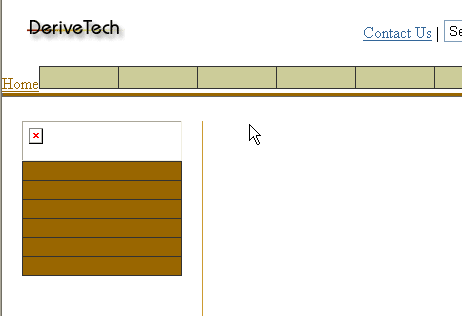
I'm creating a dynamic dropdown menu for my website. All information will be stored in a database. None of the images will have names on them. Ex: Home, Software, Support, ... These names will be found in a database along with their sub-menus, the drop downs. I have the whole thing created, statically, right now. Once I'm done with the static version I'm going to cut it all up and turn it into ASP.NET classes and such so that all data populated on each page will be generated dynamically from a database.

*** See attached screen shot

Wow... Now to my question which is probably very simple but I'm pretty green when it comes to HTML, Java Script, and CSS. My menus are extremely small gifs and I want to place a layer on top the image with the name of that button. Ex: Home, Software, Support, Contact Us, ... What is the easiest way to accomplish this and if I could get a simple example I would greatly appreciate it.

As always, thanks in advance.
- Eric
Attached Thumbnails
screenshot.gif  
Reply With Quote Quick reply to this message  
Join Date: Jul 2004
Posts: 764
Reputation: DaveSW is on a distinguished road 
Solved Threads: 17
DaveSW's Avatar
DaveSW DaveSW is offline Offline
Master Poster

Re: Help with dynamic menu

 
0
  #2
Aug 9th, 2004
for your second query it sounds like you might be better off using a css background for the image. I've used a span for the example below, but it applies whether you use divs, a list, tables, etc.

<span style="background: url(background.gif) left no-repeat;"><a href="#">link text</a></span>
Reply With Quote Quick reply to this message  
Join Date: Aug 2004
Posts: 22
Reputation: ecashwell is an unknown quantity at this point 
Solved Threads: 0
ecashwell ecashwell is offline Offline
Newbie Poster

Re: Help with dynamic menu

 
0
  #3
Aug 9th, 2004
Thanks...

I would place this span tag inplace of the img tag correct?

Is there a good source on the web which explains all the in's and out's of CSS, SPAN,and DIV tags? - Like I said I'm pretty green.


- Eric
Reply With Quote Quick reply to this message  
Join Date: Aug 2004
Posts: 22
Reputation: ecashwell is an unknown quantity at this point 
Solved Threads: 0
ecashwell ecashwell is offline Offline
Newbie Poster

Re: Help with dynamic menu

 
0
  #4
Aug 9th, 2004
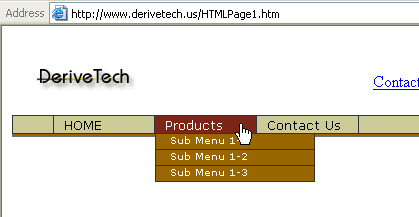
Could you hold my hand for just a second? I cut and pasted your code snippet and replaced my image tag with your span tag. See attachment for new screen shot. The image no longer displays. Could you please assist?

Original Code:
HTML and CSS Syntax (Toggle Plain Text)
  1. <TD colSpan="2"><A onmouseover="MenuOver(this,'home')" onmouseout="MenuOut(this,'home')" href="http://www.derivetech.us/"><IMG src="images/btn_default.gif" border="0" name="home_Img"></A>

Newly Edited Code:
HTML and CSS Syntax (Toggle Plain Text)
  1. <TD colSpan="2"><A onmouseover="MenuOver(this,'home')" onmouseout="MenuOut(this,'home')" href="http://www.derivetech.us/"><span style="background: url("images/btn_default.gif") name="home_Img" left no-repeat;"><a href="#">Home</a></span></A>

Again, thanks in advance
- Eric
Attached Thumbnails
screenshot2.gif  
Reply With Quote Quick reply to this message  
Join Date: Jul 2004
Posts: 764
Reputation: DaveSW is on a distinguished road 
Solved Threads: 17
DaveSW's Avatar
DaveSW DaveSW is offline Offline
Master Poster

Re: Help with dynamic menu

 
0
  #5
Aug 9th, 2004
<span style="background: url("images/btn_default.gif") left no-repeat;" name="home_Img">

The name thing shouldn't be in your style declaration.

Also do you need this name thing? I assume it's related to a javascript funtion?
Reply With Quote Quick reply to this message  
Join Date: Jul 2004
Posts: 764
Reputation: DaveSW is on a distinguished road 
Solved Threads: 17
DaveSW's Avatar
DaveSW DaveSW is offline Offline
Master Poster

Re: Help with dynamic menu

 
0
  #6
Aug 9th, 2004
can you describe the rollover effect you want to create?
check out my menu things: www.webdevfaqs.com/css.php and scroll down to the menu examples.

I'm currently writing a simple tutorial set on css/divs/basic web design with css, but it's not finished yet. I can show you what's there and write the rest quickly if you like?
Reply With Quote Quick reply to this message  
Join Date: Aug 2004
Posts: 22
Reputation: ecashwell is an unknown quantity at this point 
Solved Threads: 0
ecashwell ecashwell is offline Offline
Newbie Poster

Re: Help with dynamic menu

 
0
  #7
Aug 9th, 2004
I pass objects to move my images around. I send the name of the object to my JS function and then, simply put, I set the scr = new image path. It works very smooth and uses very little java script code. I would think that the SPAN would work as long as I can name the SPAN object.

The rollover effect:
Static label which is the name of the button: Home, Software, Products, Contact Us, ...
Under this label I would like to have an image which has a rollover event and click event.
The rollover event replaces the image with a new image and the click event would take you to the desired page.

Hope this helps.
- Eric
Reply With Quote Quick reply to this message  
Join Date: Jul 2004
Posts: 764
Reputation: DaveSW is on a distinguished road 
Solved Threads: 17
DaveSW's Avatar
DaveSW DaveSW is offline Offline
Master Poster

Re: Help with dynamic menu

 
0
  #8
Aug 9th, 2004
in that case what I would suggest is using css menu hovers.

if we assume your menu code is all within a div classed as menu.

In the head section of your document:
<style type="text/css">
<!--
.menu a {
background: #ffffff url(background_norm.jpg) left no-repeat;
}
.menu a:hover {
background: #ffffff url(background_hover.jpg) left no-repeat;
}
.menu a:active {
background: #ffffff url(background_active.jpg) left no-repeat;
}
-->
</style>

you might also want to use display: block and set widths and heights on all of those:
.menu a {
background: #ffffff url(background_norm.jpg) left no-repeat;
display: block;
height: 20px;
width: 150px;
}

Does that help at all? You can also set names on the a tags.
Reply With Quote Quick reply to this message  
Join Date: Aug 2004
Posts: 22
Reputation: ecashwell is an unknown quantity at this point 
Solved Threads: 0
ecashwell ecashwell is offline Offline
Newbie Poster

Re: Help with dynamic menu

 
0
  #9
Aug 9th, 2004
Wow... I did not know you could do that with CSS. How would I make the call from the body to the STYLE section?

Are the CSS tags platform independent? A few years ago I produced a website for a client and all of the menus were coded using layers in JavaScript. I had a very painful experience with the cross platform issue.

- Eric
Reply With Quote Quick reply to this message  
Join Date: Jul 2004
Posts: 764
Reputation: DaveSW is on a distinguished road 
Solved Threads: 17
DaveSW's Avatar
DaveSW DaveSW is offline Offline
Master Poster

Re: Help with dynamic menu

 
0
  #10
Aug 9th, 2004
css does not need to be called. Because that's in the head of the document, any hyperlink ('a' tag) found within an element with a class of class1, will have these properties.

The complexity of the stuff you do inside the a tags will affect the cross browser capabilities. Netscape 4 supports basic color changes, but I'm not sure about images. IE5 upwards supports all of the stuff above, as does netscape 5 (I believe).

Stuff like this menu http://www.webdevfaqs.com/cssmenus/ppc/ work fairly well in IE5+.
Reply With Quote Quick reply to this message  
Reply

This thread is more than three months old.
Perhaps start a new thread instead?
Message:


Similar Threads
Other Threads in the HTML and CSS Forum
Thread Tools Search this Thread


About Us | Contact Us | Advertise | DaniWeb | Acceptable Use Policy | RSS Feed

©2003 - 2009 DaniWeb® LLC