954,224 Members — Technology Publication meets Social Media
Username:
Password:
Lost login information?
Have something to say? Contribute New Article Reply to this Article

Questionable e-mail

Hi every one.
Outlook Express in Windows XP if you received e-mail that you have doubts about it is possible to highlight that particular mail, right click, go to Properties, Details. You then see all regarding that particular mail, who sent it and the message, if you're able to read the computer language. All this without actually opening it.
Is it possible to do the equivalent in a Snow Leopard 10.6.7

dogsbody
Junior Poster in Training
61 posts since Aug 2010
Reputation Points: 20
Solved Threads: 0
 

Sorry but no. You can see some stuff like forward or reply but cannot see who sent you or what time he/she sent you. Hope this helps

jingda
Industrious Poster
4,698 posts since Mar 2011
Reputation Points: 182
Solved Threads: 142
 

Hello jinjda.
Thanks for that, I suppose its as well to know what one cannot do as well as what you can.

dogsbody
Junior Poster in Training
61 posts since Aug 2010
Reputation Points: 20
Solved Threads: 0
 

That is why windows have some features mac don't have and mac have some special functions windows don't have.

jingda
Industrious Poster
4,698 posts since Mar 2011
Reputation Points: 182
Solved Threads: 142
 

Like what I wonder, Im a bit too new to have found them out as yet.

dogsbody
Junior Poster in Training
61 posts since Aug 2010
Reputation Points: 20
Solved Threads: 0
 

If you have any mac problems, i gladly help you

jingda
Industrious Poster
4,698 posts since Mar 2011
Reputation Points: 182
Solved Threads: 142
 

Well I still have this hang up regarding a lack of printing ability. I want to print photos yet the Mac does not show gloss photo paper so there fore tries to print from the front of the printer rather than the back. It does not have "poster" printing abilities. It is not the fault of my printer as it has all these things. I use the printer in conduction with this machine and a 17" Vista laptop both connected by wireless.
You have mentioned there is a possibility to download a program?

dogsbody
Junior Poster in Training
61 posts since Aug 2010
Reputation Points: 20
Solved Threads: 0
 

I will go to your post there

jingda
Industrious Poster
4,698 posts since Mar 2011
Reputation Points: 182
Solved Threads: 142
 

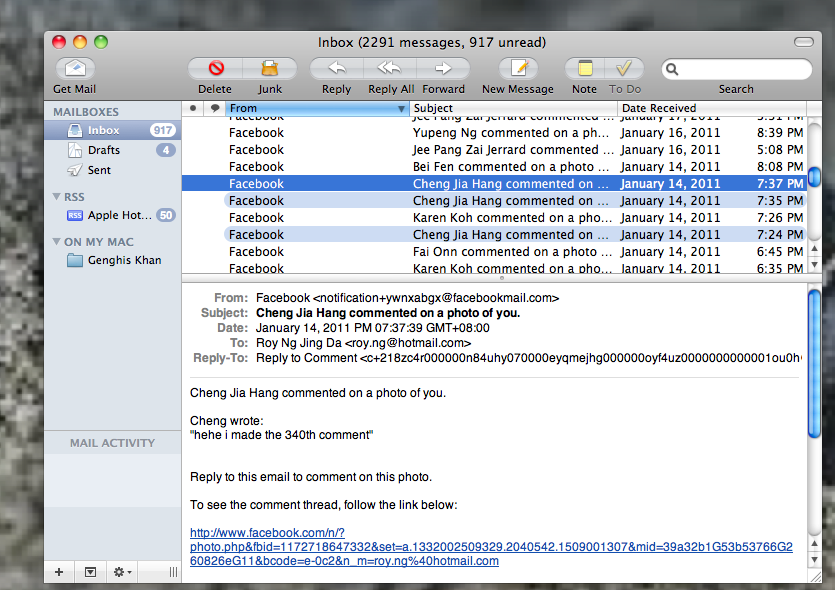
Unfortunately, once you highlight an email in Mac Mail it opens. But you can see all the information you want by looking at the long header.
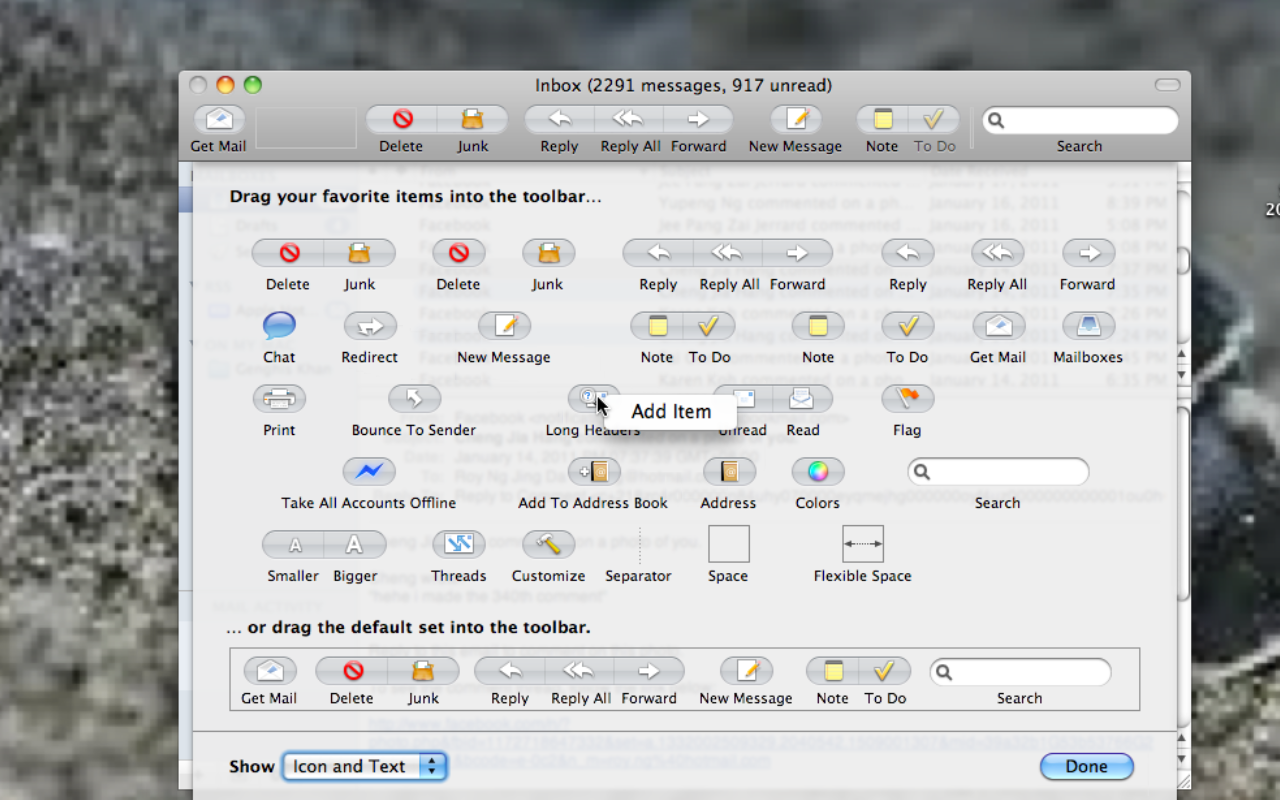
Right click on the Mail tool bar at the top of the page and click Configure. A new drop down window will open. Find the Long Header icon and drag it to the Mail tool bar.
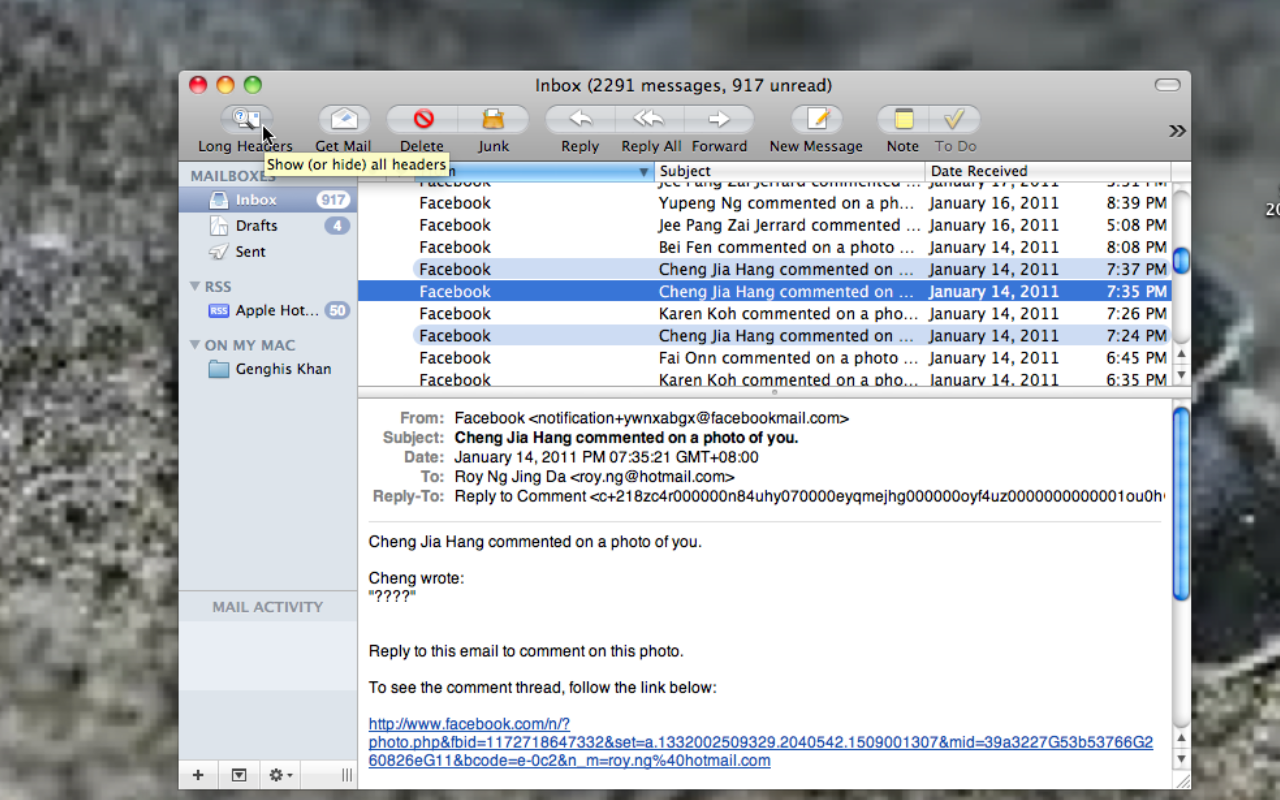
When viewing an email you can click on that Long Headers icon and see the whole path and most anything else you need.

Danarchy
Junior Poster
147 posts since Dec 2003
Reputation Points: 31
Solved Threads: 10
 

Hello Danarchy.
Thanks for your reply. Right clicking on Mail (Blue Tool Bar) did not bring up Configure although right clicking on the mail program itself did bring up Customise Toolbar, there was Long Header, in there. I was unable to drag this item to the blue toolbar. It was possible to drag LH to the tool bar in the mail program. Then again when highlighting am e-mail LH did not become active therefore was not able to use it.
I am using Snow Leopard if that makes any difference.

dogsbody
Junior Poster in Training
61 posts since Aug 2010
Reputation Points: 20
Solved Threads: 0
 

That is not actually the correct way of doing. Dogsbody, i am using snow leopard too and i think i know what you did wrong. Follow my clear instructions.

1) Open up Mail app
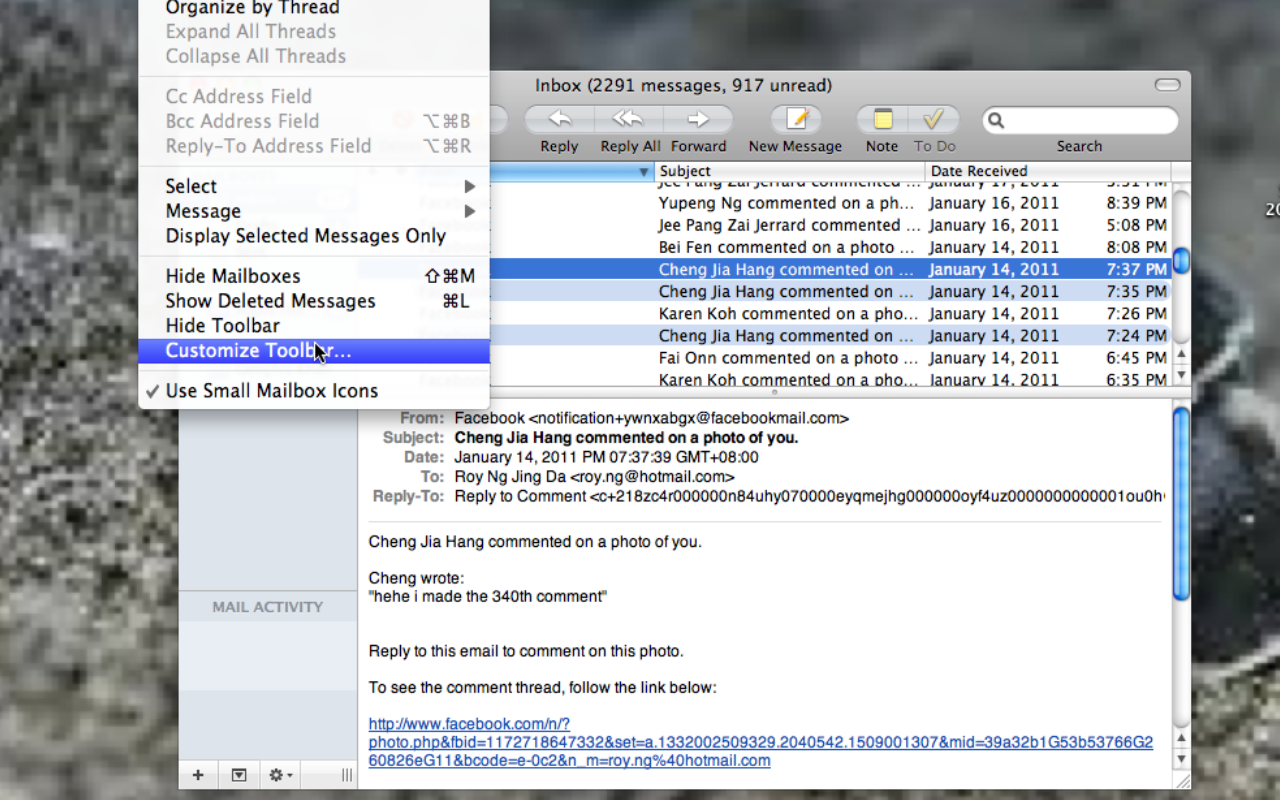
2) On the top of the window, you will see file, edit and others. Click on view and scroll down and click on customise toolbar. NExt when you open that up, find long hearder after you find that right click it and click on add toolbar. Next click done
3) Go to your inbox and select a mail, don't open it. After you select a mail click on long header at the top left hand corner and you will see all the details you want

jingda
Industrious Poster
4,698 posts since Mar 2011
Reputation Points: 182
Solved Threads: 142
 

See the screenshot below.n Hope with the screenshots it will be clearer and help you more. Good luck

Attachments Screen_shot_2011-05-21_at_PM_01.38_.50_.png 235.24KB Screen_shot_2011-05-21_at_PM_01.39_.17_.png 744.6KB Screen_shot_2011-05-21_at_PM_01.39_.24_.png 719.16KB Screen_shot_2011-05-21_at_PM_01.39_.38_.png 725.52KB
jingda
Industrious Poster
4,698 posts since Mar 2011
Reputation Points: 182
Solved Threads: 142
 

Hello jingda.
What a great tutorial every thing worked fine apart from it becoming active. I have two unopened e-mail at the moment but the "Long Header" does not become active evan when I have highlighted the mail. d.

dogsbody
Junior Poster in Training
61 posts since Aug 2010
Reputation Points: 20
Solved Threads: 0
 

Have you try clicking on the mail name and click on long header. Is there any problem for me to solve, i am always ready to help. A favour please, can you please do the 3 line of my signature. Thanks.

jingda
Industrious Poster
4,698 posts since Mar 2011
Reputation Points: 182
Solved Threads: 142
 

This question has already been solved

Post: Markdown Syntax: Formatting Help
You