954,167 Members — Technology Publication meets Social Media
Username:
Password:
Lost login information?
Have something to say? Contribute New Article Reply to this Article

Can't Change Home Page

Okay everyone. I will admit that I am a newbie to this forum. Just
when I think I consider myself having mastered much of the "basics,"
I suddenly find myself stumped, once again. For the record, I have
been a computer buff since the EARLY 1990's. In fact, I ran a local
BBS before I suddenly discovered the Internet around 1992/1993.

My question is, that lately, I cannot seem to be able to access my
browser (IE) so that I can change the home page. In other words, I
go to the typical Tools/Internet Options, and go to the General section.
But, for some reason, the whole area is shaded/highlighted, whatever
you want to call it. NONE of the buttons, Use Current, Use Default,
or Use Blank will work in an effort to change my home page. I had
been using Browser Hijack Blaster. But even with it turned off, I could
no longer change my home page. For the record, I also implement the
use of Spybot S & D, AND purchased ZeroSpyware to thwart spyware.

I even tried downloading and installing Advanced Browser, and Ace
Explorer. The same thing happened with them. I HAD been using
the Mozilla Firefox browser. Even with the current update of Mozilla,
I could no longer get that one to work AT ALL. Has anyone else
ever had a problem like this? I'm at a loss.

Gatorbabe
Newbie Poster
4 posts since Sep 2004
Reputation Points: 10
Solved Threads: 0
 

At a guess I would say that you have those options disabled/protected by Spybot S&D.

crunchie
Most Valuable Poster
Moderator
20,095 posts since Feb 2004
Reputation Points: 1,142
Solved Threads: 985
 

My web page http://www.felgall.com/brsie15.htm has some info that might help.

felgall
Junior Poster in Training
50 posts since Aug 2004
Reputation Points: 13
Solved Threads: 1
 

Mentioned by Crunchie:
--------------------------------------------------------------------------------
>At a guess I would say that you have those options disabled/protected by Spybot >S&D.
-------------------------------------------------------------------------------
....sigh....
To be on the safe side I will check it out. But I have had Spybot S & D on my
computer for a while, like, at least a month, if not more. I don't know if I would
have been able to change my home page via Internet Explorer before, but it seems
as if I started having problems with any/ALL browsers as of 7-10 days ago, including
Mozilla, of which I had previously had NO problems. I am still in the process of trying
to figure out why, and check on anything I may have inadvertently done to possibly
cause such problems.

Gatorbabe
Newbie Poster
4 posts since Sep 2004
Reputation Points: 10
Solved Threads: 0
 

Okay everyone. I will admit that I am a newbie to this forum. Just when I think I consider myself having mastered much of the "basics," I suddenly find myself stumped, once again. For the record, I have been a computer buff since the EARLY 1990's. In fact, I ran a local BBS before I suddenly discovered the Internet around 1992/1993.

My question is, that lately, I cannot seem to be able to access my browser (IE) so that I can change the home page. In other words, I go to the typical Tools/Internet Options, and go to the General section. But, for some reason, the whole area is shaded/highlighted, whatever you want to call it. NONE of the buttons, Use Current, Use Default, or Use Blank will work in an effort to change my home page. I had been using Browser Hijack Blaster. But even with it turned off, I could no longer change my home page. For the record, I also implement the use of Spybot S & D, AND purchased ZeroSpyware to thwart spyware.

I even tried downloading and installing Advanced Browser, and Ace Explorer. The same thing happened with them. I HAD been using the Mozilla Firefox browser. Even with the current update of Mozilla, I could no longer get that one to work AT ALL. Has anyone else ever had a problem like this? I'm at a loss.

Try uninstalling your browser the reinstall it, It may work.

Jason Marceau
Newbie Poster
10 posts since Sep 2004
Reputation Points: 10
Solved Threads: 0
 

Hi Stephen,

do the instructions on your webpage to edit the registry apply to windows xp (home) users?

Regards,

Teresa

Calisto
Newbie Poster
6 posts since Sep 2004
Reputation Points: 10
Solved Threads: 1
 
At a guess I would say that you have those options disabled/protected by Spybot S&D.


By golly, you were right on, with the Spybot S & D being the cause.
On the other hand, I wouldn't generally have given Spybot permi-
ssion to prevent me from changing my home page. I have no idea
how or when it could have happened.

Of course, I ~did~ have to change from default mode to advanced
mode. There it was, right under the IE tweaks section. For some
reason there it was, plain as day, a box checked stating to disallow
the current user to change the home page.

Thanks......bunches.....

Gatorbabe
Newbie Poster
4 posts since Sep 2004
Reputation Points: 10
Solved Threads: 0
 

By golly, you were right on, with the Spybot S & D being the cause. On the other hand, I wouldn't generally have given Spybot permi- ssion to prevent me from changing my home page. I have no idea how or when it could have happened.

Of course, I ~did~ have to change from default mode to advanced mode. There it was, right under the IE tweaks section. For some reason there it was, plain as day, a box checked stating to disallow the current user to change the home page.

Thanks......bunches.....

This problem has been driving me crazy for weeks. I am so glad that I found this post. It worked perfectly!
Thanks ALOT!!

pma720
Newbie Poster
3 posts since Nov 2004
Reputation Points: 10
Solved Threads: 0
 
This problem has been driving me crazy for weeks. I am so glad that I found this post. It worked perfectly! Thanks ALOT!!


All I can say is, "Thank GOD for this website!!!!!!"

Gatorbabe
Newbie Poster
4 posts since Sep 2004
Reputation Points: 10
Solved Threads: 0
 

FWIW, here's a different cause and solution to the locked up home page problem that I haven't seen posted elsewhere...

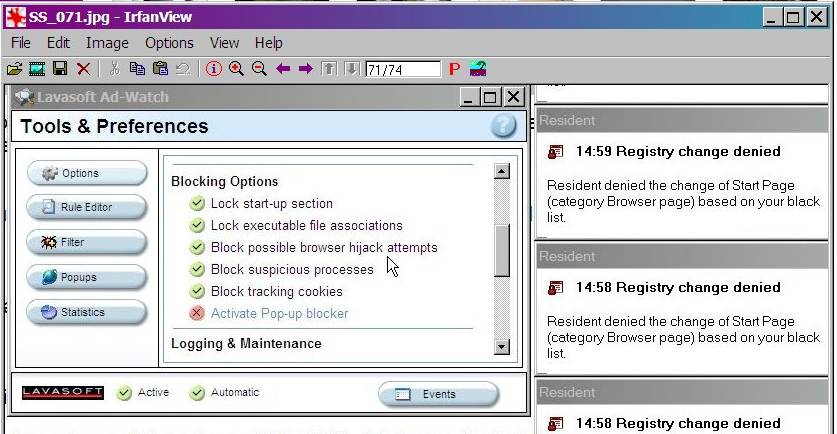
I'm running both Spybot S&D and Ad-Aware SE Plus (the purchased version), with each of them having setting options in their real-time monitor elements which lock the home page. No problem with those, but what I ran into in the process of trying to change my home page (first time in years) was an incompatibility between the two programs: Even with no home page locking set, Spybot's TeaTimer would still automatically deny registry changes associated with enabling the browser highjack blocking setting in Ad-Aware's Ad-Watch (see screenshot).

After trying everything else I could think of, the only solution I found that didn't involve compromising the desired protection of either utility was to totally uninstall Spybot, make my home page change with Ad-Aware's browser hijack blocking disabled, re-enable it, then D/L and install a fresh copy of Spybot. Bit of a nuisance that -- doubt I'll be changing home pages often -- but at least it worked.

Attachments SS_075.jpg 66.45KB
whit88
Newbie Poster
1 post since Nov 2006
Reputation Points: 10
Solved Threads: 0
 

Wow.. interesting

lol_hacker101
Junior Poster
150 posts since Sep 2006
Reputation Points: 14
Solved Threads: 0
 

This article has been dead for over three months

Post: Markdown Syntax: Formatting Help
You
View similar articles that have also been tagged: