954,170 Members — Technology Publication meets Social Media
Username:
Password:
Lost login information?
Have something to say? Contribute New Article Reply to this Article

Juust did System Restore, now ie or any other internet service doesn't work

Hey,
I'm new to this forum. There was a problem with my system( laptop, XP)so I did a system restore on it. The internet was working then. Next, I installed Office XP because the wipe erased it. Now my internet doesn't work. The status says the internet is working(Cable internet for your info.) None of the programs that use internet work, i.e. MSN Explorer, and IE. Please help!
jbs0518

jbs0518
Newbie Poster
7 posts since Oct 2003
Reputation Points: 10
Solved Threads: 0
 

Type: ipconfig /all in your command prompt and post back what it says bra

To get in the command prompt click Start/Programs/Accessories/in between the calculator and notepad

)BIG"B"Affleck
Master Poster
Banned
766 posts since Oct 2003
Reputation Points: 25
Solved Threads: 8
 

It mentions a lot of crap about Windows IP Configuration and Ethernet Adapter

jbs0518
Newbie Poster
7 posts since Oct 2003
Reputation Points: 10
Solved Threads: 0
 
It mentions a lot of crap about Windows IP Configuration and Ethernet Adapter


First of all its notcrap, it's relevent information needed much of the time when diagnosing internet problems on winblows based machines.

Can you please post what you are seeing? Just 'right click' select all and then paste it here, Be sure and 'xxx' out at least the ending numbers of your ip address, we don't want any script kiddies fondling your box. :twisted:

)BIG"B"Affleck
Master Poster
Banned
766 posts since Oct 2003
Reputation Points: 25
Solved Threads: 8
 

Here is what it said (it also included some confidential information about my ehternet adapter)


Windows IP Configuration
Host Name............................: your-q...
Primary DNS Suffix...................:
Node Type............................: Hybrid
IP Routing Enabled..........................: No
WINS Proxy Enabled..........................: No

jbs0518
Newbie Poster
7 posts since Oct 2003
Reputation Points: 10
Solved Threads: 0
 

ok, looks like nothing is wrung up there.

Try this command: ipconfig /renew and see if we can get your values to show up.

Do you have a particular setup going? Like say router and what not, or just a cable modem directly connecting your pc?

Btw, make sure you are on as administrator, or that particular command will not have the appropriate permissions to execute it's orders.;)

I gotta go take back a switch for someone, so I'll be back in say and half an hour or so. :D

)BIG"B"Affleck
Master Poster
Banned
766 posts since Oct 2003
Reputation Points: 25
Solved Threads: 8
 

i just have cable going right through, i think, i don't think i have a router.

jbs0518
Newbie Poster
7 posts since Oct 2003
Reputation Points: 10
Solved Threads: 0
 

Is your cable modem connected via a nic card or USB? When you use IPconfig, you don't have to tell us your whole IP, but does it begin with 167.x.x.x or 192.168.x.x or 127.0.0.1?

cscgal
The Queen of DaniWeb
Administrator
19,421 posts since Feb 2002
Reputation Points: 1,474
Solved Threads: 229
 

Not sure what its connected through, may be USB, and the first 3 are 12.xxx.xx.xxx

jbs0518
Newbie Poster
7 posts since Oct 2003
Reputation Points: 10
Solved Threads: 0
 

If the first digits in your ip are 192.168.xx.x then you are connected to a router, because that range is internal or private. If you have to think whether or not you have a router, then you probably don't have one.

You might want to try ipconfig /release and then go ahead and again do a ipconfig /renew. Reboot after that, then come back and tell us what values you see in the ipconfig /all field.

)BIG"B"Affleck
Master Poster
Banned
766 posts since Oct 2003
Reputation Points: 25
Solved Threads: 8
 

Everything is still the same, but my IP Addres is 12.xxx.xx.xxx (i'm sure of that)

jbs0518
Newbie Poster
7 posts since Oct 2003
Reputation Points: 10
Solved Threads: 0
 

You can still jet back to another date by means of system restore.

)BIG"B"Affleck
Master Poster
Banned
766 posts since Oct 2003
Reputation Points: 25
Solved Threads: 8
 
Windows IP Configuration Host Name............................: your-q... Primary DNS Suffix...................: Node Type............................: Hybrid IP Routing Enabled..........................: No WINS Proxy Enabled..........................: No


start the command prompt/ipconfig /all ....right click/select all/come in here and paste all of it dont delete info /*s*t*a*r* out 4 of the middle numbers in your IP
yout IP is located below

||
||
||
||
\|/
||

)BIG"B"Affleck
Master Poster
Banned
766 posts since Oct 2003
Reputation Points: 25
Solved Threads: 8
 
Not sure what its connected through, may be USB

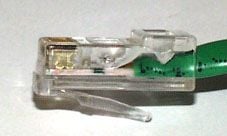
USB (LEFT)(MIDDLE) cat 5(RIGHT)

Attachments usb.jpeg 1.45KB usb1.jpeg 1.85KB cat5-crimp.jpg 6.3KB
)BIG"B"Affleck
Master Poster
Banned
766 posts since Oct 2003
Reputation Points: 25
Solved Threads: 8
 

it is a cat5 and i can't copy and paste because i'm using a diferent computer.

jbs0518
Newbie Poster
7 posts since Oct 2003
Reputation Points: 10
Solved Threads: 0
 

Technology just not that far along for my thinking ..........save it to floppy

)BIG"B"Affleck
Master Poster
Banned
766 posts since Oct 2003
Reputation Points: 25
Solved Threads: 8
 

thanks alot

egboy
Light Poster
26 posts since Apr 2005
Reputation Points: 10
Solved Threads: 0
 

I am having the exact same problem. I googled the basic idea, and got this site.

Currently, I am at my college computer lab, and will likely not be able to get you all the necessary info until later tonight, but if there are any more ideas, I'll try them when I get home.

I have a router, and the computer is connected, but the screen shows up that I can't access the page, so I know it's not a problem with the router.

bosler04
Newbie Poster
4 posts since Jun 2006
Reputation Points: 10
Solved Threads: 0
 

Got caps. Plan to upload tomorrow and post here.

Would have edited, but I didn't see the option anywhere.

bosler04
Newbie Poster
4 posts since Jun 2006
Reputation Points: 10
Solved Threads: 0
 
bosler04
Newbie Poster
4 posts since Jun 2006
Reputation Points: 10
Solved Threads: 0
 

This article has been dead for over three months

Post: Markdown Syntax: Formatting Help
You
View similar articles that have also been tagged: