954,255 Members — Technology Publication meets Social Media
Username:
Password:
Lost login information?
Have something to say? Contribute New Article Reply to this Article

Connected to internet but no websites or other internet applications

Hi, I am very new here, so I am not sure if it is the right place for my problem, but I will risk. I've already asked for help in a different section, but no one was able to answer my questions.
I am trying to connect to Internet using Tiscali Broadband,it says it's connected, the modem has two steady lights,but I am getting the DNS error when I am trying to open any websites in my browser (Internet Explorer 6.0) or when I am logging into MSN Live Messenger it reports that I am facing a DNS problem on my PC. I've pinged my IP address and my DNS servers , I asked my collegue to ping my IP and DNS externaly and it was successfull. I am unable to access any websites even using their IP addressess.
I've reinstalled the Tiscali Modem and rebooted the PC couple times. I am running out of ideas what could cause this problem. All my settings seem to be fine as it worked allright on Tuesday morning and I haven't changed anything. I also run a scan on the PC to check if there's any spyware but it didn't find anything.
I don't have any personal firewalls installed and the Windows firewall is currently turned off.
I would really appreciate your help as I am very very :sad: :sad: concerned.

Magda
Newbie Poster
14 posts since Jan 2007
Reputation Points: 23
Solved Threads: 0
 

First of all we need to now what operating system you are using and what brand/model of modem you have then we can try some things out.

pabs31
Light Poster
38 posts since Apr 2006
Reputation Points: 10
Solved Threads: 1
 
First of all we need to now what operating system you are using and what brand/model of modem you have then we can try some things out.


Hi,
I am using Windows XP Proffesional, Modem: Sagem Speedtouch 330.

thanks in advance

Magda
Newbie Poster
14 posts since Jan 2007
Reputation Points: 23
Solved Threads: 0
 

Try this out then:
1. Click Start then Run and type in cmd then press Enter...this will bring up command prompt.
2. in command prompt type ipconfig /flushdns (you will get a message saying successfully flushed DNS)
3. type exit and try browsing again

If this does not work than do the following:
If this is Windows XP with SP2 then do the following:
1. Click on Start then run again and cmd should still be there press enter.
2. Type in (no quotes) "netsh winsock reset catalog" then press enter(in a few seconds you should get a message saying that system must be restarted)
3. Type exit then enter.
4. Click on Start then Turn Off Computer then click on restart then when system comes back up try browsing again.

If this is not a computer with SP2 let me know and I will post the instructions for Sp1.

pabs31
Light Poster
38 posts since Apr 2006
Reputation Points: 10
Solved Threads: 1
 

Thank you very very much, the issue is now resolved and I can browse again:) :) :)

Your help is much appreciated

Regards,

Magda

Magda
Newbie Poster
14 posts since Jan 2007
Reputation Points: 23
Solved Threads: 0
 

Hello,

I am having the same difficulty. I am using Windows XP service pack 2, and I'm connecting through a Broadcom 440x 10/100 Integrated Controller.

I tried the above steps, and completed them successfully. However the problem was not fixed. I would appreciate any other suggestions though.

Thanks in advance.

devalera01
Newbie Poster
1 post since Sep 2007
Reputation Points: 10
Solved Threads: 0
 

Try this out then: 1. Click Start then Run and type in cmd then press Enter...this will bring up command prompt. 2. in command prompt type ipconfig /flushdns (you will get a message saying successfully flushed DNS) 3. type exit and try browsing again

If this does not work than do the following: If this is Windows XP with SP2 then do the following: 1. Click on Start then run again and cmd should still be there press enter. 2. Type in (no quotes) "netsh winsock reset catalog" then press enter(in a few seconds you should get a message saying that system must be restarted) 3. Type exit then enter. 4. Click on Start then Turn Off Computer then click on restart then when system comes back up try browsing again.

If this is not a computer with SP2 let me know and I will post the instructions for Sp1.

Just wanted to say thanks a million. I had the same problem and your second set of instructions worked!! THANK YOU!!

tensabsirk
Newbie Poster
1 post since Jun 2009
Reputation Points: 10
Solved Threads: 0
 

My mom is having this same problem and she has SP1. Can you post the instructions for SP1 please?? Thank you very much!!

tasha221
Newbie Poster
1 post since Nov 2009
Reputation Points: 10
Solved Threads: 0
 

I sure hope someone has an answer for this one. I've been pulling my hair out for 3 days now. I'm a software developer, and am somewhat familiar with networking and OS guts, but can't figure this one out:

We have 8 Windows machines on our LAN and all work perfectly except ONE, which uses XP Media Center (Home) SP3, and worked fine until last week.
I can ping everywhere, using both IP address & machine/domain name.
I can map drives.
I can access this machine from other machines using Remote Desktop.
But IE7 is dead, just displays "IE cannot display the webpage".
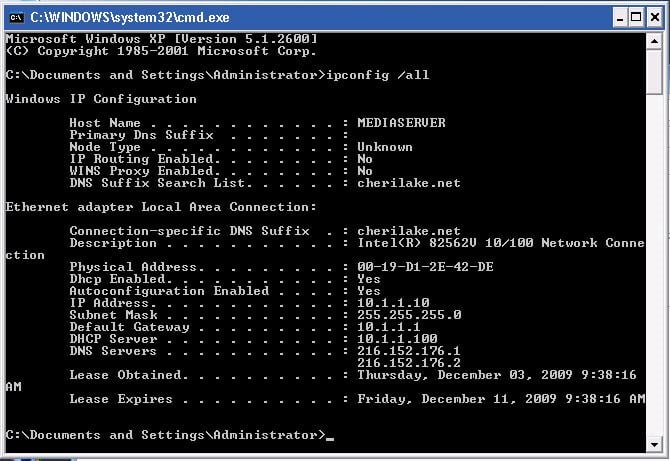
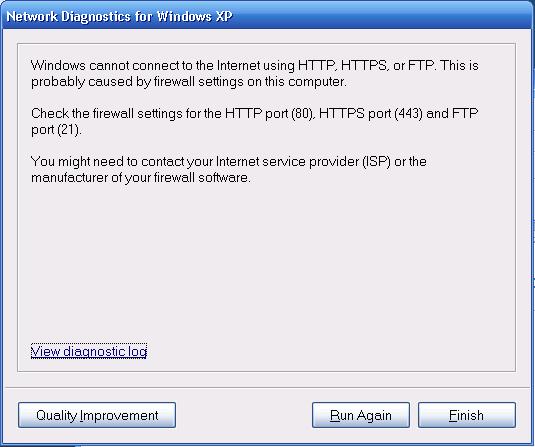
Network diagnostics results are attached.
Windows Firewall is OFF. No other firewall installed.
Tried "netsh int ip reset c:\resetlog.txt", Tried "netsh winsock reset catalog", Tried "ipconfig /flushdns", Tried installing IE8.
DHCP looks OK, no IP conflicts, etc.
Time to get the hammer?

Attachments XP_NetDiag.jpg 37.49KB ipconfig.jpg 67.44KB
AlaskaStout
Newbie Poster
1 post since Dec 2009
Reputation Points: 10
Solved Threads: 0
 

I sure hope someone has an answer for this one. I've been pulling my hair out for 3 days now. I'm a software developer, and am somewhat familiar with networking and OS guts, but can't figure this one out:

We have 8 Windows machines on our LAN and all work perfectly except ONE, which uses XP Media Center (Home) SP3, and worked fine until last week. I can ping everywhere, using both IP address & machine/domain name. I can map drives. I can access this machine from other machines using Remote Desktop. But IE7 is dead, just displays "IE cannot display the webpage". Network diagnostics results are attached. Windows Firewall is OFF. No other firewall installed. Tried "netsh int ip reset c:\resetlog.txt", Tried "netsh winsock reset catalog", Tried "ipconfig /flushdns", Tried installing IE8. DHCP looks OK, no IP conflicts, etc. Time to get the hammer?

I just ran into this problem as well and the fix was to go into IE, Tools menu, Internet Options, Connections tab, click the LAN Settings button and uncheck the Proxy Server box.

Rhyos
Newbie Poster
1 post since Dec 2009
Reputation Points: 10
Solved Threads: 0
 

Try this out then: 1. Click Start then Run and type in cmd then press Enter...this will bring up command prompt. 2. in command prompt type ipconfig /flushdns (you will get a message saying successfully flushed DNS) 3. type exit and try browsing again

If this does not work than do the following: If this is Windows XP with SP2 then do the following: 1. Click on Start then run again and cmd should still be there press enter. 2. Type in (no quotes) "netsh winsock reset catalog" then press enter(in a few seconds you should get a message saying that system must be restarted) 3. Type exit then enter. 4. Click on Start then Turn Off Computer then click on restart then when system comes back up try browsing again.

If this is not a computer with SP2 let me know and I will post the instructions for Sp1.


Hi there,
I tried your suggestions, but I get the message:

>"The requested operation requires elevation."

What should I do? The IExplorer runs OK, but the mozila is not working.

Thanks

javaAddict
Nearly a Senior Poster
Team Colleague
3,329 posts since Dec 2007
Reputation Points: 1,014
Solved Threads: 448
 

hi I'm having the same problem, i'm connected but can´t access the internet, I can use Skype but not internet. I've already tried all the things posted, no effect though.
My computer´s windows Xp SP3. our wireless modem D-Link Dir - 635. Everyone else can connect wirelless I'm the only one who can´t!

ericvigar
Newbie Poster
1 post since Feb 2010
Reputation Points: 10
Solved Threads: 0
 

hello, i read the above suggestions and solutions, but it didn't worked in my PC..please help me..i tried several ways already and still the same problem....i also try to change the DNS, and it's still the same....the page cannot be displayed always appear..but there is an internet connection but i can't connect..don't know why??i have a headache already thinking of so many ways to make it work...so please please, help me....thanks in advance

shine75
Newbie Poster
1 post since Feb 2010
Reputation Points: 10
Solved Threads: 0
 

I have a small problem with nowhere to turn. I left for a holiday for a week and come back and the Internet was playing up. I checked the modem and it shows that my Ethernet cable is fine. The dsl light is on. It's just that the light that shows I'm connected to the Internet is not lighting up. All the laptops in the house can connect to it's wireless network. Jut can't connect
to the Internet.
Windows XP professional
Thompson wireless modem.
All cables are connected as usual.

Thanks

Zasalamel1423
Newbie Poster
3 posts since Mar 2010
Reputation Points: 10
Solved Threads: 0
 

I have a small problem with nowhere to turn. I left for a holiday for a week and come back and the Internet was playing up. I checked the modem and it shows that my Ethernet cable is fine. The dsl light is on. It's just that the light that shows I'm connected to the Internet is not lighting up. All the laptops in the house can connect to it's wireless network. Jut can't connect
t

Zasalamel1423
Newbie Poster
3 posts since Mar 2010
Reputation Points: 10
Solved Threads: 0
 

Hi,
I have the same problem in Vista Operating system. I am able to connect to Internet but nable to open any web pages.
Kindly suggest.
Regards.
Vamshi.

Try this out then: 1. Click Start then Run and type in cmd then press Enter...this will bring up command prompt. 2. in command prompt type ipconfig /flushdns (you will get a message saying successfully flushed DNS) 3. type exit and try browsing again

If this does not work than do the following: If this is Windows XP with SP2 then do the following: 1. Click on Start then run again and cmd should still be there press enter. 2. Type in (no quotes) "netsh winsock reset catalog" then press enter(in a few seconds you should get a message saying that system must be restarted) 3. Type exit then enter. 4. Click on Start then Turn Off Computer then click on restart then when system comes back up try browsing again.

If this is not a computer with SP2 let me know and I will post the instructions for Sp1.

vamshimohanp
Newbie Poster
1 post since Apr 2010
Reputation Points: 10
Solved Threads: 0
 

The problem that I had was with the settings of the AntiVirus that I was using. Somehow it was set so that it would block Mozila.
You can check that as well.

If you don't have any, you can check also the Vista Firewall.

javaAddict
Nearly a Senior Poster
Team Colleague
3,329 posts since Dec 2007
Reputation Points: 1,014
Solved Threads: 448
 

This article has been dead for over three months

Post: Markdown Syntax: Formatting Help
You
View similar articles that have also been tagged: