954,173 Members — Technology Publication meets Social Media
Username:
Password:
Lost login information?
Have something to say? Contribute New Article Reply to this Article

What are all these Processes?

well I can see 21 non system processes on the task manager.

So what are all these going? some are obvious like Ybrowser.exe or aim.exe, but what the hell are things like OSD.exe?

Fish
Light Poster
28 posts since Oct 2003
Reputation Points: 11
Solved Threads: 0
 

You want to come down to about 13 or 14 so your comp will run quick here are the instructions.
Go to www.BlackViper.com and hit the XP services. It will tell you step by step instructions on how to do it.

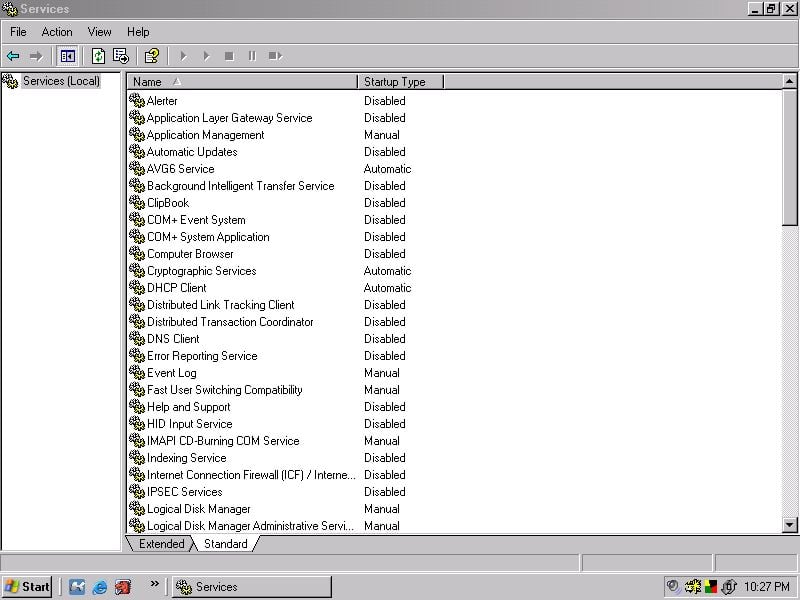
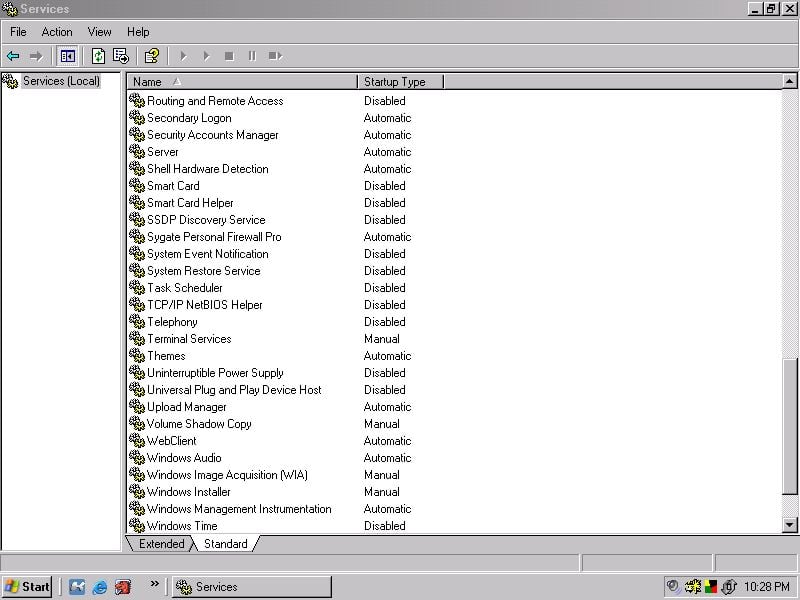
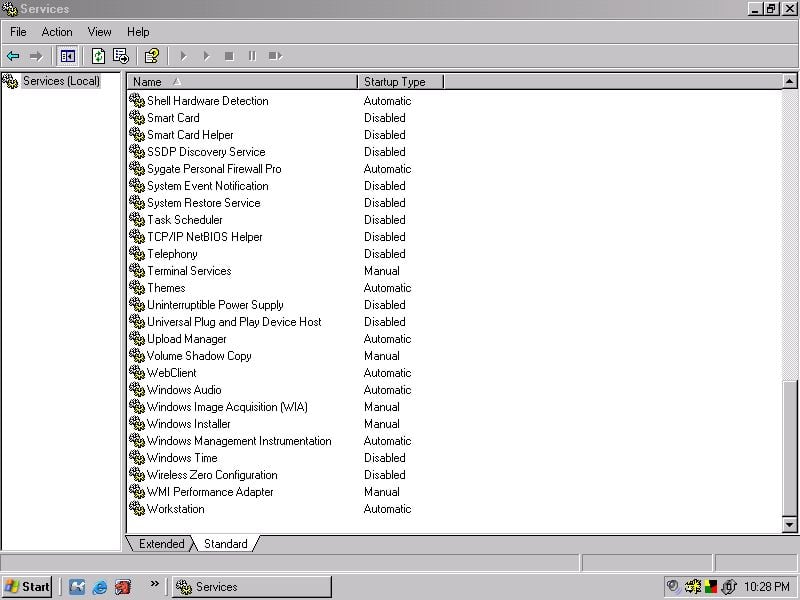
These are all the ones I disable.

Attachments 11111111111111111111111111.jpg 71.42KB 2222222222222222.JPG 75.85KB 33333333333333333333.jpg 70.22KB 4444444444444444444.jpg 68.21KB
)BIG"B"Affleck
Master Poster
Banned
766 posts since Oct 2003
Reputation Points: 25
Solved Threads: 8
 

...

ok I assume you mean this page
http://www.blackviper.com/WinXP/servicecfg.htm

i cant really figure out how this helps me...

So how exactly do I find what exactly are these programs that start running every time I start...

Fish
Light Poster
28 posts since Oct 2003
Reputation Points: 11
Solved Threads: 0
 

QUOTE:FISH Well I can see 21 non system processes on the task manager.

When you use CONTROL+ALT+DELETE and you see processes XPservices are related to them so the more you disable services the more that will not show up.

QUOTE:FISH So how exactly do I find what exactly are these programs that start running every time I start

Are you just wanting to know which ones to turn off with the program starter that I gave you the link to?

QUOTE: FISH i cant really figure out how this helps me...

Ummmm.....Well the link to blkviper I gave you tells about almost all of them in your TASK MANAGER.

)BIG"B"Affleck
Master Poster
Banned
766 posts since Oct 2003
Reputation Points: 25
Solved Threads: 8
 

hm, one of the things on startup is MSBlast, I have no idea, but someone told me that this was a virus, and that it was this

http://securityresponse.symantec.com/avcenter/venc/data/w32.blaster.worm.html

is that true?

Fish
Light Poster
28 posts since Oct 2003
Reputation Points: 11
Solved Threads: 0
 

It helps because many of those processes you are seeing are tied to a service. Learning which ones to shut off will help you in reducing the amount of processes running.

I'll just share with you the registry entry I created over at blackviper (excellent resource by the way).

Ok:

This is the one I use, to use it just open up note pad and paste in it there and then save it as a .reg file. Then simply merge it into your registry or double click it.

That particular one may not be for everyone, but it's a damn good one.

I also do a couple of registry tweaks to fine tune what I'm shooting for, I think you'll like them. Especially since what I'm showing you in this thread will effectively shut down every single port from being open on an XP machine. Pending you don't need any special things like ftp, telnet, etc..

Ok here are the other tweaks I do after a fresh install:

HKEY_LOCAL_MACHINE-->Software--> Microsoft--> Ole--> Enable DCOM Set it's value to a N instead of the Y thats shown.

HKEY_LOCAL_MACHINE-->Software--> Microsoft--> Rpc Once there, take a look over at the right hand panel and you'll see "DCOM protocols", double click it. Do not modify the entire value, but instead only remove ncacn_ip_tcp from the DCOM Protocols value, and leave everything else untouched.

HKEY_LOCAL_MACHINE-->SYSTEM-->CurrentControlSet-->Services-->NetBT-->Paramaters now look in the right hand panel at TransportBindName and double click it. It should have a value set of "/device/" just remove it and your good to go.

Now reboot and then go to the run prompt and type in cmd--> then netstat -an and tell me what you see. I think you'll be pleased with what you find.

~|The|Snowman

[edit] I've removed that huge quote and attached as a txt file. Please attach rather than post huge lists in future. Thanks. peterska2

Attachments 1.txt (8.01KB)
|The|Snowman
Newbie Poster
16 posts since Nov 2003
Reputation Points: 34
Solved Threads: 0
 

hmm, ok

snowman, you totaly lost me there :'(

Fish
Light Poster
28 posts since Oct 2003
Reputation Points: 11
Solved Threads: 0
 

What? Just read it again bro, I'm sure when you do, you will see the gold in it. Someone back me up here would ya? :!:

Just take what I posted up there inside the quotes and paste it inside notepad. Then simply save it as "myservices.reg" or whatever you want to call it and then double click it as an admin. You can do the other reg tweaks in regedit if you'd like. Have fun makeing your computer much faster and safer.

~|The|Snowman

|The|Snowman
Newbie Poster
16 posts since Nov 2003
Reputation Points: 34
Solved Threads: 0
 

That was a good one |SNOW| Now thats a reg tweak if Ive ever seen one.
Fish did you not get the removal tool from symantec to get rid of blaster?

)BIG"B"Affleck
Master Poster
Banned
766 posts since Oct 2003
Reputation Points: 25
Solved Threads: 8
 

what removal tool...

Fish
Light Poster
28 posts since Oct 2003
Reputation Points: 11
Solved Threads: 0
 

I know my post might seem a little overwhelming, but in reality the steps are very simple.

To find notepad just hit: Start-> Programs--> Accessories Just look around half way down that list.

To get to the run command just hit: Start and then look right in that column. You cant miss it.

Take care.

~Snowman

|The|Snowman
Newbie Poster
16 posts since Nov 2003
Reputation Points: 34
Solved Threads: 0
 

ok, that long thing you posted, what exactly does that do?

What kind of file extension is a .reg? and what do you mean by "double click it as an admin"

Fish
Light Poster
28 posts since Oct 2003
Reputation Points: 11
Solved Threads: 0
 

ok, that long thing you posted, what exactly does that do?

What kind of file extension is a .reg? and what do you mean by "double click it as an admin"


Ok, what that will do is shutdown known useless services in the services manager. If you want to see where the changes will be made type in services.msc in the run prompt.

Not only does that speed up your computer, but it will also shutdown your open ports. Each port on a computer is tied to a service, if you aren't using a service then you should always shut it down.

Ports are the things hackers look for on their victims machines. If there is an open port on a computer then chances are a hacker can get in through it.

Many people rely on firewalls alone to "block" or stealth these ports. You can do even better than that by shutting them down altogether. Running that reg file will effectively do that, along with the other reg tweaks I provided you.

A .reg file is just a registry file. Basically the registry is the backbone or brain of your computer.

What I mean by doubleclick it as admin is after you have pasted that information into notepad and saved it as a .reg file like myservices.reg you can simply doubleclick the .reg file to merge it into your registry. In other words once you doubleclick the .reg file the information will be put into your registry automatically.

Simple as pie.

~Snowman

|The|Snowman
Newbie Poster
16 posts since Nov 2003
Reputation Points: 34
Solved Threads: 0
 

"double click it as an admin"
I see what you meant, i just read the sentence wrong.

Ok i copied that into a notepad and made it a .reg, when I ran it, it asked me if im sure I want to add the to my registry, after i hit yes it says it cant import the file because its not a proper registry script

Fish
Light Poster
28 posts since Oct 2003
Reputation Points: 11
Solved Threads: 0
 

Make sure you copied it right that looks correct to me.Dude do you even know how many newbies would like to have this info this is nuts.Nobody ever gave this great amount of detail in a post here is what you entry should look like in note pad.

)BIG"B"Affleck
Master Poster
Banned
766 posts since Oct 2003
Reputation Points: 25
Solved Threads: 8
 

[edit] huge list removed and attached as a text file. peterska2

Attachments 2.txt (8.02KB)
)BIG"B"Affleck
Master Poster
Banned
766 posts since Oct 2003
Reputation Points: 25
Solved Threads: 8
 
hm, one of the things on startup is MSBlast, I have no idea, but someone told me that this was a virus, and that it was this http://securityresponse.symantec.com/avcenter/venc/data/w32.blaster.worm.html is that true?

W32.Blaster.Worm Removal Tool

DUDE we have to get this off your comp first download the removal tool from symantec

http://securityresponse.symantec.com/avcenter/venc/data/w32.blaster.worm.removal.tool.html

)BIG"B"Affleck
Master Poster
Banned
766 posts since Oct 2003
Reputation Points: 25
Solved Threads: 8
 

http://securityresponse.symantec.com/avcenter/FixBlast.exe

That is the link you need fish.

And on the registry entry, be sure to include the line that says "Windows Registry Editor Version 5.00". Log into your admin account and then doubleclick the .reg file.

And when you're in notepad and you hit "save as" go down to "Save type as" and make sure its set to "all files" otherwise notepad is gonna save it as a text file and thats not what were shooting for here. This will work.


~Snowman

|The|Snowman
Newbie Poster
16 posts since Nov 2003
Reputation Points: 34
Solved Threads: 0
 

Don't forget to backup your registry before you make all those changes to it .
and Yes MBLAST is a virus ,and I think you need to deal with it before you try and tweek your registry .
http://www.symantec.com/avcenter/venc/data/w32.blaster.worm.html

caperjack
I hate 20 Questions
Team Colleague
13,069 posts since Aug 2003
Reputation Points: 1,064
Solved Threads: 812
 

I'm using Winxp pro , 3 useres, all admin,Cable internet,would it be safe for me to use/rey that reg tweek

caperjack
I hate 20 Questions
Team Colleague
13,069 posts since Aug 2003
Reputation Points: 1,064
Solved Threads: 812
 

This article has been dead for over three months

Post: Markdown Syntax: Formatting Help
You