954,173 Members — Technology Publication meets Social Media
Username:
Password:
Lost login information?
Have something to say? Contribute New Article Reply to this Article

unknown harddrive error

ive purchased a laptop from a friend of a friend. he brought a newer and better one. the laptop, p4 2.8g 512RAM XP Home Ed 60g HD, i checked the manufacturer and believe that i got a pretty good deal. until i ran into this problem. once in awhile when i boot up, the hard drive (guessing) would make clicking noise. when that happens any programs that i would run would lag and ill get a unknown hard drive error. then xp would shutdown "to prevent a serious problem". I removed the hard drive to check its connector and pins. it looked fine. after i reinstalled it into its bay and booted the laptop again, it worked fine. i tested by opening all my large applications and doing everything possible and it ran smoothly. several days later, the noise would return and so did the error. so im confused and need guidance on what should i do to permanently fix this problem.

naturallyxgood
Newbie Poster
3 posts since Nov 2003
Reputation Points: 10
Solved Threads: 0
 

I would never had the courage to remove a laptop's hard drive - unless, of course, it was modular. Did you by any chance note the name of the hdd manufacturer?

Often times, manufacturers supply low-level drive checking programs which will test a drive for physical errors / bad drives. For example, Western Digital has one such utility you can download from their website - but of course it only works with WD drives.

cscgal
The Queen of DaniWeb
Administrator
19,421 posts since Feb 2002
Reputation Points: 1,474
Solved Threads: 229
 

Maybe the hardrive has passed or is getting close to 80,000 per minute.

)BIG"B"Affleck
Master Poster
Banned
766 posts since Oct 2003
Reputation Points: 25
Solved Threads: 8
 

Where did you get the # 80,000 from? I doubt the harddrive is so worn out as that ... the rest of the laptop's specs seem to be relatively new technology. We're not talking about a 7 year old machine here.

cscgal
The Queen of DaniWeb
Administrator
19,421 posts since Feb 2002
Reputation Points: 1,474
Solved Threads: 229
 

cscgal,
the hd manufacturer is hitachi and the model is dk23ea-60.

affleck,
no i dont think it has been that long of usage. i have to agree with cscgal, the comp is pretty new.

naturallyxgood
Newbie Poster
3 posts since Nov 2003
Reputation Points: 10
Solved Threads: 0
 

Hard drive utility for that drive found here in downloads on the left.
http://www.hgst.com/hdd/support/dk/2/23ea60spec.html

caperjack
I hate 20 Questions
Team Colleague
13,069 posts since Aug 2003
Reputation Points: 1,064
Solved Threads: 812
 

Go to this page: http://www.hgst.com/hdd/support/download.htm

There, you can download the Drive Fitness Test. According to the website, it "performs real-time analysis of your drive to quickly determine whether the drive has a problem."

Seems just what you need!

cscgal
The Queen of DaniWeb
Administrator
19,421 posts since Feb 2002
Reputation Points: 1,474
Solved Threads: 229
 
Where did you get the # 80,000 from? I doubt the harddrive is so worn out as that ... the rest of the laptop's specs seem to be relatively new technology. We're not talking about a 7 year old machine here.

Theoretical Computer Science is mathematical and abstract in spirit, but it derives its motivation from practical and everyday computation. Its aim is to understand the nature of computation and, as a consequence of this understanding, provide more efficient methodologies.
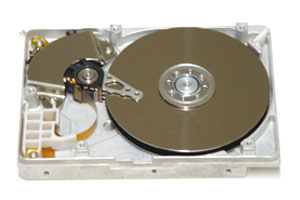
Sorry I meant to say revolutions per minute If your hard drive emits unusual noises (clicking, grinding or metal scraping).This symptom typically indicates a head crash that can destroy your data. Hard drives spin fast, at high revolutions per minute. Extensive damage can occur quickly buddy.
Maybe someone ran eraser8.9 on that bad boy till it wore out :lol:

Sorry that was for DOD supercomputers HD's ---- Damaged 80,000 Rpm. It should be more like

READ/WRITE HEAD

Definition: [n] (computer science) a tiny electromagnetic coil and metal pole used to write and read magnetic patterns on a disk

Synonyms: head

See Also: coil


3,600 to 7,200 RPM. Average HD----- 7,200 to 15,000 Damaged HD

I suggest Back Up and download some recovery tools.

Attachments pic2.jpg 18.12KB HDDAZ.jpg 35.29KB
)BIG"B"Affleck
Master Poster
Banned
766 posts since Oct 2003
Reputation Points: 25
Solved Threads: 8
 

hi. ty for the link. the test prgm wont work on my laptop because itll stop right after the section creating a boot disk. at the section i only have one option and that is to create a boot disk in the A drive, which i do not have. is there any other programs i can test my drive or can i override the section.

naturallyxgood
Newbie Poster
3 posts since Nov 2003
Reputation Points: 10
Solved Threads: 0
 

Sorry, the only way to run the test program is off of a floppy disk which boots on startup. You cannot skip that section because that skips creating the program you want to run! See if you could borrow an external USB floppy drive from someone.

cscgal
The Queen of DaniWeb
Administrator
19,421 posts since Feb 2002
Reputation Points: 1,474
Solved Threads: 229
 

Yeah go to CompUSA use the external drive then take it back.

)BIG"B"Affleck
Master Poster
Banned
766 posts since Oct 2003
Reputation Points: 25
Solved Threads: 8
 

Try to do this hard disk integrity check before you do something about it.
In windows --> click start ---> run then type "CMD"

On DOS command prompt type this
chkdsk /r c:

Let the chkdsk /r process completely 100% finish. After that scan your harddisk with antivirus software you have.

After that restart and see if the sound still there. If the problem persist read this... http://www.datarecovery.com.sg/data_recovery/hard_disk_symptons_clicking_sound.htm then consider to use your warranty card for exchange with the new one :)

frontier2002
Newbie Poster
3 posts since Jun 2008
Reputation Points: 10
Solved Threads: 0
 

This article has been dead for over three months

Post: Markdown Syntax: Formatting Help
You