954,260 Members — Technology Publication meets Social Media
Username:
Password:
Lost login information?
Have something to say? Contribute New Article Reply to this Article

Computer freezes after startup

I was given a computer with windows xp on it but no disks. It has worked fine except at first when i signed up for the internet with a number of providers i could only get 1 or 2 pages and then it would disonect, I was told i might have a viris. Found a disk that give me a virus cheker antispam etc and installed it. Now when i starup i get as far as the desktop and icons but as soon as i try to access the programs the computer freezes and i have to switch it of at the plug socket. Any ideas of what to do would be appreciated
craigboy

craigboy
Newbie Poster
6 posts since Mar 2005
Reputation Points: 10
Solved Threads: 0
 
Found a disk that give me a virus cheker antispam etc and installed it.

What exact product was that? Were you able to run any of the checks, or did the system start freezing before you could even do that?

See if the system will run if you boot Windows in Safe Mode. (you get to the safe mode boot option by hitting the F8 key as your computer is starting up). When Windows boots into Safe Mode, it loads only a bare minimum of drivers, processes/programs, etc., but that will at least get you to a place where we can do some initial looking around and troubleshooting.

DMR
Wombat At Large
Team Colleague
7,229 posts since Dec 2003
Reputation Points: 221
Solved Threads: 370
 

Thanks for info. Installed wincleaner utility suite but froze after this before checking. Tried the safe mode you said but just got list of drivers etc. Tried safe mode with command prompt and entering command sugested at microsoft support but no command prompt came up. Tried it on my friends computer which i am using. Instructions worked fine. Any more ideas?

craigboy
Newbie Poster
6 posts since Mar 2005
Reputation Points: 10
Solved Threads: 0
 
Tried the safe mode you said but just got list of drivers etc.

It's normal to see that list of drivers when you're booting into Safe Mode. On some systems however, this phase of the safe mode boot process can take avery long time, causing you to think that the system has frozen. Try it again, but this time just let the system sit and think about things for a longer period of time. Also- watch the hard drive's activity light on the front of the machine and listen for the grumbling sounds of hard drive activity; if you can see or hear even occational indications of activity, the system may not really be hanging.

DMR
Wombat At Large
Team Colleague
7,229 posts since Dec 2003
Reputation Points: 221
Solved Threads: 370
 

Thanks for advice. Left the computer running and system restore came up. Found this at microsoft support %systemroot%\system32\resore\rstrui.exe and typed in after command prompt. Computer back at work
craigboy

craigboy
Newbie Poster
6 posts since Mar 2005
Reputation Points: 10
Solved Threads: 0
 

So you were able to roll back to a good Restore Point? Cool; glad that worked. :)

DMR
Wombat At Large
Team Colleague
7,229 posts since Dec 2003
Reputation Points: 221
Solved Threads: 370
 

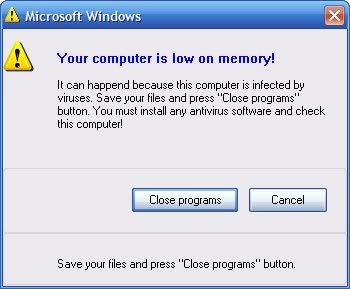
hey my computer keeps freezing up also some times when its starting up or once i log in or it will log me in ill be on it and it will freeze up like a hour later or so i tryed 4 anti virus programs they done nothing i tryed avg,norton,spyware doctor,adware i also keep getting this when it does work for that short amount of time [IMG]http://i208.photobucket.com/albums/bb273/wolfmaster150/untitled-15.jpg[/IMG] so you think you could help

awolfgod
Newbie Poster
1 post since Jan 2009
Reputation Points: 10
Solved Threads: 0
 

just try avast..then schedule a boot scan

jniadas
Newbie Poster
2 posts since Nov 2008
Reputation Points: 10
Solved Threads: 0
 
hey my computer keeps freezing up also some times when its starting up or once i log in or it will log me in ill be on it and it will freeze up like a hour later or so i tryed 4 anti virus programs they done nothing i tryed avg,norton,spyware doctor,adware i also keep getting this when it does work for that short amount of time [IMG]http://i208.photobucket.com/albums/bb273/wolfmaster150/untitled-15.jpg[/IMG] so you think you could help

I know your msg is a bit old but in case it's not been solved, a few things mate:

1. Try not to piggyback on to other people's thread, create your one, you'll get more help that way.

2. When you re-post, do it in the Viruses, Spyware and other Nasties because,

3. That message is from some malware of some sort. Get Malwarebytes to help you clear that. There is more information in the forum I mentioned in 2.

Good luck!

Thinka
Posting Whiz
Team Colleague
378 posts since Aug 2004
Reputation Points: 50
Solved Threads: 11
 

Thanks for this info,I will try it:)
I am having the same problem.

Leonle
Newbie Poster
10 posts since Jan 2009
Reputation Points: 10
Solved Threads: 0
 

This question has already been solved

Post: Markdown Syntax: Formatting Help
You