We're a community of 1077K IT Pros here for help, advice, solutions, professional growth and fun. Join us!
1,076,254 Members — Technology Publication meets Social Media
Username:
Password:
Lost login information?
Start New Discussion Reply to this Discussion

Best free defragmenter

Well basically my problem is that when i use the built in defragmenter it takes a few hours to defragment, i don't know if thats normal but it seems very slow. So i was wondering if there is any other defragmenter that is definately faster. Thanks in advance.


Packard bell intel pentium 4 CPU 2,80GHz, 512MB of RAM
(just copied all the information from right cliicking my computer and properties then went under General)

4
Contributors
13
Replies
1 Week
Discussion Span
2 Years Ago
Last Updated
14
Views
Question
Answered
SSSD
Light Poster
37 posts since Jan 2010
Reputation Points: 10
Solved Threads: 0
Skill Endorsements: 0

Hello,

Personally I like defragler. It is free and by the same people who make CCleaner. Gives you many more options and a visual of what is going on.

rch1231
Veteran Poster
1,040 posts since Sep 2009
Reputation Points: 142
Solved Threads: 154
Skill Endorsements: 12

a few hrs isn't long for defrag ,,also it would depend on the size of the drive and how bad its defragemented.

i have yet defr4ag my 320 gig ,running win7 since last november ,started to do defrag last week and its 0% fragemented

caperjack
I hate 20 Questions
Team Colleague
13,852 posts since Aug 2003
Reputation Points: 1,071
Solved Threads: 879
Skill Endorsements: 50

thanks for the replies, anyway i use the built in one, and i think that my computer is fully 'defragged', but the bar at the bottom doesn't show all the colours in one place. For a full defrag should all the colours be together? I though it might be fully defragged because after about 10 consecutive defrags the computer defrags very quickly now, but im not sure everything is defraged

SSSD
Light Poster
37 posts since Jan 2010
Reputation Points: 10
Solved Threads: 0
Skill Endorsements: 0

no the colors will not all be together ,for one ,system files are not defragged ,therefor they would be in different location

caperjack
I hate 20 Questions
Team Colleague
13,852 posts since Aug 2003
Reputation Points: 1,071
Solved Threads: 879
Skill Endorsements: 50

The more intensely you defrag a partition ie go past just removing fragments and into over-consolidating your files, the sooner your files will fragment again. Windows has spread out the files on my C: drive [only the OS in there] with lots of spaces, so it doesn't fragment them too much, i find. Every time your sys reads and writes back a file it is going to fragment if it is a part of one consolidated chunk.

gerbil
Industrious Poster
4,454 posts since May 2005
Reputation Points: 253
Solved Threads: 322
Skill Endorsements: 5

so what is the best program to completely defrag then? because when i defrag now there is practically no difference. Most of the blues (contiguous) are together but there are white lines (freespace), red lines (fragmented) and green lines (unmovable) running through them, and there are small chunks of white spread around. Is there any way to completely defragment this?


Here's an attachment to show what it looks like --->

Attachments defrag.jpg 187.35KB
SSSD
Light Poster
37 posts since Jan 2010
Reputation Points: 10
Solved Threads: 0
Skill Endorsements: 0

The large green immovable block is your page file. Have you set it as dynamic, or fixed? If dynamic you may find other blocks being created here n there.
The white spaces everywhere are not a problem. Files that are modified often will be kept away from files that are not.
The other green blocks - I don't know how many files you have but it may be that your originally allocated Master File Table and reserve is full, and the system has assumed extra space for it.

Why not get this free trial to play with?
http://www.perfectdisk.com/products/home-perfectdisk11-home-premium/key-features
It will analyse your disk and show you what the blocks are in some detail.

gerbil
Industrious Poster
4,454 posts since May 2005
Reputation Points: 253
Solved Threads: 322
Skill Endorsements: 5

thanks again gerbil, i'll try it now and ill mark this as solved in a few days

SSSD
Light Poster
37 posts since Jan 2010
Reputation Points: 10
Solved Threads: 0
Skill Endorsements: 0

Post back with pics of before and after using PerfectDisk if you will, SSSD. I'd like tosee the effect, and what a couple of those green blocks actually are.

gerbil
Industrious Poster
4,454 posts since May 2005
Reputation Points: 253
Solved Threads: 322
Skill Endorsements: 5

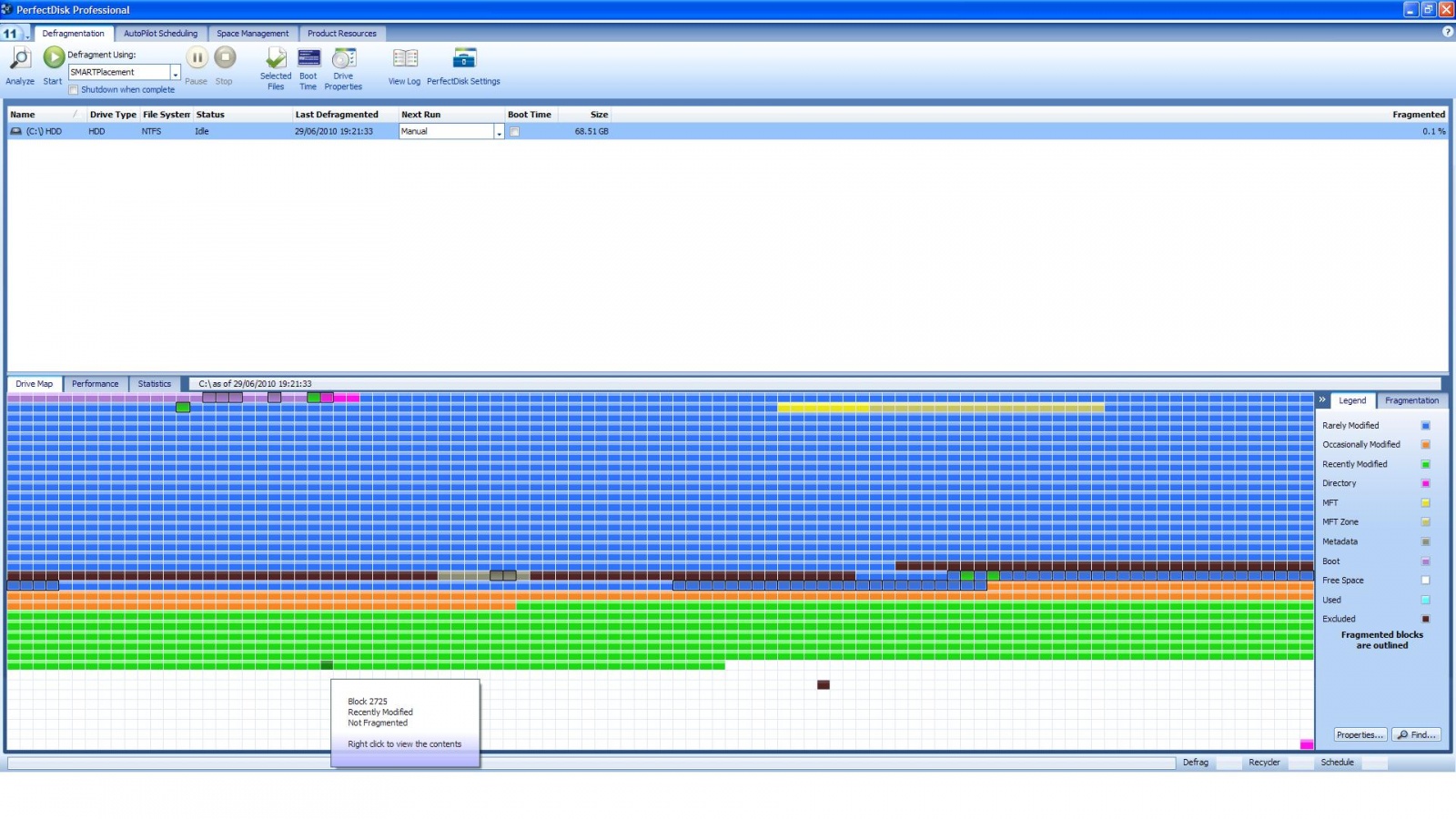
here's a pic after using perfect disk, looks pretty good now i think

Attachments defrag.jpg 442.69KB
SSSD
Light Poster
37 posts since Jan 2010
Reputation Points: 10
Solved Threads: 0
Skill Endorsements: 0

Nice enough, SSSD. You can see straight away that you have some fragmenting of rarely modified files still. i wonder why it did not fix those...? Only a few, though.
Would have been nice to have seen the "before" SMARTplacement.

gerbil
Industrious Poster
4,454 posts since May 2005
Reputation Points: 253
Solved Threads: 322
Skill Endorsements: 5

sorry but i had already posted a picture of before with the windows defrag, so i thought thats what you meant

SSSD
Light Poster
37 posts since Jan 2010
Reputation Points: 10
Solved Threads: 0
Skill Endorsements: 0

Yep, not a problem, I was just interested in those extra green immovables.
Cheers.

gerbil
Industrious Poster
4,454 posts since May 2005
Reputation Points: 253
Solved Threads: 322
Skill Endorsements: 5
Question Answered as of 2 Years Ago by gerbil, caperjack and rch1231

This question has already been solved: Start a new discussion instead

Post: Markdown Syntax: Formatting Help
 
You
View similar articles that have also been tagged:
 
© 2013 DaniWeb® LLC
Page rendered in 0.1327 seconds using 2.73MB