954,285 Members — Technology Publication meets Social Media
Username:
Password:
Lost login information?
Have something to say? Contribute New Article Reply to this Article

XP do I need to update drivers?

I have never knowingly updated the drivers on my PC since it was refurbished (if that's the word) some two years ago.
Over the last year I have had 'blue screens' which have disappeared after a reboot.
I just had another and it appears that updating the drivers on my PC may help to solve the problem. Is that correct and, if so, can I identify the manufacturers without taking the PC apart?
Knowledgeable advice would definitely be appreciated.

Knowsum
Newbie Poster
10 posts since Aug 2007
Reputation Points: 10
Solved Threads: 0
 

Download 'Driver Agent'. It automatically checks your system and recommends if there are any updates available for any of the hardware. Installing the drivers or not, is upto you.
http://driveragent.com/?q=driver+agent

jumbowat
Light Poster
39 posts since Jan 2012
Reputation Points: -3
Solved Threads: 4
 
Download 'Driver Agent'. It automatically checks your system and recommends if there are any updates available for any of the hardware. Installing the drivers or not, is upto you. http://driveragent.com/?q=driver+agent


was going to say im sure its a good program ,but then i ran it ,and first they want money from you to download drivers you can get from the maker of the devices on you motherboard ,for FREE
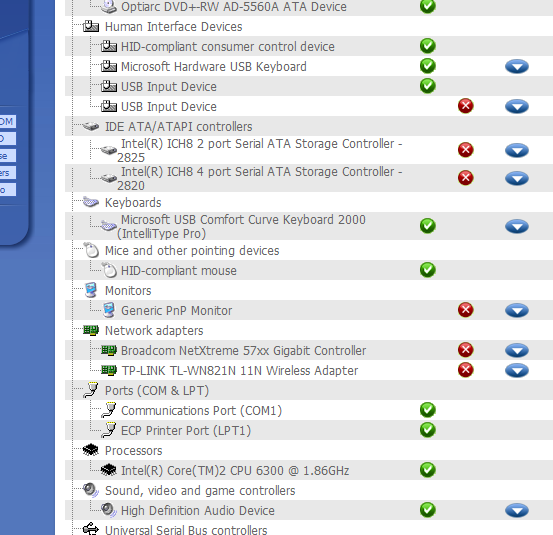
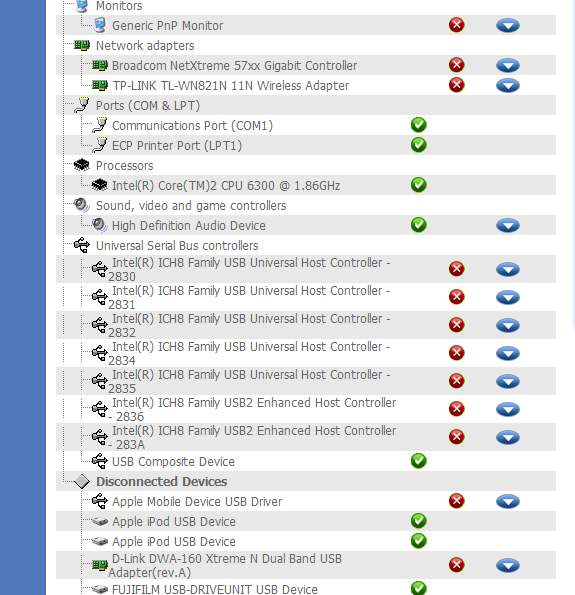
so i ran it and it said i have 16 bad drivers ,2 or three mentioned were for my harddrive controller ,my router ,my wireless device ,all working just fine ,all drivers were for devices that work just fine on my computer ,thinking they just see drivers that they think are outdated ,
my opinion to the original poster is you only need updated drive if you are having problem with a specific device ,and the updated drive will fix it .

Attachments Capture.PNG 70.9KB Capture2.PNG 63.58KB
caperjack
I hate 20 Questions
Team Colleague
13,069 posts since Aug 2003
Reputation Points: 1,064
Solved Threads: 812
 

If you know your computer's model you can go to the manufacturer's website. The manufacturer normally distributes up-to-date drivers for their products, even if they're a bit older.

dmanw100
Posting Whiz in Training
242 posts since Apr 2008
Reputation Points: 104
Solved Threads: 27
 
was going to say im sure its a good program ,but then i ran it ,and first they want money from you to download drivers you can get from the maker of the devices on you motherboard ,for FREE so i ran it and it said i have 16 bad drivers ,2 or three mentioned were for my harddrive controller ,my router ,my wireless device ,all working just fine ,all drivers were for devices that work just fine on my computer ,thinking they just see drivers that they think are outdated , my opinion to the original poster is you only need updated drive if you are having problem with a specific device ,and the updated drive will fix it .


just figured out why mine has so many bad/out dated drivers ,im using a Dell ,not compatible with win7 and it doesn't have drivers for win7 on the Dell site xp/vista only ,
but it works just fine

caperjack
I hate 20 Questions
Team Colleague
13,069 posts since Aug 2003
Reputation Points: 1,064
Solved Threads: 812
 

I took jumbowat's suggestion and ran the program. There appear to be 34% "bad drivers". I need to spend more time on this. Thanks for the help.

Knowsum
Newbie Poster
10 posts since Aug 2007
Reputation Points: 10
Solved Threads: 0
 
just figured out why mine has so many bad/out dated drivers ,im using a Dell ,not compatible with win7 and it doesn't have drivers for win7 on the Dell site xp/vista only , but it works just fine


how about the Windows XP Windows Update...? Should you update it monthly?

angelsmith115
Newbie Poster
2 posts since Dec 2011
Reputation Points: 10
Solved Threads: 0
 
how about the Windows XP Windows Update...? Should you update it monthly?


set it to auto update ,chose a time you know the computer will be turned on.


how to configure windows updates http://support.microsoft.com/kb/306525

caperjack
I hate 20 Questions
Team Colleague
13,069 posts since Aug 2003
Reputation Points: 1,064
Solved Threads: 812
 

Automatic updates for my PC is definitely on.

Knowsum
Newbie Poster
10 posts since Aug 2007
Reputation Points: 10
Solved Threads: 0
 
Automatic updates for my PC is definitely on.


ok, i usually set mine to download the update but let me decide when to install ,then i look through them and and install only the critical ones

caperjack
I hate 20 Questions
Team Colleague
13,069 posts since Aug 2003
Reputation Points: 1,064
Solved Threads: 812
 
was going to say im sure its a good program ,but then i ran it ,and first they want money from you to download drivers you can get from the maker of the devices on you motherboard ,for FREE so i ran it and it said i have 16 bad drivers ,2 or three mentioned were for my harddrive controller ,my router ,my wireless device ,all working just fine ,all drivers were for devices that work just fine on my computer ,thinking they just see drivers that they think are outdated , my opinion to the original poster is you only need updated drive if you are having problem with a specific device ,and the updated drive will fix it .

Updated drivers are only a better version of your previously installed drivers. Obviously your hardware is working fine, it just showed whether a new driver is available or not.

jumbowat
Light Poster
39 posts since Jan 2012
Reputation Points: -3
Solved Threads: 4
 
I took jumbowat's suggestion and ran the program. There appear to be 34% "bad drivers". I need to spend more time on this. Thanks for the help.

Now that you know what drivers are outdated, find them on the web. I am sure you will get it somewhere or the other. Try torrentz.eu or the websites of your hardware. Free drivers are there, you just need to find them. All the best.

jumbowat
Light Poster
39 posts since Jan 2012
Reputation Points: -3
Solved Threads: 4
 
Updated drivers are only a better version of your previously installed drivers. Obviously your hardware is working fine, it just showed whether a new driver is available or not.


i have a Dell SFF tower right now and only get drivers from the maker of my computers and they have none for win7 so it ain't broke i don't fix it ,and I definitely don't get drivers from no torrent site ,i guess if i wanted to i could go to the maker of each device website and go look for drivers,bit as i said in my case it works ,i leave it alone.
look at the pictures i posted the program is telling the usb controller is bad ,the sata controller /my network devices ,im really if those had bad drivers my computer would not boot and no usb device ,or hard drive would work right ,so i leave it alone

caperjack
I hate 20 Questions
Team Colleague
13,069 posts since Aug 2003
Reputation Points: 1,064
Solved Threads: 812
 

This article has been dead for over three months

Post: Markdown Syntax: Formatting Help
You