Great, it was a difficult one but I found the answer on Ask.com. Better than Google sometimes, worth remembering.
Dave

daveee
0
Newbie Poster
odegani
0
Light Poster
I sure will! Thanks again.
Oded
odegani
0
Light Poster
What do dyou mean by "refresh"? Did you reboot the machine? You must!
gerbil
216
Industrious Poster
hey, Oded, i'm glad you got the context menu problem sorted also [I'm just going through catching up on things..]. The Identify button? - you would not see that unless you had a video card capable of handling multiple displays, so nothing missed there [all Identify does is show you which screen driver/channel number you're watching..]. And i guess Acronis just were not IE7 ready.
odegani
0
Light Poster
Hi Gerbil. Thanks again for all the help and the follow-up. The people on this board are a great resource for help. I wrote Acronis about the problem and they recommended removing and reinstalling the program, which I did following the fix. Up until now - no further problems. I assume that something may have gone awry during the original installation. However, only time will, tell.
santoshmp
0
Newbie Poster
Thanks Gerbil !
It really works ......

greeneyedlady
1
Newbie Poster
desktop.htt pretty much controls the size and position of your desktop and the wallpaper you have on it, plus it includes a little activeX control to allow you to reshape it..... IE7 is a little bit incompatible with the old profile you may have had already.
Since this file is automatically generated by windows, the best fix is to delete the old one[s] and let windows create a new one. To do this open an explorer window and go to tools > folder options > view, and uncheck hide protected opsys files. Apply and ok. Then do a search in your sys drive [usually c: ] for desktop.htt. It will be in Docs and Settings\User\Application Data\Microsoft\Internet Explorer.
Delete them [it, whatever...]. Close the explorer window, rclick your desktop and click Refresh, and then go back and RECHECK that box. you really don't want those special files exposed all the time!!
Gerbil, I am trying to take ur advice on this same matter, but after deleting and refreshing it still didn't solve the matter. My Q. is , when you say "delete them, it " I have 4 or 5 files, but only the one under the exact location you say above did I delete. should I delete all the others also?
Thanks
gerbil
216
Industrious Poster
There should only be one desktop.htt in each user's Application Data\Microsoft\Internet Explorer folder. Delete it, because it will be regenerated. And restart; log off/on should work also... other users may have to do the same with their file.
greeneyedlady
1
Newbie Poster
There should only be one desktop.htt in each user's Application Data\Microsoft\Internet Explorer folder. Delete it, because it will be regenerated. And restart; log off/on should work also... other users may have to do the same with their file.
Sorry that I have so many questions, I only have one account, but two (admin)-desktop .htt folders, and one (computer) -desktop.htt folder and a (system 32)- desktop folder.
I really need this spelled out like a baby cause I'm not real sure how this works.
which ones are going?
thanks again.
momrocks
0
Newbie Poster
It seems all the fixes for this problem has to do with opening IE. I cannot open it at all. When I click on IE, nothing happens. If I try to get into any other program, the Active desktop recovery message comes up.
Argh!
gerbil
216
Industrious Poster
Gee, greeneyes, I do apologise.... somehow your repost feel thru a crack in the floorboards - I missed it. Lessee... any desktop.htt file you can find WITH Folder Options setting "Hide protected operating system files" CHECKED is an imposter! To see the real one, your's... you MUST uncheck that setting. Your real one, the only real one, is at C:\Documents & Settings\greeneyes\Application Data\Microsoft\Internet Explorer\desktop.htt
Typically, each user on a sys will have his own under his own Application Data branch. How you, with only one account, can see two admin files is beyond me..
Example: I am a user with admin privileges, there is also a non-privileged user account on my machine - if I search I will find only two files, one under my settings, one under the other account:-
C:\Documents and Settings\XXX\Application Data\Microsoft\Internet Explorer\desktop.htt
C:\Documents and Settings\YYY\Application Data\Microsoft\Internet Explorer\desktop.htt
That desktop.htt should definitely not be in system32. Delete that one for sure [you may have to do it in Safe mode if it won't delete in normal mode..]
But this is all just information... :) - delete ANY desktop.htt file you can find. XP will recreate the real one in the right place. Only one per user account.
greeneyedlady
1
Newbie Poster
Gee, greeneyes, I do apologise.... somehow your repost feel thru a crack in the floorboards - I missed it. Lessee... any desktop.htt file you can find WITH Folder Options setting "Hide protected operating system files" CHECKED is an imposter! To see the real one, your's... you MUST uncheck that setting. Your real one, the only real one, is at C:\Documents & Settings\greeneyes\Application Data\Microsoft\Internet Explorer\desktop.htt
Typically, each user on a sys will have his own under his own Application Data branch. How you, with only one account, can see two admin files is beyond me..
Example: I am a user with admin privileges, there is also a non-privileged user account on my machine - if I search I will find only two files, one under my settings, one under the other account:-
C:\Documents and Settings\XXX\Application Data\Microsoft\Internet Explorer\desktop.htt
C:\Documents and Settings\YYY\Application Data\Microsoft\Internet Explorer\desktop.htt
That desktop.htt should definitely not be in system32. Delete that one for sure [you may have to do it in Safe mode if it won't delete in normal mode..]
But this is all just information... :) - delete ANY desktop.htt file you can find. XP will recreate the real one in the right place. Only one per user account.
Thanks Gerbil for the reply. I have deleted all the files , rebooted, and it still this script error on line 65 keeps coming up...is there anything else it could be? thanks again..
gerbil
216
Industrious Poster
reworking post...
gerbil
216
Industrious Poster
reworked that post. Greeneyes, i just rechecked your earlier posts.... the only files to delete are actual desktop.htt files, not Desktop folders, nor desktop files with any other extension, such as desktop.ini. If you deleted any of those you could restore them from your bin. There is a Desktop folder in system32\config\systemprofile which is valid.. and a desktop.ini in system32, but both are probably empty; and others. So it may not be necessary to do what I posted earlier [and which I have just edited out if you did see it.. :)], but it won't hurt. Could you be more precise with that script error please?
momrocks
0
Newbie Poster
I'll keep checking in, but I am thinking there is no answer to my post a couple days ago. I'm ready to chuck it out the window.
gerbil
216
Industrious Poster
momrocks, start a new thread with it.. attract some more attention.
greeneyedlady
1
Newbie Poster
reworked that post. Greeneyes, i just rechecked your earlier posts.... the only files to delete are actual desktop.htt files, not Desktop folders, nor desktop files with any other extension, such as desktop.ini. If you deleted any of those you could restore them from your bin. There is a Desktop folder in system32\config\systemprofile which is valid.. and a desktop.ini in system32, but both are probably empty; and others. So it may not be necessary to do what I posted earlier [and which I have just edited out if you did see it.. :)], but it won't hurt. Could you be more precise with that script error please?
Hi Gerbil, I did delete all those, they were all htt files not folders.
the error is: I E script error
line 65
char 1
error: object does not support this action
url: doc & set/ comp/ap/data/microsoft/IE/desktop.htt
gerbil
216
Industrious Poster
Greeneyes, if you have restarted then you would have a new desktop.htt, and it should be a good one. Try changing your screen resolution or background picture, apply, and then change back again [that is from M$!!].
But seriously, I could be concerned about the desktop.htt you had in system32. If the changing your desktop bit does not work then I suggest you start a new thread over in Viruses n Nasties forum with these two logs:
==download hijackthis: http://216.180.233.162/~merijn/files/HijackThis.exe
-install it to a new folder alongside your program files and then rename the Hijackthis.exe to imabunny.exe.
-in that folder start HijackThis by dclicking the .exe; now close ALL other applications and any open windows including the explorer window containing HijackThis.
-Click the Scan and Save a Logfile button. Post the log here.
==Download this file: http://www.techsupportforum.com/sectools/sUBs/ComboFix.exe
...or from here: http://download.bleepingcomputer.com/sUBs/ComboFix.exe
-- to run it dclick combofix.exe and follow the prompts to start it. When finished, it will produce a log - post that log also in your next reply.
A word of caution - do not touch your mouse/keyboard until the scan has completed. The scan will temporarily disable your desktop, and if interrupted may leave your desktop disabled. If this occurs, please reboot to restore the desktop.
greeneyedlady
1
Newbie Poster
your the bomb Gerbil...thank you very much...the desktop background settings worked...
gerbil
216
Industrious Poster
oh, okay, cool. give us those logs tho if you did have one in system32.
frmtheburgh34
0
Newbie Poster
If anyone is still reading this thread, I have a log from the HiJackThis and Combfix programs below:
HIJACKTHIS LOG:
Logfile of HijackThis v1.99.1
Scan saved at 12:37:28 AM, on 9/2/2007
Platform: Windows XP SP2 (WinNT 5.01.2600)
MSIE: Internet Explorer v7.00 (7.00.6000.16512)
Running processes:
C:\WINDOWS\System32\smss.exe
C:\WINDOWS\system32\winlogon.exe
C:\WINDOWS\system32\services.exe
C:\WINDOWS\system32\lsass.exe
C:\WINDOWS\system32\svchost.exe
C:\WINDOWS\system32\svchost.exe
C:\WINDOWS\System32\svchost.exe
C:\WINDOWS\system32\spoolsv.exe
C:\WINDOWS\Explorer.EXE
C:\Program Files\Lavasoft\Ad-Aware 2007\aawservice.exe
C:\PROGRA~1\Grisoft\AVG7\avgamsvr.exe
C:\PROGRA~1\Grisoft\AVG7\avgcc.exe
C:\PROGRA~1\Grisoft\AVG7\avgupsvc.exe
C:\PROGRA~1\Grisoft\AVG7\avgemc.exe
C:\WINDOWS\system32\cisvc.exe
C:\WINDOWS\system32\inetsrv\inetinfo.exe
C:\WINDOWS\System32\svchost.exe
C:\WINDOWS\system32\cidaemon.exe
C:\WINDOWS\system32\cidaemon.exe
C:\Program Files\Internet Explorer\iexplore.exe
C:\Documents and Settings\Carl & Danae\Desktop\HijackThis.exe
R0 - HKCU\Software\Microsoft\Internet Explorer\Main,Start Page = http://www.yahoo.com/
R1 - HKLM\Software\Microsoft\Internet Explorer\Main,Default_Page_URL = http://go.microsoft.com/fwlink/?LinkId=69157
R1 - HKLM\Software\Microsoft\Internet Explorer\Main,Default_Search_URL = http://go.microsoft.com/fwlink/?LinkId=54896
R1 - HKLM\Software\Microsoft\Internet Explorer\Main,Search Bar = http://us.rd.yahoo.com/customize/ie/defaults/sb/msgr7/*http://www.yahoo.com/ext/search/search.html
R1 - HKLM\Software\Microsoft\Internet Explorer\Main,Search Page = http://go.microsoft.com/fwlink/?LinkId=54896
R0 - HKLM\Software\Microsoft\Internet Explorer\Main,Start Page = http://go.microsoft.com/fwlink/?LinkId=69157
R0 - HKLM\Software\Microsoft\Internet Explorer\Search,SearchAssistant = http://www.yahoo.com/search/ie.html
R0 - HKLM\Software\Microsoft\Internet Explorer\Search,CustomizeSearch = http://search.yahoo.com/search/preferences?vl=lang_{SUB_RFC1766}&pref_done=http%3A%2F%2Fsearch.yahoo.com%2Fsearch%2Fpreferences%3Fp%3D
R1 - HKCU\Software\Microsoft\Internet Explorer\SearchURL,(Default) = http://www.accoona.com/search?q=%s
R0 - HKCU\Software\Microsoft\Internet Explorer\Main,Local Page =
R0 - HKLM\Software\Microsoft\Internet Explorer\Main,Local Page =
R3 - URLSearchHook: Yahoo! Toolbar - {EF99BD32-C1FB-11D2-892F-0090271D4F88} - C:\Program Files\Yahoo!\Companion\Installs\cpn4\yt.dll
O2 - BHO: &Yahoo! Toolbar Helper - {02478D38-C3F9-4EFB-9B51-7695ECA05670} - C:\Program Files\Yahoo!\Companion\Installs\cpn4\yt.dll
O2 - BHO: AcroIEHlprObj Class - {06849E9F-C8D7-4D59-B87D-784B7D6BE0B3} - C:\Program Files\Adobe\Acrobat 5.0\Reader\ActiveX\AcroIEHelper.ocx
O2 - BHO: (no name) - {724d43a9-0d85-11d4-9908-00400523e39a} - C:\Program Files\Siber Systems\AI RoboForm\roboform.dll
O2 - BHO: SSVHelper Class - {761497BB-D6F0-462C-B6EB-D4DAF1D92D43} - C:\Program Files\Java\jre1.6.0_02\bin\ssv.dll
O3 - Toolbar: Yahoo! Toolbar - {EF99BD32-C1FB-11D2-892F-0090271D4F88} - C:\Program Files\Yahoo!\Companion\Installs\cpn4\yt.dll
O3 - Toolbar: &RoboForm - {724d43a0-0d85-11d4-9908-00400523e39a} - C:\Program Files\Siber Systems\AI RoboForm\roboform.dll
O4 - HKLM\..\Run: [AVG7_CC] C:\PROGRA~1\Grisoft\AVG7\avgcc.exe /STARTUP
O6 - HKCU\Software\Policies\Microsoft\Internet Explorer\Restrictions present
O6 - HKCU\Software\Policies\Microsoft\Internet Explorer\Control Panel present
O8 - Extra context menu item: Customize Menu - file://C:\Program Files\Siber Systems\AI RoboForm\RoboFormComCustomizeIEMenu.html
O8 - Extra context menu item: E&xport to Microsoft Excel - res://C:\PROGRA~1\MICROS~3\Office10\EXCEL.EXE/3000
O8 - Extra context menu item: Fill Forms - file://C:\Program Files\Siber Systems\AI RoboForm\RoboFormComFillForms.html
O8 - Extra context menu item: RoboForm Toolbar - file://C:\Program Files\Siber Systems\AI RoboForm\RoboFormComShowToolbar.html
O8 - Extra context menu item: Save Forms - file://C:\Program Files\Siber Systems\AI RoboForm\RoboFormComSavePass.html
O8 - Extra context menu item: Yahoo! &SMS - file:///C:\Program Files\Yahoo!\Common/ycsms.htm
O9 - Extra button: (no name) - {08B0E5C0-4FCB-11CF-AAA5-00401C608501} - C:\Program Files\Java\jre1.6.0_02\bin\ssv.dll
O9 - Extra 'Tools' menuitem: Sun Java Console - {08B0E5C0-4FCB-11CF-AAA5-00401C608501} - C:\Program Files\Java\jre1.6.0_02\bin\ssv.dll
O9 - Extra button: Fill Forms - {320AF880-6646-11D3-ABEE-C5DBF3571F46} - file://C:\Program Files\Siber Systems\AI RoboForm\RoboFormComFillForms.html
O9 - Extra 'Tools' menuitem: Fill Forms - {320AF880-6646-11D3-ABEE-C5DBF3571F46} - file://C:\Program Files\Siber Systems\AI RoboForm\RoboFormComFillForms.html
O9 - Extra button: Save - {320AF880-6646-11D3-ABEE-C5DBF3571F49} - file://C:\Program Files\Siber Systems\AI RoboForm\RoboFormComSavePass.html
O9 - Extra 'Tools' menuitem: Save Forms - {320AF880-6646-11D3-ABEE-C5DBF3571F49} - file://C:\Program Files\Siber Systems\AI RoboForm\RoboFormComSavePass.html
O9 - Extra button: RoboForm - {724d43aa-0d85-11d4-9908-00400523e39a} - file://C:\Program Files\Siber Systems\AI RoboForm\RoboFormComShowToolbar.html
O9 - Extra 'Tools' menuitem: RoboForm Toolbar - {724d43aa-0d85-11d4-9908-00400523e39a} - file://C:\Program Files\Siber Systems\AI RoboForm\RoboFormComShowToolbar.html
O9 - Extra button: (no name) - {CD67F990-D8E9-11d2-98FE-00C0F0318AFE} - (no file)
O9 - Extra button: (no name) - {e2e2dd38-d088-4134-82b7-f2ba38496583} - %windir%\Network Diagnostic\xpnetdiag.exe (file missing)
O9 - Extra 'Tools' menuitem: @xpsp3res.dll,-20001 - {e2e2dd38-d088-4134-82b7-f2ba38496583} - %windir%\Network Diagnostic\xpnetdiag.exe (file missing)
O9 - Extra button: Yahoo! Messenger - {E5D12C4E-7B4F-11D3-B5C9-0050045C3C96} - C:\Program Files\Yahoo!\Messenger\YahooMessenger.exe
O9 - Extra 'Tools' menuitem: Yahoo! Messenger - {E5D12C4E-7B4F-11D3-B5C9-0050045C3C96} - C:\Program Files\Yahoo!\Messenger\YahooMessenger.exe
O11 - Options group: [INTERNATIONAL] International*
O12 - Plugin for .spop: C:\Program Files\Internet Explorer\Plugins\NPDocBox.dll
O16 - DPF: {0E5F0222-96B9-11D3-8997-00104BD12D94} (PCPitstop Utility) - http://www.pcpitstop.com/pcpitstop/PCPitStop.CAB
O16 - DPF: {39B0684F-D7BF-4743-B050-FDC3F48F7E3B} - http://www.fileplanet.com/fpdlmgr/cabs/FPDC_2.3.2.100.cab
O16 - DPF: {924C1588-90C3-4910-B6CA-D57A1C0418FE} (YbUploadFavsCtl Class) - http://us.bookmarks.yahoo.com/YbConvFav.CAB
O16 - DPF: {D27CDB6E-AE6D-11CF-96B8-444553540000} (Shockwave Flash Object) - http://fpdownload2.macromedia.com/get/shockwave/cabs/flash/swflash.cab
O20 - Winlogon Notify: WgaLogon - WgaLogon.dll (file missing)
O21 - SSODL: WPDShServiceObj - {AAA288BA-9A4C-45B0-95D7-94D524869DB5} - C:\WINDOWS\system32\WPDShServiceObj.dll
O23 - Service: Ad-Aware 2007 Service (aawservice) - Lavasoft AB - C:\Program Files\Lavasoft\Ad-Aware 2007\aawservice.exe
O23 - Service: Adobe LM Service - Adobe Systems - C:\Program Files\Common Files\Adobe Systems Shared\Service\Adobelmsvc.exe
O23 - Service: AVG7 Alert Manager Server (Avg7Alrt) - GRISOFT, s.r.o. - C:\PROGRA~1\Grisoft\AVG7\avgamsvr.exe
O23 - Service: AVG7 Update Service (Avg7UpdSvc) - GRISOFT, s.r.o. - C:\PROGRA~1\Grisoft\AVG7\avgupsvc.exe
O23 - Service: AVG E-mail Scanner (AVGEMS) - GRISOFT, s.r.o. - C:\PROGRA~1\Grisoft\AVG7\avgemc.exe
O23 - Service: Google Updater Service (gusvc) - Google - C:\Program Files\Google\Common\Google Updater\GoogleUpdaterService.exe
O23 - Service: InstallDriver Table Manager (IDriverT) - Macrovision Corporation - C:\Program Files\Common Files\InstallShield\Driver\11\Intel 32\IDriverT.exe
O23 - Service: Pml Driver HPH11 - HP - C:\WINDOWS\system32\HPHipm11.exe
COMBOFIX LOG:
ComboFix 07-08-30.3 - "Carl & Danae" 2007-09-02 0:40:36.1 - NTFSx86
Microsoft Windows XP Professional 5.1.2600.2.1252.1.1033.18.239 [GMT -4:00]
((((((((((((((((((((((((((((((((((((((( Other Deletions )))))))))))))))))))))))))))))))))))))))))))))))))
C:\DOCUME~1\CARL&D~1\Desktop\internet explorer.lnk
((((((((((((((((((((((((( Files Created from 2007-08-02 to 2007-09-02 )))))))))))))))))))))))))))))))
2007-09-02 00:39 51,200 --a------ C:\WINDOWS\nircmd.exe
2007-09-02 00:31 <DIR> d-------- C:\WINDOWS\LastGood
2007-08-26 23:49 <DIR> d-------- C:\Program Files\1st Registry Repair
2007-08-26 23:39 <DIR> d-------- C:\DOCUME~1\CARL&D~1\APPLIC~1\Uniblue
2007-08-19 23:31 <DIR> d-------- C:\Program Files\PCPitstop
2007-08-16 14:42 <DIR> d-------- C:\Program Files\Blaster
(((((((((((((((((((((((((((((((((((((((( Find3M Report ))))))))))))))))))))))))))))))))))))))))))))))))))))
2007-09-02 00:26 --------- d--h----- C:\Program Files\InstallShield Installation Information
2007-09-02 00:26 --------- d-------- C:\Program Files\Yahoo! Games
2007-08-31 19:58 --------- d-------- C:\Program Files\Active Data Recovery Software
2007-08-26 22:35 --------- d-------- C:\DOCUME~1\ALLUSE~1\APPLIC~1\Spybot - Search & Destroy
2007-08-26 20:05 --------- d-------- C:\Program Files\Lavasoft
2007-08-26 20:05 --------- d-------- C:\Program Files\Common Files\Wise Installation Wizard
2007-08-20 00:13 --------- d-------- C:\Program Files\Picasa2
2007-08-20 00:13 --------- d-------- C:\Program Files\OfficeUpdate11
2007-08-20 00:12 --------- d-------- C:\Program Files\Yahoo!
2007-08-20 00:12 --------- d-------- C:\Program Files\Real
2007-08-06 16:18 --------- d-------- C:\DOCUME~1\ALLUSE~1\APPLIC~1\yahoo!
2007-08-05 22:07 --------- d-------- C:\DOCUME~1\ALLUSE~1\APPLIC~1\Yahoo! Companion
2007-07-30 19:19 92504 --a------ C:\WINDOWS\system32\cdm.dll
2007-07-30 19:19 549720 --a------ C:\WINDOWS\system32\wuapi.dll
2007-07-30 19:19 53080 --a------ C:\WINDOWS\system32\wuauclt.exe
2007-07-30 19:19 43352 --a--c--- C:\WINDOWS\system32\wups2.dll
2007-07-30 19:19 325976 --a------ C:\WINDOWS\system32\wucltui.dll
2007-07-30 19:19 271224 --a------ C:\WINDOWS\system32\mucltui.dll
2007-07-30 19:19 207736 --a------ C:\WINDOWS\system32\muweb.dll
2007-07-30 19:19 203096 --a------ C:\WINDOWS\system32\wuweb.dll
2007-07-30 19:19 1712984 --a------ C:\WINDOWS\system32\wuaueng.dll
2007-07-30 19:18 33624 --a--c--- C:\WINDOWS\system32\wups.dll
2007-07-25 20:37 --------- d-------- C:\DOCUME~1\ALLUSE~1\APPLIC~1\RoboForm
2007-07-25 20:35 --------- d-------- C:\Program Files\Siber Systems
2007-07-24 23:47 --------- d-------- C:\Program Files\Stamps.com Internet Postage
2007-07-24 23:33 --------- d-------- C:\DOCUME~1\CARL&D~1\APPLIC~1\Stamps.com Internet Postage
2007-07-13 18:31 63488 --a------ C:\WINDOWS\xobglu16.dll
2007-07-13 18:31 23552 --a------ C:\WINDOWS\xobglu32.dll
2007-07-13 18:02 --------- d-------- C:\Program Files\Common Files\Knowledge Adventure
2007-07-13 15:50 --------- d-------- C:\Program Files\Common Files\Real
2007-07-13 15:33 --------- d-------- C:\Program Files\Common Files\AOL
2007-07-11 21:22 --------- d-------- C:\Program Files\Google
2007-07-09 22:08 --------- d-------- C:\Program Files\Verizon
2007-06-26 02:08 1104896 --a------ C:\WINDOWS\system32\msxml3.dll
2007-06-19 09:31 282112 --a------ C:\WINDOWS\system32\gdi32.dll
2007-06-16 18:00 3400 -----c--- C:\WINDOWS\system32\winxtm.dll
2007-06-13 06:23 1033216 --a------ C:\WINDOWS\explorer.exe
((((((((((((((((((((((((((((((((((((( Reg Loading Points ))))))))))))))))))))))))))))))))))))))))))))))))))
*Note* empty entries & legit default entries are not shown
[HKEY_LOCAL_MACHINE\SOFTWARE\Microsoft\Windows\CurrentVersion\Run]
"AVG7_CC"="C:\PROGRA~1\Grisoft\AVG7\avgcc.exe" [2007-08-31 20:12]
[HKEY_USERS\.default\software\microsoft\windows\currentversion\runonce]
"RunNarrator"=Narrator.exe
[HKEY_LOCAL_MACHINE\software\microsoft\windows\currentversion\policies\explorer]
"NoResolveSearch"=1 (0x1)
[HKEY_CURRENT_USER\software\microsoft\windows\currentversion\policies\explorer]
"NoViewOnDrive"=0 (0x0)
"NoLogoff"=0 (0x0)
[HKEY_LOCAL_MACHINE\software\microsoft\shared tools\msconfig\startupfolder\C:^Documents and Settings^All Users^Start Menu^Programs^Startup^Adobe Acrobat Speed Launcher.lnk]
backup=C:\WINDOWS\pss\Adobe Acrobat Speed Launcher.lnkCommon Startup
[HKEY_LOCAL_MACHINE\software\microsoft\shared tools\msconfig\startupfolder\C:^Documents and Settings^All Users^Start Menu^Programs^Startup^Adobe Reader Speed Launch.lnk]
backup=C:\WINDOWS\pss\Adobe Reader Speed Launch.lnkCommon Startup
[HKEY_LOCAL_MACHINE\software\microsoft\shared tools\msconfig\startupfolder\C:^Documents and Settings^All Users^Start Menu^Programs^Startup^gwum.lnk]
backup=C:\WINDOWS\pss\gwum.lnkCommon Startup
[HKEY_LOCAL_MACHINE\software\microsoft\shared tools\msconfig\startupfolder\C:^Documents and Settings^All Users^Start Menu^Programs^Startup^Microsoft Office.lnk]
backup=C:\WINDOWS\pss\Microsoft Office.lnkCommon Startup
[HKEY_LOCAL_MACHINE\software\microsoft\shared tools\msconfig\startupfolder\C:^Documents and Settings^All Users^Start Menu^Programs^Startup^Verizon Online Support Center.lnk]
backup=C:\WINDOWS\pss\Verizon Online Support Center.lnkCommon Startup
[HKEY_LOCAL_MACHINE\software\microsoft\shared tools\msconfig\startupfolder\C:^Documents and Settings^All Users^Start Menu^Programs^Startup^VIA RAID TOOL.lnk]
backup=C:\WINDOWS\pss\VIA RAID TOOL.lnkCommon Startup
[HKEY_LOCAL_MACHINE\software\microsoft\shared tools\msconfig\startupreg\Acrobat Assistant 7.0]
[HKEY_LOCAL_MACHINE\software\microsoft\shared tools\msconfig\startupreg\AIM]
[HKEY_LOCAL_MACHINE\software\microsoft\shared tools\msconfig\startupreg\AOL Fast Start]
[HKEY_LOCAL_MACHINE\software\microsoft\shared tools\msconfig\startupreg\AOL Spyware Protection]
[HKEY_LOCAL_MACHINE\software\microsoft\shared tools\msconfig\startupreg\AOLDialer]
[HKEY_LOCAL_MACHINE\software\microsoft\shared tools\msconfig\startupreg\DIGServices]
[HKEY_LOCAL_MACHINE\software\microsoft\shared tools\msconfig\startupreg\DIGStream]
[HKEY_LOCAL_MACHINE\software\microsoft\shared tools\msconfig\startupreg\FreeRAM XP]
[HKEY_LOCAL_MACHINE\software\microsoft\shared tools\msconfig\startupreg\HPDJ Taskbar Utility]
C:\WINDOWS\System32\spool\drivers\w32x86\3\hpztsb07.exe
[HKEY_LOCAL_MACHINE\software\microsoft\shared tools\msconfig\startupreg\HPHmon04]
C:\WINDOWS\System32\hphmon04.exe
[HKEY_LOCAL_MACHINE\software\microsoft\shared tools\msconfig\startupreg\HPHUPD04]
"C:\Program Files\HP Photosmart 11\hphinstall\UniPatch\hphupd04.exe"
[HKEY_LOCAL_MACHINE\software\microsoft\shared tools\msconfig\startupreg\IntelliPoint]
[HKEY_LOCAL_MACHINE\software\microsoft\shared tools\msconfig\startupreg\KernelFaultCheck]
%systemroot%\system32\dumprep 0 -k
[HKEY_LOCAL_MACHINE\software\microsoft\shared tools\msconfig\startupreg\Motive SmartBridge]
[HKEY_LOCAL_MACHINE\software\microsoft\shared tools\msconfig\startupreg\MSMSGS]
[HKEY_LOCAL_MACHINE\software\microsoft\shared tools\msconfig\startupreg\NvCplDaemon]
RUNDLL32.EXE C:\WINDOWS\system32\NvCpl.dll,NvStartup
[HKEY_LOCAL_MACHINE\software\microsoft\shared tools\msconfig\startupreg\NvMediaCenter]
RUNDLL32.EXE C:\WINDOWS\System32\NvMcTray.dll,NvTaskbarInit
[HKEY_LOCAL_MACHINE\software\microsoft\shared tools\msconfig\startupreg\nwiz]
nwiz.exe /install
[HKEY_LOCAL_MACHINE\software\microsoft\shared tools\msconfig\startupreg\RegistryMechanic]
[HKEY_LOCAL_MACHINE\software\microsoft\shared tools\msconfig\startupreg\Share-to-Web Namespace Daemon]
C:\Program Files\Hewlett-Packard\HP Share-to-Web\hpgs2wnd.exe
[HKEY_LOCAL_MACHINE\software\microsoft\shared tools\msconfig\startupreg\SoundMan]
SOUNDMAN.EXE
[HKEY_LOCAL_MACHINE\software\microsoft\shared tools\msconfig\startupreg\Spyware Doctor]
[HKEY_LOCAL_MACHINE\software\microsoft\shared tools\msconfig\startupreg\SunJavaUpdateSched]
[HKEY_LOCAL_MACHINE\software\microsoft\shared tools\msconfig\startupreg\Yahoo! Pager]
R0 viasraid;viasraid;C:\WINDOWS\system32\DRIVERS\viasraid.sys
R2 CdaD10BA;CdaD10BA;\??\C:\WINDOWS\system32\drivers\CdaD10BA.SYS
R2 ETDrv;ETDrv;C:\WINDOWS\system32\drivers\ETDrv.sys
R2 SMTPSVC;Simple Mail Transfer Protocol (SMTP);C:\WINDOWS\system32\inetsrv\inetinfo.exe
R3 Dot4 HPH11;Dot4 HPH11;C:\WINDOWS\system32\DRIVERS\hphid411.sys
R3 Dot4Print HPH11;Print Class Driver for IEEE-1284.4 HPH11;C:\WINDOWS\system32\DRIVERS\hphipr11.sys
R3 Dot4Storage HPH11;Storage Class Driver for IEEE-1284.4 (HPH11);C:\WINDOWS\system32\Drivers\hphs2k11.sys
R3 Dot4Usb HPH11;Dot4Usb HPH11;C:\WINDOWS\system32\drivers\hphius11.sys
S2 Ca533av;VCamNow Video Capture;C:\WINDOWS\system32\Drivers\Ca533av.sys
S3 MarkFun_NT;MarkFun_NT;\??\C:\Program Files\Gigabyte\Gigabyte Windows Utility Manager\markfun.w32
S3 Point32;Microsoft IntelliPoint Filter Driver;C:\WINDOWS\system32\DRIVERS\point32.sys
S3 RTRSys;RTRSys;\??\C:\Program Files\XSoft\xworking\rsrsys.sys
S3 USBCamera;VCamNow Digital Camera;C:\WINDOWS\system32\Drivers\Bulk533.sys
*Newly Created Service* - CATCHME
Contents of the 'Scheduled Tasks' folder
2007-08-10 21:15:00 C:\WINDOWS\Tasks\1-Click Maintenance.job - C:\Program Files\TuneUp Utilities 2007\SystemOptimizer.exe
2006-01-08 00:01:05 C:\WINDOWS\Tasks\Spybot - Search & Destroy - Scheduled Task.job
2007-09-02 03:46:16 C:\WINDOWS\Tasks\User_Feed_Synchronization-{38A72A77-226F-4FA9-8056-7D4BE01694F9}.job - C:\WINDOWS\system32\msfeedssync.exe
**************************************************************************
catchme 0.3.1061 W2K/XP/Vista - rootkit/stealth malware detector by Gmer, http://www.gmer.net
Rootkit scan 2007-09-02 00:41:33
Windows 5.1.2600 Service Pack 2 NTFS
scanning hidden processes ...
scanning hidden autostart entries ...
scanning hidden files ...
scan completed successfully
hidden files: 0
**************************************************************************
Completion time: 2007-09-02 0:42:06
C:\ComboFix-quarantined-files.txt ... 2007-09-02 00:41
--- E O F ---
VidyaR
0
Newbie Poster
Hi,
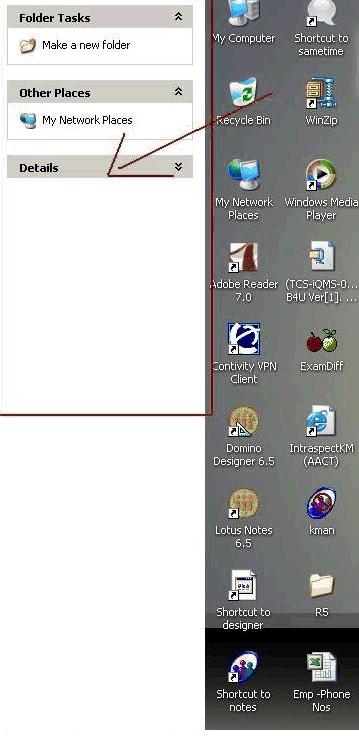
I have a problem with active desktop. On my desktop I can see wallpaper for 75% of windows,rest is some screen.Tried all the solutions given here,no hope. Can anyone help me to get the problem solved. Attaching the snap shot.
lions6958
0
Newbie Poster
Hey Gerbil i dont see Folder Options under tools. I have internet Explorer 7 and i dont see it.
gerbil
216
Industrious Poster
G'day, lion.. I don't use IE7, I use IE6 only when forced to.... but folder options is part of Windows Explorer so if you do not have malware issues this reg file should fix that issue for you:
==Please copy the text between the lines to a notepad [format/wordwrap unchecked] and save as fixkey.reg, as type "all files", to your desktop; dclick it to run... agree; if it opens in notepad instead rclick the icon [file], choose Open with, Registry editor....
__________________________________________________________
Windows Registry Editor Version 5.00
[HKEY_CURRENT_USER\SOFTWARE\Microsoft\Windows\CurrentVersion\Policies\ Explorer]
"NoFolderOptions"=-
[HKEY_LOCAL_MACHINE\SOFTWARE\Microsoft\Windows\CurrentVersion\Policies \Explorer]
"NoFolderOptions"=-
__________________________________________________________
karlsthenn
0
Newbie Poster
Thanks, Gerbil. This clinched it! I have no idea what this means or what other 'side effects' are associated with this change, if any. However, at this point in time it works again!
Thank you so much!
Oded
Yess. It works! Thanks Gerbil...
ankit0141
0
Newbie Poster
hi evry1...
im having a problem....
lst day i ws surfing on net....
and i pressed d key F11 for full screen....
den i pressed dat key again...
since den i m experiencing a problem dat as my system boots, first i see a msg for restoring...
if i press yes or no, sdnly my task bar disappears and i found myself unable to start any program...
i found jst a blank screen....
nthing else....
i restord d system bt nthng hppnd....
results r same...
plz help mee out....
gerbil
216
Industrious Poster
ankit... when you computer does start and you have that blank screen it is probably because explorer.exe is not starting, or not continuing to run, or is corrupted. As a first step try going Ctr-Alt-Del to open Task Manager, go File, New Task, and type or paste in...
sfc /scannow
-insert your windows cd of the same upgrade level as your OS eg XP + SP2 and let it run.
You may also have malware.... come back when you get Windows Explorer working and we shall tackle that. You may also need spellcheck.
Zorcur
0
Newbie Poster
ankit... when you computer does start and you have that blank screen it is probably because explorer.exe is not starting, or not continuing to run, or is corrupted. As a first step try going Ctr-Alt-Del to open Task Manager, go File, New Task, and type or paste in...
sfc /scannow
-insert your windows cd of the same upgrade level as your OS eg XP + SP2 and let it run.
You may also have malware.... come back when you get Windows Explorer working and we shall tackle that. You may also need spellcheck.
Hey Gerbil.
I actually cannot find my desktop.htt folder. I have shown all of the hidden operating system folders, but when I go into documents and settings, there is no 'Application Data' folder. I have run numerous searches on C: But I cannot find anything. Please help.
Zorcur
0
Newbie Poster
Scratch that, I found my desktop.htt folder, deleted it and edited my registry files,
then restarted my computer - nothing .Help?
gerbil
216
Industrious Poster
Zorcur, this thread is quite old, and very long. I have almost no idea what the problem you are experiencing is. May I suggest that you start a new thread and give as full a description as you can? By all means copy in bits of posts that are relevant [but pls do not link to them]. And then we may be able to help.
Be a part of the DaniWeb community
We're a friendly, industry-focused community of developers, IT pros, digital marketers, and technology enthusiasts meeting, networking, learning, and sharing knowledge.