We're a community of 1076K IT Pros here for help, advice, solutions, professional growth and fun. Join us!
1,075,539 Members — Technology Publication meets Social Media
Username:
Password:
Lost login information?
Start New Discussion Reply to this Discussion

Error 1606 Received when installing driver for scanner

I am having a problem installing the driver for Windows 7 from Mustek for my scanner.

Hardware and Software I Use
Mustek ScanExpress A3 USB 1200 Pro Large Format Scanner
Windows 7 Pro 64bit
HP Pavilion Elite e9280t PC i7
HP Photosmart Premium Fax AIO C309a - Wireless

I downloaded the driver for Windows 7 from the Mustek site. It was a .zip file that I extracted to my desktop. It was named ScanExpress A3 USB 1200 WIN7. I then ran the setup.exe inside the folder. It begins preparing for install and before it gets to "next" or anything like that it fails with the Windows Installer error--"Error 1606 Could not access network location \." BTW, as instructed by Mustek, at no time during these attempts was the scanner attached to the PC.

I deleted the download and tried again with a fresh download. I still received the error.

I searched the registry and removed any entry with Mustek. I deleted all temp files and emptied the recycle bin. I rebooted and turned off the firewall and virus checker. I downloaded again and extracted the files again and received the same error 1606.

I then searched the Microsoft MSDN site and found a registry “fix.” The fix corrects settings in the User Shell Folders key in both HKEY_LOCAL_MACHINE/Software/Microsoft/Windows/Current Version/Explorer/User Shell Folders and CURRENT_USER/ditto. I used the automatic fix and then compared the results manually. My registry values matched the Microsoft recommended values exactly.

After “fixing” the registry I tried to install the driver again and still receive the same error. I feel there must be another registry key that is not correct somewhere but I don’t know where. Any help would be appreciated. I am supporting an old Vista 32-bit computer just so I can use this scanner, which I use in my business.
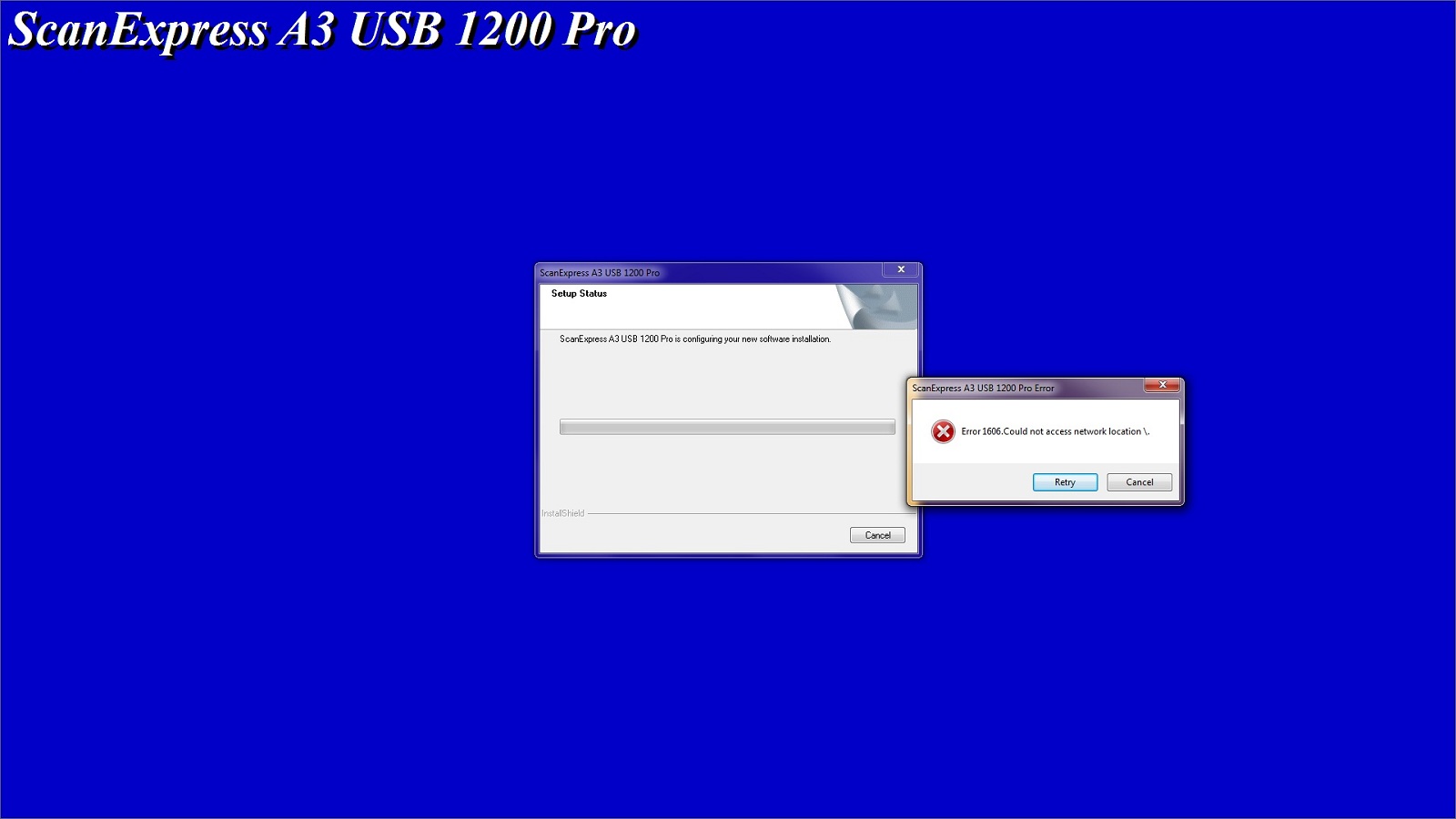
Attachments ScanError.jpg 98.03KB
4
Contributors
22
Replies
2 Weeks
Discussion Span
2 Years Ago
Last Updated
23
Views
easouza
Newbie Poster
22 posts since Aug 2007
Reputation Points: 10
Solved Threads: 0
Skill Endorsements: 0

Is that driver specifically for windows 7 64bit? I suspect it's for windows 7 32bit.
If there is a driver available for Vista 64bit then give thay a try!

Rik from RCE
Nearly a Posting Maven
2,457 posts since May 2009
Reputation Points: 125
Solved Threads: 206
Skill Endorsements: 6

Mustek lists this download as Windows 7 (32/64bit). There is also only one download called Vista Drivers. I downloaded the Vista Drivers and tried to install it. It was a good thing I took a checkpoint prior to installing it. The install required a reboot and Window 7 would not start up again. I had to do a restore, which is why it took me a little longer to reply.

So the bottom line is that altough the Vista driver install did not generate the 1606 error, it also didn't work.

Thanks for the suggestion. It was worth a shot.

easouza
Newbie Poster
22 posts since Aug 2007
Reputation Points: 10
Solved Threads: 0
Skill Endorsements: 0

Have a look at the first driver you downloaded and see if there is a setup specifically for 64bit!

Rik from RCE
Nearly a Posting Maven
2,457 posts since May 2009
Reputation Points: 125
Solved Threads: 206
Skill Endorsements: 6

There isn't. Apparently, they bundle both drivers into a single setup.

easouza
Newbie Poster
22 posts since Aug 2007
Reputation Points: 10
Solved Threads: 0
Skill Endorsements: 0

Have you gone to mustek for the driver or to HP?

Rik from RCE
Nearly a Posting Maven
2,457 posts since May 2009
Reputation Points: 125
Solved Threads: 206
Skill Endorsements: 6

I went to mustek. I also originally went to mustek with this installation problem and their response was that their driver works and this is a Microsoft problem.

easouza
Newbie Poster
22 posts since Aug 2007
Reputation Points: 10
Solved Threads: 0
Skill Endorsements: 0

I don't know what else to suggest!

Rik from RCE
Nearly a Posting Maven
2,457 posts since May 2009
Reputation Points: 125
Solved Threads: 206
Skill Endorsements: 6

Thanks for trying. I appreciated your thoughts.

easouza
Newbie Poster
22 posts since Aug 2007
Reputation Points: 10
Solved Threads: 0
Skill Endorsements: 0

One thought, have you checked for malware? If so, with what software and what result did you get exactly!

Rik from RCE
Nearly a Posting Maven
2,457 posts since May 2009
Reputation Points: 125
Solved Threads: 206
Skill Endorsements: 6

That was a good thought. I do run Norton Internet Security but I also have a product by Malwarebytes called Anti-Malware. I just ran it and it came up negative.

easouza
Newbie Poster
22 posts since Aug 2007
Reputation Points: 10
Solved Threads: 0
Skill Endorsements: 0

Did you make sure Mbam was up to date? It is updated upto 5 times a day!

Rik from RCE
Nearly a Posting Maven
2,457 posts since May 2009
Reputation Points: 125
Solved Threads: 206
Skill Endorsements: 6

I reran a full scan after updating Mbam and still no malware found.

easouza
Newbie Poster
22 posts since Aug 2007
Reputation Points: 10
Solved Threads: 0
Skill Endorsements: 0

I'm all out of ideas!

Rik from RCE
Nearly a Posting Maven
2,457 posts since May 2009
Reputation Points: 125
Solved Threads: 206
Skill Endorsements: 6

I have just about given up getting my Mustek scanner to work with Win7 natively; no one has worked around or solved the error 1606 issue since I "found" it over a year ago. I bypass the issue entirely by running the WinXP mode virtual machine instead. Not great, but functional. Sometimes. Grrrr.

bryduck
Newbie Poster
6 posts since May 2010
Reputation Points: 10
Solved Threads: 0
Skill Endorsements: 0

I have just about given up getting my Mustek scanner to work with Win7 natively; no one has worked around or solved the error 1606 issue since I "found" it over a year ago. I bypass the issue entirely by running the WinXP mode virtual machine instead. Not great, but functional. Sometimes. Grrrr.

Do you have 64-bit or 32-bit WIN7?

easouza
Newbie Poster
22 posts since Aug 2007
Reputation Points: 10
Solved Threads: 0
Skill Endorsements: 0

Do you have 64-bit or 32-bit WIN7?

hi,answer in 4th line first post

caperjack
I hate 20 Questions
Team Colleague
13,845 posts since Aug 2003
Reputation Points: 1,071
Solved Threads: 878
Skill Endorsements: 50

This is a long shot, but perhaps that Norton rubbish is interfering with the installer?!? It interferes with plenty of other things not malware or virus related!

Rik from RCE
Nearly a Posting Maven
2,457 posts since May 2009
Reputation Points: 125
Solved Threads: 206
Skill Endorsements: 6

I don't have any onboard antivirus software, and I still have the same issue; that's not it . . .

bryduck
Newbie Poster
6 posts since May 2010
Reputation Points: 10
Solved Threads: 0
Skill Endorsements: 0

I do run Norton Internet Security

is what you said at the top of the page.

Rik from RCE
Nearly a Posting Maven
2,457 posts since May 2009
Reputation Points: 125
Solved Threads: 206
Skill Endorsements: 6

This article has been dead for over three months: Start a new discussion instead

Post: Markdown Syntax: Formatting Help
 
You
 
© 2013 DaniWeb® LLC
Page rendered in 0.1181 seconds using 2.71MB