I've got an EX58-UD3R which I'm trying to troubleshoot.
It's not posting, but instead turning on for a few seconds then turning off, repeating indefinitely. No beep is heard from the speaker.
I cannot isolate the problem and was hoping someome can advise me on what it might be.
Here's some interesting points:
This is a bare bones test setup. Single stick of RAM, no graphics card, no peripherals.
When the PSU is "hot-wired" on (by shorting the green ATX connector), the system remains on, but still no beep or post. Also, no heat is generated from the CPU.
There is NO CHANGE when the stick of RAM is swapped to different sockets or even removed.
There is NO CHANGE when the CPU is removed from it's socket. (This personally interests me)
When the 8 pin CPU 12V connector is removed, it only attempts to turn on once.
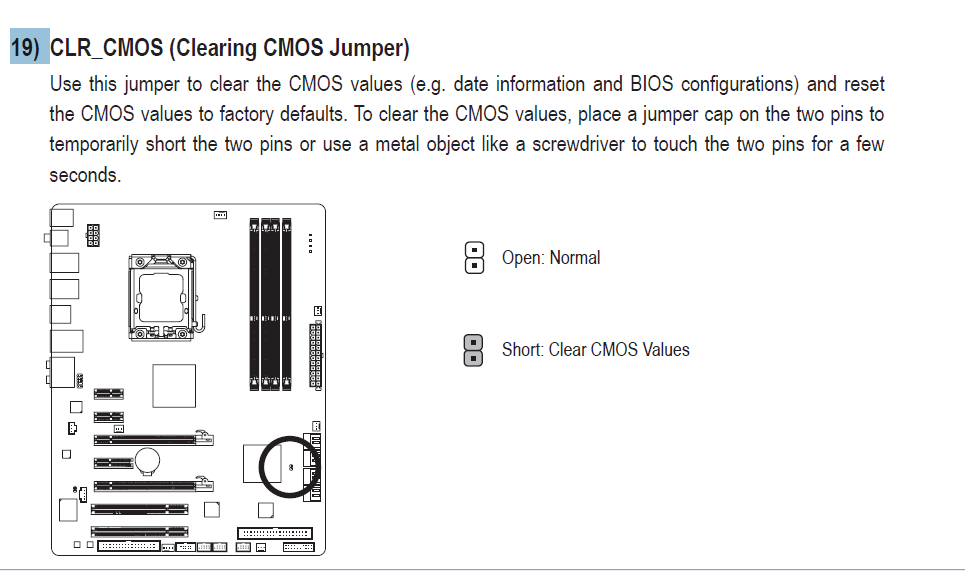
CMOS has been reset by removing the battery.
I'm stumped. My guess would be a CPU failure, but that in itself is hard to diagnose.
5
Contributors
16
Replies
3 Days
Discussion Span
1 Year Ago
Last Updated
17
Views
Related Article:Urgent - my pc won't start AS I TRIED TO DO ram upgrade
is a PC Hardware discussion thread by sabisingh that has 19 replies, was last updated 1 year ago and has been tagged with the keywords: troubleshooting-hardware.
with a keyboard attached,power up, if there were power going through the board the lights on the keyboard will light up or flash,no lights, no power going through the board.
it is really hard to diagnose, i see a motherboard do the same thing and it was caused by a dvi to avg adapter being used to connect video to monitor, i know you don't have video card connected[are you using onboard video to see what if anything comes up on the monitor ] ,just saying it could be anything
Interesting you mention that. I always thought that it should still come up with a POST error if there is no GPU. Regardless, someone else mentioned this to me recently so from now on all checks will be with a GPU plugged in.
The keyboard lights up when power is switched on, but nothing during the infinite power cycle.
I've also tried a few different PSU's to no avail.
Doing some more research though leads me to believe this is actually a bit of a more widespread problem than I first thought.
There appears to be some issues with incompatible RAM (though if I remove all the RAM, I'd expect a POST complaint that there's no memory) and "incompatible" PSU's (a term which just doesn't really make much sence in my opinion since there is a standard) with the motherboard. On top of that people are saying that the motherboard just does this eventually and no one can really pin down what the issue is.
I may attempt disabling the main BIOS by shorting specific pins to see whether it is corrupt and if the secondary BIOS chip kicks in (although I do not yet have precise instructions on which pins and I'm certainly not going to guess)
Might have to RMA it, but it was purchased in Nov '09, so I don't know whether I can still do that?
I believe you have a 3 year limited factory warranty on that board, so if there isn't any physical damage, you might be in luck. :)
About your notion on the incompatible psu's, I recommend you take a look at "Hardware secrets" tutorial pages (scroll down to the Power section)
There is two "all you need to know about PSU's" which (if I remember correctly) is explaining in details, why some psu's might not be equally suited for your setup as other psu's.
It is actually a great source for deeper understanding on every hardware related issues that you might come across. ;)
its very important in how the memory is install in this board ,like most boards i guess ,this is copy paste from the boards manual .. http://download.gigabyte.us/FileList/Manual/mb_manual_ga-ex58-ud3r_1.7_e.pdf
====================
Due to chipset limitations, read the following guidelines before installing the memory in Dual or 3 Channel mode.
Dual Channel--
1. Dual Channel mode cannot be enabled if only one DDR3 memory module is installed.
2. When enabling Dual Channel mode with two modules, it is recommended that memory of the same capacity, brand, speed, and chips be used. When enabling Dual Channel mode with two memory modules, be sure to install them in the DDR3_1 and DDR3_4 or DDR3_1 and DDR3_2 sockets.
3 Channel--
1. 3 Channel mode cannot be enabled if only one or two DDR3 memory modules are installed.
2. When enabling 3 Channel mode with three or four modules, it is recommended that memory of the same capacity, brand, speed, and chips be used. When enabling 3 Channel mode with three memory modules, be sure to install them in the DDR3_1, DDR3_2 and DDR3_4 sockets.
Read the following guidelines before you begin to install the memory:
• Make sure that the motherboard supports the memory. It is recommended that memory of the same capacity, brand, speed, and chips be used.
(Go to GIGABYTE's website for the latest memory support list.)
• Always turn off the computer and unplug the power cord from the power outlet before installing the memory to prevent hardware damage.
• Memory modules have a foolproof design. A memory module can be installed in only one direction. If you are unable to insert the memory, switch the direction.
• For the DDR3_2/DDR3_3 memory socket, make sure the memory module to be installed is a SA2 memory module.
• If only one DDR3 memory module is installed, it is recommended to install it in the DDR3_1 socket.
• When memory modules of different capacity and chips are installed, a message which says memory is operating in Flex Memory Mode will appear during the POST. Intel Flex Memory Technology offers greater flexibility to upgrade by allowing different memory sizes to be populated and remain in Dual/3 Channel mode/performance.
"If only one DDR3 memory module is installed, it is recommended to install it in the DDR3_1 socket."
This is what I am doing. Although even without any RAM installed, the board should POST.
(I'd normally prefer to diagnose without any RAM sticks, but in this case I'm trying everything)
Don't see anything about duel bios in manual .check attachment for pin location
Always turn off your computer and unplug the power cord from the power outlet before clearing the CMOS values.
• After clearing the CMOS values and before turning on your computer, be sure to remove the jumper cap from the jumper. Failure to do so may cause damage to the motherboard.
• After system restart, go to BIOS Setup to load factory defaults (select Load Optimized
Defaults) or manually configure the BIOS settings (refer to Chapter 2, "BIOS Setup," for BIOS configurations).
yeah ,manual mentions duel bios ,but didn't see and info on it ,its quite possible that something is dead on the board causing it to not boot ,do have a keyboard hooked up ,if so do the lights on KB flash /light up