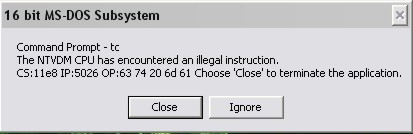
I've tried out suggestions from several posts related to BGI Error (on daniweb n innumerable sites)but it just doesnt get solved.. Whenever i try to execute (after compiling successfully) a graphics program it either exits out of C and into DOS mode or it gives an error "The NTVDM comp encountered an illegal instruction #########(sum hexadecimal code) and i get options Close and Ignore(although after this i hav to restart TC)..
Let me give my computer specifications: 3.12GB RAM, Nvidia GeForce 7050/Nvidia nForce 610i 512 MB graphic card, win XP pro service pack 2, Intel Core2Duo Processor(2.20GHz) n a 19"W Acer LCD screen.. (tell me if u need ne more specifications).... Even a simple program lyk the 1 below is not working.....
#include <stdio.h>
#include <conio.h>
#include <graphics.h>

void main()
{
int gd,gm;
gd=DETECT;
detectgraph(&gd,&gm);
initgraph(&gd,&gm,"C:\\TC\\BGI");

line(100,100,200,100);

getch();
closegraph();
}
Suggestions tried out by me
------------------------------------
1. I've already checked the [X] Graphics library option in Options->Linker->Libraries
2.I checked my BGI folder.. it has all the reqd BGI files such as EGAVGA.BGI, CGA.BGI n more
3.I've downloaded n tried atleast 5 TC's(v. 3.0) frm different sources.. none of em support graphics.. so there must be sumthin wrong wid my comp.. A program which works perfectly well in college doesnt work on my brand new home comp!!
4.I've even tried out running TC in compatibility mode for Win 98,95 but to no avail
I hope sum1 can tell me a permanent solution for this problem
P.S. All other types of programs work in my TC.. Only programs involving graphics do not work at all!!