We're a community of 1076K IT Pros here for help, advice, solutions, professional growth and fun. Join us!
1,075,657 Members — Technology Publication meets Social Media
Username:
Password:
Lost login information?
Start New Discussion Reply to this Discussion

How to read unicode (utf-8) / binary file line by line

Hi programmers,

I want read line by line a Unicode (UTF-8) text file created by Notepad, i don't want display the Unicode string in the screen, i want just read and compare the strings!.

This code read ANSI file line by line, and compare the strings

What i want
Read test_ansi.txt line by line
if the line = "b" print "YES!"
else print "NO!"

read_ansi_line_by_line.c

#include <stdio.h>

int main()
{
    char *inname = "test_ansi.txt";
    FILE *infile;
    char line_buffer[BUFSIZ]; /* BUFSIZ is defined if you include stdio.h */
    char line_number;

    infile = fopen(inname, "r");
    if (!infile) {
        printf("\nfile '%s' not found\n", inname);
        return 0;
    }
    printf("\n%s\n\n", inname);

    line_number = 0;
    while (fgets(line_buffer, sizeof(line_buffer), infile)) {
        ++line_number;
        /* note that the newline is in the buffer */
		if (strcmp("b\n", line_buffer) == 0 ){
            printf("%d: YES!\n", line_number);
        }else{
            printf("%d: NO!\n", line_number,line_buffer);
        }
    }
    printf("\n\nTotal: %d\n", line_number);
    return 0;
}

test_ansi.txt

a
b
c

Compiling gcc -o read_ansi_line_by_line read_ansi_line_by_line.c Output

test_ansi.txt

1: NO!
2: YES!
3: NO!


Total: 3

Now i need read Unicode (UTF-8) file created by Notepad, after more than 6 months i don't found any good code/library in C can read file coded in UTF-8!, i don't know exactly why but i think the standard C don't support Unicode!

Reading Unicode binary file its OK!, but the probleme is the binary file most be already created in binary mode!, that mean if we want read a Unicode (UTF-8) file created by Notepad we need to translate it from UTF-8 file to BINARY file!

This code write Unicode string to a binary file, NOTE the C file is coded in UTF-8 and compiled by GCC

What i want
Write the Unicode char "ب" to test_bin.dat

create_bin.c

#define UNICODE
#ifdef UNICODE
#define _UNICODE
#else
#define _MBCS
#endif

#include <stdio.h>
#include <wchar.h>

int main()
{
     /*Data to be stored in file*/
     wchar_t line_buffer[BUFSIZ]=L"ب";
     /*Opening file for writing in binary mode*/
     FILE *infile=fopen("test_bin.dat","wb");
     /*Writing data to file*/
     fwrite(line_buffer, 1, 13, infile);
     /*Closing File*/
     fclose(infile);

    return 0;
}

Compiling gcc -o create_bin create_bin.c Output [I]create test_bin.dat[/I] Now i want read the binary file line by line and compare!

What i want
Read test_bin.dat line by line
if the line = "ب" print "YES!"
else print "NO!"

read_bin_line_by_line.c

#define UNICODE
#ifdef UNICODE
#define _UNICODE
#else
#define _MBCS
#endif

#include <stdio.h>
#include <wchar.h>

int main()
{
    wchar_t *inname = L"test_bin.dat";
    FILE *infile;
    wchar_t line_buffer[BUFSIZ]; /* BUFSIZ is defined if you include stdio.h */

    infile = _wfopen(inname,L"rb");
    if (!infile) {
        wprintf(L"\nfile '%s' not found\n", inname);
        return 0;
    }
	wprintf(L"\n%s\n\n", inname);
	
	/*Reading data from file into temporary buffer*/
    while (fread(line_buffer,1,13,infile)) {
        /* note that the newline is in the buffer */
        if ( wcscmp ( L"ب" , line_buffer ) == 0 ){
             wprintf(L"YES!\n");
        }else{
             wprintf(L"NO!\n", line_buffer);
        }
    }
	/*Closing File*/
    fclose(infile);
    return 0;
}

Compiling gcc -o read_bin_line_by_line read_bin_line_by_line.c Output

test_bin.dat

YES!

THE PROBLEM

This method is VERY LONG! and NOT POWERFUL (i m beginner in software engineering)

Please any one know how to read Unicode file ? (i know its not easy!)
Please any one know how to convert Unicode file to Binary file ? (simple method)
Please any one know how to read Unicode file in binary mode ? (i m not sure)

Thank You.

4
Contributors
13
Replies
3 Days
Discussion Span
3 Years Ago
Last Updated
14
Views
Question
Answered
freeseif
Newbie Poster
6 posts since Jan 2010
Reputation Points: 10
Solved Threads: 0
Skill Endorsements: 0
Ancient Dragon
Achieved Level 70
Team Colleague
32,109 posts since Aug 2005
Reputation Points: 5,836
Solved Threads: 2,575
Skill Endorsements: 68

Thank You Ancient Dragon, but you think fgetws() is the all solution of this probleme ?!
OKAY!

I try by your function but the result of comparison string read from UTF-8 file is every times -1 "NO!"

#define UNICODE
#ifdef UNICODE
#define _UNICODE
#else
#define _MBCS
#endif

#include <stdio.h>
#include <wchar.h>

int main()
{
    wchar_t *inname = L"test_utf8.txt";
    FILE *infile;
    wchar_t line_buffer[BUFSIZ]; /* BUFSIZ is defined if you include stdio.h */
    int line_number;

    infile = _wfopen(inname, L"r");
    if (!infile) {
        wprintf(L"\nfile '%s' not found\n", inname);
        return 0;
    }
    wprintf(L"\n%s\n\n", inname);

    line_number = 0;
    while (fgetws(line_buffer, sizeof(line_buffer), infile)) {
        line_number = line_number +1;
        /* note that the newline is in the buffer */
        if ( wcscmp ( L"ب\n" , line_buffer ) == 0 ){
             wprintf(L"YES!\n");
        }else{
             wprintf(L"NO!\n", line_buffer);
        }
    }
	/*Closing File*/
    fclose(infile);
    return 0;
}
freeseif
Newbie Poster
6 posts since Jan 2010
Reputation Points: 10
Solved Threads: 0
Skill Endorsements: 0

Pot shot:

if ( wcscmp ( L"\xD8\xA8\n" , line_buffer + 3 ) == 0 ){

The + 3 is skipping the BOM. The L"ب\n" part gets mistranslated for me in the source code.

As far as knowing shortcuts, I don't know any. I'm just curious and playing along at home a little.

Dave Sinkula
long time no c
Team Colleague
5,058 posts since Apr 2004
Reputation Points: 2,780
Solved Threads: 314
Skill Endorsements: 37

Thak You Dave Sinkula,

But its didn't work for me!

NOTE:

ب
=
0x0628
= 
"\u0628"
freeseif
Newbie Poster
6 posts since Jan 2010
Reputation Points: 10
Solved Threads: 0
Skill Endorsements: 0

When I copy the character ب from your post, paste it to a UTF-8 file in an editor and view it in he mode, it shows me D8A8 . I don't know where 0x0628 comes from.

Dave Sinkula
long time no c
Team Colleague
5,058 posts since Apr 2004
Reputation Points: 2,780
Solved Threads: 314
Skill Endorsements: 37

This is a simple example how to use 0x0628 and \u0628

#define UNICODE
#ifdef UNICODE
#define _UNICODE
#else
#define _MBCS
#endif

#include <windows.h>

int WINAPI
WinMain(HINSTANCE hInst, HINSTANCE hPrev, LPSTR pszCmdLine, int iCmdShow)
{
	MessageBoxW(NULL,L"\u0628",(wchar_t*)(char[]){0x0, 0x06, 0x28, 0x06, 0, 0},MB_OK|MB_RTLREADING|MB_RIGHT);
	return 0;
}

Output
[IMG]http://seifsoftware.com/download/unicode_msg_example.jpg[/IMG]

But now!, its possible to read UTF-8 file line by line in C (C99) ?

freeseif
Newbie Poster
6 posts since Jan 2010
Reputation Points: 10
Solved Threads: 0
Skill Endorsements: 0

I was finally able to get it to work by opening the file in binary mode, not text mode. In binary mode the buffer will contain "\r\n" at the end of each string

#include <stdio.h>
#include <ctype.h>
#pragma warning(disable: 4996)

int main()
{
    FILE* fp = fopen("c:\\dvlp\\test.txt", "rb");
    if( fp != NULL)
    {
// The first two bytes of a unicode file contain -1 and -2 respectively, which is the unicode signature.
        char b[2] = {0};
        wchar_t iobuf[255] = {0};
        // read the unicode signature bytes
        fread(b,1,sizeof(b), fp);
        // read the rest of the file
        while( fgetws(iobuf, 255, fp) )
        {

            size_t len = wcslen(iobuf);
// Strip off trailing '\r\n' from the string
            if( len > 2 && iobuf[len-1] == L'\n' && iobuf[len-2] == '\r')
                iobuf[wcslen(iobuf)-2] = 0;
            len = wcslen(iobuf);
            printf("(%d) \"%S\"\  ", len, iobuf);
            if( iobuf[0] == L'\r' )
                printf("Yes\n");
            else
                printf("No\n");
        }
        fclose(fp);

    }
}
Ancient Dragon
Achieved Level 70
Team Colleague
32,109 posts since Aug 2005
Reputation Points: 5,836
Solved Threads: 2,575
Skill Endorsements: 68

NOTE:

ب
=
0x0628
= 
"\u0628"

0x0628 is not UTF-8, but rather UTF-16. Dave Sinkula's 0xD8 0xA8 is the UTF-8 representation of \u0628.

mitrmkar
Posting Virtuoso
1,834 posts since Nov 2007
Reputation Points: 1,119
Solved Threads: 399
Skill Endorsements: 8

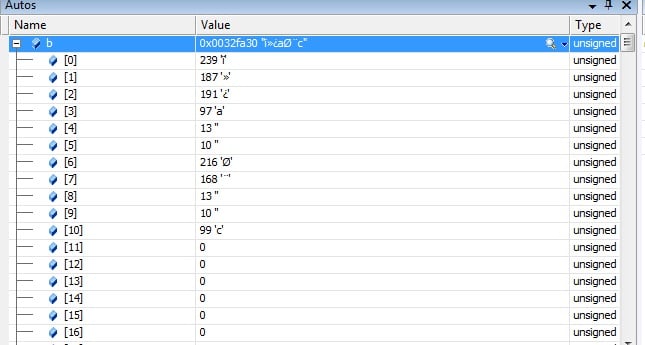
@freesif: Are you sure that file contains valid data? The file's contents are as shown in the attached. It shows each byte of the file.

Attachments Untitled.jpg 63.93KB
Ancient Dragon
Achieved Level 70
Team Colleague
32,109 posts since Aug 2005
Reputation Points: 5,836
Solved Threads: 2,575
Skill Endorsements: 68

yes im sure =)

freeseif
Newbie Poster
6 posts since Jan 2010
Reputation Points: 10
Solved Threads: 0
Skill Endorsements: 0

Code below should at least partially solve the problem. There are several ways in which a UNICODE file can be encoded, and the first 2 to 4 bytes of the file will describe which kind of unicode encoding it is. Winipedia has a good article that describes all of them. The code below only implements the UTF-8 encoding, which is really just standard ascii characters. You will have to write the others if you want to implement them.

Unlike my previous attempt this version works ok then the file is opened in text mode.

Note that you will not see "Yes" printed on the screen because the file does not contain any blank lines.

As it turns out, the file you posted does contain the BOM but is otherwise just a normal ascii text file, which is the definition of UTF-8.

void ReadUTF8(FILE* fp)
{
    unsigned char iobuf[255] = {0};
    while( fgets((char*)iobuf, sizeof(iobuf), fp) )
    {
            size_t len = strlen((char *)iobuf);
            if(len > 1 &&  iobuf[len-1] == '\n')
                iobuf[len-1] = 0;
            len = strlen((char *)iobuf);
            printf("(%d) \"%s\"  ", len, iobuf);
            if( iobuf[0] == '\n' )
                printf("Yes\n");
            else
                printf("No\n");
    }
}

void ReadUTF16BE(FILE* fp)
{
}

void ReadUTF16LE(FILE* fp)
{
}

int main()
{
    FILE* fp = fopen("c:\\dvlp\\test_utf8.txt", "r");
    if( fp != NULL)
    {
        // see http://en.wikipedia.org/wiki/Byte-order_mark for explaination of the BOM
        // encoding
        unsigned char b[3] = {0};
        fread(b,1,2, fp);
        if( b[0] == 0xEF && b[1] == 0xBB)
        {
            fread(b,1,1,fp); // 0xBF
            ReadUTF8(fp);
        }
        else if( b[0] == 0xFE && b[1] == 0xFF)
        {
            ReadUTF16BE(fp);
        }
        else if( b[0] == 0 && b[1] == 0)
        {
            fread(b,1,2,fp); 
            if( b[0] == 0xFE && b[1] == 0xFF)
                ReadUTF16LE(fp);
        }
        else
        {
            // we don't know what kind of file it is, so assume its standard
            // ascii with no BOM encoding
            rewind(fp);
            ReadUTF8(fp);
        }
    }        

    fclose(fp);
}
Ancient Dragon
Achieved Level 70
Team Colleague
32,109 posts since Aug 2005
Reputation Points: 5,836
Solved Threads: 2,575
Skill Endorsements: 68
Question Answered as of 3 Years Ago by Ancient Dragon, Dave Sinkula and mitrmkar

Hi Mr.Ancient Dragon,

Your are really a very expert advanced programmer, you are very very good programmer ^_^

I want seriously give you some thing.. read my private message!
And that its nothing if we compare it with your help :)

Thank You again Mr.Ancient Dragon, Good job =)

freeseif
Newbie Poster
6 posts since Jan 2010
Reputation Points: 10
Solved Threads: 0
Skill Endorsements: 0

Hi Mr.Ancient Dragon,
I want seriously give you some thing.. read my private message!
And that its nothing if we compare it with your help :)

As I said in my PM to you, I do not accept payment for any problems I solve here at DaniWeb. But thank you anyway.

Ancient Dragon
Achieved Level 70
Team Colleague
32,109 posts since Aug 2005
Reputation Points: 5,836
Solved Threads: 2,575
Skill Endorsements: 68

This question has already been solved: Start a new discussion instead

Post: Markdown Syntax: Formatting Help
 
You
 
© 2013 DaniWeb® LLC
Page rendered in 0.1063 seconds using 2.72MB