I hope somebody can help me, I work with Visual C++ 2008 with QT libraries
I am trying to include a Interop.Encore.dll file into my program to access our ERP system business objects and post new data to the ERP
We have a Visual Basic program geared to communicate with our ERP using this same DLL file...
Now what is the Syntax for including the neccesary DLL file (no header file available) into my program?
I will also add that I have built my program using a qmake command (compiles headers and source files etc into a sollution file) to include the dll and when I build the solution I get the following:
"1>fatal error C1308: c:\...\Libs\Interop.Encore.dll: linking assemblies is not supported
1>LINK : fatal error LNK1257: code generation failed"
You cannot directly link to a DLL like that, as the error says.
To link to a DLL, you can do it either statically or dynamically.
Statically, you need an "import library" (or "interface library"). This is a .lib file that acts as an intermediate between the linker of the compiler suite and the DLL file. Developments suites like MinGW provide tools to generate a .lib file from a DLL. With MinGW, you can use the dlltool program to do that. I don't know about MSVC though, I'm sure there is an equivalent, or that the MinGW dlltool program might produce a .lib file that is compatible with MSVC too.
Anyhow, you have to create the header file manually, and don't forget the extern "C" specification on your function prototypes. You include the header file that you have created for the DLL, and then you link to the .lib file and make sure the DLL is available at run-time for the application (either in the same folder or installed in a standard system folder (usually "C:\Windows\system" or "C:\Windows\system32").
Dynamically, you can use LoadLibrary / GetProcAddress / FreeLibrary (or dlopen / dlsym /dlclose under *nix systems) functions to load the DLL (at run-time), get the function pointers to the functions you have in the DLL, and unload (or free) the library once you are done using the functions of the library (i.e. before exiting the program).
In both cases, you also have to be sure that all the prototypes of your functions (pointers) exactly correspond to the functions in your DLL. That is, same parameters, same return-type, same parameter-types, same ordering of parameters, same calling convention (usually stdcall or cdecl), same name, extern "C", etc.
Allright guys... due to a deadline and other external factors Ive not been able to test any of this or investigate further
Simply had to write a VB satelite, will maby check back to this when the oppertunity arises, for now I am just going to mark the thread solved to save everyboddy's time, thankyou very much for the quick responses :)
Hi there guys, ok I finally got back to the subject of code while we are re-working the structure (finally)
So I have been looking into the WINAPI LoadLibrary functionality mike mentioned and it looks like it will be ideal, however I have never worked with WINAPI, this might be a REALLY beginner question but how do I include the WINAPI functionality?
Doing some searches I found references to "#include "windows.h"... I found a file "marshal_windows.h" in my visual studio include folder but I am completely lost and I request someone to PLEASE hand me a flashlight here :)
Is the DLL a dot net assembly?
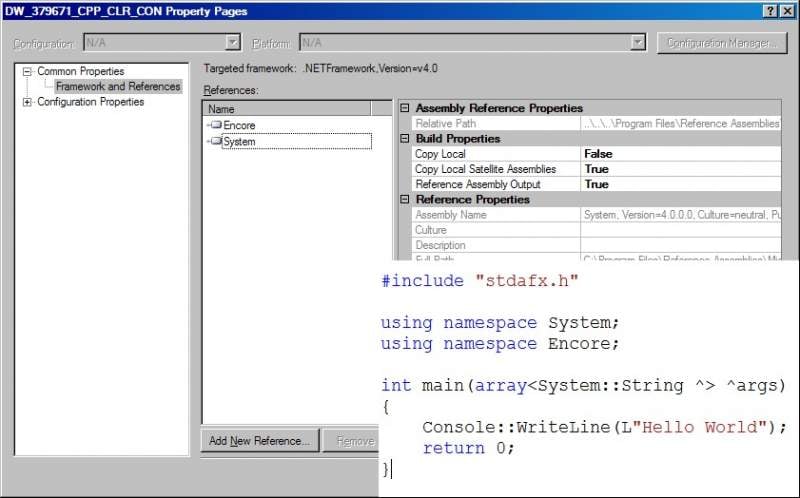
If so, add it as a reference.
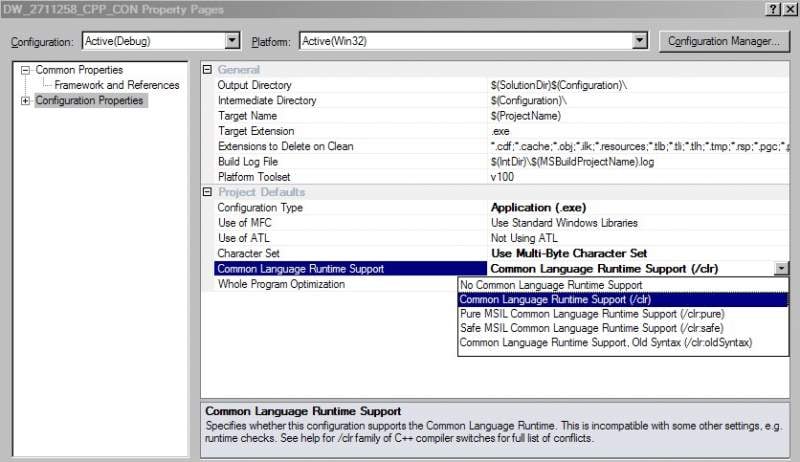
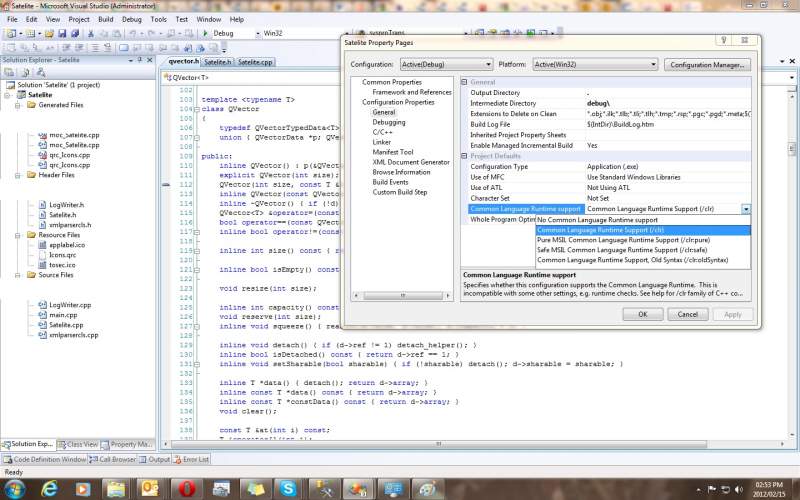
Of course, you would need to be compiling in /clr mode.
Project->Properties->Add New Reference
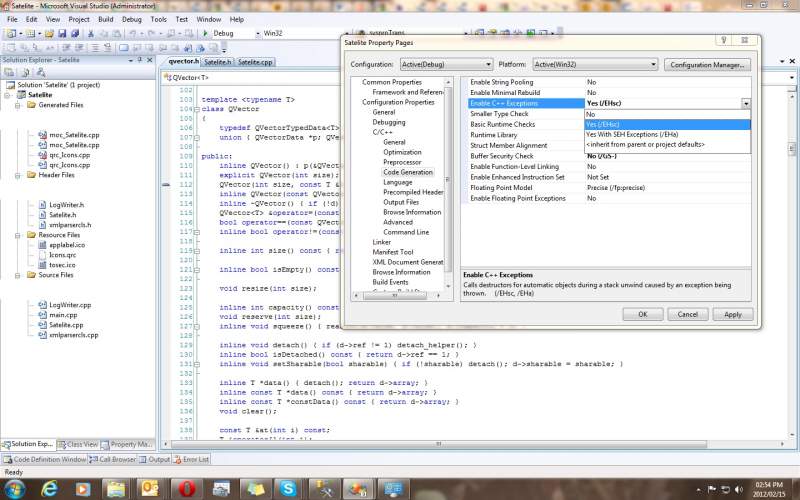
"1>cl : Command line error D8016 : '/EHs' and '/clr' command-line options are incompatible"
After turning off /EHs (C++ Exceptions) I get LOADS of error and warning methods pretaining to QT:
Warning:
static Category QT_FASTCALL category(uint ucs4);
"1>c:\qt\4.5.2\include\qtcore\../../src/corelib/tools/qchar.h(301) : warning C4561: '__fastcall' incompatible with the '/clr' option: converting to '__stdcall'"
Error:
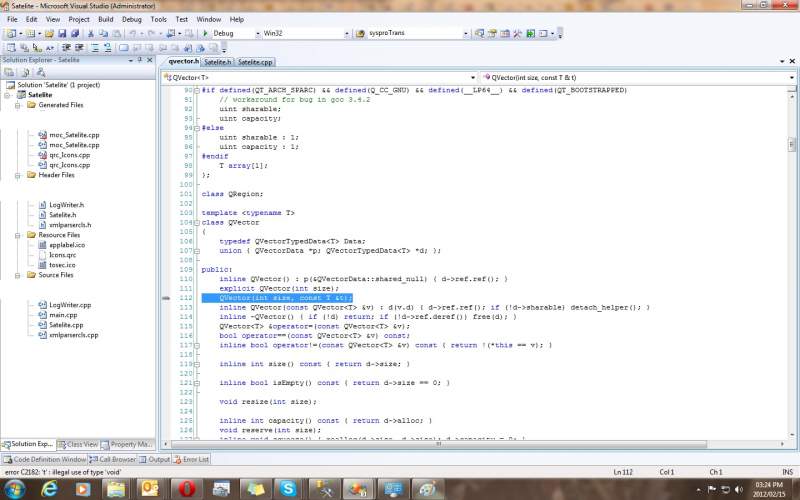
QVector(int size, const T &t);
"1>c:\qt\4.5.2\include\qtcore\../../src/corelib/tools/qvector.h(112) : error C2182: 't' : illegal use of type 'void'"
Got the screenshot. Thanks.
It's has a nested namespace, so the line of code to use it would be:
using namespace Interop::Encore;
Also, if you're using VS 2008 or earlier, you'll be OK, but if you're using VS 2010, you might have a problem when you compile as your dot net version was set at 3.5 when you started the project. Under VS 2010, I've found I need to start all C++ projects under dot net 4.0 (or what ever is highest for the given compiler version). I have not found a way (yet) to modify the dot net version in an existingC++ VS 2010 project without re-creating the project.
On DaniWeb, to include an attachment, you would need to click the "Post Reply" button on the left of the post and you will see the option.
Haha ok got it thnx, anyway, gave that a try, no dice...
Errors:
"1>.\Source\Satelite.cpp(6) : error C2653: 'Interop' : is not a class or namespace name"
"1>.\Source\Satelite.cpp(6) : error C2871: 'Encore' : a namespace with this name does not exist"
The boss man thinks this is becoming a waste of time but my curiosity has been spiked,
any additional assistance would be greatly appreciated