So basically, I'm making a Windows Form Application CLR which calculates a worker's wage. Problem is, when I select the schedule (day,night,afternoon,mixed), I use a button for each schedule respectively, which, upon click, calculates everything on the data you've input. While this is effective, I am being asked to use a combo box to demonstrate each schedule, and a single "Calculate" button for this, yet I do not know how to use a combo box correctly, nor how to use the selected option (say, I selected night, and do the respective calculation parameters). I am unable to find a tutorial which might help me, so would anyone mind telling me how do I use the items in the combo box, which would later influence in the calculation? (i.e. if I select 'day', I get 1.5 over my wage for each extra hour, while if my schedule is 'night', it's 2 over my wage).

Raim
Recommended Answers
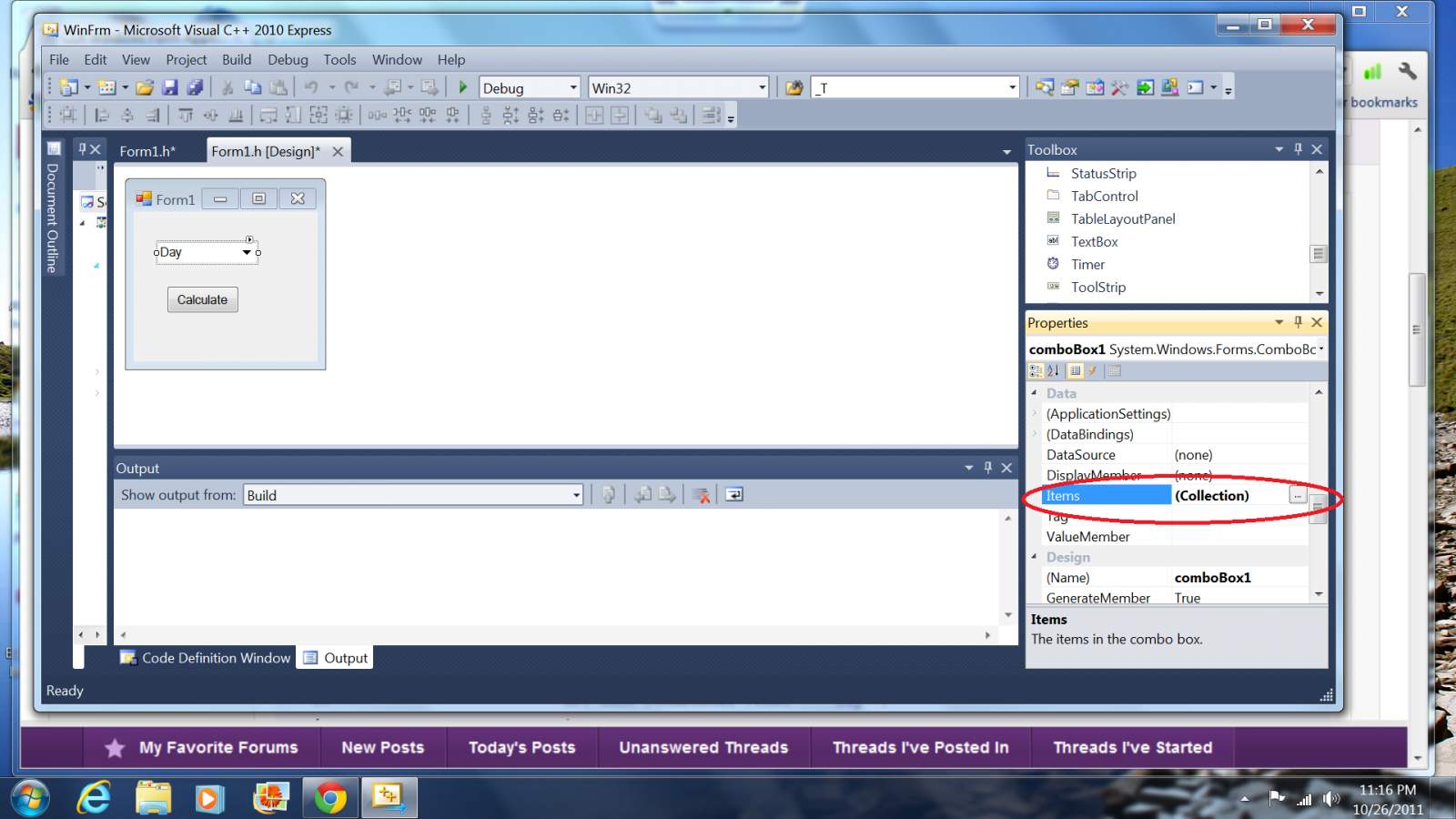
Jump to PostYou have already stated the items in the combo box -- Day, Afternoon, Night and Mixed. Do you know how to add those items to the combo box while in Form Designor? (In the comboBox Properties page scroll down to the Items Collection and you can add them there. See …
All 3 Replies
Reply to this topic
Be a part of the DaniWeb community
We're a friendly, industry-focused community of developers, IT pros, digital marketers, and technology enthusiasts meeting, networking, learning, and sharing knowledge.