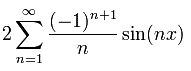
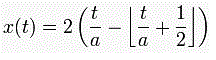
While surfing the web I got to this site: http://en.wikipedia.org/wiki/Fourier_series “Hey, I why not write something like this in C#!” The rather scary looking formulas did not withhold me to start coding (see below Fig. 1 and Fig. 2) The formula from Fig. 2 is hidden under one of the sawtooth pictures on the site. Here is the code I came up with.
Start a forms application, drop a panel on the form in the designer and name it PlotPanel.
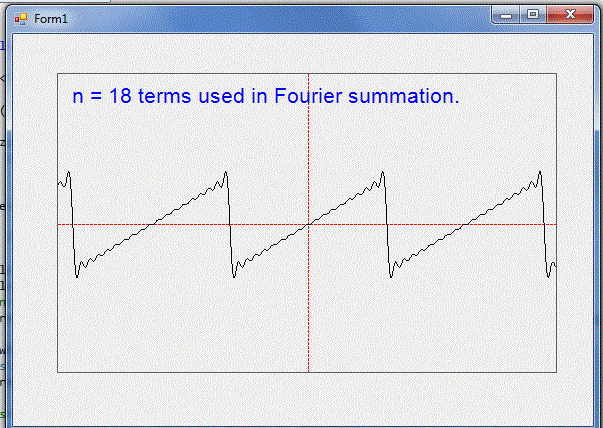
Fill in or add the code below and enjoy. With the comments it should be clear what is done, otherwise feel free to ask. An example output is also provided. If you want the same effect as on the site, put the method in a loop.
Have fun! :)
Two methods to calculate and plot a sawtooth function in C#
using System;
using System.Collections.Generic;
using System.Drawing;
using System.Windows.Forms;

namespace SawTooth
{
    public partial class Form1 : Form
    {
        private List<PointF> Coords;

        public Form1()
        {
            InitializeComponent();
            Coords = new List<PointF>(); // Make list to store the coordinates of some function
        }

        const int Nterms = 18; // number of term used in sum = n in the formula

        private void PlotPanel_Paint(object sender, PaintEventArgs e)
        {
            Plot MyPlot = new Plot(this.PlotPanel.Size);
            MyPlot.PlotAxes(e.Graphics);
            // comment this ou if you want to use second method
            String drawString = string.Format("n = {0} terms used in Fourier summation." , Nterms.ToString()); // Create string to draw.

            Font drawFont = new Font("Arial", 16);          // Create font and brush.
            SolidBrush drawBrush = new SolidBrush(Color.Blue);
            PointF drawPoint = new PointF(10f, 10f);  // Create point for upper-left corner of drawing.

            // Draw string to screen.
            MyPlot.DrawString(drawString, drawFont, drawBrush, drawPoint, e.Graphics);

            Coords = SawToothFunc(-10.0, 10.0, Nterms, 0.01); //generate list of x,y coordinates
            //second method
            //MyPlot.SetPlotPort(-10, 10, -5, 5);
            //Coords = SawToothFunc(-10.0, 10.0, 0.01);
            MyPlot.PlotPoints(Coords, Pens.Black, e.Graphics); //plot the coordinate list, take care of screen transforms.
        }

        /// <summary>
        /// Method to calculate a sawtooth function
        /// </summary>
        /// <param name="Xlow">The lower boundary value on the X axis</param>
        /// <param name="Xhigh">The higher boundary value on the X axis</param>
        /// <param name="NSums">The number of terms used, higher values give better aproximations</param>
        /// <param name="step">stepvalue of x used in the Xlow XHigh interval</param>
        /// <returns>A list of PointF structures, containing the calculated coordinates </returns>
        private List<PointF> SawToothFunc(double Xlow, double Xhigh, int NSums, double step)
        {
            List<PointF> CoordList = new List<PointF>();
            CoordList.Clear();

            int UnityFactor;
            for (double x = Xlow; x <= Xhigh; x += step)
            {
                PointF P = new PointF();
                P.X = (float)x;
                P.Y = 0f;
                UnityFactor = 1;
                for (int n = 1; n <= NSums; n++)
                {
                    // could use Math.Pow(-1.0, n + 1) here to reflect the syntax of the formula a bit more
                    // but the UnityFactor trick uses far less computer time!
                    P.Y += (float)(2 * UnityFactor * Math.Sin(n * x) / n);
                    UnityFactor = -UnityFactor;
                }
                CoordList.Add(P);
            }
            return CoordList;
        }

        /// <summary>
        /// Another method (without a series approximation) to calculate a Sawtooth function
        /// </summary>
        /// <param name="Xlow">The lower boundary value on the X axis</param>
        /// <param name="Xhigh">The higher boundary value on the X axis</param>
        /// <param name="step">stepvalue of x used in the Xlow XHigh interval</param>
        /// <returns></returns>
        private List<PointF> SawToothFunc(double Xlow, double Xhigh, double step)
        {
            List<PointF> CoordList = new List<PointF>();
            CoordList.Clear();

            for (double t = Xlow; t <= Xhigh; t += step)
            {
                PointF P = new PointF();
                P.X = (float)t;

                double a = 2;

                P.Y = (float)(2 * (t / a - Math.Floor(t / a + 0.5)));

                CoordList.Add(P);
            }
            return CoordList;
        }
    }
}

/*---------------------------------------------------------------------------

  PLOT CLASS
  By DM, last edit : 2/2/2012
  Version 3.00

  If I can find the time I will extend this.
  --------------------------------------------------------------------------*/
using System;
using System.Collections.Generic;
using System.Drawing;

namespace SawTooth
{
    /// <summary>
    /// class to plot x and y values on a Form or Panel
    ///
    /// Because on the form coordinates start at the upper left corner with 0,0
    /// with the y coordinate going down, a little transformation is done here
    /// so that x,y coordinates act as normal carthesian coordinates, with 0,0
    /// in the center of the Form or Panel
    /// </summary>
    class Plot
    {
        struct PlotPort
        {
            public int minX;
            public int maxX;
            public int minY;
            public int maxY;
        };

        private PlotPort _PlotW;    //"window" of carthesian coordinates
        private Size _ClientArea;   //keeps the screen pixels info
        private float _Xspan;
        private float _Yspan;

        public Plot()
        {
            _ClientArea = new Size(50,  50); //default width,height
            SetPlotPort(-10, 10, -10, 10);   //default, sets the PlotPort struct
            AxisColor = Color.Red;
        }

        public Plot(Size Plotarea) : this()
        {
            _ClientArea = Plotarea;
        }

        public Color AxisColor { get; set; }

        public Size ClientArea { set { _ClientArea = value; } }

        /// <summary>
        /// Set the bounderies of the form(screen) to real(world) coordinates.
        /// </summary>
        /// <param name="minx">lowest x value</param>
        /// <param name="maxx">highest x value</param>
        /// <param name="miny">lowest y value</param>
        /// <param name="maxy">highest y value</param>
        public void SetPlotPort(int minx, int maxx, int miny, int maxy)
        {
            //set the bounderies of the form(screen) to real coordinates.
            _PlotW.minX = minx;
            _PlotW.maxX = maxx;
            _PlotW.minY = miny;
            _PlotW.maxY = maxy;
            _Xspan = _PlotW.maxX - _PlotW.minX;
            _Yspan = _PlotW.maxY - _PlotW.minY;
        }

        public void PlotPixel(PointF P, Color C, Graphics G)
        {
            //Plot one pixel
            Bitmap bm = new Bitmap(1, 1);
            bm.SetPixel(0, 0, C);
            P = ToScreen(P);
            G.DrawImageUnscaled(bm, (int)P.X, (int)P.Y); string s = Convert.ToString("astr");
        }

        public void PlotAxes(Graphics G)
        {
            Pen AxisPen = new Pen(Color.Red);
            AxisPen.DashStyle = System.Drawing.Drawing2D.DashStyle.Dash;
            // X-Axis
            PointF X0 = new PointF( _PlotW.minX, _PlotW.minY + _Yspan / 2f);
            PointF X1 = new PointF( _PlotW.maxX, _PlotW.minY + _Yspan / 2f);
            //Y-Axis
            PointF Y0 = new PointF(_PlotW.minX + _Xspan / 2f, _PlotW.maxY);
            PointF Y1 = new PointF(_PlotW.minX + _Xspan / 2f, _PlotW.minY);

            G.DrawLine(AxisPen, ToScreen(X0), ToScreen(X1));
            G.DrawLine(AxisPen, ToScreen(Y0), ToScreen(Y1));

        }

        /// <summary>
        /// Plot a list of carthesian points on the screen
        /// </summary>
        /// <param name="thePts"></param>
        /// <param name="G"></param>
        public void PlotPoints(List<PointF> thePts,Pen P, Graphics G)
        {
            PointF[] PtAr = thePts.ToArray();
            for (int k = 0; k < PtAr.Length; k++)
            {
                PtAr[k] = ToScreen(PtAr[k]);
            }
            G.DrawLines(P, PtAr);
        }

        /// <summary>
        /// Transform a point in carthesian coordinates to a point on the screen
        /// </summary>
        /// <param name="ptC">The point in carthesian(world) coordinates</param>
        /// <returns>Transformed point to be plotted on the screen</returns>
        private PointF ToScreen(PointF ptC)
        {
            PointF aP = new PointF();
            aP.X = _ClientArea.Width / _Xspan * ptC.X + _ClientArea.Width / 2f;
            aP.Y = -(_ClientArea.Height / _Yspan * ptC.Y - _ClientArea.Height / 2f);
            return aP;
        }

        /// <summary>
        /// Print a string in the drawing area
        /// </summary>
        /// <param name="str">The string to print</param>
        /// <param name="fnt"></param>
        /// <param name="br"></param>
        /// <param name="drawPnt">The coordinate of the lefttop corner of the font where printing starts</param>
        /// <param name="G"></param>
        public void DrawString(String str,Font fnt, Brush br, PointF drawPnt, Graphics G)
        {
            G.DrawString(str, fnt, br, drawPnt);
        }
    }
}

Be a part of the DaniWeb community
We're a friendly, industry-focused community of developers, IT pros, digital marketers, and technology enthusiasts meeting, networking, learning, and sharing knowledge.