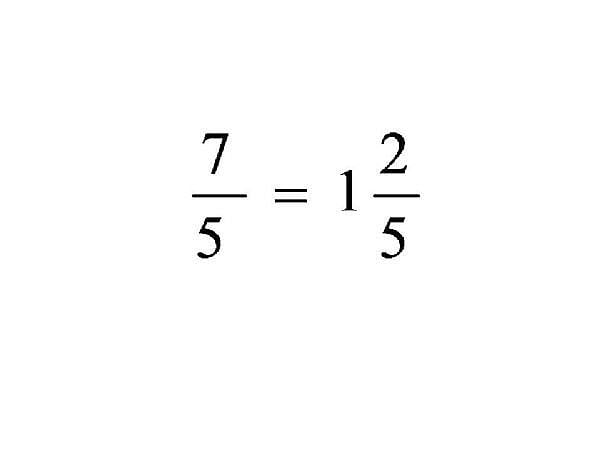
Hi, you have working code that takes the user input and displays it in Math format, is that correct?
If so, could you post that code here and we can show you how to rework it :)
Ryshad
Nearly a Posting Virtuoso
1,307 posts since Aug 2009
Reputation Points: 512
Solved Threads: 246
personally, i would display the readable characters in the textbox, then parse the textbox.text trhough a function that swaps out the readable characters for math format using string.replace.
private string FormatText(string input)
{
input = input.Replace("÷", "//div");
input = input.Replace("√", "sqrt");
//and so on
return input;
}
//then call the function like this:
WriteEquation(FormatText(textBoxEquation.Text));
it may be easier to use regular expressions, but i have very limited experience with them so someone more versed may be able to point you in the right direction.
Ryshad
Nearly a Posting Virtuoso
1,307 posts since Aug 2009
Reputation Points: 512
Solved Threads: 246
sknake
Industrious Poster
4,954 posts since Feb 2009
Reputation Points: 1,764
Solved Threads: 735
The way i see it there are two choices:
1) you can try the way i suggested, populate the textbox with the user friendly text then reformat it using string functions/regex.
2) build two strings, any time you add to the user friendly textbox, add the math format to a class level string variable as well. This way you'll have one string that the user can read and one that is formatted for the MIMETex. The problem you'll have here is keeping the two in sync...very tricky, since you'd have to capture the changes in the textbox : /
I think 1) is the way to go... just pass the string through a function that pulls out the user friendly text and rearranges it into MIMETex format.
Regular expressions would probably be helpful to you here. Check out:
http://msdn.microsoft.com/en-us/library/30wbz966(VS.71).aspx
http://www.regular-expressions.info/
Ryshad
Nearly a Posting Virtuoso
1,307 posts since Aug 2009
Reputation Points: 512
Solved Threads: 246
Hi,
The replace function will only replace exact string matches, so if the user has entered numebrs into the brackets then the string will no longer match : "(12)/(24)" != "()/()"
You will definitely need to use regular expressions here to find the sections you want to replace. Read through the links i sent you...its been a long time since i worked with Regex so i cant rewrite the code for you atm : /
Perhaps someone more familair with it can give you a sample
Ryshad
Nearly a Posting Virtuoso
1,307 posts since Aug 2009
Reputation Points: 512
Solved Threads: 246
Ryshad has already given you the information you need. You need to make regex patterns with groups for each math command from latex.
sknake
Industrious Poster
4,954 posts since Feb 2009
Reputation Points: 1,764
Solved Threads: 735
private void button5_Click(object sender, EventArgs e)
{
const string matchNumerator = @"\((?<Numerator>[\d,]*(\.\d*))\)";
const string matchDenominator = @"\((?<Denominator>[\d,]*(\.\d*))\)";
const string matchBoth = matchNumerator + @"\/" + matchDenominator;
const string txtBoxInput = @"(5.2)/(4.3)";
System.Text.RegularExpressions.Match m = System.Text.RegularExpressions.Regex.Match(txtBoxInput, matchBoth);
if (m.Success)
{
decimal dNumerator, dDenominator;
if (decimal.TryParse(m.Groups["Numerator"].Value, out dNumerator) && decimal.TryParse(m.Groups["Denominator"].Value, out dDenominator))
{
string latex = @"\frac {" + dNumerator.ToString() + "}{" + dDenominator.ToString() + "}";
decimal valueOut = dNumerator / dDenominator;
System.Diagnostics.Debugger.Break();
}
}
}
sknake
Industrious Poster
4,954 posts since Feb 2009
Reputation Points: 1,764
Solved Threads: 735
I know. I gave you one regex, you need to write the rest.
Please mark this thread as solved if you have found an answer to your question and good luck!
sknake
Industrious Poster
4,954 posts since Feb 2009
Reputation Points: 1,764
Solved Threads: 735
What do you mean "all values"? The demo worked fine for me...
sknake
Industrious Poster
4,954 posts since Feb 2009
Reputation Points: 1,764
Solved Threads: 735
The code does work for any fraction. const string txtBoxInput = @"(5.2)/(4.3)"; was the simulated sample input. You can instead take the value of textbox1.Text and the code will still function.
sknake
Industrious Poster
4,954 posts since Feb 2009
Reputation Points: 1,764
Solved Threads: 735