This is the form.cs in my REMOTE SERVER
using System;
using System.Collections.Generic;
using System.ComponentModel;
using System.Data;
using System.Drawing;
using System.Text;
using System.Windows.Forms;
using System.Runtime.Remoting;
using System.Runtime.Remoting.Channels;
using System.Runtime.Remoting.Channels.Tcp;
using Microsoft.Win32;


namespace remoteserver
{
    public partial class Form1 : Form
    {
        public Form1()
        {
            InitializeComponent();
        }

        private void Form1_Load(object sender, EventArgs e)
        {

            TcpChannel ch = new TcpChannel(8085);

            ChannelServices.RegisterChannel(ch);

            RemotingConfiguration.RegisterWellKnownServiceType(typeof

                           (remoteclass.xx), "Ankit", WellKnownObjectMode.Singleton);
            //RegistryKey rkApp = Registry.CurrentUser.OpenSubKey("SOFTWARE\\Microsoft\\Windows\\CurrentVersion\\Run", true);
            //if(rkApp.GetValue("RemoteServer")==null)
            //rkApp.SetValue("RemoteServer", Application.ExecutablePath.ToString());

        }
    }
}
And This code is present in my Remote Client
It returns the sumation of two numbers in textBox1 and textBox2 in textBox3
using System;

using System.Collections.Generic;

using System.ComponentModel;

using System.Data;

using System.Drawing;

using System.Text;

using System.Windows.Forms;

using System.Runtime.Remoting;

using System.Runtime.Remoting.Channels;

using System.Runtime.Remoting.Channels.Tcp;
using System.Runtime.Serialization.Formatters.Soap;
using System.Threading;


namespace remoteclient
{

    public partial class Form1 : Form
    {

        //TcpChannel ch = new TcpChannel();

        remoteclass.xx obj = new remoteclass.xx();

        public Form1()
        {

            InitializeComponent();

        }


        private void button1_Click_1(object sender, EventArgs e)
        {
            try
            {
                //ChannelServices.RegisterChannel(ch);

                obj = (remoteclass.xx)Activator.GetObject(typeof(remoteclass.xx),

                               "tcp://"+txtPath.Text+":8085/Ankit");

                int x = Int32.Parse(textBox1.Text);

                int y = Int32.Parse(textBox2.Text);

                textBox3.Text = (obj.sum(x, y)).ToString();
            }
            catch(Exception ex)
            {
                MessageBox.Show(ex.ToString());
            }
        }
when I input localhost in txtPath
it works great
But when I try to connect it over lan
(Say my ip address is 192.168.1.1 and the server's ip address is 192.168.1.2)
and i input 192.168.1.2 in txtPath
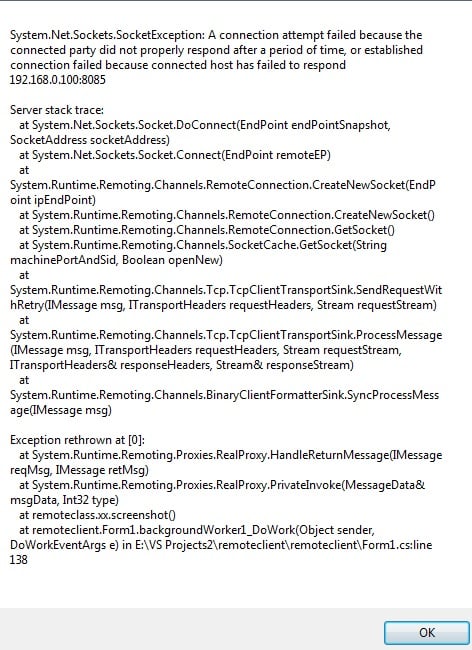
I get the System.Net.Sockets.SocketException: A connection attempt failed because the connected party did not respond after a period of time, or established connection failed because connected host has failed to respond 192.168.1.2
and when i try it over the internet
I get the exception
"No connection could be made because the target machine actively refused it."
Exception attached...
Thanks in advance