We're a community of 1076K IT Pros here for help, advice, solutions, professional growth and fun. Join us!
1,075,803 Members — Technology Publication meets Social Media
Username:
Password:
Lost login information?
Start New Discussion Reply to this Discussion

Win Forms App: Updating a label on button clicks

Hello,

My application has a simple textbox for user input, a database connection, a button and a label.

I will search for the user input in my database and update the label when the user clicks the button.

This works fine on the first button click but ceases to function on subsequent clicks.
Any idea why?

Regards,

MC

2
Contributors
3
Replies
2 Days
Discussion Span
1 Year Ago
Last Updated
4
Views
Question
Answered
masala_curry
Newbie Poster
4 posts since Aug 2008
Reputation Points: 10
Solved Threads: 0
Skill Endorsements: 0

Not without seeing some code...

hericles
Veteran Poster
1,065 posts since Nov 2007
Reputation Points: 156
Solved Threads: 228
Skill Endorsements: 9

Not without seeing some code...

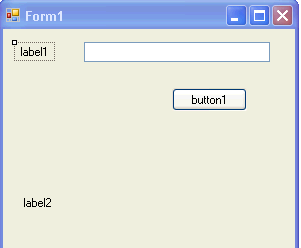
Please check out the attached image to get an overview of what I have. Imagine that a user will enter her/his name in the text box, I will check if the name exists in the database and display it on the label...then the user will enter another name etc...
I would love to learn best practices as well...so please let me know if some of my code should belong in a new code file...in a separate class...maybe I can make use of fewer try-catches etc.

Thanks a bunch!

public partial class Form1 : Form
    {
        SqlConnection con;
        DataSet ds1;

        public Form1()
        {
            InitializeComponent();
        }

        private void Form1_Load(object sender, EventArgs e)
        {
            con = new SqlConnection(...MyConnectionString...);
            ds1 = new DataSet();
        }

        private void label1_Click(object sender, EventArgs e)
        {
            //Dont really need this and will delete it later...Please ignore
        }

        private void button1_Click(object sender, EventArgs e)
        {
            try
            {
                con.Open();
            }
            catch(Exception ex)
            {
                Console.WriteLine("Con Open(): \n {0}", ex);
                return;
            }

            string sql = select a,b,c from table where x=y;

            SqlDataAdapter da = new SqlDataAdapter(sql, con);

            try
            {
                da.Fill(ds1, "MyDataSetName");
            }
            catch (Exception ex)
            {
                Console.WriteLine("Da Fill(): \n {0}", ex);
                return;
            }
            GetRecords();

            con.Close();  
        }

        private void GetRecords()
        {
            DataRow dRow = ds1.Tables["MyDataSetName"].Rows[0];
            label2.Refresh();
            label2.Text = dRow.ItemArray.GetValue(0).ToString() + " " + dRow.ItemArray.GetValue(1).ToString() + " " + dRow.ItemArray.GetValue(2).ToString();
        }
    }
Attachments 11-29-2011_11-06-01_PM.png 3.89KB
masala_curry
Newbie Poster
4 posts since Aug 2008
Reputation Points: 10
Solved Threads: 0
Skill Endorsements: 0

This can be solved by calling Clear() on dataset before filling it with new values.

[B]ds1.Clear();[/B]
try
{
  da.Fill(ds1, "MyDataSetName");
}
masala_curry
Newbie Poster
4 posts since Aug 2008
Reputation Points: 10
Solved Threads: 0
Skill Endorsements: 0
Question Answered as of 1 Year Ago by hericles

This question has already been solved: Start a new discussion instead

Post: Markdown Syntax: Formatting Help
 
You
View similar articles that have also been tagged:
 
© 2013 DaniWeb® LLC
Page rendered in 0.0684 seconds using 2.78MB