We're a community of 1076K IT Pros here for help, advice, solutions, professional growth and fun. Join us!
1,075,916 Members — Technology Publication meets Social Media
Username:
Password:
Lost login information?
Start New Discussion Reply to this Discussion

Exporting EXCEL

Hello everyone, i have the following problem and I come here looking for some advice.

I am using c#, but i have a dll that creates the excel file in Visual Basic.

i have a datagridview and the information there is exported to excel file. No problem there.

the problems is the following, in my datagridview i have a field that has almost 20 numbers(15 to 17).
in my datagrid the information is being displayed fine from the database. example

| col_Number |
|20120217082628888|

but the problem is when i export this data to excel.

i am using a template and the column where that number goes is currently formatted as general and the data is displayed like this

| col_Number |
| 2.01202E+16 |

if I apply the number format in the template the information goes like this

| col_Number |
|20120217082628800.00|

from the database the columns is

varchar(50)

, if i try to convert that to

bigint

, the winform gives me an error.

what i see is that when i convert to number, automatically is taking the last two digits away and replacing them with 0
20120217082628888 -- ORIGINAL
20120217082628800.00 -- AFTER NUMBER FORMAT

the code that I use in my dll to paste the information is the following.

For row As Integer = 1 To table2.Rows.Count - 1
                For cols As Integer = 0 To table2.Columns.Count - 1
                    exlWsh.Cells(row + 1, cols + 1) = table2.Rows(row)(cols)
                Next
            Next

i dont do any format in any part of the code, that is done directly in the excel file.

any help will be appreciated.

Thanks...

2
Contributors
30
Replies
4 Hours
Discussion Span
1 Year Ago
Last Updated
31
Views
Question
Answered
darkelflemurian
Light Poster
47 posts since Dec 2010
Reputation Points: 10
Solved Threads: 2
Skill Endorsements: 0

Is it going to be used in a calculation after it reaches Excel?
If not, can your template treat it as a string?

thines01
Postaholic
Team Colleague
2,433 posts since Oct 2009
Reputation Points: 447
Solved Threads: 408
Skill Endorsements: 7

Thanks for the reply first of all.

no calculations. and the thing is that even when i treat the information as string, it shows up like this
| col_Number |
| 2.01202E+16 |

Is it going to be used in a calculation after it reaches Excel?
If not, can your template treat it as a string?

darkelflemurian
Light Poster
47 posts since Dec 2010
Reputation Points: 10
Solved Threads: 2
Skill Endorsements: 0

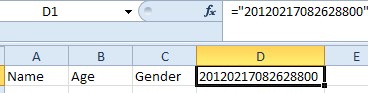
Can you wrap it in this?:

string strCell = "=\"20120217082628800\"";
thines01
Postaholic
Team Colleague
2,433 posts since Oct 2009
Reputation Points: 447
Solved Threads: 408
Skill Endorsements: 7

Can you wrap it in this?:

string strCell = "=\"20120217082628800\"";

it did not work. is there a way i can extract the value of the current cell in the datatable. somethign like this (i know this is nor correct) this is in visual Basic:

exlWsh.Cells(row + 1, cols + 1) = table2.Rows(row)(cols). Value
darkelflemurian
Light Poster
47 posts since Dec 2010
Reputation Points: 10
Solved Threads: 2
Skill Endorsements: 0

it did not work.

What do you mean?
Did it throw an exception?
Did the value remain the same?


Are you populating .Value2 on the spreadsheet or just the whole cell?

thines01
Postaholic
Team Colleague
2,433 posts since Oct 2009
Reputation Points: 447
Solved Threads: 408
Skill Endorsements: 7

What do you mean?
Did it throw an exception?
Did the value remain the same?


Are you populating .Value2 on the spreadsheet or just the whole cell?

just the whole cell, I am using this right now

For row As Integer = 1 To table2.Rows.Count - 1
       For cols As Integer = 0 To table2.Columns.Count - 1
         exlWsh.Cells(row + 1, cols + 1) = table2.Rows(row)(cols)
       Next
    Next
darkelflemurian
Light Poster
47 posts since Dec 2010
Reputation Points: 10
Solved Threads: 2
Skill Endorsements: 0

Can you change it to .Value2
?

thines01
Postaholic
Team Colleague
2,433 posts since Oct 2009
Reputation Points: 447
Solved Threads: 408
Skill Endorsements: 7

Can you change it to .Value2
?

is giving me the following exception
Public member 'Value2' on type 'String' not found.

and my code looks like

For row As Integer = 1 To table2.Rows.Count - 1
                For cols As Integer = 0 To table2.Columns.Count - 1
                    exlWsh.Cells(row + 1, cols + 1) = table2.Rows(row)(cols).Value2
                Next
            Next
darkelflemurian
Light Poster
47 posts since Dec 2010
Reputation Points: 10
Solved Threads: 2
Skill Endorsements: 0

Put that on the CELL in Excel, not on the table row.

thines01
Postaholic
Team Colleague
2,433 posts since Oct 2009
Reputation Points: 447
Solved Threads: 408
Skill Endorsements: 7

Put that on the CELL in Excel, not on the table row.

you mean in the excel file or in my code after

exlWsh.Cells
darkelflemurian
Light Poster
47 posts since Dec 2010
Reputation Points: 10
Solved Threads: 2
Skill Endorsements: 0

Yes, in your code. Affix the .Value2 to the end of the cell you are populating.

thines01
Postaholic
Team Colleague
2,433 posts since Oct 2009
Reputation Points: 447
Solved Threads: 408
Skill Endorsements: 7

Put that on the CELL in Excel, not on the table row.

that goes in the excel file or in my code?

and if is in code can you tell me how it will looks like?

thanks...

darkelflemurian
Light Poster
47 posts since Dec 2010
Reputation Points: 10
Solved Threads: 2
Skill Endorsements: 0

It goes in your code.
At the end of the code populating the cell after the (), hit the period key.
You will see a menu pop up. One of the selections will be Value2.

thines01
Postaholic
Team Colleague
2,433 posts since Oct 2009
Reputation Points: 447
Solved Threads: 408
Skill Endorsements: 7

It goes in your code.
At the end of the code populating the cell after the (), hit the period key.
You will see a menu pop up. One of the selections will be Value2.

i tried what you said but i was only getting the pop up with the code like this

exlWsh.Cells.Value2(row + 1, cols + 1)

and if I run the program like that, eventually tells me that there is Insufficient memory to keep executing the program.

darkelflemurian
Light Poster
47 posts since Dec 2010
Reputation Points: 10
Solved Threads: 2
Skill Endorsements: 0

Nope.
The parentheses go after the word Cells and the Value2 goes after that with no parentheses.
...then you give THAT a string value or whatever you're trying to put in it.

thines01
Postaholic
Team Colleague
2,433 posts since Oct 2009
Reputation Points: 447
Solved Threads: 408
Skill Endorsements: 7

Nope.
The parentheses go after the word Cells and the Value2 goes after that with no parentheses.
...then you give THAT a string value or whatever you're trying to put in it.

it gives me the following exception

Public member 'Values2' on type 'Range' not found.

darkelflemurian
Light Poster
47 posts since Dec 2010
Reputation Points: 10
Solved Threads: 2
Skill Endorsements: 0

Then convert it to a cell or use this:

CType(rowCurrent.Cells(1, 1), Range).Value2 = "Some Value"

Sorry for posting VB in the C# forum.

thines01
Postaholic
Team Colleague
2,433 posts since Oct 2009
Reputation Points: 447
Solved Threads: 408
Skill Endorsements: 7

Then convert it to a cell or use this:

CType(rowCurrent.Cells(1, 1), Range).Value2 = "Some Value"

Sorry for posting VB in the C# forum.

I got the same result.

| COL_NUMBER |
| 2.01202E+16 |

darkelflemurian
Light Poster
47 posts since Dec 2010
Reputation Points: 10
Solved Threads: 2
Skill Endorsements: 0

Did you wrap the extra quotes around it?

thines01
Postaholic
Team Colleague
2,433 posts since Oct 2009
Reputation Points: 447
Solved Threads: 408
Skill Endorsements: 7

This question has already been solved: Start a new discussion instead

Post: Markdown Syntax: Formatting Help
 
You
View similar articles that have also been tagged:
 
© 2013 DaniWeb® LLC
Page rendered in 0.1334 seconds using 2.73MB