Right... I've managed to run select statements with associated Joins to show the data I want in DGV's which is great. Seems to be working fine.
I'm not to the point where I need to be able to Insert, Update & Delete Rows in my Database. I am guessing If I can nail down one of these the others shoul fall into place with some tweaking of the code.
The Code I've written uses the 'CommandBuilder' object to try and re-establish a connected to the DB. Whilst Debugging the Values seem to be passed correclty (See Screenshot attached) but I get an error stating the Connection has not been initalised (See Screenshot).
I've just tried doing it via a different method using the following code:
//Creates new versions of the Connection string and Data Set//
con = new System.Data.OleDb.OleDbConnection();
ds = new DataSet();
//The actual connection to the database//
con.ConnectionString = "PROVIDER=Microsoft.Jet.OLEDB.4.0;Data Source = E:/Orders1.mdb";
con.Open();
//The SQL String you need to pass into the Data Adapter to collect the information//
string AddCustomerSQL = "SELECT * from cashCustomers";
da = new System.Data.OleDb.OleDbDataAdapter(AddCustomerSQL, con);
//The Data Adapater (da) is told to fill the DataSet (ds) with the information pulled from the SQL Query and call this fill "cashCustomers"//
da.Fill(ds, "cashCustomers");
DataRow dRow = ds.Tables["cashCustomers"].NewRow();
dRow[1] = txtAccRef.Text;
dRow[2] = txtAccName.Text;
dRow[3] = txtAccAddr1.Text;
dRow[4] = txtAccAddr2.Text;
dRow[5] = txtAccTown.Text;
dRow[6] = txtAccPostCode.Text;
dRow[7] = txtAccCounty.Text;
ds.Tables["cashCustomers"].Rows.Add(dRow);
da.Update(ds, "cashCustomers");
con.Dispose();
MessageBox.Show("Account Added");
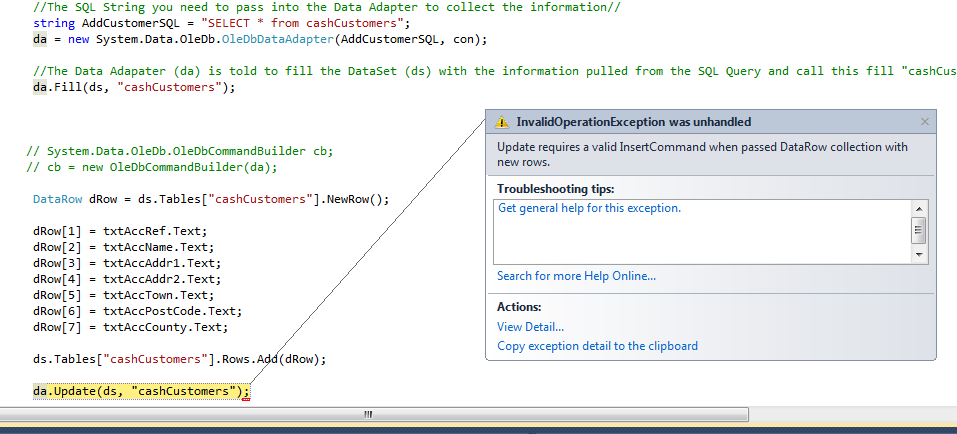
But that did not seem to work either but did pull up a different Error message. (See Screenshot)
Many thanks for any Help Offered. I'm sure we can crack this.
got this all sorted now.. used the following code:
//Creates new versions of the Connection string and Data Set//
con = new System.Data.OleDb.OleDbConnection();
ds = new DataSet();
//The actual connection to the database//
con.ConnectionString = "PROVIDER=Microsoft.Jet.OLEDB.4.0;Data Source = E:/Orders1.mdb";
//Open the Connection to the Database//
con.Open();
//The SQL INSERT INTO String you need to pass into the Data Adapter to collect the information//
string AddCustomerSQL = "INSERT INTO cashCustomers(CashAccRef, CashName, CashAddress1, CashAddress2, CashTown, CashAddress3,CashAddress4 ) " +
" VALUES('" + txtAccRef.Text + "', '" + txtAccName.Text + "','" + txtAccAddr1.Text + "' ,'" + txtAccAddr2.Text + "' , '" + txtAccTown.Text + "' , '" + txtAccCounty.Text + "' , '" + txtAccPostCode.Text + "')";
//Creates a new version of the Data Adapater which passed the SQL and Connection information//
da = new System.Data.OleDb.OleDbDataAdapter(AddCustomerSQL, con);
//Data Adapater (da) uses the Insert Command along with the SQL Querey & Connection Details//
da.InsertCommand = new OleDbCommand(AddCustomerSQL, con);
da.InsertCommand.ExecuteNonQuery();
//Closes the connection//
con.Dispose();
//Shows End User the Account has been added//
MessageBox.Show("Account Added");