954,536 Members — Technology Publication meets Social Media
Username:
Password:
Lost login information?
Have something to say? Contribute New Article Reply to this Article

Netbeans Input Fields

Hi,

I am trying to develop a GUI application that has a text area for a 10 digit number. I would prefer to right click on the field and select a max length and "number type" instead of coding an 'if function on keypress' and so on. Is this possible?

I looked but didn't find anything, perhaps I'm not looking in the right places...

Thanks,
-Ashton.

AshtonHogan
Posting Whiz in Training
210 posts since Jul 2009
Reputation Points: 7
Solved Threads: 1
 

Tutorial for drag&drop "developers" Designing a Swing GUI in NetBeans IDE

peter_budo
Code tags enforcer
Moderator
15,436 posts since Dec 2004
Reputation Points: 2,806
Solved Threads: 902
 

lol, no need to insult.. it's just a question - you probably don't know some minor things here and there either... you could've given me a 2 line answer if you knew this instead of making me read a huge document... I know how to make swing applications, I just don't know this one little thing.

AshtonHogan
Posting Whiz in Training
210 posts since Jul 2009
Reputation Points: 7
Solved Threads: 1
 

All your dreams come true when you click on the component and check the Properties tab (normally on the right).
If by any chance you do not see this panel then from main menu select Window >> Properties or Ctrl+Shift+7

peter_budo
Code tags enforcer
Moderator
15,436 posts since Dec 2004
Reputation Points: 2,806
Solved Threads: 902
 

Hi,

I am trying to develop a GUI application that has a text area for a 10 digit number. I would prefer to right click on the field and select a max length and "number type" instead of coding an 'if function on keypress' and so on. Is this possible?

I looked but didn't find anything, perhaps I'm not looking in the right places...

Thanks, -Ashton.

I have checked properties of the text field many times, but did not find anything, that's why I made this thread.

PS: Why do I always have to argue with some big shot before I can get an answer on this website? It would work so much better if we were all willing to listen before talking I think.

Thanks again,
-Ashton.

AshtonHogan
Posting Whiz in Training
210 posts since Jul 2009
Reputation Points: 7
Solved Threads: 1
 

Have a look at JFormattedTextField in the API, if I understand your requirement properly, this may be the answer.

JamesCherrill
Posting Genius
Moderator
6,373 posts since Apr 2008
Reputation Points: 2,130
Solved Threads: 1,073
 

Hi James,

I was looking for a Netbeans answer in specific, If there is no function like the one I'm looking for then I will move on and look at alternative methods. Thanks for your input.

-Ashton.

AshtonHogan
Posting Whiz in Training
210 posts since Jul 2009
Reputation Points: 7
Solved Threads: 1
 

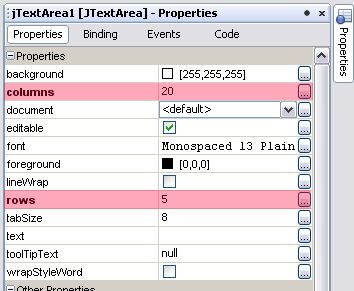
Am I missing something here? :-/

jtextarea_options.png

However you will not able to set content type like NUMBER, ANY, EMAIL. For that you will need add on library

Attachments jtextarea_options.png 5.59KB
peter_budo
Code tags enforcer
Moderator
15,436 posts since Dec 2004
Reputation Points: 2,806
Solved Threads: 902
 

Hi James,

I was looking for a Netbeans answer in specific, If there is no function like the one I'm looking for then I will move on and look at alternative methods. Thanks for your input.

-Ashton.

I'm an Eclipse user myself, so I can't address NetBeans, but I thought if NetBeans supports JFormattedTextField in its GUI builder (which it really should) then it should have the standard format options available for you to pick from including numeric type & length.

JamesCherrill
Posting Genius
Moderator
6,373 posts since Apr 2008
Reputation Points: 2,130
Solved Threads: 1,073
 

Good suggestion James, there is of course one in NetBeans.

peter_budo
Code tags enforcer
Moderator
15,436 posts since Dec 2004
Reputation Points: 2,806
Solved Threads: 902
 

Am I missing something here?

However you will not able to set content type like NUMBER, ANY, EMAIL. For that you will need add on library

Sorry I meant text field not text area.

AshtonHogan
Posting Whiz in Training
210 posts since Jul 2009
Reputation Points: 7
Solved Threads: 1
 

JTextField also doesn't let you set content type (unlike TextField in Java Microedition).

Use JFormattedTextField as James suggested. You will find it in NetBeans in Palette>> Swing Controls >> FormattedField. And to set content type in Properties look for formatterFactory and use drop down menu

peter_budo
Code tags enforcer
Moderator
15,436 posts since Dec 2004
Reputation Points: 2,806
Solved Threads: 902
 

I just played around with the JFormattedTextField and formatterFactory, and had a look at the API. The problem though, is that it formats the text after it has already been typed in where as my aim is to completely disable any other character except numbers. Is this not possible?

At the same time, to disable input once the 10th character has been entered (max length).

Thanks again,
-Ashton.

AshtonHogan
Posting Whiz in Training
210 posts since Jul 2009
Reputation Points: 7
Solved Threads: 1
 

why not use a JSpinner?
EDIT> misread the question, just use a JFormattedTextField as said by the other two.

majestic0110
Nearly a Posting Virtuoso
1,328 posts since Oct 2007
Reputation Points: 256
Solved Threads: 72
 

Hi majestic0110,

I think it's cool that you have 1,234 posts but you didn't read my previous reply as to why I can't use the JFormattedTextField.

Thanks,
-Ashton.

AshtonHogan
Posting Whiz in Training
210 posts since Jul 2009
Reputation Points: 7
Solved Threads: 1
 

This article has been dead for over three months

Post: Markdown Syntax: Formatting Help
You
View similar articles that have also been tagged: