Hello,
I have a project and I'm working on the important part now.
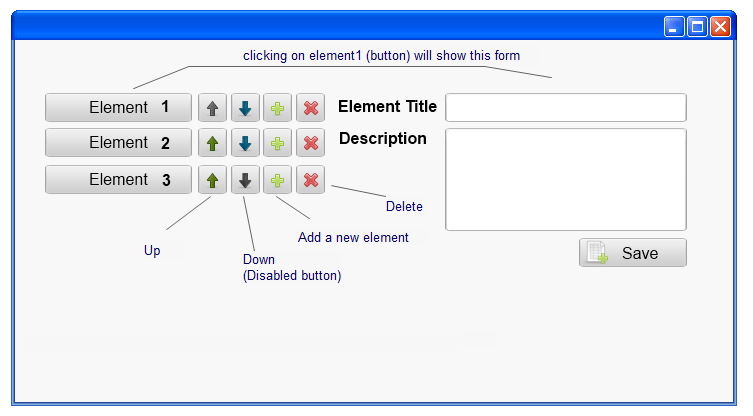
I want to create this interface in the end and informations in DB.
This my goal, this is a prototypical interface created with MockupScreens
http://i.imgur.com/7rt5U.png
now I created this interface, I think I'm progressing slowly because I made it in one day
it needs more work on...
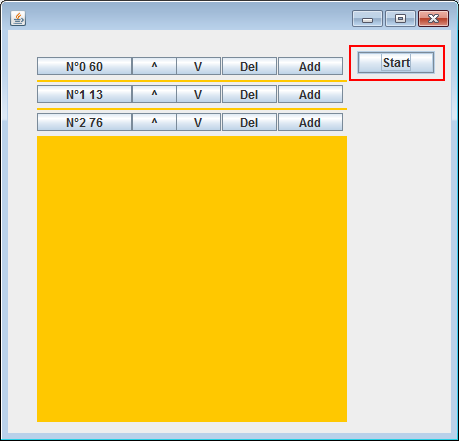
This is the ouput:
http://i.imgur.com/ROuMD.png
This interface is composed by :
- one columnPanel with a GridLayout
- a rowPanel which contains the 5 buttons : ( title of row + up + down + delete + add)
Now I created the add button but itsn't woks like I want.
It adds rowPanel in columnPanel. For example when I click add buttton on row N°0 60, the next rowPanel will be in the end of list not just after.
I want the new rowPanel appear between N°0 60 and N°0 13 .
I added a random number with number of row to differentiate between rowPanels.
Someone have an idea.
I tryed to print the index of rowpanel using getComponent() but it always gives 0.
int index = 0;
rowPanel.getComponent(index);
Here's my full code:
import java.awt.BorderLayout;
import java.awt.Container;
import java.awt.EventQueue;
import javax.swing.BorderFactory;
import javax.swing.Box;
import javax.swing.BoxLayout;
import javax.swing.JButton;
import javax.swing.JFrame;
import javax.swing.JLabel;
import javax.swing.JPanel;
import javax.swing.border.EmptyBorder;
import java.awt.Color;
import java.awt.GridLayout;
import javax.swing.JScrollPane;
import java.awt.event.ActionListener;
import java.awt.event.ActionEvent;
import javax.swing.JTextField;
import javax.swing.JTextArea;
import java.awt.event.MouseAdapter;
import java.awt.event.MouseEvent;
import java.util.Random;
public class Test_DG extends JFrame {
	private JPanel contentPane;
	static int nbrows;
	JPanel columnPanel = new JPanel();
	JButton btnStart = new JButton("Start");
	/**
	 * Launch the application.
	 */
	public static void main(String[] args) {
		nbrows=0;
		Test_DG frame = new Test_DG();
		frame.setVisible(true);
	}

	/**
	 * Create the frame.
	 */
	public Test_DG() {
		setDefaultCloseOperation(JFrame.EXIT_ON_CLOSE);
		setBounds(100, 100, 637, 441);
		contentPane = new JPanel();
		contentPane.setBorder(new EmptyBorder(5, 5, 5, 5));
		setContentPane(contentPane);
		contentPane.setLayout(null);

		btnStart.addActionListener(new ActionListener() {
			public void actionPerformed(ActionEvent arg0) {
				addRow();
			}
		});
		btnStart.setBounds(349, 21, 78, 23);
		contentPane.add(btnStart);
		columnPanel.setBounds(29, 24, 310, 368);
		contentPane.add(columnPanel);

		columnPanel.setBackground(Color.ORANGE);
		columnPanel.setLayout(new GridLayout(13, 1, 0, 2));

	}

	  void addRow() {

		    JPanel rowPanel = new JPanel();
		    rowPanel.setLayout(null);

		    JButton lbl = new JButton("");
			Random randGen = new Random();
		    lbl.setText("N°"+nbrows +" "+randGen.nextInt(8) +randGen.nextInt(8));
		    ///////////////////
		    nbrows++;
		    ////////////////////
		    lbl.setBounds(0, 3, 95, 18);
		    rowPanel.add(lbl);
		    //////////////////////////////////
		    JButton btnUp = new JButton("^");
		    btnUp.setBounds(95, 3, 45, 18);
			rowPanel.add(btnUp);

			JButton btnDown = new JButton("V");
			btnDown.setBounds(139, 3, 45, 18);
			rowPanel.add(btnDown);

		    JButton btnDel = new JButton("Del");
		    btnDel.setBounds(185, 3, 55, 18);
			rowPanel.add(btnDel);
			///////////////////////////////////////

		    JButton btnAdd = new JButton("Add");
			btnAdd.setBounds(241, 3, 65, 18);
			rowPanel.add(btnAdd);
			int index = 0;
			rowPanel.getComponent(index);
			System.out.println(index);
			btnAdd.addActionListener(new ActionListener() {
				public void actionPerformed(ActionEvent arg0) {
					addRow(); //////// ISNT RECURSION HERE ??

				}
			});

			//int index = 0;
			rowPanel.getComponent(index);
			System.out.println(index);

			btnDel.addActionListener(new ActionListener() {
				public void actionPerformed(ActionEvent arg0) {
 					//columnPanel.remove(this.rowPanel);
				}
			});

			columnPanel.add(rowPanel);
		    columnPanel.validate();
		    columnPanel.repaint();
		    ////////////////////////////////////

		  }
}
Also I wouldn't start adding rowPanels by the start button,
I created it because it call the addRow method and the first rowPanel won't appear.
Waiting for your response.
Thanks in advance.
Best regrads,
Ali.