954,554 Members — Technology Publication meets Social Media
Username:
Password:
Lost login information?
Have something to say? Contribute New Article Reply to this Article

Problems with Rock, Paper, Scissors JApplet

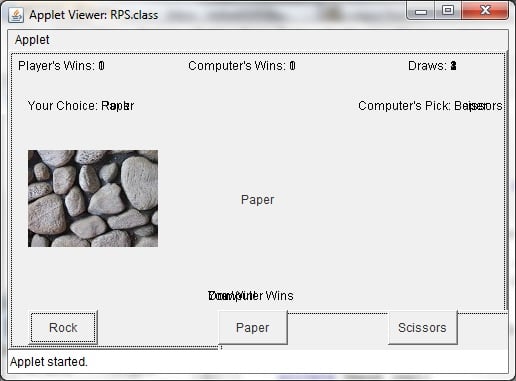
Hello everyone, I'm having some issues with my rock, paper, scissors JApplet program. Of course I have it "extends Applets" from the beginning of my class and I realized that this wasn't the same as JApplet. After I changed "Applet" to "JApplet", when I ran it, it doesn't look like of what I had before I changed it to "JApplet". When I have "Applet", everything looks fine. So I'm assuming I need to change something around within my code. Here is my code and please let me know as to what I need to change for the program.

import java.awt.*;
import java.applet.*;
import java.awt.event.*;
import java.net.*;
import javax.swing.*;

public class RPS extends JApplet implements ActionListener
{
    private Button rockButton;
    private Button scissorsButton;
    private Button paperButton;
    private String buttonPressed = "";
    private int computerValue = -1;
    private int myValue;
    private int playerScore = 0;
    private int computerScore = 0;
    private int drawScore = 0;

	private Image img1;

    public void init()
    {

		loadImage();
		rockButton = new Button("Rock");
		scissorsButton = new Button("Scissors");
		paperButton = new Button("Paper");
		add(rockButton);
		add(scissorsButton);
		add(paperButton);
		rockButton.addActionListener(this);
		scissorsButton.addActionListener(this);
		paperButton.addActionListener(this);

    }

    public void loadImage()
    {
		URL url = getClass().getResource("rock.jpg");
		img1 = getToolkit().getImage(url);

	}

    public void actionPerformed(ActionEvent event)
    {
		buttonPressed = ((Button)event.getSource()).getLabel();
		computerValue = randomNumber012();
		translator(buttonPressed);
		repaint();
    }

    public void paint(Graphics g)
    {
		rockButton.setLocation(20,260);
    	rockButton.setSize(70,35);

    	paperButton.setLocation(210, 260);
    	paperButton.setSize(70, 35);

    	scissorsButton.setLocation(380, 260);
    	scissorsButton.setSize(70, 35);

		computerChoice(g);
		winner(g, computerValue, myValue);

		g.drawString("Player's Wins: " + playerScore, 10, 20);
		g.drawString("Computer's Wins: " + computerScore, 180, 20);
		g.drawString("Draws: " + drawScore, 400, 20);
		g.drawString("Your Choice: " + buttonPressed, 20, 60);
		g.drawString("Computer's Pick: ", 350, 60);

		g.drawImage(img1, 20, 100, this);

    }

	    int randomNumber012()
	    {
			return (int)(Math.random()*3);
    	}

    /*
    public void actionPerformed(ActionEvent e)
    {
    	Gra
    	if(e.getSource() == rockButton)
    	{
    		g.drawString("Player's Pick: Rock", 20, 60);
    	}
    }*/
	/*public void playersChoice(Graphics g)
	{
		if(rockButton.isPressed())
		{
			g.setColor(Color.black);
			g.drawString("Player's Pick: Rock", 70, 80);
		}
		if(paperButton.equals("Paper"))
		{
			g.setColor(Color.black);
			g.drawString("Player's Pick: Paper", 70, 80);
		}
		if(scissorsButton.equals("Scissors"))
		{
			g.setColor(Color.black);
			g.drawString("Player's Pick: Rock", 70, 80);
		}
	}*/

    public void computerChoice(Graphics g)
    {

		if(computerValue == 0)
		{
		    g.drawString("Computer's Pick: Rock", 350, 60);
		}
		else if(computerValue == 1)
		{
		    g.drawString("Computer's Pick: Scissors", 350, 60);
		}

		else if(computerValue == 2)
		{
		    g.drawString("Computer's Pick: Paper", 350, 60);
		}

    }


    public void translator(String s)
    {
		if(s.equals("Rock"))
		{
			//Graphics g = getGraphics();
			//g.drawString("Player's Pick: Rock", 70, 60);
		    myValue = 0;
		}
		else if(s.equals("Scissors"))
		{
			//Graphics g = getGraphics();
			//g.drawString("Player's Pick: Scissors", 70, 60);
		    myValue = 1;
		}

		else if(s.equals("Paper"))
		{
			//Graphics g = getGraphics();
			//g.drawString("Player's Pick: Paper", 70, 60);
		    myValue = 2;
		}
    }

    public void winner(Graphics g, int cv, int mv)
    {
		if(cv == -1)
		{
		    g.drawString("", 200, 100);
		}

		else if(cv == mv)
		{
		    g.drawString("Draw", 200, 250);
		    drawScore = drawScore + 1;
		}

		else if(cv == 0 && mv == 1 ||
			cv == 2 && mv == 0 ||
			cv == 1 && mv == 2)
		{
		    g.drawString("Computer Wins", 200, 250);
		    computerScore = computerScore + 1;
		}


		else
		{
		    g.drawString("You Win!", 200, 250);
		    playerScore = playerScore + 1;
		}
    }
}


Thanks! :)

(Note: Please ignore any statements that involves with the images.)
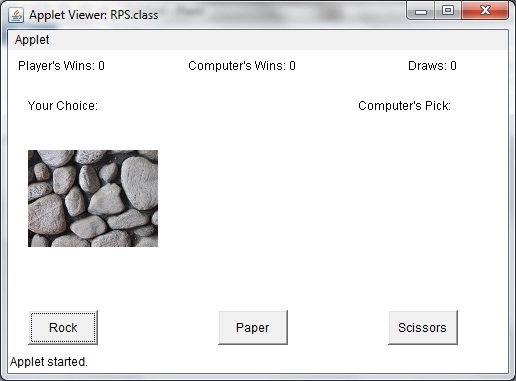
Attachments RPS_Applet_Version.jpg 38.69KB RPS_JApplet_Version.jpg 48.55KB
ZetaX9
Newbie Poster
16 posts since Sep 2008
Reputation Points: 10
Solved Threads: 0
 

What I can see from the picture, is that you need to clear your screen on a repaint().

Two ideas:
- Call super.paint(g); in the first line of your paint method. This is the paint method of the super class, it might help.
- Call a clearRect(0,0,getWidth(), getHeight());. This clears the screen, and might do the job.

Let me know if it works.

hiddepolen
Posting Whiz in Training
297 posts since Oct 2010
Reputation Points: 82
Solved Threads: 35
 

What I can see from the picture, is that you need to clear your screen on a repaint().

Two ideas: - Call super.paint(g); in the first line of your paint method. This is the paint method of the super class, it might help. - Call a clearRect(0,0,getWidth(), getHeight());. This clears the screen, and might do the job.

Let me know if it works.


Ahh, I see now. At first, I found out that I needed to have the Container variable for it as well as changing the "Button" to "JButton". So I had to change some stuff around in there and I thought that would work, but it was giving me the exception. But when you mentioned the super.paint(g), I've added that and it works! Here is what I have now:

import java.awt.*;
import java.awt.event.*;
import java.net.*;
import javax.swing.*;

public class RPS extends JApplet implements ActionListener
{
	Container c;
    private JButton rockButton;
    private JButton scissorsButton;
    private JButton paperButton;
    private String buttonPressed = "";
    private int computerValue = -1;
    private int myValue;
    private int playerScore = 0;
    private int computerScore = 0;
    private int drawScore = 0;

	private Image img1;

    public void init()
    {
		c = getContentPane();
		loadImage();
		rockButton = new JButton("Rock");
		scissorsButton = new JButton("Scissors");
		paperButton = new JButton("Paper");
		c.add(rockButton);
		c.add(scissorsButton);
		c.add(paperButton);
		rockButton.addActionListener(this);
		scissorsButton.addActionListener(this);
		paperButton.addActionListener(this);

    }

    public void loadImage()
    {
		URL url = getClass().getResource("rock.jpg");
		img1 = getToolkit().getImage(url);

	}

    public void actionPerformed(ActionEvent event)
    {
		buttonPressed = ((JButton)event.getSource()).getLabel();
		computerValue = randomNumber012();
		translator(buttonPressed);
		repaint();
    }

    public void paint(Graphics g)
    {
    	super.paint(g);
		rockButton.setLocation(20,260);
    	rockButton.setSize(70,35);

    	paperButton.setLocation(210, 260);
    	paperButton.setSize(70, 35);

    	scissorsButton.setLocation(380, 260);
    	scissorsButton.setSize(90, 35);

		computerChoice(g);
		winner(g, computerValue, myValue);

		g.drawString("Player's Wins: " + playerScore, 10, 20);
		g.drawString("Computer's Wins: " + computerScore, 180, 20);
		g.drawString("Draws: " + drawScore, 400, 20);
		g.drawString("Your Choice: " + buttonPressed, 20, 60);
		g.drawString("Computer's Pick: ", 350, 60);

		g.drawImage(img1, 20, 100, this);

    }

	    int randomNumber012()
	    {
			return (int)(Math.random()*3);
    	}

    /*
    public void actionPerformed(ActionEvent e)
    {
    	Gra
    	if(e.getSource() == rockButton)
    	{
    		g.drawString("Player's Pick: Rock", 20, 60);
    	}
    }*/
	/*public void playersChoice(Graphics g)
	{
		if(rockButton.isPressed())
		{
			g.setColor(Color.black);
			g.drawString("Player's Pick: Rock", 70, 80);
		}
		if(paperButton.equals("Paper"))
		{
			g.setColor(Color.black);
			g.drawString("Player's Pick: Paper", 70, 80);
		}
		if(scissorsButton.equals("Scissors"))
		{
			g.setColor(Color.black);
			g.drawString("Player's Pick: Rock", 70, 80);
		}
	}*/

    public void computerChoice(Graphics g)
    {

		if(computerValue == 0)
		{
		    g.drawString("Computer's Pick: Rock", 350, 60);
		}
		else if(computerValue == 1)
		{
		    g.drawString("Computer's Pick: Scissors", 350, 60);
		}

		else if(computerValue == 2)
		{
		    g.drawString("Computer's Pick: Paper", 350, 60);
		}

    }


    public void translator(String s)
    {
		if(s.equals("Rock"))
		{
			//Graphics g = getGraphics();
			//g.drawString("Player's Pick: Rock", 70, 60);
		    myValue = 0;
		}
		else if(s.equals("Scissors"))
		{
			//Graphics g = getGraphics();
			//g.drawString("Player's Pick: Scissors", 70, 60);
		    myValue = 1;
		}

		else if(s.equals("Paper"))
		{
			//Graphics g = getGraphics();
			//g.drawString("Player's Pick: Paper", 70, 60);
		    myValue = 2;
		}
    }

    public void winner(Graphics g, int cv, int mv)
    {
		if(cv == -1)
		{
		    g.drawString("", 200, 100);
		}

		else if(cv == mv)
		{
		    g.drawString("Draw", 200, 250);
		    drawScore = drawScore + 1;
		}

		else if(cv == 0 && mv == 1 ||
			cv == 2 && mv == 0 ||
			cv == 1 && mv == 2)
		{
		    g.drawString("Computer Wins", 200, 250);
		    computerScore = computerScore + 1;
		}


		else
		{
		    g.drawString("You Win!", 200, 250);
		    playerScore = playerScore + 1;
		}
    }
}


So far, everything is the same. Just some stuff I had to change around. Thanks for your help! I appreciate it! :)

ZetaX9
Newbie Poster
16 posts since Sep 2008
Reputation Points: 10
Solved Threads: 0
 

Super, glad I could help!

hiddepolen
Posting Whiz in Training
297 posts since Oct 2010
Reputation Points: 82
Solved Threads: 35
 

This question has already been solved

Post: Markdown Syntax: Formatting Help
You
View similar articles that have also been tagged: