954,557 Members — Technology Publication meets Social Media
Username:
Password:
Lost login information?
Have something to say? Contribute New Article Reply to this Article

PhotoImage not Displaying (Tkinter)

Hey guys. I'm working on a simple hangman program. I got the core engine down working in a command prompt, and now I'm making it using classes and a GUI. I'm using tkinter.

Anyway, everything works with no error, but the image is not displaying at all. Here is the code that makes the image:

hang.getBoardName() #Makes hang.boardnumber, when run at first it is "board1.gif"
ImageFrame = tk.Frame(F, relief="sunken", border=1)
GameBoardImage = tk.PhotoImage(file=hang.boardnumber)
GameBoardLabel = tk.Label(ImageFrame,image=GameBoardImage)
GameBoardLabel.grid(row=0, column=0)
ImageFrame.grid(row=2, column=0)

I had it working at one point, before I added in a few labels about the word and the letters they have guessed.

Oh, and yes, board1.gif does exist in the source folder.
Thanks!
Arbolito
Newbie Poster
2 posts since Jul 2010
Reputation Points: 10
Solved Threads: 0
 

This isn't a reply as such but I'm a newcomer and couldn't find a way to start a new thread. It's not completely new anyway - why is it so difficult to display images in Python?

I picked up the following lines of code from Internet discussions:-

import Image, ImageTk

image = Image.open("p.gif")
image.show()

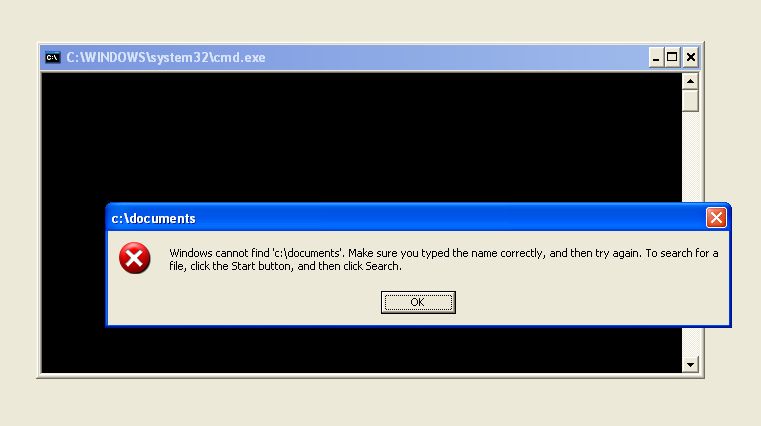
Whenever I try something like this - and I've tried variants - I get a message about C:\Documents not being found from the image.show() line. I've even tried entering a full path.

I attach a screen dump of the message.

Keith

Attachments Problem_01.jpg 26.21KB
KWL
Newbie Poster
2 posts since Oct 2010
Reputation Points: 10
Solved Threads: 0
 

This isn't a reply as such but I'm a newcomer and couldn't find a way to start a new thread. It's not completely new anyway - why is it so difficult to display images in Python?

I picked up the following lines of code from Internet discussions:-

import Image, ImageTk

image = Image.open("p.gif") image.show()

Whenever I try something like this - and I've tried variants - I get a message about C:\Documents not being found from the image.show() line. I've even tried entering a full path.

I attach a screen dump of the message.

Keith

Where is p.gif? Is it in C:\Documents and Settings\Something\Something ?

Try making a directory at the root of C and calling it images or something.

Also, I don't think image.show() is going to do what you think it is. On my mac it launches an external image viewer. Preview specifically. On windows it will probably launch paint, or internet explorer, or Windows Previewer.

On Windows I don't seem to have an Image module, I've probably never installed it.

jgritty
Newbie Poster
7 posts since Apr 2008
Reputation Points: 10
Solved Threads: 0
 

Where is p.gif? Is it in C:\Documents and Settings\Something\Something ?

Try making a directory at the root of C and calling it images or something.

Also, I don't think image.show() is going to do what you think it is. On my mac it launches an external image viewer. Preview specifically. On windows it will probably launch paint, or internet explorer, or Windows Previewer.

On Windows I don't seem to have an Image module, I've probably never installed it.

I apologise for the delay in replying and thank you for the suggestion. I have tried placing the p.gif in various places, including the current directory, the root, Images at the root, etc and also putting the program at the root. None worked.

You must be right about image.show() but I don't understand what it does in Windows.

I can now display images thanks to a suggestion from my son, so in one sense the problem is solved. On the other hand I used to do the older style of programming - procedural - and understood that. It would be nice to understand the new object-oriented ideas but I am struggling. Perhaps I should be satisfied with what I've now got!

Keith

KWL
Newbie Poster
2 posts since Oct 2010
Reputation Points: 10
Solved Threads: 0
 

This article has been dead for over three months

Post: Markdown Syntax: Formatting Help
You
View similar articles that have also been tagged: