We're a community of 1077K IT Pros here for help, advice, solutions, professional growth and fun. Join us!
1,076,348 Members — Technology Publication meets Social Media
Username:
Password:
Lost login information?
Start New Discussion Reply to this Discussion

No lines in pylab graph?

A simple physics graph...

import pylab
a_time = range(0,141,10)
a_R = [3.0,2.8,2.56,2.36,2.2,2.0,1.86,1.7,1.6,1.43,1.3,1.2,1.1,1.06,0.96]
for i in range(0,15):
    pylab.plot(a_time[i],a_R[i], 'x')
    pylab.errorbar(a_time[i], a_R[i], 0.5, 0.05)
pylab.show()

I'm guessing the pylab.plot line isn't needed, but even with this there is nothing connecting the plots together. I'm pretty sure there wasn't anything extra needed when i tried this out on another machine.
Here's an image: http://i51.tinypic.com/v77gjb.jpg or check the attachment

EDIT: Oh and i'm running Ubuntu 9.10 with matplotlib installed through the software centre

So basically what I want is a line joining the plots, either i'm being really stupid or there are some settings I need to change...
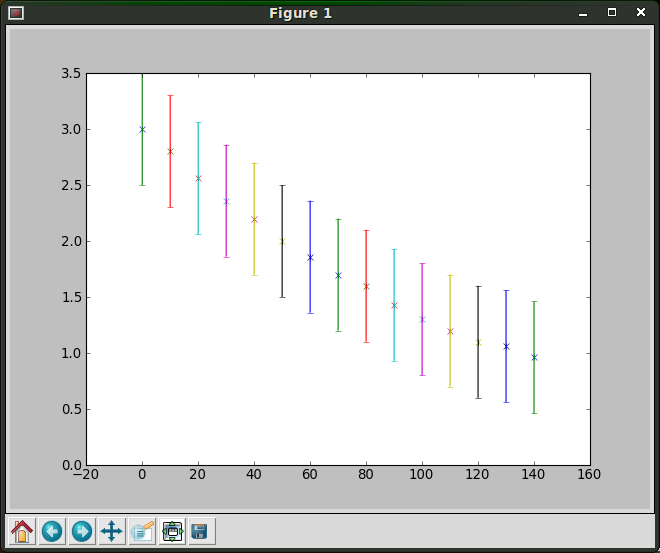
Attachments Screenshot-Figure_1.png 21.11KB
1
Contributor
1
Reply
1 Day
Discussion Span
2 Years Ago
Last Updated
2
Views
Question
Answered
lagspike
Light Poster
27 posts since Jun 2009
Reputation Points: 17
Solved Threads: 5
Skill Endorsements: 0

Ok, i solved the problem. I needed to plot multiple values in one call to make them join up:

import pylab
a_time = range(0,141,10)
a_R = [3.0,2.8,2.56,2.36,2.2,2.0,1.86,1.7,1.6,1.43,1.3,1.2,1.1,1.06,0.96]
pylab.plot(a_time,a_R, 'x')
pylab.errorbar(a_time, a_R, 0.5, 0.05)
pylab.show()
lagspike
Light Poster
27 posts since Jun 2009
Reputation Points: 17
Solved Threads: 5
Skill Endorsements: 0
Question Self-Answered as of 2 Years Ago

This question has already been solved: Start a new discussion instead

Post: Markdown Syntax: Formatting Help
 
You
View similar articles that have also been tagged:
 
© 2013 DaniWeb® LLC
Page rendered in 0.0572 seconds using 2.67MB