954,515 Members — Technology Publication meets Social Media
Username:
Password:
Lost login information?
Have something to say? Contribute New Article Reply to this Article

Tkinter help - extra window?

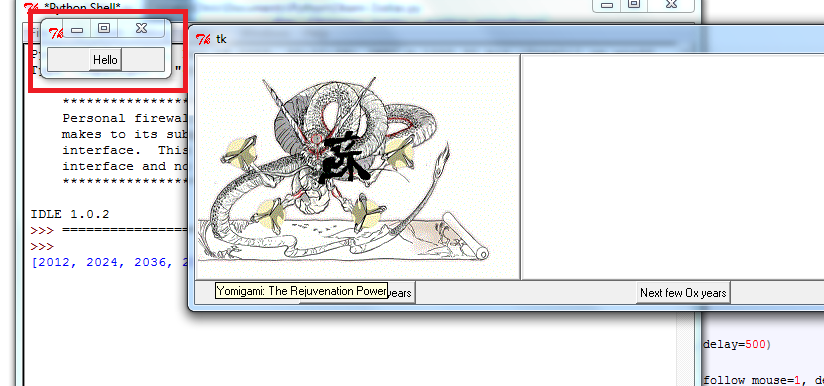
I'm having trouble with an application in Tkinter. The program displays a button that has a picture on it and that button takes you to a website about that picture, but that is not where the issue lies. There is another module that I have found on an internet tutorial for tooltips (those popups when you hover over a button, and when imported it does work fine, however, there is a weird side effect. An extra window pops up behind the intended one with just a button that says 'hello' and the title of the window is Tk. If you could help me get rid of that window without breaking my code I would be grateful.


MAIN APP:

#Okami Clock.py
from Tkinter import *
import webbrowser

#For some reason the tooltip module has the side effect of opening an
#unwanted window along with the normal window
from ToolTip import *


class App:
    def __init__(self, master):

        frame = Frame(master)
        frame.pack()


        buttonImage = PhotoImage(file = 'Okami Rejuvenation.gif', master=root)

        self.button = Button(frame, image=buttonImage, command=self.infoOpen)
        b = self.button
        
        self.button.image = buttonImage
        self.button.pack()
        t1 = ToolTip(b, text="The Rejuvenation Power")
        
    def infoOpen(self):
        webbrowser.open("http://japanese.about.com/library/weekly/aa012101a.htm", new=2) #Will go to relevant webpage
        

#If hour=(1-12) display corresponding button


#Create Window

root = Tk()
app = App(root)
root.mainloop()

TOOLTIP:

import Tkinter
class ToolTip:
    def __init__(self, master, text='Your text here', delay=1500, **opts):
       self.master = master
       self._opts = {'anchor':'center', 'bd':1, 'bg':'lightyellow', 'delay':delay, 'fg':'black',\
                  'follow_mouse':0, 'font':None, 'justify':'left', 'padx':4, 'pady':2,\
                     'relief':'solid', 'state':'normal', 'text':text, 'textvariable':None,\
                     'width':0, 'wraplength':150}
       self.configure(**opts)
       self._tipwindow = None
       self._id = None
       self._id1 = self.master.bind("<Enter>", self.enter, '+')
       self._id2 = self.master.bind("<Leave>", self.leave, '+')
       self._id3 = self.master.bind("<ButtonPress>", self.leave, '+')
       self._follow_mouse = 0
       if self._opts['follow_mouse']:
           self._id4 = self.master.bind("<Motion>", self.motion, '+')
           self._follow_mouse = 1
   
    def configure(self, **opts):
        for key in opts:
            if self._opts.has_key(key):
                self._opts[key] = opts[key]
            else:
                KeyError = 'KeyError: Unknown option: "%s"' %key
                raise KeyError
    
    def enter(self, event=None):
        self._schedule()
        
    def leave(self, event=None):
        self._unschedule()
        self._hide()
    
    def motion(self, event=None):
       if self._tipwindow and self._follow_mouse:
           x, y = self.coords()
           self._tipwindow.wm_geometry("+%d+%d" % (x, y))
   
    def _schedule(self):
       self._unschedule()
       if self._opts['state'] == 'disabled':
            return
       self._id = self.master.after(self._opts['delay'], self._show)

    def _unschedule(self):
       id = self._id
       self._id = None
       if id:
        self.master.after_cancel(id)

    def _show(self):
       if self._opts['state'] == 'disabled':
          self._unschedule()
          return
       if not self._tipwindow:
         self._tipwindow = tw = Tkinter.Toplevel(self.master)

         tw.withdraw()
         tw.wm_overrideredirect(1)

         if tw.tk.call("tk", "windowingsystem") == 'aqua':
             tw.tk.call("::tk::unsupported::MacWindowStyle", "style", tw._w, "help", "none")

         self.create_contents()
         tw.update_idletasks()
         x, y = self.coords()
         tw.wm_geometry("+%d+%d" % (x, y))
         tw.deiconify()
   
    def _hide(self):
       tw = self._tipwindow
       self._tipwindow = None
       if tw:
           tw.destroy()
                
    
    def coords(self):
       tw = self._tipwindow
       twx, twy = tw.winfo_reqwidth(), tw.winfo_reqheight()
       w, h = tw.winfo_screenwidth(), tw.winfo_screenheight()
       if self._follow_mouse:
           y = tw.winfo_pointery() + 20

           if y + twy > h:
               y = y - twy - 30
           else:
               y = self.master.winfo_rooty() + self.master.winfo_height() + 3
               if y + twy > h:
                   y = self.master.winfo_rooty() - twy - 3
           x = tw.winfo_pointerx() - twx / 2
           if x < 0:
               x = 0
           elif x + twx > w:
               x = w - twx
           return x, y

    def create_contents(self):
        opts = self._opts.copy()
        for opt in ('delay', 'follow_mouse', 'state'):
            del opts[opt]
        label = Tkinter.Label(self._tipwindow, **opts)
        label.pack()
chris99
Junior Poster
118 posts since Sep 2006
Reputation Points: 10
Solved Threads: 0
 

Clarification - It isn't the root window, that is the one with all the stuff. I can't get rid of the 'hello' dialog no matter what I try.

chris99
Junior Poster
118 posts since Sep 2006
Reputation Points: 10
Solved Threads: 0
 

It works almost fine for me in a linux box, I only had to add this

else: # ADDED
           return 0, 0 # ADDED

to ToolTip.coords() (there are probably better values to return), and I used

t1 = ToolTip(b, text="The Rejuvenation Power", delay=500)
#or
        t1 = ToolTip(b, text="The Rejuvenation Power", follow_mouse=1, delay=500)
Gribouillis
Posting Maven
Moderator
2,786 posts since Jul 2008
Reputation Points: 1,044
Solved Threads: 691
 

It works almost fine for me in a linux box, I only had to add this

else: # ADDED
           return 0, 0 # ADDED

to ToolTip.coords() (there are probably better values to return), and I used

t1 = ToolTip(b, text="The Rejuvenation Power", delay=500)
#or
        t1 = ToolTip(b, text="The Rejuvenation Power", follow_mouse=1, delay=500)

Thankyou for your answer, but I've added the code (intended for the main loop in coords right?) and it still happens. Here's a screenshot of the unwanted window. There is no reference to it in the code.

Attachments what.png 106.51KB
chris99
Junior Poster
118 posts since Sep 2006
Reputation Points: 10
Solved Threads: 0
 

We are going to find where this window comes from:

1) download and install the 'aspects' module here http://www.cs.tut.fi/~ask/aspects/index.shtml
2) unpack and install the attached file tracepect.py in your site-packages folder.
3) change your main code to

from inspect import getmro
from tracepect import Tracer
tracer = Tracer()
tracer.wrap_classes(*getmro(Button))
root = Tk()
app = App(root)
root.mainloop()

4) run your code (avoid the image with your mouse otherwise there will be too much output), then close the window.
5) Look for the string Hello in the output, you should be able to find from which file and line the hello button was created.

Attachments tracepect.py_.zip (1.34KB)
Gribouillis
Posting Maven
Moderator
2,786 posts since Jul 2008
Reputation Points: 1,044
Solved Threads: 691
 

I've tried to download those, and the aspect folder is in the right directory but I can find nothing in them with Tracespect.py (and the only thing in your zip is a single file that is called "-" and won't do anything). Also did you typo in the code? Should it be aspect or inspect? I checked the aspect.py file and found no "getmro" anywhere.

chris99
Junior Poster
118 posts since Sep 2006
Reputation Points: 10
Solved Threads: 0
 
I've tried to download those, and the aspect folder is in the right directory but I can find nothing in them with Tracespect.py (and the only thing in your zip is a single file that is called "-" and won't do anything). Also did you typo in the code? Should it be aspect or inspect? I checked the aspect.py file and found no "getmro" anywhere.


Yes,reload the attachment, this time the file is called tracepect.py (or rename the file called -). The code is ok, there is no typo, inspect is the standard library module. You don't need to check any module.

Gribouillis
Posting Maven
Moderator
2,786 posts since Jul 2008
Reputation Points: 1,044
Solved Threads: 691
 
Traceback (most recent call last):
  File "C:\Users\Chris\Documents\Python\Okami Zodiac.py", line 100, in ?
    from tracespect import Tracer
  File "C:\Users\Chris\Documents\Python\tracespect.py", line 17
    @simplegeneric
    ^
SyntaxError: invalid syntax


Yeah... it's not liking the function decorators. Are they necessary or can I comment them out?

chris99
Junior Poster
118 posts since Sep 2006
Reputation Points: 10
Solved Threads: 0
 
Traceback (most recent call last):
  File "C:\Users\Chris\Documents\Python\Okami Zodiac.py", line 100, in ?
    from tracespect import Tracer
  File "C:\Users\Chris\Documents\Python\tracespect.py", line 17
    @simplegeneric
    ^
SyntaxError: invalid syntax

Yeah... it's not liking the function decorators. Are they necessary or can I comment them out?


Which version of python are you using ? These decorators are necessary, you don't have to change anything in tracepect.

Gribouillis
Posting Maven
Moderator
2,786 posts since Jul 2008
Reputation Points: 1,044
Solved Threads: 691
 

Python 2.3.3 (according to idle) :P

chris99
Junior Poster
118 posts since Sep 2006
Reputation Points: 10
Solved Threads: 0
 

Do you have possibility to upgrade? Admin rights and not any incompatible modules you use? For example if you use psyco, you need to keep to Python 2.6, but I think most things should at least work with that. Latest Python 2 is Python 2.7.2.

pyTony
pyMod
Moderator
5,359 posts since Apr 2010
Reputation Points: 782
Solved Threads: 852
 

SOLVED! Just switched to 2.7 and the extra window stopped appearing! Thankyou for all your help (also Tracer works properly now ^_^

chris99
Junior Poster
118 posts since Sep 2006
Reputation Points: 10
Solved Threads: 0
 

This question has already been solved

Post: Markdown Syntax: Formatting Help
You
View similar articles that have also been tagged: