We're a community of 1077K IT Pros here for help, advice, solutions, professional growth and fun. Join us!
1,076,039 Members — Technology Publication meets Social Media
Username:
Password:
Lost login information?
Start New Discussion Reply to this Discussion

Shell script for Rsync

A friend of mine made this script to backup files from all my ubuntu boxes using lftp to an ftp server i setup on my local windows 7 machine using apache and abilityftp server. However it is only backing up some config files(see attached screen), none of the actual directories are being backed up. I can't figure out if the problem lies in the script or what?

#!/bin/bash
FTPUSER=sanders
FTPPASS=law123
SERVERIP="192.168.1.37"
DATE=`date +%D`

for i in `ls /home/`
do
echo "mirror -rR /home/$i $i" | lftp -u $FTPUSER,$FTPPASS $SERVERIP 
echo "User $i Backed Up"
done
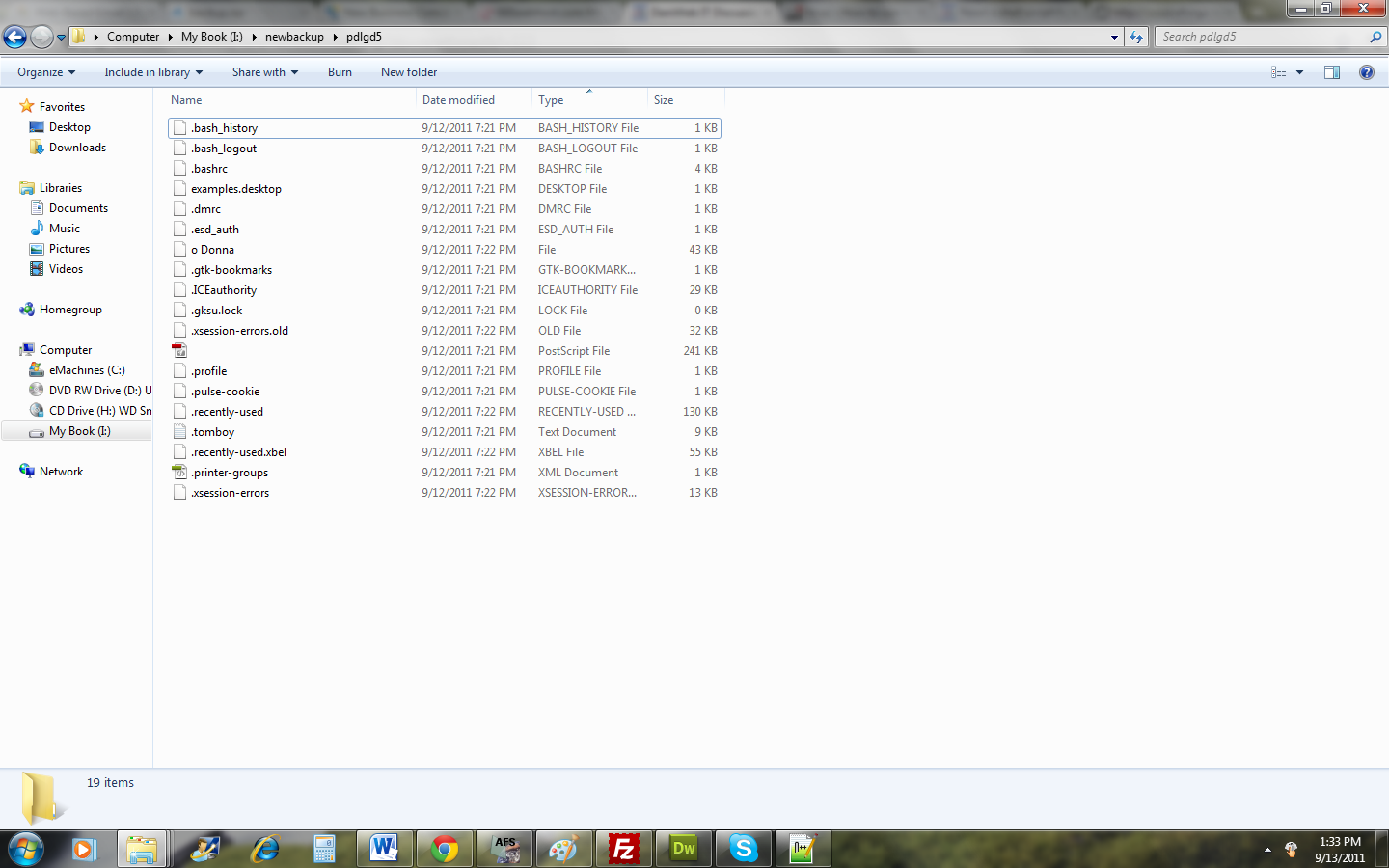
Attachments serverfiles.png 253.68KB
2
Contributors
9
Replies
23 Hours
Discussion Span
1 Year Ago
Last Updated
10
Views
Staric
Newbie Poster
22 posts since Sep 2011
Reputation Points: 10
Solved Threads: 0
Skill Endorsements: 0

Hi Staric!

I see a couple of potential issues here. I think the real answer lies in your "mirror" command. I'm not familiar with a 'mirror' command, so is it safe to assume that's a script? Could you paste that script here as well?

If the problem is that it's not copying the sub-directories, then it sounds like there's maybe a recursive flag missing somewhere.

Gromit
Posting Whiz in Training
214 posts since Sep 2008
Reputation Points: 47
Solved Threads: 33
Skill Endorsements: 0

Hmm, yeah ive been researching that recrusive flag. The mirror command is an lftp command, just type "man lftp" in terminal and scroll down. I'm pretty sure that recursive flag is there hence the -rR??

echo "mirror -rR /home/$i $i" | lftp -u $FTPUSER,$FTPPASS $SERVERIP

*ok i see what is going on now, it is copying all files in the /home/username/ directory, but none of the subfolders and their files

Staric
Newbie Poster
22 posts since Sep 2011
Reputation Points: 10
Solved Threads: 0
Skill Endorsements: 0

I see, that makes sense :) I wasn't paying attention..

I don't see a -r flag for the mirror command... IN FACT! When I run mirror -R without the lower case r, it works recursively. WITH the -r it does NOT copy recursively.

tl;dr: change the mirror command to this:

echo "mirror -R /home/$i $i" | lftp -u $FTPUSER,$FTPPASS $SERVERIP

I hope this helps!

Gromit
Posting Whiz in Training
214 posts since Sep 2008
Reputation Points: 47
Solved Threads: 33
Skill Endorsements: 0

Wow, that works perfect now, seems my buddy thought he knew a little more than he did. I think what he was trying to do was use the rsync flag -r(recursive- recurse into directories) and -R(realtive -use relative names). It seems that this script copies all users home directories, do you know how i could make it relative to the account launching the script, so that it would only copy that users home? Thanks Gromit, you rock!

Staric
Newbie Poster
22 posts since Sep 2011
Reputation Points: 10
Solved Threads: 0
Skill Endorsements: 0

Glad I could help :)

If you just want it to back up the home directory of the user launching the script, all you reall have to do is declare the directory you want to back up and take out the 'for' loop. I'd probably do something like this:

#!/bin/bash
FTPUSER=sanders
FTPPASS=law123
SERVERIP="192.168.1.37"
DATE=`date +%D`
 
echo "mirror -R $HOME $USER" | lftp -u $FTPUSER,$FTPPASS $SERVERIP 
echo "Backup of $HOME complete for $USER"

$USER and $HOME are environment variables that *should* be available to the script, otherwise you can set it with something like 'whoami', or just by setting it manually.

Gromit
Posting Whiz in Training
214 posts since Sep 2008
Reputation Points: 47
Solved Threads: 33
Skill Endorsements: 0

Hey Gromit, I tried that script and it sill copies over all user files over, not just the one launching it. It created a folder called home and stored my two users home directories there. You have been very helpful so far, and I'm trying to figure this out on my own, but am struggling. Would replacing $whoami with $user be the proper step?

Staric
Newbie Poster
22 posts since Sep 2011
Reputation Points: 10
Solved Threads: 0
Skill Endorsements: 0

Maybe so! I'm not sure why it would copy more than just the user's /home/user directory, unless it's doing something unexpected with those environment variables...

1. What does that last line echo when the script runs?
2. What's the output of: echo "$USER:$HOME" 3. Does the line in question #2 produce a different result if you run it from a script?

If you you get more than one line of "Backup of /home/user complete for user", then you might still be using the "for" loop from the original script!

Gromit
Posting Whiz in Training
214 posts since Sep 2008
Reputation Points: 47
Solved Threads: 33
Skill Endorsements: 0

I took your exact script from above without the for loop and it doesnt run at all, it flashes the terminal and then nothing.

#!/bin/bash
FTPUSER=sanders
FTPPASS=law123
SERVERIP="192.168.1.37"
DATE=`date +%D`
 
echo "mirror -R $HOME $USER" | lftp -u $FTPUSER,$FTPPASS $SERVERIP 
echo "Backup of $HOME complete for $USER"

I'm sorry im new to this and totally lost. My friend said that grep can be used to accomplish this

Staric
Newbie Poster
22 posts since Sep 2011
Reputation Points: 10
Solved Threads: 0
Skill Endorsements: 0

Well that's different!

Let's see... What happens if you run it like this: /bin/bash -x script.sh That should give us some debugging information

Gromit
Posting Whiz in Training
214 posts since Sep 2008
Reputation Points: 47
Solved Threads: 33
Skill Endorsements: 0

This article has been dead for over three months: Start a new discussion instead

Post: Markdown Syntax: Formatting Help
 
You
View similar articles that have also been tagged:
 
© 2013 DaniWeb® LLC
Page rendered in 0.0809 seconds using 2.67MB