Hi Im new here-I wanted to create a Login System. I am using Visual Basic 2008 Express Edition, Microsoft Access 2007/2010 Beta.
Ok this is my current code-the main problem I have is that I dont how to compare what the user puts into the textboxes and then check that against the data in my database.
Public Class LoginForm1
Dim inc As Integer
Dim MaxRows As Integer
Dim con As New OleDb.OleDbConnection
Dim ds As New DataSet
Dim da As OleDb.OleDbDataAdapter
Dim sql As String
Private Sub OK_Click(ByVal sender As System.Object, ByVal e As System.EventArgs) Handles OK.Click
con.ConnectionString = "PROVIDER=Microsoft.JET.OLEDB.4.0;Data Source = D:\Work\Computing\Computing CourseWork\The Quiz DataBase.mdb"
con.Open()
If sql = "Select Username ID, Password FROM tblStudentLogin WHERE Username ID = UserName.Text AND Password = & PassWord.Text " Then
MsgBox("You are now logged in " & UserName.Text)
Me.Hide()
StudentMainScreen.Show()
Else
MsgBox("Incorrect Login Details - Please try again.")
End If
con.Close()
End Sub
When I run/debug the program and enter the correct username and password into the program it comes up with the MsgBox("Incorrect Login Details - Please try again.").
The connection string for where the database is coming from is right, because I checked it..so must be something wrong with the SQL Coding I guess. I honestly don't have a clue what's wrong with this code-according to my logic it makes sense, but maybe I'm missing some keyword or something? Please any help at all will be greatly appreciated!
The sql is defined as string, before you assign any value to sql, it's nothing. and when you compare sql with "Select Username ID, Password FROM tblStudentLogin WHERE Username ID = UserName.Text AND Password = & PassWord.Text ", of course the result is false.
What you should do is to run the select statement and fill the result into the datatable you defined. Then to check if any row retunred. If teh rows.count>=1, means the userID and password match one of the record.
I dont fully understand-what do I Dim SQl as instead of String?
What I mean is
Dim Sql as (what?)
Also Pritesh
sql="Select UserName,Password from tblStudentLogin
WHERE [Username ID] ='" & trim(UserName.Text) & "' AND [Password =]'" & trim(PassWord.Text) & "' "
Your second line of Code is an error because ' (goes green) in Vb - which means that you want to comment the code. Also, why do you have so many & ? Is that the way Sql is suppposed to be coded?
I dont mean to be rude or anything, just not understanding because Im not that experienced with Sql/Vb lol.
Also one more thing I thought of a different approach trying to code this.......
Dim sql As New DbType
Private Sub OK_Click(ByVal sender As System.Object, ByVal e As System.EventArgs) Handles OK.Click
con.ConnectionString = "PROVIDER=Microsoft.JET.OLEDB.4.0;Data Source = D:\Work\Computing\Computing CourseWork\The Quiz DataBase.mdb"
sql = "SELECT * FROM tblStudentLogin WHERE Username ID and Password = 'UserName.text' ,'PassWord.text'"
End Sub
I want to put this into an If statement but not sure how i would I do this...What I mean is IF the UserName.text and PassWord.text = Whats in the table THEN it links to the next form, but if it doesnt match ELSE MsgBox("Incorrect Details")
Im not sure how I would be able to code this, if someone can help me with this approach or the other it would be greatly appreciated!
con.ConnectionString="" ''here your connection string
con.open
dim sql as string, dim i as BOOLEAN
sql="SELECT UserName,Password from tblStudentLogin
Where [UaserName]='" & Trim(txtuname.text) & "'And [Password]='" & trim(txtpwd.text) & "'"
cmd= new OledCommand(sql,con)
i=cmd.ExecuteNonquery
if (i=true) then
''welcome to system
else
'' login fails
end if
cmd= nothing
con.close
''+++++================================
here is second way to code in vb.net
con.ConnectionString="" ''here your connection string
con.open
dim sql as string
dim i as BOOLEAN
dim dr as oledDatareader
sql="SELECT UserName,Password from tblStudentLogin
Where [UaserName]='" & Trim(txtuname.text) & "'And [Password]='" & trim(txtpwd.text) & "'"
cmd= new OledCommand(sql,con)
dr=cmd.Executereader()
if (dr.hasRows)=false then exit sub
else
while(dr.read())
if (txtuname.text)=dr(0).Tostring() and (txtpwd.text)=dr(1).tostring() then
''welcome to system
else
'' login fails
end if
end while
dr.close()
cmd= nothing
con.close
con.ConnectionString="" ''here your connection string
con.open
dim sql as string, dim i as BOOLEAN
sql="SELECT UserName,Password from tblStudentLogin
Where [UaserName]='" & Trim(txtuname.text) & "'And [Password]='" & trim(txtpwd.text) & "'"
cmd= new OledCommand(sql,con)
i=cmd.ExecuteNonquery
if (i=true) then
''welcome to system
else
'' login fails
end if
cmd= nothing
con.close
''+++++================================
here is second way to code in vb.net
con.ConnectionString="" ''here your connection string
con.open
dim sql as string
dim i as BOOLEAN
dim dr as oledDatareader
sql="SELECT UserName,Password from tblStudentLogin
Where [UaserName]='" & Trim(txtuname.text) & "'And [Password]='" & trim(txtpwd.text) & "'"
cmd= new OledCommand(sql,con)
dr=cmd.Executereader()
if (dr.hasRows)=false then exit sub
else
while(dr.read())
if (txtuname.text)=dr(0).Tostring() and (txtpwd.text)=dr(1).tostring() then
''welcome to system
else
'' login fails
end if
end while
dr.close()
cmd= nothing
con.close
One more question Pritesh, do you have like MSN so i can talk to you, because It will be easier to talk between ourselves and solve my problem quicker please.?
your image is not clear so i can't see what is the problem occurs in your page write your code and error so i can help you.
and sorry i don't have MSN.
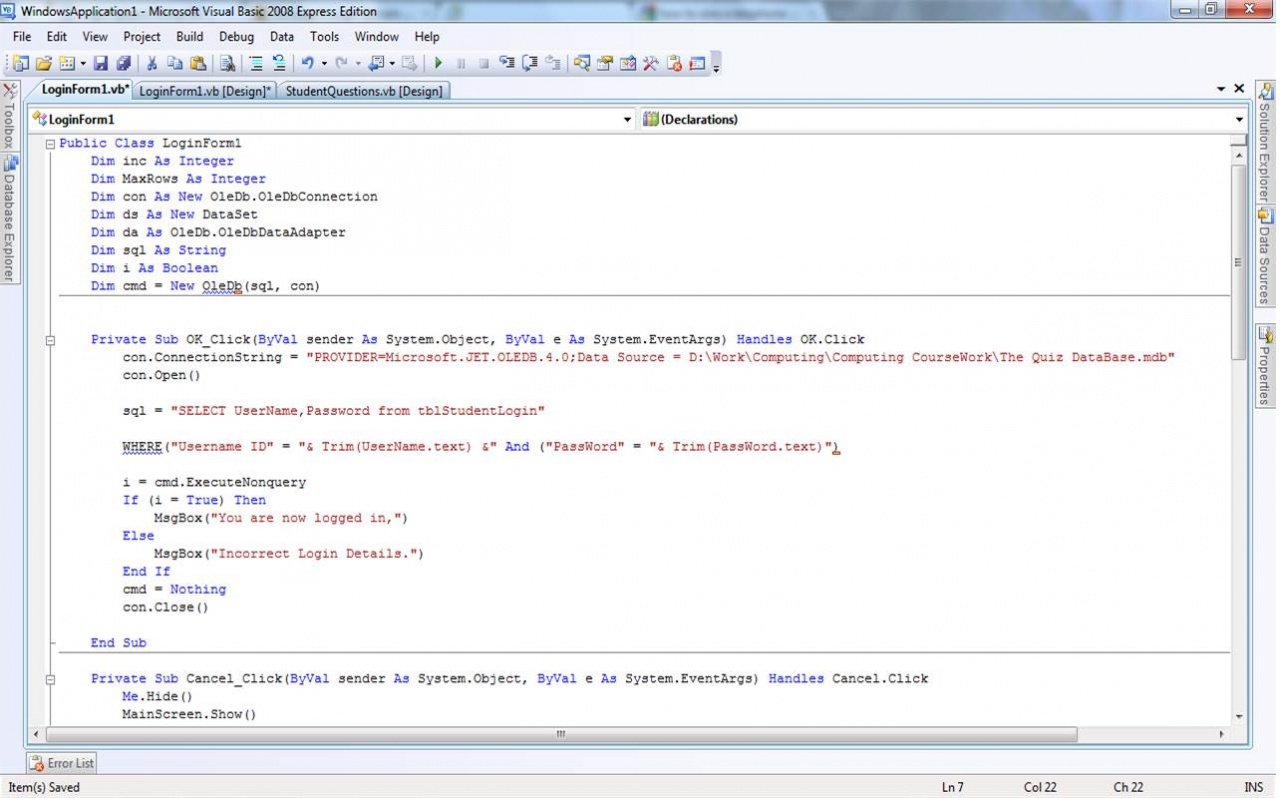
Public Class LoginForm1
Dim inc As Integer
Dim MaxRows As Integer
Dim con As New OleDb.OleDbConnection
Dim ds As New DataSet
Dim da As OleDb.OleDbDataAdapter
Dim sql As String
Dim i As Boolean
Dim cmd = New OleDb(sql, con)
Private Sub OK_Click(ByVal sender As System.Object, ByVal e As System.EventArgs) Handles OK.Click
con.ConnectionString = "PROVIDER=Microsoft.JET.OLEDB.4.0;Data Source = D:\Work\Computing\Computing CourseWork\The Quiz DataBase.mdb"
con.Open()
sql = "SELECT UserName,Password from tblStudentLogin"
WHERE("Username ID" = "& Trim(UserName.text) &" And ("PassWord" = "& Trim(PassWord.text)")
i = cmd.ExecuteNonquery
If (i = True) Then
MsgBox("You are now logged in,")
Else
MsgBox("Incorrect Login Details.")
End If
cmd = Nothing
con.Close()
End Sub
see here u can't defined command as globally
and you are specifying OLEDB, but it's a namespace you should defined it's oledbcommand where you can specify it's sql query.
in global variable u just defined like this
dim sql as string,i As Boolean
dim cmd as OledCommand
''in button event write
private sub btnok_click
''open your connection
con.open
'' here yor sqlstring Like
sql="SELECT UserName,Password from tblStudentLogin Where Username_ID Like' "& Trim(UserName.text) & " 'And PassWord Like '" & Trim(PassWord.text)& " ' "
cmd=new Oledbcommand(sql,con)
i = cmd.ExecuteNonquery
#
If (i = True) Then
MsgBox("You are now logged in,")
Else
MsgBox("Incorrect Login Details.")
End If
cmd = Nothing
con.Close()
End sub
and in your where condition is also some mistake like at the end of the password.text box theres is messing of &.
try like this.
Public Class LoginForm1
Dim inc As Integer
Dim MaxRows As Integer
Dim con As New OleDb.OleDbConnection
Dim ds As New DataSet
Dim da As OleDb.OleDbDataAdapter
Private Sub OK_Click(ByVal sender As System.Object, ByVal e As System.EventArgs) Handles OK.Click
Dim sql As String
Dim i As Boolean
Dim cmd As OleDb.OleDbCommand
con.ConnectionString = "PROVIDER=Microsoft.JET.OLEDB.4.0;Data Source = D:\Work\Computing\Computing CourseWork\The Quiz DataBase.mdb"
con.Open()
sql = "SELECT Username ID,Password from tblStudentLogin Where Username ID Like' " & Trim(UserName.Text) & " 'And Password Like '" & Trim(PassWord.Text) & " ' "
cmd = New OleDb.OleDbCommand(sql, con)
i = cmd.ExecuteNonQuery
#If (i = True) Then
MsgBox("You are now logged in,")
Else
MsgBox("Incorrect Login Details.")
#End If
cmd = Nothing
con.Close()
End Sub
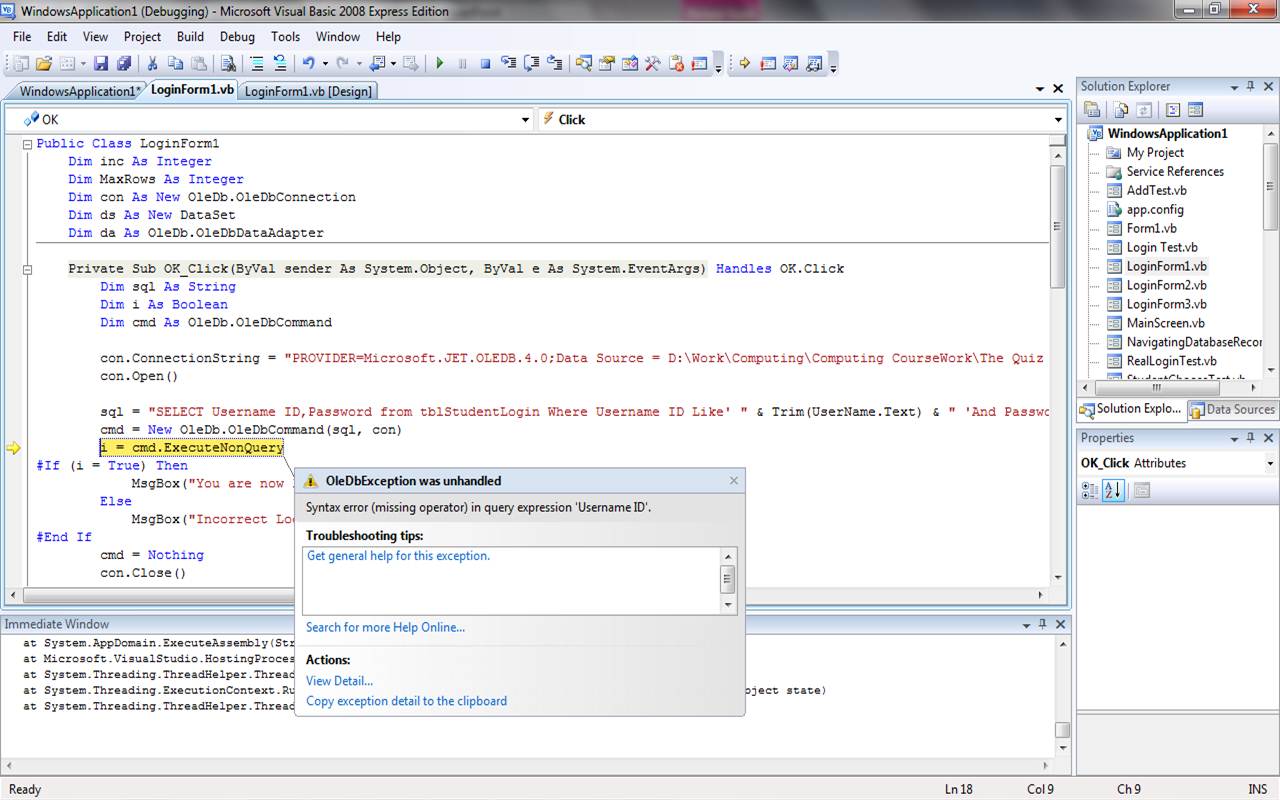
But when I debug/run the program and I try and login it says this error.
it's simple just remove space from your table tblStudentLogin where you are defined column name [Username Id] and and write like [UsernameId] without space and change in where condition without space. then it will not give any error. if this done make thread as solve.
Ok I amended the code as you said Pritesh..and 1 error still..
Public Class LoginForm1
Dim inc As Integer
Dim MaxRows As Integer
Dim con As New OleDb.OleDbConnection
Dim ds As New DataSet
Dim da As OleDb.OleDbDataAdapter
Private Sub OK_Click(ByVal sender As System.Object, ByVal e As System.EventArgs) Handles OK.Click
Dim sql As String
Dim i As Boolean
Dim cmd As OleDb.OleDbCommand
con.ConnectionString = "PROVIDER=Microsoft.JET.OLEDB.4.0;Data Source = D:\Work\Computing\Computing CourseWork\The Quiz DataBase.mdb"
con.Open()
sql = "SELECT UsernameID,Password FROM tblStudentLogin WHERE UsernameID Like' " & Trim(UserName.Text) & " 'And Password Like '" & Trim(PassWord.Text) & " ' "
cmd = New OleDb.OleDbCommand(sql, con)
<strong>i = cmd.ExecuteNonQuery</strong>
#If (i = True) Then
MsgBox("You are now logged in.")
Me.Hide()
StudentMainScreen.Show()
Else
MsgBox("Incorrect Login Details.")
UserName.Clear()
PassWord.Clear()
#End If
cmd = Nothing
con.Close()
End Sub
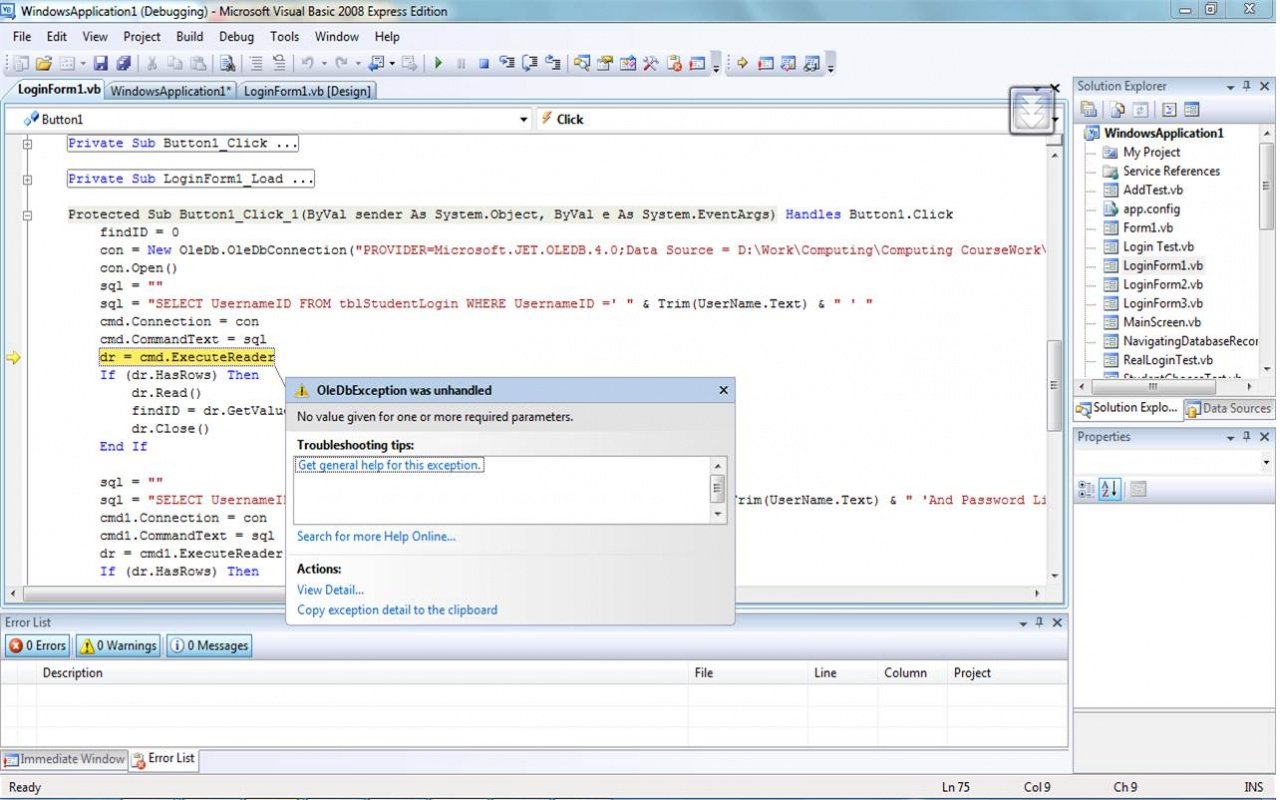
Error :
i = cmd.ExecuteNonQuery
- No value given for one or more required parameters. Thanks again for the help. Im sorry but I really dont know why Im having so many problems with this program:angry:
getconnect() '''where i'm open the connection
sqlstr = "SELECT [EmployeeNO],[Password]FROM [EmpMaster] WHERE [EmployeeNO] like'" & Trim(txtuname.Text) & "' and [Password] like '" & Trim(txtpwd.Text) & "';"
Dim dr As OleDbDataReader
cmd = New OleDbCommand(sqlstr, con)
dr = cmd.ExecuteReader
If dr.HasRows = False Then
MessageBox.Show("Invalid userName and Password", "Invalid Employee", MessageBoxButtons.OK, MessageBoxIcon.Stop)
dr.Close()
dr = Nothing
Exit Sub
Else
''messagebox.Show("Valid User")
dr.Close()
dr = Nothing
End If
Dim con As New OleDb.OleDbConnection
Dim sql As String
Dim dr As OleDb.OleDbDataReader
Dim cmd As New OleDb.OleDbCommand
Dim cmd1 As New OleDb.OleDbCommand
Dim findID, newID As String
Protected Sub Button1_Click(ByVal sender As Object, ByVal e As System.EventArgs) Handles Button1.Click
findID = 0
con = New OleDbConnection("Provider=Microsoft.ACE.OLEDB.12.0;Data Source=C:\San\Projects\Try_Vb_DotNET\LoginSystem.accdb")
con.Open()
sql = ""
sql = "select ID from Table1 where UserName='" & Trim(TextBox1.Text) & "'"
cmd.Connection = con
cmd.CommandText = sql
dr = cmd.ExecuteReader
If (dr.HasRows) Then
dr.Read()
findID = dr.GetValue(0)
dr.Close()
End If
sql = ""
sql = "select ID from Table1 where Password='" & TextBox2.Text & "' and ID =" & findID & " "
cmd1.Connection = con
cmd1.CommandText = sql
dr = cmd1.ExecuteReader
If (dr.HasRows) Then
dr.Read()
newID = dr.GetValue(0)
dr.Close()
End If
If (findID = newID) Then
Response.Write("Login is successfully")
Else
Response.Write("Wrong Username")
End If
End Sub