Hi,
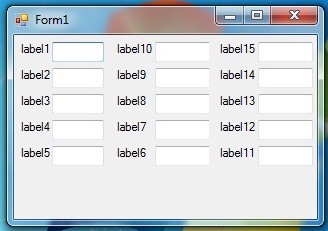
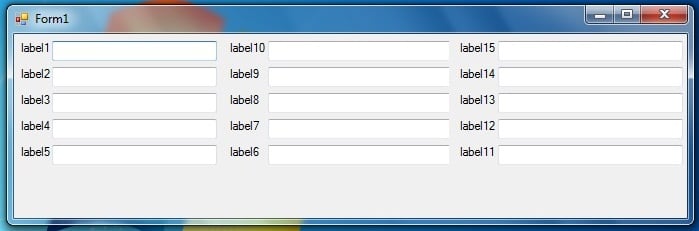
we all know how to dock or anchor controls so that they resize themselves accordingly when a form is resized. It works fine till we have rows of controls on left and right size of the form. But what if have three columns (Columns as in visual sense. I'm not talking about any column control containing other controls) of controls? For example a form having a bunch of controls in the left side, a bunch in the middle and a bunch in the right. There may be a few more bunches in the middle. Now while resizing the form, I want the controls to resize accordingly as well as change their positions to make space for the previous bunch of controls that are resizing.
I mean, while the user increases the form size horizontally, the controls of the second bunch should resize and at the same time they should move right because the controls of the first bunch are increasing horizontally too. When the user decreases the form size horizontally the same thing should occur in the reverse order.
I can manage it somehow using nested splitcontainers but that's too cumbersome. I would like to know if there's some better way to achieve it, like setting some property etc.?
Please help. Check the attached image. Please feel free to ask if my post isn't comprehensible. Regards.

Recommended Answers
Jump to PostI do not believe that there is such a Property, unless you create one.:)
See if this helps otherwise.
3 Panels (including Labels and TextBoxes as your attached images)Public Class Form1 Private iWidth As Integer = 0 '// used to resize. Private Sub Form1_Resize(ByVal sender As …
All 3 Replies
Reply to this topic
Be a part of the DaniWeb community
We're a friendly, industry-focused community of developers, IT pros, digital marketers, and technology enthusiasts meeting, networking, learning, and sharing knowledge.