As the title says i am trying to click this button...
Pic (The save one)
on this webpage...
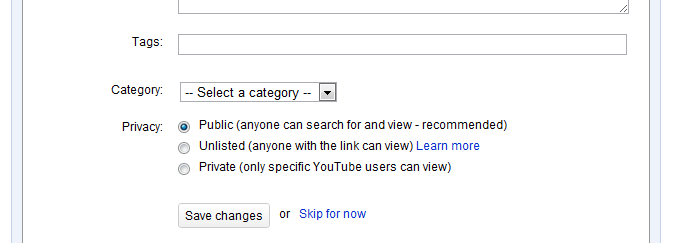
I have been trying various permutatuons of this

Dim j As HtmlElementCollection = WebBrowser1.Document.GetElementsByTagName("BUTTON")
        For Each elem As HtmlElement In i
            elem.InvokeMember("click")
        Next

With little luck, i also tried to find the element bytagname of Class and it couldnt find it...

My whole code (for this procedure) is here.

End Sub

    Private Sub ButtonX3_Click(ByVal sender As System.Object, ByVal e As System.EventArgs) Handles ButtonX3.Click
        Dim f As HtmlElementCollection = WebBrowser1.Document.GetElementsByTagName("input")
        For Each elem As HtmlElement In f
            If elem.GetAttribute("name") = "title" Then
                elem.SetAttribute("value", txtTitle.Text)
            End If
            If elem.GetAttribute("name") = "keywords" Then
                elem.SetAttribute("value", txtKeyWords.Text)
            End If
        Next

        Dim i As HtmlElementCollection = WebBrowser1.Document.GetElementsByTagName("textarea")
        For Each elem As HtmlElement In i
            If elem.GetAttribute("name") = "description" Then
                elem.SetAttribute("value", txtDescription.Text)
            End If
        Next
        Dim value As Integer

        Dim h As HtmlElementCollection
        Dim g As HtmlElementCollection = WebBrowser1.Document.GetElementsByTagName("select")
        For Each elem As HtmlElement In g
            h = elem.Children
        Next
        For Each elem As HtmlElement In h
            If ComboBoxEx1.SelectedText = elem.InnerText Then
                value = elem.GetAttribute("value")
            End If
        Next

        For Each elem As HtmlElement In g
            elem.SetAttribute("value", value)
        Next


        Dim j As HtmlElementCollection = WebBrowser1.Document.GetElementsByTagName("BUTTON")
        For Each elem As HtmlElement In i
            elem.InvokeMember("click")
        Next


    End Sub

Dani AI

Generated

a couple quick wins. In your last section you build j with the BUTTON elements but then loop i (your textarea collection), so the click never runs on the button. Also, fire automation only after the page is fully loaded. Use WebBrowser.DocumentCompleted and act on the final event (it can fire for each frame, then once for the top document). (learn.microsoft.com)

A small, frame-aware pattern that reliably clicks a Save button:

Private Sub WebBrowser1_DocumentCompleted(sender As Object, e As WebBrowserDocumentCompletedEventArgs) _
    Handles WebBrowser1.DocumentCompleted

    Dim doc = WebBrowser1.Document
    If doc Is Nothing Then Return

    Dim save As HtmlElement = FindSaveButton(doc)
    If save Is Nothing Then
        For Each frame As HtmlWindow In doc.Window.Frames
            If frame.Document IsNot Nothing Then
                save = FindSaveButton(frame.Document)
                If save IsNot Nothing Then Exit For
            End If
        Next
    End If

    If save IsNot Nothing Then
        save.InvokeMember("click") 'fires the element's onclick via IHTMLElement.click
    End If
End Sub

Private Function FindSaveButton(d As HtmlDocument) As HtmlElement
    For Each el As HtmlElement In d.GetElementsByTagName("button")
        Dim text = If(el.InnerText, "").Trim()
        If String.Equals(text, "Save", System.StringComparison.OrdinalIgnoreCase) Then Return el
    Next
    For Each el As HtmlElement In d.GetElementsByTagName("input")
        If String.Equals(el.GetAttribute("type"), "submit", System.StringComparison.OrdinalIgnoreCase) AndAlso
           String.Equals(el.GetAttribute("value"), "Save", System.StringComparison.OrdinalIgnoreCase) Then Return el
    Next
    Return Nothing
End Function

InvokeMember("click") maps to the native IHTMLElement.click, so it will trigger any attached onclick handlers. (learn.microsoft.com)

If the Save button sits in an iframe, the code above looks there too. But if that iframe is on a different host, the WebBrowser control blocks access to its Document for security, so you cannot programmatically click it; in that case, submitting the form (as suggested) works only if the site uses a normal HTML form submit. (learn.microsoft.com)

Recommended Answers

All 3 Replies

Bump for new location!

Bump!

I use this to load and login to a site from a made form but should work or give you an idea.

Private Sub LogInSub()
        On Error GoTo err1
        WebBrowser1.Navigate(" webaddress")
        While WebBrowser1.ReadyState <> WebBrowserReadyState.Complete
            Application.DoEvents()
        End While
        Dim theElementCollection As HtmlElementCollection
        theElementCollection = WebBrowser1.Document.GetElementsByTagName("Input")
        For Each curElement As HtmlElement In theElementCollection
            Dim controlName As String = curElement.GetAttribute("id").ToString
            If controlName = "email" Then
                curElement.SetAttribute("Value", "username for site")
            End If
        Next
        theElementCollection = WebBrowser1.Document.GetElementsByTagName("Input")
        For Each curElement As HtmlElement In theElementCollection
            Dim controlName As String = curElement.GetAttribute("id").ToString
            If controlName = "password" Then
                curElement.SetAttribute("Value", "password for site")
            End If
        Next
        WebBrowser1.Document.Forms("login_pw").InvokeMember("submit")

err1:
        Exit Sub
    End Sub
Be a part of the DaniWeb community

We're a friendly, industry-focused community of developers, IT pros, digital marketers, and technology enthusiasts meeting, networking, learning, and sharing knowledge.