We're a community of 1077K IT Pros here for help, advice, solutions, professional growth and fun. Join us!
1,076,047 Members — Technology Publication meets Social Media
Username:
Password:
Lost login information?
Start New Discussion Reply to this Discussion

Add image to project resource in design time

im creating a custom button . when user select a image file for button image i want to add it to the project resource (in design time) . how to do this??

im currently drawing image using image location but its not a good solution.

3
Contributors
8
Replies
8 Hours
Discussion Span
1 Year Ago
Last Updated
12
Views
Question
Answered
y2kshane
Light Poster
35 posts since Aug 2010
Reputation Points: 8
Solved Threads: 0
Skill Endorsements: 0

Add the image as new item in your project. Use the *.* filter to locate it, and insert.
on your project, select the image prperties and change the build action to embedded resource.

Hope this helps

lolafuertes
Practically a Posting Shark
889 posts since Oct 2008
Reputation Points: 164
Solved Threads: 189
Skill Endorsements: 5
codeorder
Postaholic
2,124 posts since Aug 2010
Reputation Points: 256
Solved Threads: 387
Skill Endorsements: 8

Add the image as new item in your project. Use the *.* filter to locate it, and insert.
on your project, select the image prperties and change the build action to embedded resource.

Hope this helps

can u explain more ??

y2kshane
Light Poster
35 posts since Aug 2010
Reputation Points: 8
Solved Threads: 0
Skill Endorsements: 0

See if this helps.
http://social.msdn.microsoft.com/Forums/en/vbgeneral/thread/969b32ee-e055-4569-bc76-7a19e7daf3c7

im not taking about adding resources in run time im talking about design time

its like adding image to picturebox using image property . image property let u choose a image from ur file system . soon as u select one it adds that image to the resource . i want that kinda functionality .

y2kshane
Light Poster
35 posts since Aug 2010
Reputation Points: 8
Solved Threads: 0
Skill Endorsements: 0

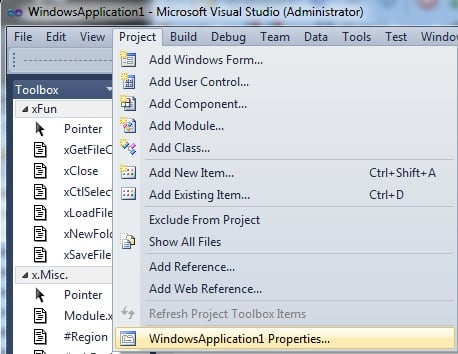
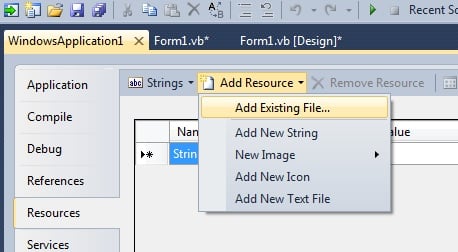
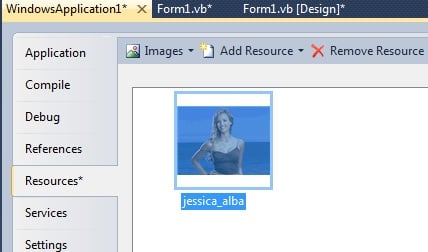
To add images or any file/files to My.Resources, follow these little steps.

First, check out the 3attached.images, in the order they appear.
2nd, you're done.:)

With PictureBox1
            .Image = My.Resources.jessica_alba
        End With

3rd, Jessica Alba is a hottie.:*

Attachments img1.jpg 61.67KB img2.jpg 42.05KB img3.jpg 29.25KB
codeorder
Postaholic
2,124 posts since Aug 2010
Reputation Points: 256
Solved Threads: 387
Skill Endorsements: 8

Steps on VS2010:
Method A)
1)Select your project
2)Right click and select the option Add
3)Select the option Existing Item
4)On the lower right corner Select the option All Files (*.*)
5)Using the left pane, nevigate to the place where the image or icon is located
6)On the right pane, select the image you want to include and click on the Add button located in the lower right corner.
7)The image is copied into the source folder of your project.
8)On the Solution Explorer select the image and right click. Select the Properties option.
9)On the properties pane, find the Build Action. Change it to Embedded Resource.
10) Save your project

Method B)

1) Select your project.
2) On the VS2010 Menu, select Project, then the las one (yourprojectname properties)
3) Select the resources tab
4) On the top of this form, Click on Add Resource
5) Select the Add existing file
6) Continue with the steeps 4 to 7 of method A)
7) Select the image in the Resources tab, and see the properties pane
8) Find the persistance option and change it to Embedded in .resx
9) Save your project.

Hope this helps

lolafuertes
Practically a Posting Shark
889 posts since Oct 2008
Reputation Points: 164
Solved Threads: 189
Skill Endorsements: 5

thnx .

"3rd, Jessica Alba is a hottie." lol :D of coz

y2kshane
Light Poster
35 posts since Aug 2010
Reputation Points: 8
Solved Threads: 0
Skill Endorsements: 0

Glad I could help in more ways than1, "coz".:)
.Now mark your sh.t as Solved before I start the cussing, and it won't involve anything about hotties.:D

codeorder
Postaholic
2,124 posts since Aug 2010
Reputation Points: 256
Solved Threads: 387
Skill Endorsements: 8
Question Answered as of 1 Year Ago by codeorder and lolafuertes

This question has already been solved: Start a new discussion instead

Post: Markdown Syntax: Formatting Help
 
You
View similar articles that have also been tagged:
 
© 2013 DaniWeb® LLC
Page rendered in 0.3183 seconds using 2.65MB