Hello Daniweb, and thank you for taking the time to read this post.
I have a question of efficiency.
I am wondering, what is the most efficient way to print from a listview. The listview's values are loaded from a database, and I would like to print from that listview. So far I have tried moving them to a text file and printing the text file, but Windows said that "The file is to large for notpad" even though I was not using notepad.
Is it advised to create an array of structures and then load everything into the array?
If so, do I create the array dynamicly?
Please, if anyone has any suggestions, let me know.
Thank you,
begginnerdev
Unfortunately, it will not convert from the previous version to Visual Studio 2010. I can't get into the file to view the code either. :'( Thank you for the help though.
.NET provide a flexible way to organize your data and print by using PrintDocument. The following is the "Hello World" example of using PrintDocument.
Dim WithEvents pd As New System.Drawing.Printing.PrintDocument
Private Sub Form1_Load(ByVal sender As System.Object, ByVal e As System.EventArgs) Handles MyBase.Load
pd.Print()
End Sub
Private Sub pd_PrintPage(ByVal sender As Object, ByVal e As System.Drawing.Printing.PrintPageEventArgs) Handles pd.PrintPage
e.Graphics.DrawString("Hello World", Me.Font, Brushes.Black, 0, 0)
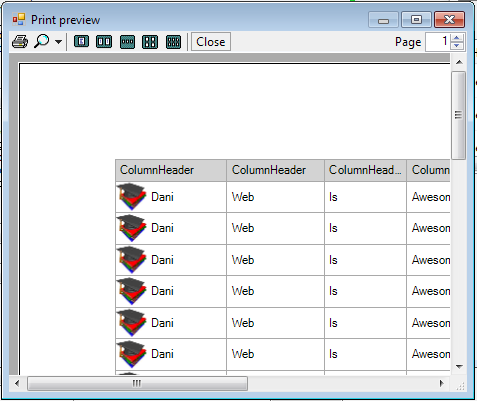
End Sub An example of printing a listview in details view.
Prints the columns to the current size as on the screen and prints images in the image list if one exists.
Public Class Form1
Private Sub Form1_Load(ByVal sender As Object, ByVal e As System.EventArgs) Handles Me.Load
'Junk items for demonstation.
For i = 1 To 100
ListView1.Items.Add(New ListViewItem(New String() {"Dani", "Web", "Is", "Awesome"}, 0))
Next
End Sub
Private Sub ButtonPrintListView_Click(ByVal sender As System.Object, ByVal e As System.EventArgs) Handles ButtonPrintListView.Click
'Used printPreviewDialog instead of printdialog
'to save paper while debugging. When finished
'swith out to PrintDialog.
Dim PrintPreview As New PrintPreviewDialog
PrintPreview.Document = PrintDocument1
PrintPreview.ShowDialog()
End Sub
Private Sub PrintDocument1_PrintPage(ByVal sender As Object, ByVal e As System.Drawing.Printing.PrintPageEventArgs) Handles PrintDocument1.PrintPage
'The below is desined for details view.
If ListView1.View = View.Details Then
PrintDetails(e)
End If
End Sub
Private Sub PrintDetails(ByRef e As System.Drawing.Printing.PrintPageEventArgs)
Static LastIndex As Integer = 0
Static CurrentPage As Integer = 0
'Getting the current dpi so the textleftpad
'will be the same on a different dpi than
'the 96 i'm using. Won't make much of a difference though.
Dim DpiGraphics As Graphics = Me.CreateGraphics
Dim DpiX As Integer = DpiGraphics.DpiX
Dim DpiY As Integer = DpiGraphics.DpiY
DpiGraphics.Dispose()
Dim X, Y As Integer
Dim ImageWidth As Integer
Dim TextRect As Rectangle = Rectangle.Empty
Dim TextLeftPad As Single = CSng(4 * (DpiX / 96)) '4 pixel pad on the left.
Dim ColumnHeaderHeight As Single = CSng(ListView1.Font.Height + (10 * (DpiX / 96))) '5 pixel pad on the top an bottom
Dim StringFormat As New StringFormat
Dim PageNumberWidth As Single = e.Graphics.MeasureString(CStr(CurrentPage), ListView1.Font).Width
'Specify the text should be drawn in the center of the line and
'that the text should not be wrapped and the text should show
'ellipsis would cut off.
StringFormat.FormatFlags = StringFormatFlags.NoWrap
StringFormat.Trimming = StringTrimming.EllipsisCharacter
StringFormat.LineAlignment = StringAlignment.Center
CurrentPage += 1
'Start the x and y at the top left margin.
X = CInt(e.MarginBounds.X)
Y = CInt(e.MarginBounds.Y)
'Draw the column headers
For ColumnIndex As Integer = 0 To ListView1.Columns.Count - 1
TextRect.X = X
TextRect.Y = Y
TextRect.Width = ListView1.Columns(ColumnIndex).Width
TextRect.Height = ColumnHeaderHeight
e.Graphics.FillRectangle(Brushes.LightGray, TextRect)
e.Graphics.DrawRectangle(Pens.DarkGray, TextRect)
'TextLeftPad adds a little padding from the gridline.
'Add it to the left and subtract it from the right.
TextRect.X += TextLeftPad
TextRect.Width -= TextLeftPad
e.Graphics.DrawString(ListView1.Columns(ColumnIndex).Text, ListView1.Font, Brushes.Black, TextRect, StringFormat)
'Move the x position over the width of the column width.
'Since I subtracted some padding add the padding back
'when offsetting.
X += TextRect.Width + TextLeftPad
Next
'Just drew the headers. Move the Y down the height
'of the column headers.
Y += ColumnHeaderHeight
'Now draw the items. If this is the first page then the
'last index will be zero. If its not then the last index
'will be the last index we tried to draw but had no room.
For i = LastIndex To ListView1.Items.Count - 1
With ListView1.Items(i)
'Start the x at the pages left margin.
X = CInt(e.MarginBounds.X)
'Check for Last Line
If Y + .Bounds.Height > e.MarginBounds.Bottom Then
'This item won't fit.
'subtract 1 from i so the next time this sub
'is entered we can start with this item.
LastIndex = i - 1
e.HasMorePages = True
StringFormat.Dispose()
'Draw the current page number before leaving.
e.Graphics.DrawString(CStr(CurrentPage), ListView1.Font, Brushes.Black, (e.PageBounds.Width - PageNumberWidth) / 2, e.PageBounds.Bottom - ListView1.Font.Height * 2)
Exit Sub
End If
'Print Images.
'The image width is used so we can draw the gridline
'around the image about to be drawn. You'll see it
'below.
ImageWidth = 0
If ListView1.SmallImageList IsNot Nothing Then
'If the image key is set then draw the image
'with the key . If not draw the image with the
'index. A tiny bit of validation would be good.
If Not String.IsNullOrEmpty(.ImageKey) Then
e.Graphics.DrawImage(ListView1.SmallImageList.Images(.ImageKey), X, Y)
ElseIf .ImageIndex >= 0 Then
e.Graphics.DrawImage(ListView1.SmallImageList.Images(.ImageIndex), X, Y)
End If
ImageWidth = ListView1.SmallImageList.ImageSize.Width
End If
'Now draw the subitems. using the columns count so the
'grid lines can be drawn. If used the subitems count then
'the table would not be full if some subitems where less
'than others.
For ColumnIndex As Integer = 0 To ListView1.Columns.Count - 1
TextRect.X = X
TextRect.Y = Y
TextRect.Width = ListView1.Columns(ColumnIndex).Width
TextRect.Height = .Bounds.Height
If ListView1.GridLines Then
e.Graphics.DrawRectangle(Pens.DarkGray, TextRect)
End If
'If an image is drawn then shift over the x to
'accomadate its width. If this was shifted before
'now then the gridline with draw rect above would be
' on the wrong side of the image.
If ColumnIndex = 0 Then TextRect.X += ImageWidth
'Add a little padding from the gridline.
TextRect.X += TextLeftPad
TextRect.Width -= TextLeftPad
If ColumnIndex < .SubItems.Count Then
'This item has at least the same number of
'subitems as the current column index.
e.Graphics.DrawString(.SubItems(ColumnIndex).Text, ListView1.Font, Brushes.Black, TextRect, StringFormat)
End If
'Shift the x of the width of this subitem.
'Add some padding to the left side of the text
'so need to add it back.
X += TextRect.Width + TextLeftPad
Next
'Set the next line
Y += .Bounds.Height
End With
Next
'Draw the final page number.
e.Graphics.DrawString(CStr(CurrentPage), ListView1.Font, Brushes.Black, (e.PageBounds.Width - PageNumberWidth) / 2, e.PageBounds.Bottom - ListView1.Font.Height * 2)
StringFormat.Dispose()
LastIndex = 0
CurrentPage = 0
End Sub
End Class
thanks for this article.. it helps me.. but can help me how to adjust the listview item to another place? it places on the top of paper.. i want to place in middle of page. :) thanx.
I modified your code now is in color
'Keep track of the Line Y postition to determine if there are more pages
Static CurrentYPosition As Integer = 0
'The below is desined for details view.
If ListView1.View = View.Details Then
PrintDetails(e)
End If
End Sub
Private Sub PrintDetails(ByRef e As System.Drawing.Printing.PrintPageEventArgs)
If ListView1.Visible = True Then
Static LastIndex As Integer = 0
Static CurrentPage As Integer = 0
'Getting the current dpi so the textleftpad
'will be the same on a different dpi than
'the 96 i'm using. Won't make much of a difference though.
Dim DpiGraphics As Graphics = Me.CreateGraphics
Dim DpiX As Integer = DpiGraphics.DpiX
Dim DpiY As Integer = DpiGraphics.DpiY
DpiGraphics.Dispose()
Dim X, Y As Integer
Dim ImageWidth As Integer
Dim TextRect As Rectangle = Rectangle.Empty
Dim TextLeftPad As Single = CSng(4 * (DpiX / 96)) '4 pixel pad on the left.
Dim ColumnHeaderHeight As Single = CSng(ListView1.Font.Height + (10 * (DpiX / 96))) '5 pixel pad on the top an bottom
Dim StringFormat As New StringFormat
Dim PageNumberWidth As Single = e.Graphics.MeasureString(CStr(CurrentPage), ListView1.Font).Width
'Specify the text should be drawn in the center of the line and
'that the text should not be wrapped and the text should show
'ellipsis would cut off.
StringFormat.FormatFlags = StringFormatFlags.NoWrap
StringFormat.Trimming = StringTrimming.EllipsisCharacter
StringFormat.LineAlignment = StringAlignment.Center
CurrentPage += 1
'Start the x and y at the top left margin.
X = CInt(e.MarginBounds.X)
Y = CInt(e.MarginBounds.Y)
'Draw the column headers
For ColumnIndex As Integer = 0 To ListView1.Columns.Count - 1
TextRect.X = X
TextRect.Y = Y
TextRect.Width = ListView1.Columns(ColumnIndex).Width
TextRect.Height = ColumnHeaderHeight
e.Graphics.FillRectangle(Brushes.LightGray, TextRect)
e.Graphics.DrawRectangle(Pens.DarkGray, TextRect)
'TextLeftPad adds a little padding from the gridline.
'Add it to the left and subtract it from the right.
TextRect.X += TextLeftPad
TextRect.Width -= TextLeftPad
e.Graphics.DrawString(ListView1.Columns(ColumnIndex).Text, ListView1.Font, Brushes.Black, TextRect, StringFormat)
'Move the x position over the width of the column width.
'Since I subtracted some padding add the padding back
'when offsetting.
X += TextRect.Width + TextLeftPad
Next
'Just drew the headers. Move the Y down the height
'of the column headers.
Y += ColumnHeaderHeight
'Now draw the items. If this is the first page then the
'last index will be zero. If its not then the last index
'will be the last index we tried to draw but had no room.
For i = LastIndex To ListView1.Items.Count - 1
With ListView1.Items(i)
'Start the x at the pages left margin.
X = CInt(e.MarginBounds.X)
'Check for Last Line
If Y + .Bounds.Height > e.MarginBounds.Bottom Then
'This item won't fit.
'subtract 1 from i so the next time this sub
'is entered we can start with this item.
LastIndex = i - 1
e.HasMorePages = True
StringFormat.Dispose()
'Draw the current page number before leaving.
e.Graphics.DrawString(CStr(CurrentPage), ListView1.Font, Brushes.Black, (e.PageBounds.Width - PageNumberWidth) / 2, e.PageBounds.Bottom - ListView1.Font.Height * 2)
Exit Sub
End If
'Print Images.
'The image width is used so we can draw the gridline
'around the image about to be drawn. You'll see it
'below.
ImageWidth = 0
If ListView1.SmallImageList IsNot Nothing Then
'If the image key is set then draw the image
'with the key . If not draw the image with the
'index. A tiny bit of validation would be good.
If Not String.IsNullOrEmpty(.ImageKey) Then
e.Graphics.DrawImage(ListView1.SmallImageList.Images(.ImageKey), X, Y)
ElseIf .ImageIndex >= 0 Then
e.Graphics.DrawImage(ListView1.SmallImageList.Images(.ImageIndex), X, Y)
End If
ImageWidth = ListView1.SmallImageList.ImageSize.Width
End If
'Now draw the subitems. using the columns count so the
'grid lines can be drawn. If used the subitems count then
'the table would not be full if some subitems where less
'than others.
For ColumnIndex As Integer = 0 To ListView1.Columns.Count - 1
TextRect.X = X
TextRect.Y = Y
TextRect.Width = ListView1.Columns(ColumnIndex).Width
TextRect.Height = .Bounds.Height
Dim bColor As Integer = ListView1.Items(i).BackColor.ToArgb
Dim myBColor As Color = ColorTranslator.FromHtml(bColor)
e.Graphics.FillRectangle(New SolidBrush(myBColor), TextRect)
If ListView1.GridLines Then
e.Graphics.DrawRectangle(Pens.DarkGray, TextRect)
End If
'If an image is drawn then shift over the x to
'accomadate its width. If this was shifted before
'now then the gridline with draw rect above would be
' on the wrong side of the image.
If ColumnIndex = 0 Then TextRect.X += ImageWidth
'Add a little padding from the gridline.
TextRect.X += TextLeftPad
TextRect.Width -= TextLeftPad
If ColumnIndex < .SubItems.Count Then
'This item has at least the same number of
'subitems as the current column index.
Dim TColor As Integer = ListView1.Items(i).SubItems(ColumnIndex).ForeColor.ToArgb
Dim myTColor As Color = ColorTranslator.FromHtml(TColor)
e.Graphics.DrawString(.SubItems(ColumnIndex).Text, ListView1.Font, New SolidBrush(myTColor), TextRect, StringFormat)
End If
'Shift the x of the width of this subitem.
'Add some padding to the left side of the text
'so need to add it back.
X += TextRect.Width + TextLeftPad
Next
'Set the next line
Y += .Bounds.Height
End With
Next
'Draw the final page number.
e.Graphics.DrawString(CStr(CurrentPage), ListView1.Font, Brushes.Black, (e.PageBounds.Width - PageNumberWidth) / 2, e.PageBounds.Bottom - ListView1.Font.Height * 2)
StringFormat.Dispose()
LastIndex = 0
CurrentPage = 0
End If
End Sub