954,517 Members — Technology Publication meets Social Media
Username:
Password:
Lost login information?
Have something to say? Contribute New Article Reply to this Article

Unsure why my Code is crashing!

Hello, When I go to Debug my program (F5), the program will load, until I click on the form with the main part of code in it, and then the program freezes, although it doesn't lock up because as soon as I press stop debugging/ task manager end process, it closes fine.

I will attach the zip of the program here. The form that it freezes on is "Black Ops". :)

Edit :

Due to the forum not accepting my .Zip file (Invalid file type), I will upload it to MediaFire.

Download link (445kb): Click Here

Thanks, Toby.

Tobyjug2222
Newbie Poster
17 posts since Dec 2011
Reputation Points: 10
Solved Threads: 0
 

Bump / Anybody Willing to help? :/

Tobyjug2222
Newbie Poster
17 posts since Dec 2011
Reputation Points: 10
Solved Threads: 0
 

your given proj is not working at my end and it gives an error when i run it .you should use break points in your code to solve this type of issues .please in order to get help , post your code or again give new link of working project

regards

waqasaslammmeo
Posting Pro in Training
472 posts since Aug 2011
Reputation Points: 38
Solved Threads: 82
 

I d/l'ed the project and got the "Black Ops" issue taken care of.
.The issues laid inside the Private Sub KillStreaks() (located it by commenting out lines for each called Sub) and I am not exactly certain as to why it froze, though I froze also when I took a look at the code inside that Sub.:D

I tried following along the same guidelines as the code posted w/in that Sub and hopefully this helps.
.Just replace your entire Private Sub KillStreaks() with the following code.

Private rnd As New Random '// DECLARED ONCE AND USES THE FUNCTION.

    Private Function getCoolRandomNumber(ByVal minCoolNumberValue As Integer, ByVal maxCoolNumberValue As Integer) As Integer
        rnd = New Random
        Return rnd.Next(minCoolNumberValue, maxCoolNumberValue)
    End Function
#Region "-----===-----===-----===-----===-----=== KILL STREAKS ===-----===-----===-----===-----===-----"
    Private Sub KillStreaks()
        '// send a random# to set the selected KillStreak.
        setKillStreaks(getCoolRandomNumber(1, 9), 1)
        setKillStreaks(getCoolRandomNumber(1, 9), 2)
        setKillStreaks(getCoolRandomNumber(1, 9), 3)
    End Sub

    Private Sub setKillStreaks(ByVal selRandomNumber As Integer, ByVal selKillStreak As Integer)
        Select Case selRandomNumber
            Case 1
                Select Case getCoolRandomNumber(1, 3)
                    Case 1
                        setKillStreakLabelText(selKillStreak, "SPY PLANE")
                    Case 2
                        setKillStreakLabelText(selKillStreak, "RC-XD")
                End Select
            Case 2
                Select Case getCoolRandomNumber(1, 3)
                    Case 1
                        setKillStreakLabelText(selKillStreak, "COUNTER-SPY PLANE")
                    Case 2
                        setKillStreakLabelText(selKillStreak, "SAM TURRET")
                End Select
            Case 3
                Select Case getCoolRandomNumber(1, 3)
                    Case 1
                        setKillStreakLabelText(selKillStreak, "CARE PACKAGE")
                    Case 2
                        setKillStreakLabelText(selKillStreak, "NAPALM STRIKE")
                End Select
            Case 4
                Select Case getCoolRandomNumber(1, 3)
                    Case 1
                        setKillStreakLabelText(selKillStreak, "SENTRY GUN")
                    Case 2
                        setKillStreakLabelText(selKillStreak, "MORTAR TEAM")
                End Select
            Case 5
                Select Case getCoolRandomNumber(1, 3)
                    Case 1
                        setKillStreakLabelText(selKillStreak, "ATTACK HELICOPTER")
                    Case 2
                        setKillStreakLabelText(selKillStreak, "VALKYRIE ROCKETS")
                End Select
            Case 6
                Select Case getCoolRandomNumber(1, 3)
                    Case 1
                        setKillStreakLabelText(selKillStreak, "BLACKBIRD")
                    Case 2
                        setKillStreakLabelText(selKillStreak, "ROLLING THUNDER")
                End Select
            Case 7
                setKillStreakLabelText(selKillStreak, "CHOPPER GUNNER")
            Case 8
                Select Case getCoolRandomNumber(1, 3)
                    Case 1
                        setKillStreakLabelText(selKillStreak, "ATTACK DOGS")
                    Case 2
                        setKillStreakLabelText(selKillStreak, "GUNSHIP")
                End Select
        End Select
        '// To Not duplicate, check if duplicate values and if found, call the Sub again for that selectedKillStreak.
        If lblKillStreak1.Text = lblKillStreak2.Text Or lblKillStreak1.Text = lblKillStreak3.Text Then setKillStreaks(getCoolRandomNumber(1, 9), 1)
        If lblKillStreak2.Text = lblKillStreak1.Text Or lblKillStreak2.Text = lblKillStreak3.Text Then setKillStreaks(getCoolRandomNumber(1, 9), 2)
    End Sub

    Private Sub setKillStreakLabelText(ByVal selKillStreak As Integer, ByVal selCoolTextForLabel As String) '// easier to manage.
        If selKillStreak = 1 Then lblKillStreak1.Text = selCoolTextForLabel
        If selKillStreak = 2 Then lblKillStreak2.Text = selCoolTextForLabel
        If selKillStreak = 3 Then lblKillStreak3.Text = selCoolTextForLabel
    End Sub
#End Region

.If you have any questions regarding my updated code, do ask.
.If you need help cleaning up the rest of the code w/in your Black Ops Form to make it more manageable and give your app less lines of code to read, do notify.

Since I'm a huge Call of Duty fan myself, if you would like any support and/or cover fire w/this project, p.m.Me.

One more thing, replace the Private Sub Black_Ops_Load Sub with this.

Private Sub Black_Ops_Load(ByVal sender As System.Object, ByVal e As System.EventArgs) Handles MyBase.Load
        Cmd_Generate_Click(sender, e) '// call the Button's.Click event.
    End Sub
codeorder
Posting Virtuoso
1,913 posts since Aug 2010
Reputation Points: 255
Solved Threads: 384
 

@codeorder, Thanks for that help, it looks like It's almost perfect! Apart from one part.

'// To Not duplicate, check if duplicate values and if found, call the Sub again for that selectedKillStreak.
        If lblKillStreak1.Text = lblKillStreak2.Text Or lblKillStreak1.Text = lblKillStreak3.Text Then setKillStreaks(getCoolRandomNumber(1, 9), 1)
        If lblKillStreak2.Text = lblKillStreak1.Text Or lblKillStreak2.Text = lblKillStreak3.Text Then setKillStreaks(getCoolRandomNumber(1, 9), 2)
    End Sub

    Private Sub setKillStreakLabelText(ByVal selKillStreak As Integer, ByVal selCoolTextForLabel As String) '// easier to manage.
        If selKillStreak = 1 Then lblKillStreak1.Text = selCoolTextForLabel
        If selKillStreak = 2 Then lblKillStreak2.Text = selCoolTextForLabel
        If selKillStreak = 3 Then lblKillStreak3.Text = selCoolTextForLabel
    End Sub


At this part the problem is, You cannot have either KillStreak from the selected number (Hence why I didn't just do random 1-17), If the KillStreak is from Case1, then another KillStreak shows up from Case 1, This is also a duplicate (I.E. Spy Plane + RC-XD).. I don't think your code (Above) will prevent this from happening, what's the best way to tackle that?

I also think I understand the rest of the code, so I think I should be okay on correcting the rest of my code! (Big thanks though!) Although I'll be sure to message you if I encounter any problems! :)

(PS. I'm a really new to coding, and that's probably why you though my code was so "Dirty") haha! :)

Thanks, Toby.

Tobyjug2222
Newbie Poster
17 posts since Dec 2011
Reputation Points: 10
Solved Threads: 0
 

>>I don't think your code (Above) will prevent this from happening, what's the best way to tackle that?
Entirely different question and I only replied to this thread for this question.

>>(PS. I'm a really new to coding,...
Would have never guessed.:D

As for the rest, glad I could help:); and If issue solved, then the thread should be as well.

Something else before I delete your project from my.p.c..
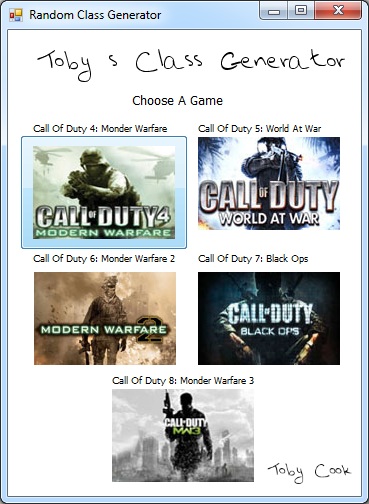
.I would place those images on frmHomePage in a Button's.BackgroundImage; just makes nice eye candy for the user when you hover over the btn.:)(view.attached)

Attachments tcg.vb_.net_.jpg 68.85KB
codeorder
Posting Virtuoso
1,913 posts since Aug 2010
Reputation Points: 255
Solved Threads: 384
 

This question has already been solved

Post: Markdown Syntax: Formatting Help
You
View similar articles that have also been tagged: