We're a community of 1077K IT Pros here for help, advice, solutions, professional growth and fun. Join us!
1,076,329 Members — Technology Publication meets Social Media
Username:
Password:
Lost login information?
Start New Discussion Reply to this Discussion

validating combobox

please kindly help me!!!
what i wanted is when i select items in the combobox and it is already in the database it will prompt that it is already in the database..tnx

Private Sub ComboBox3_Validating(ByVal sender As Object, ByVal e As System.ComponentModel.CancelEventArgs) Handles ComboBox3.Validating
        If ComboBox3.Validating Then
            con = New OleDbConnection("Provider= Microsoft.ACE.oledb.12.0; Data Source=C:\Users\edenzam\Desktop\CBFMNHS Enrollment System\CBFMNHS Enrollment System\bin\Debug\Enrollment System.accdb")
            Dim ewaaa As String = "Select * from SchedulingTwos  where YearLevels = '" & ComboBox1.Text & "'"
            com = New OleDbCommand(ewaaa, con)
            con.Open()
            com.ExecuteNonQuery()
            rid = com.ExecuteReader
            rid.Read()
            If (rid.HasRows) Then
                ComboBox3.Text = rid(2)
                MsgBox("Section Already Exist", MsgBoxStyle.Critical, "Error")
                ComboBox3.SelectedIndex = -1
            End If
        End If
    End Sub
4
Contributors
23
Replies
1 Week
Discussion Span
1 Year Ago
Last Updated
24
Views
Question
Answered
jhedonghae
Junior Poster
117 posts since Mar 2012
Reputation Points: 0
Solved Threads: 0
Skill Endorsements: 0

i needed the answer badly..please help me

jhedonghae
Junior Poster
117 posts since Mar 2012
Reputation Points: 0
Solved Threads: 0
Skill Endorsements: 0

What does ur combobox1 contains and what is in combobox3

Private Sub ComboBox3_Validating(ByVal sender As Object, ByVal e As System.ComponentModel.CancelEventArgs) Handles ComboBox3.Validating
    If ComboBox3.Validating Then
    con = New OleDbConnection("Provider= Microsoft.ACE.oledb.12.0; Data Source=C:\Users\edenzam\Desktop\CBFMNHS Enrollment System\CBFMNHS Enrollment System\bin\Debug\Enrollment System.accdb")
    Dim ewaaa As String = "Select * from SchedulingTwos where YearLevels = '" & ComboBox1.Text & "'"
    com = New OleDbCommand(ewaaa, con)
    con.Open()
    rid = com.ExecuteReader
        if rid.Read=True then
                MsgBox("Section Already Exist", MsgBoxStyle.Critical, "Error")
                ComboBox3.SelectedIndex = -1
        End If
    End If
End Sub
poojavb
Posting Pro
524 posts since Nov 2011
Reputation Points: 39
Solved Threads: 77
Skill Endorsements: 5

combobox1 contains the items First Year, Second Year, Third Year, Fourth Year and combobox3 contains sections 1 - 15

jhedonghae
Junior Poster
117 posts since Mar 2012
Reputation Points: 0
Solved Threads: 0
Skill Endorsements: 0

and their is an error with this code "If ComboBox3.Validating Then"

jhedonghae
Junior Poster
117 posts since Mar 2012
Reputation Points: 0
Solved Threads: 0
Skill Endorsements: 0

use the below select query

"Select * from SchedulingTwos where YearLevels = '" & ComboBox1.Text & "'" and Sections = '" & ComboBox3.Text & '""

if this condition is true then u will get the alert message that the section is already added

poojavb
Posting Pro
524 posts since Nov 2011
Reputation Points: 39
Solved Threads: 77
Skill Endorsements: 5

this code generates an error com = New OleDbCommand(ewaaa, con) it says that ewaaa is not declared

jhedonghae
Junior Poster
117 posts since Mar 2012
Reputation Points: 0
Solved Threads: 0
Skill Endorsements: 0

paste ur code again so that we can help u....if already fixed mark the thread as solved....
Remove the if condition of validating...see if com is declared....check the connections

poojavb
Posting Pro
524 posts since Nov 2011
Reputation Points: 39
Solved Threads: 77
Skill Endorsements: 5

this code generates an error com = New OleDbCommand(ewaaa, con) it says that ewaaa is not declared

venus1
Newbie Poster
Banned
1 post since Mar 2012
Reputation Points: -2
Solved Threads: 1
Skill Endorsements: 0
Infraction Points: 20
Private Sub ComboBox3_Validating(ByVal sender As Object, ByVal e As System.ComponentModel.CancelEventArgs) Handles ComboBox3.Validating
        If ComboBox3.Text = "'" Then
            con = New OleDbConnection("Provider= Microsoft.ACE.oledb.12.0; Data Source=C:\Users\edenzam\Desktop\CBFMNHS Enrollment System\CBFMNHS Enrollment System\bin\Debug\Enrollment System.accdb")
            Dim ewaaa As String = "Select * from Schedulings where YearLevels = '" & ComboBox3.Text & "' And Sections = '" & ComboBox1.Text & "' "
            com = New OleDbCommand(ewaaa, con)
            con.Open()
            rid = com.ExecuteReader
            rid.Read()
            If (rid.HasRows) Then
                ComboBox3.Text = rid(2)
                MsgBox("Section Already Exist", MsgBoxStyle.Critical, "Error")
                ComboBox3.SelectedIndex = -1
            End If
        End If
    End Sub
jhedonghae
Junior Poster
117 posts since Mar 2012
Reputation Points: 0
Solved Threads: 0
Skill Endorsements: 0

i think the problem is in this part "If ComboBox3.Text = "'" Then" i just don't know how to manipulate combobox when the event is validating...please help me

jhedonghae
Junior Poster
117 posts since Mar 2012
Reputation Points: 0
Solved Threads: 0
Skill Endorsements: 0

Remove that if (If ComboBox3.Text = "'") condition y u need it???

and u have written double quotes then single quote and then double quotes in the if condition for combobox text....y u need that??? remove the single quote and keep it just If ComboBox3.Text = "" Then....i would recommend to remove that condition

anyways if this is the condition it wont enter the if loop anytime...

poojavb
Posting Pro
524 posts since Nov 2011
Reputation Points: 39
Solved Threads: 77
Skill Endorsements: 5

ok i'll remove it and update if tis works..thanks

jhedonghae
Junior Poster
117 posts since Mar 2012
Reputation Points: 0
Solved Threads: 0
Skill Endorsements: 0

i change my codes to this:

 Private Sub ComboBox3_Validating(ByVal sender As Object, ByVal e As System.ComponentModel.CancelEventArgs) Handles ComboBox3.Validating
        con = New OleDbConnection("Provider= Microsoft.ACE.oledb.12.0; Data Source=C:\Users\edenzam\Desktop\CBFMNHS Enrollment System\CBFMNHS Enrollment System\bin\Debug\Enrollment System.accdb")
        Dim ewaaa As String = "Select * from Schedulings where YearLevels = '" & ComboBox3.Text & "' And Sections = '" & ComboBox1.Text & "' "
        com = New OleDbCommand(ewaaa, con)
        con.Open()
        rid = com.ExecuteReader
        rid.Read()
        If (rid.HasRows = True) Then
            ComboBox3.Text = rid(2)
            MsgBox("Section Already Exist", MsgBoxStyle.Critical, "Error")
            ComboBox3.SelectedIndex = -1
        Else
            ' do nothing
        End If
    End Sub

but still it is not working

jhedonghae
Junior Poster
117 posts since Mar 2012
Reputation Points: 0
Solved Threads: 0
Skill Endorsements: 0

1st, why use use Validating event? Why not SelectedIndexChnaged (of comboBox(es))?
2nd, change comboBoxX.Text with comboBoxX.SelectedItem.tostring()
3rd, remove "if(rid.HasRows)" out of the code, change it with "if(rid.Read())" statement
and last,:
You cannot use comboBox3.Text, this will do nothing. What you can do, is to ADD a new Item to this comboBox. And then select it (if you want to show it on top (in "textBox" of comboBox area).
So change ComboBox3.Text = rid(2) to: ComboBox3.Items.Add(rid(2).ToString())

--
Hope it helps,
bye

Mitja Bonca
Posting Maven
2,561 posts since May 2009
Reputation Points: 642
Solved Threads: 486
Skill Endorsements: 13

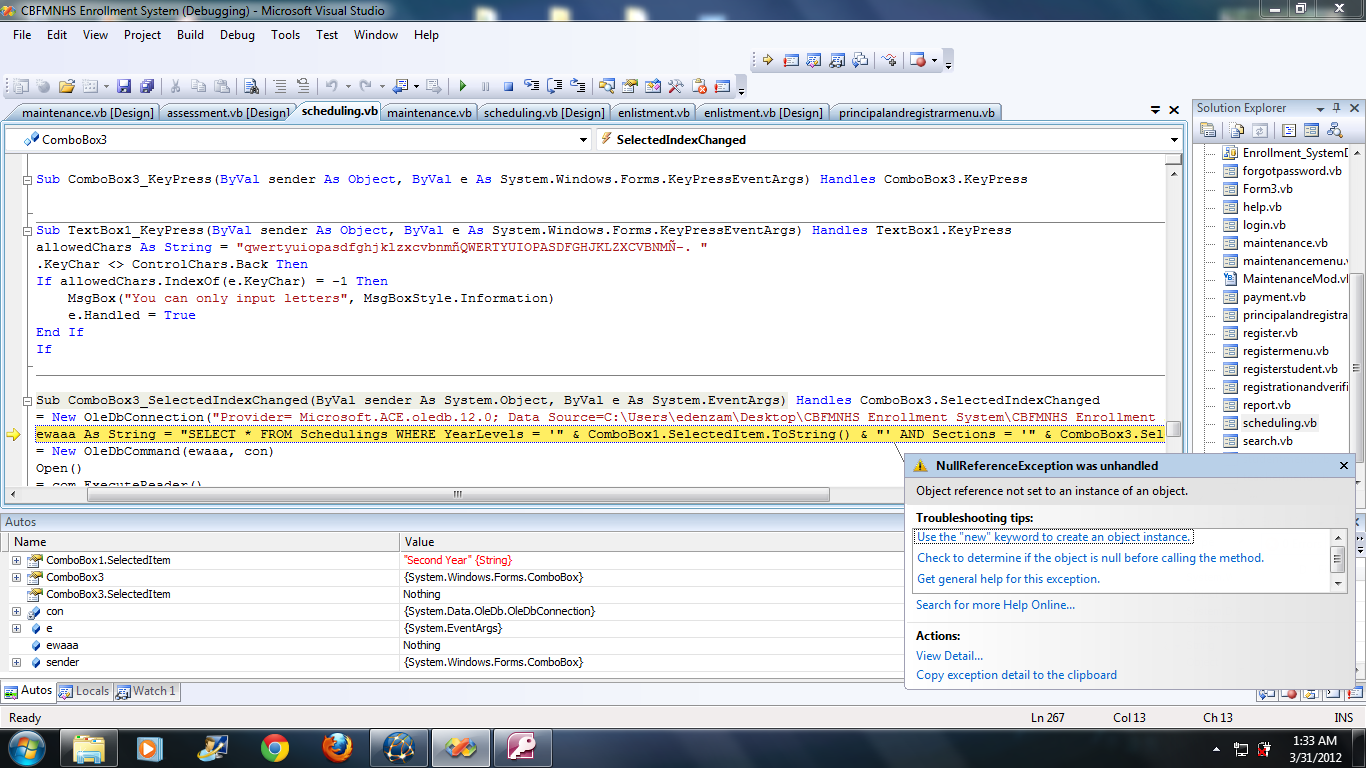
@Mitja this is my new code that i based from what you said i hope i did it the way you wanted because it still didn't work

Private Sub ComboBox3_SelectedIndexChanged(ByVal sender As System.Object, ByVal e As System.EventArgs) Handles ComboBox3.SelectedIndexChanged
con = New OleDbConnection("Provider= Microsoft.ACE.oledb.12.0; Data Source=C:\Users\edenzam\Desktop\CBFMNHS Enrollment System\CBFMNHS Enrollment System\bin\Debug\Enrollment System.accdb")
Dim ewaaa As String = "Select * from Schedulings where YearLevels = '" & ComboBox3.Text & "' And Sections = '" & ComboBox1.Text & "' "
com = New OleDbCommand(ewaaa, con)
con.Open()
rid = com.ExecuteReader
rid.Read()
If (rid.Read()) Then
ComboBox3.Items.Add(rid(2).ToString())
MsgBox("Section Already Exist", MsgBoxStyle.Critical, "Error")
ComboBox3.SelectedIndex = -1
Else
' do nothing
End If
End Sub

and by the way where do i add this code? 2nd, change comboBoxX.Text with comboBoxX.SelectedItem.tostring()
tnx

jhedonghae
Junior Poster
117 posts since Mar 2012
Reputation Points: 0
Solved Threads: 0
Skill Endorsements: 0

Ok, I did renovate your code, and it you have data inside your table (and it connection string is the right one), is must work:

Private Sub ComboBox3_SelectedIndexChanged(sender As System.Object, e As System.EventArgs)
    con = New OleDbConnection("Provider= Microsoft.ACE.oledb.12.0; Data Source=C:\Users\edenzam\Desktop\CBFMNHS Enrollment System\CBFMNHS Enrollment System\bin\Debug\Enrollment System.accdb")
    Dim ewaaa As String = "SELECT * FROM Schedulings WHERE YearLevels = '" & ComboBox3.SelectedItem.ToString() & "' AND Sections = '" & ComboBox1.SelectedItem.ToString() & "'"
    com = New OleDbCommand(ewaaa, con)
    con.Open()
    rid = com.ExecuteReader()
    If rid.Read() Then
        Dim text As String = rid(2).ToString()
        ComboBox3.Items.Add(text)
        '2 means 3rd column! do you have 3 columns inside table?
        'show this on top:
        ComboBox1.Text = text
            'Interaction.MsgBox("Section Already Exist", MsgBoxStyle.Critical, "Error");               
        ComboBox3.SelectedIndex = -1
            ' do nothing
    Else
    End If
End Sub
Mitja Bonca
Posting Maven
2,561 posts since May 2009
Reputation Points: 642
Solved Threads: 486
Skill Endorsements: 13

yes i have three columns...i'm sorry but it still didn't work

jhedonghae
Junior Poster
117 posts since Mar 2012
Reputation Points: 0
Solved Threads: 0
Skill Endorsements: 0

Put a break point before this line of code:
Dim text As String = rid(2).ToString()

and you will see by putting a mouse cursor over "text" variable if there is any text iside.
If it is , it code should put text into comboBox, else its something wrong with query statement.

Mitja Bonca
Posting Maven
2,561 posts since May 2009
Reputation Points: 642
Solved Threads: 486
Skill Endorsements: 13

what does that mean..i'm confused..sorry

jhedonghae
Junior Poster
117 posts since Mar 2012
Reputation Points: 0
Solved Threads: 0
Skill Endorsements: 0

This question has already been solved: Start a new discussion instead

Post: Markdown Syntax: Formatting Help
 
You
 
© 2013 DaniWeb® LLC
Page rendered in 0.1220 seconds using 2.71MB