We're a community of 1077K IT Pros here for help, advice, solutions, professional growth and fun. Join us!
1,076,089 Members — Technology Publication meets Social Media
Username:
Password:
Lost login information?
Start New Discussion Reply to this Discussion
Page 2 of Article: validating combobox
please kindly help me!!! what i wanted is when i select items in the combobox and it is already in the database it will prompt that it is already in the database..tnx ~~~ vb Private Sub ComboBox3_Validating(ByVal sender As Object, ByVal e As System.ComponentModel.CancelEventArgs) Handles ComboBox3.Validating If ComboBox3.Validating Then con…

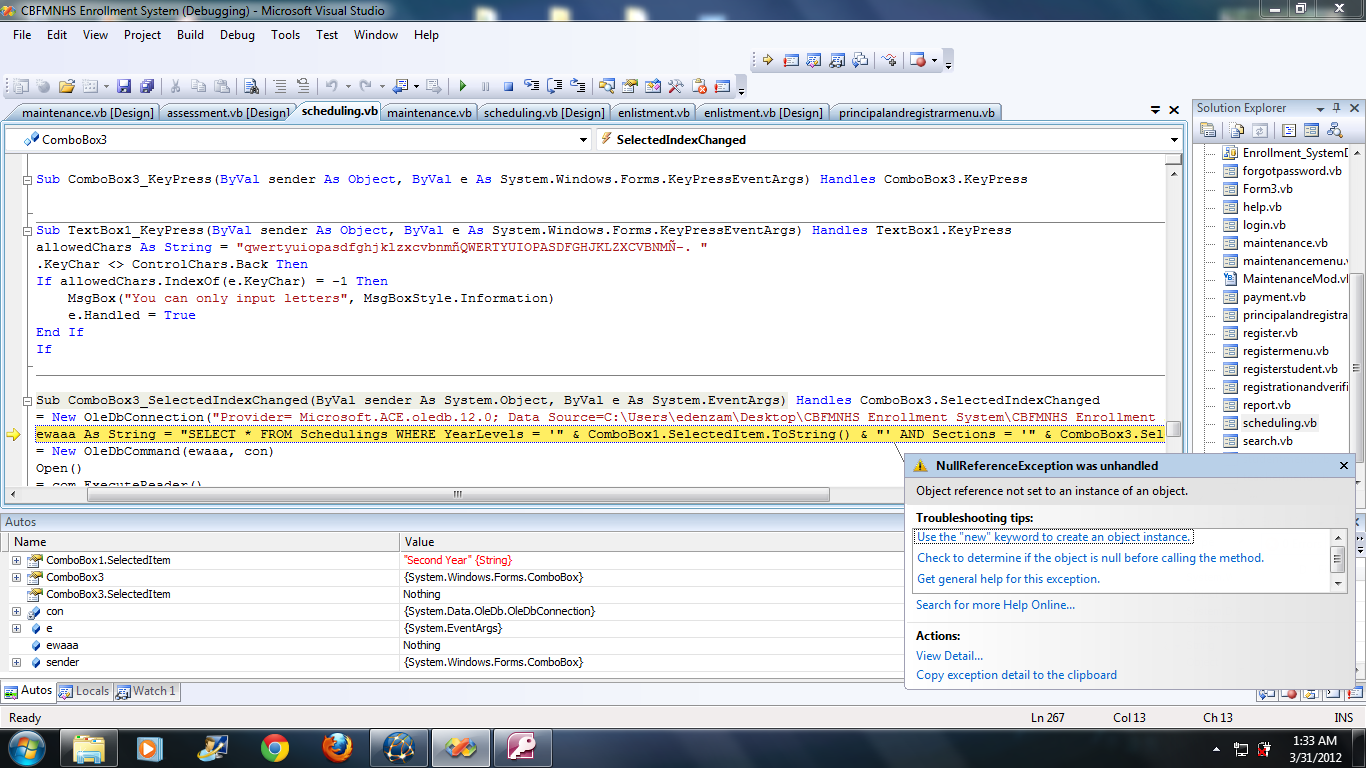
Untitled58 it works tnx but when i click the message box the attach image that shows the problem occurs

Attachments Untitled.png 231.46KB
jhedonghae
Junior Poster
117 posts since Mar 2012
Reputation Points: 0
Solved Threads: 0
Skill Endorsements: 0
Question Answered as of 1 Year Ago by poojavb, Mitja Bonca and venus1

U can use Debug.Print("text: "+ text) to check the value...if u dont know how to use debugger

it will show the value of the word declared as a variable but it should be string else convert it to String...

Try this below code...

  Private Sub ComboBox3_SelectedIndexChanged(sender As System.Object, e As System.EventArgs)

con = New OleDbConnection("Provider= Microsoft.ACE.oledb.12.0; Data Source=C:\Users\edenzam\Desktop\CBFMNHS Enrollment System\CBFMNHS Enrollment System\bin\Debug\Enrollment System.accdb")

Dim ewaaa As String = "SELECT * FROM Schedulings WHERE YearLevels = '" & ComboBox3.SelectedItem.ToString() & "' AND Sections = '" & ComboBox1.SelectedItem.ToString() & "'"
com = New OleDbCommand(ewaaa, con)
con.Open()
rid = com.ExecuteReader()
    If rid.Read = True Then
       MsgBox("Section Already Exist", MsgBoxStyle.Critical, "Error");
       else
       MsgBox("Section does not Exist", MsgBoxStyle.Critical, "Error");
    End If
End Sub
poojavb
Posting Pro
524 posts since Nov 2011
Reputation Points: 39
Solved Threads: 77
Skill Endorsements: 5

instead of & use + sign.....if still it does not work then try to convert SelectedItem.ToString to Text....hope it works for u...

poojavb
Posting Pro
524 posts since Nov 2011
Reputation Points: 39
Solved Threads: 77
Skill Endorsements: 5

tnx

jhedonghae
Junior Poster
117 posts since Mar 2012
Reputation Points: 0
Solved Threads: 0
Skill Endorsements: 0

This question has already been solved: Start a new discussion instead

Post: Markdown Syntax: Formatting Help
 
You
 
© 2013 DaniWeb® LLC
Page rendered in 0.0806 seconds using 2.66MB