We're a community of 1077K IT Pros here for help, advice, solutions, professional growth and fun. Join us!
1,076,280 Members — Technology Publication meets Social Media
Username:
Password:
Lost login information?
Start New Discussion Reply to this Discussion

Need a good Loop Statement

i have a listview in a form that contains a name like "Aileen-EB" , "FEMA-EB" , "CARMEN-EB7" , "TONETTE-A"
something like that

I need to get them and put it on a

Dim AccountName as String

I use if statement but i want my code to be like this

For AccountName 
Loop
Next

Something like that please help me guys
I attached a screenshot of my listview
i want the AM Field to input in the AccountName
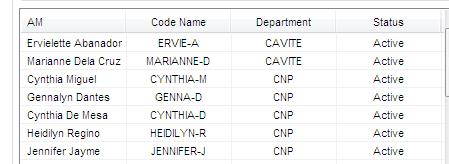
Listview

Attachments Listview.jpg 17.81KB
2
Contributors
9
Replies
5 Days
Discussion Span
5 Months Ago
Last Updated
12
Views
Question
Answered
Zick Technology
Junior Poster
183 posts since Dec 2012
Reputation Points: 0
Solved Threads: 2
Skill Endorsements: 3

Please clarify what you want to do.

i want the AM Field to input in the AccountName

is unclear.

I need to get them and put it on a

Dim AccountName as String

You already have them. They are in the ListView.

Reverend Jim
Carpe per diem
Moderator
3,612 posts since Aug 2010
Reputation Points: 563
Solved Threads: 451
Skill Endorsements: 32

yes it is in the listview i want each of the code name to go into the

   dim AccountName as string

so that each time i click the selected they will go to the AccountName
like this

AccountName = "ERVIE-A" & "GENNA-D" 'it will add if i click again

then if i click again it will add another
I want them to search all the data in the AccountName

"Select * from [Calls and Visits$] where AM like '" & AccountName & "%'", con

Sorry for the bad english and explanation..

Zick Technology
Junior Poster
183 posts since Dec 2012
Reputation Points: 0
Solved Threads: 2
Skill Endorsements: 3

So every time the user clicks on a line in the listview you want to append the value from the Code Name column to AccountName. The query

"Select * from [Calls and Visits$] where AM like '" & AccountName & "%'

will never match any records if AccountName contains more than one Code Name.

Reverend Jim
Carpe per diem
Moderator
3,612 posts since Aug 2010
Reputation Points: 563
Solved Threads: 451
Skill Endorsements: 32

yes i know but how can i do that to append?

Zick Technology
Junior Poster
183 posts since Dec 2012
Reputation Points: 0
Solved Threads: 2
Skill Endorsements: 3

@Reverend Jim i want to revise something
I want all my listview in code name to store or append in a string
so that i can easily use this code

For AccountName = ???
    "Select * from [Calls and Visits$] where AM like '" & AccountName & "%'"
Loop until listview.eof?

something like that????

Zick Technology
Junior Poster
183 posts since Dec 2012
Reputation Points: 0
Solved Threads: 2
Skill Endorsements: 3

So in pseudo code

For Each "Code Name" in the listview
    get all calls and visits for that Code Name
Next

and in real code that is

Dim query As String

For Each item As ListViewItem In ListView1.Items
    query = "Select * from [Calls and Visits$] where AM like '" & item.SubItems(1).Text & "%'"
    'execute the query and do something with the results
Next
Reverend Jim
Carpe per diem
Moderator
3,612 posts since Aug 2010
Reputation Points: 563
Solved Threads: 451
Skill Endorsements: 32

wow thank you so much @Reverend Jim for the codes
i will try this right now :)

Zick Technology
Junior Poster
183 posts since Dec 2012
Reputation Points: 0
Solved Threads: 2
Skill Endorsements: 3

Hi @reverend Jim

i have a question for this one

Dim query As String
For Each item As ListViewItem In ListView1.Items
query = "Select * from [Calls and Visits$] where AM like '" & item.SubItems(1).Text & "%'"
'execute the query and do something with the results
Next

so my code will going to be

        Dim con As New OleDbConnection
        Dim FilePath As String = FormConnection.TextPathCallsVisits.Text

        Dim dt As New DataTable
        Dim ds As New DataSet
        con.ConnectionString = ("provider=Microsoft.Jet.OLEDB.4.0; Data Source='" & FilePath & "';Extended Properties=Excel 8.0;")
        con.Open()
        ' this will find all the item in lvAccountManager
        For Each item As ListViewItem In lvAccountManager.Items
            Dim da As New OleDbDataAdapter("Select * from [Calls and Visits$] where AM like '" & item.SubItems(1).Text & "%'", con)

        ' this one will put all the AM that the systems find in the Listview
            da.Fill(dt)
            Dim dc As DataColumn
            For Each dc In ds.Tables(0).Columns
                Dim ch As New ColumnHeader
                ch.Text = dc.ColumnName
                ch.Width = 105
                Me.ListView1.Columns.Add(ch)
            Next
            ' Importing all data from Excel to Listview
            For Each myRow In dt.Rows
                Me.ListView1.Items.Add(myRow.Item(0))
                Me.ListView1.Items(Me.ListView1.Items.Count - 1).SubItems.Add(myRow.Item(1))
                Me.ListView1.Items(Me.ListView1.Items.Count - 1).SubItems.Add(myRow.Item(2))
                Me.ListView1.Items(Me.ListView1.Items.Count - 1).SubItems.Add(myRow.Item(3))
                Me.ListView1.Items(Me.ListView1.Items.Count - 1).SubItems.Add(myRow.Item(4))
            Next
            con.Close()

        Next
Zick Technology
Junior Poster
183 posts since Dec 2012
Reputation Points: 0
Solved Threads: 2
Skill Endorsements: 3

anyways i got it right :) thanks @reverend

        Dim con As New OleDbConnection
        Dim FilePath As String

        Dim dt As New DataTable
        Dim ds As New DataSet
        FilePath = FormConnection.TextPathCallsVisits.Text
        con.ConnectionString = ("provider=Microsoft.Jet.OLEDB.4.0; Data Source='" & FilePath & "';Extended Properties=Excel 8.0;")
        con.Open()
        dt.Clear()
        ds.Tables.Add(dt)
        For Each item As ListViewItem In lvAccountManager.Items
            Dim da As New OleDbDataAdapter("Select * from [Calls and Visits$] where AM like '" & item.SubItems(0).Text & "%'", con)
            da.Fill(dt)
        Next

        Dim dc As DataColumn
        For Each dc In ds.Tables(0).Columns
            Dim ch As New ColumnHeader
            ch.Text = dc.ColumnName
            ch.Width = 105
            Me.ListView1.Columns.Add(ch)
        Next

        For Each myRow In dt.Rows
            Me.ListView1.Items.Add(myRow.Item(0))
            Me.ListView1.Items(Me.ListView1.Items.Count - 1).SubItems.Add(myRow.Item(1))
            Me.ListView1.Items(Me.ListView1.Items.Count - 1).SubItems.Add(myRow.Item(2))
            Me.ListView1.Items(Me.ListView1.Items.Count - 1).SubItems.Add(myRow.Item(3))
            Me.ListView1.Items(Me.ListView1.Items.Count - 1).SubItems.Add(myRow.Item(4))
        Next
        con.Close()

I hope you can help me again :) THANK YOU SO MUCH

Zick Technology
Junior Poster
183 posts since Dec 2012
Reputation Points: 0
Solved Threads: 2
Skill Endorsements: 3
Question Answered as of 5 Months Ago by Reverend Jim

This question has already been solved: Start a new discussion instead

Post: Markdown Syntax: Formatting Help
 
You
View similar articles that have also been tagged:
 
© 2013 DaniWeb® LLC
Page rendered in 0.0938 seconds using 2.72MB