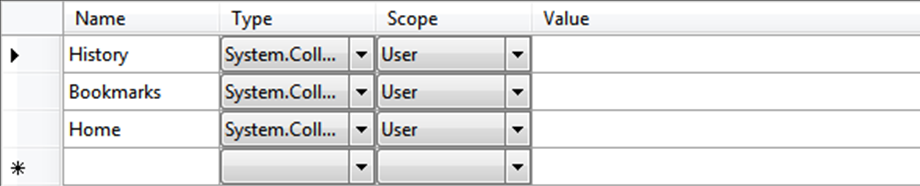
I'm working on a web browser and I need to know how to store history & bookmarks permanently as currently after the browser is closed all data is lossed.
Should I put it on a DB? Suggestions?
PS: They are currently being saved on a ListBox.
4
Contributors
11
Replies
1 Week
Discussion Span
3 Months Ago
Last Updated
15
Views
Question Answered
Related Article:SQL Gives Data Type Mismatch in Criteria Expression
is a solved VB.NET discussion thread by Formby that has 7 replies, was last updated 9 months ago and has been tagged with the keywords: data, mismatch, sql, type.
An easy way to do this is to create a string collectionin My.Settings.
You can add/delete from it like any other list. Set it as the Listbox's DataSource. ListBox1.DataSource = My.Settings.History
Just make sure that user settings is set to automatically save or do it in your code in the form closed event handler.
Private Sub Form1_FormClosed(ByVal sender As Object, ByVal e As System.Windows.Forms.FormClosedEventArgs) Handles Me.FormClosed
My.Settings.Save()
End Sub
Private Sub Form1_FormClosed(ByVal sender As Object, ByVal e As System.Windows.Forms.FormClosedEventArgs) Handles Me.FormClosed
My.Settings.Save()
End Sub
Well there were no syntax errors. Just when I published the project, I went to Google and I closed the program. I reopened it and found no records of me going to Google and I've done as @TnTinMN told me. :(
Public Class HistoryClass
Private Sub HistoryList_SelectedIndexChanged(ByVal sender As System.Object, ByVal e As System.EventArgs) Handles HistoryList.SelectedIndexChanged
HistoryList.DataSource = My.Settings.History
End Sub
Private Sub Delete_Click(ByVal sender As System.Object, ByVal e As System.EventArgs) Handles Delete.Click
HistoryList.Items.Clear()
End Sub
Private Sub Remove_Click(ByVal sender As System.Object, ByVal e As System.EventArgs) Handles Remove.Click
If (HistoryList.SelectedIndex >= 0) Then
HistoryList.Items.RemoveAt(HistoryList.SelectedIndex)
End If
End Sub
Private Sub Open_Click(ByVal sender As System.Object, ByVal e As System.EventArgs) Handles Open.Click
If (HistoryList.SelectedIndex >= 0) Then
Form1.WebBrowser.Navigate(HistoryList.SelectedItems(0))
End If
End Sub
End Class
Here is a very crude webbrowser example that maintains two history listes. It may give you some ideas. This example uses datatables instead of a string collection.