I have an IP camera that feeds video over lan or the internet thru a browser. It has its own interface on either Mozilla, IE or other browsers. I tried calling the site using the Microsoft Internet Controls component and it works fine. The GUI is called upon and I see the feed along with the buttons. My problem is that I want to use several Web Browser controls and divide the page to show only the camera feed. I also want to separate the arrow keys present to control the camera. Basically, instead of one complete browser window, I want to divide it into several. Is this possible? Thanks in advance.
I'm using VB6 by the way and the code I used to call its interface is
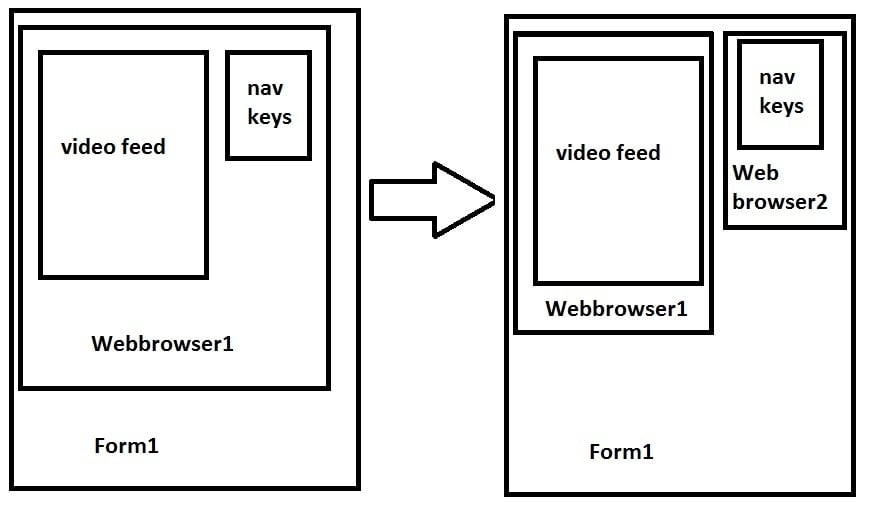
It works as a browser and shows me the GUI of the camera control. I want to divide the said GUI into several browsers. Here is an image that can sort of explain it.
What exactly does the GUI of the camera control consist of that you need to break down? Is it one application (camera's) that you want to split say the video control from the control buttons?
I understand the diagram above, why not just add a second webbrowser. What does the second browser need to contain?
You are right. I want to split the video feed from the control buttons. The first browser has to contain the feed.
I do not know the signals that are being sent to the camera to control it. So I cannot sent bits out over the UTP cable to control the camera. Rather, I want to make it look like my own interface. My plan is to make new buttons over those existing ones.
There may be no need for a second browser if possible. All I want is to have four command buttons that when clicked, will click the navigation keys in the browser as well.
@jhai,
Thanks but the source code is more or less the same in any browser.
@topic,
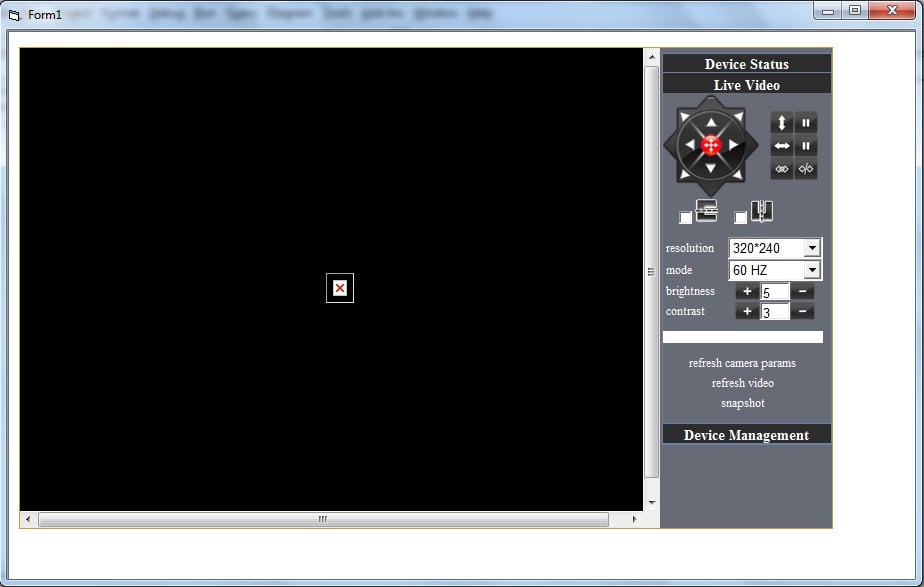
To make things clearer, I guess it is better to provide a concrete screenshot. Attached is the actual camera GUI. The camera is a FOSCAM FI8908W
Viewing the source, here is part of the html code that might help.
- This is the video feed. The exact site is 192.168.0.5/videostream.cgi
If I go to that site directly thru the browser or thru the VB control, the video feed does not load. I guess it is because authentication is required before you can access the GUI.
These are the source codes of the navigation keys. Only the up, down, left and right. These are the more important ones. Hope these additional information is of any help.
Unfortunately the camera has problems with the UPnP which makes it hard to control over the internet. We are planning on using this over LAN only. Any suggestions on how to divide the browser interface? Or possibly utilize the codes in HTML to call the camera functions? Let me know if you want the entire source code or if the ones earlier posted would suffice.
That's alright. I don't know what sort of control it is since the interface given is from the browser and not a standalone application.
I found some interesting codes when I inspected with Opera. I think there might be a way to make my own interface with the use of these functions and scripts but I don't know how to call them in VB6.
Opera:
<html>
<head>
<meta http-equiv="Content-Type" content="text/html; charset=utf-8"/>
<link rel="stylesheet" href="style.css" type="text/css"/>
<title/>
</head>
<script src="get_camera_params.cgi"></script>
<script>
var R320_240=8;
var R640_480=32;
var ptz_type=0;
if(top.client_minor==4) ptz_type=1;
if(top.client_minor==5) ptz_type=2;
var PTZ_STOP=1;
var TILT_UP=0;
var TILT_UP_STOP=1;
var TILT_DOWN=2;
var TILT_DOWN_STOP=3;
var PAN_LEFT=4;
var PAN_LEFT_STOP=5;
var PAN_RIGHT=6;
var PAN_RIGHT_STOP=7;
var PTZ_LEFT_UP=90;
var PTZ_RIGHT_UP=91;
var PTZ_LEFT_DOWN=92;
var PTZ_RIGHT_DOWN=93;
var PTZ_CENTER=25;
var PTZ_VPATROL=26;
var PTZ_VPATROL_STOP=27;
var PTZ_HPATROL=28;
var PTZ_HPATROL_STOP=29;
var PTZ_PELCO_D_HPATROL=20;
var PTZ_PELCO_D_HPATROL_STOP=21;
var IO_ON=94;
var IO_OFF=95;
function decoder_control(command)
{
action_zone.location='decoder_control.cgi?command='+command;
}
function camera_control(param,value)
{
action_zone.location='camera_control.cgi?param='+param+'&value='+value;
}
function set_flip()
{
if (image_reversal.checked)
flip|=1;
else
flip&=2;
if (image_mirror.checked)
flip|=2;
else
flip&=1;
camera_control(5,flip);
}
function up_onmousedown()
{
(flip&0x01)?decoder_control(TILT_DOWN):decoder_control(TILT_UP);
}
function up_onmouseup()
{
if (!ptz_type)
decoder_control(PTZ_STOP);
else if (flip&0x01)
decoder_control(TILT_DOWN_STOP);
else
decoder_control(TILT_UP_STOP);
}
function down_onmousedown()
{
(flip&0x01)?decoder_control(TILT_UP):decoder_control(TILT_DOWN);
}
function down_onmouseup()
{
if (!ptz_type)
decoder_control(PTZ_STOP);
else if (flip&0x01)
decoder_control(TILT_UP_STOP);
else
decoder_control(TILT_DOWN_STOP);
}
function left_onmousedown()
{
(flip&0x02)?decoder_control(PAN_RIGHT):decoder_control(PAN_LEFT);
}
function left_onmouseup()
{
if (!ptz_type)
decoder_control(PTZ_STOP);
else if (flip&0x02)
decoder_control(PAN_RIGHT_STOP);
else
decoder_control(PAN_LEFT_STOP);
}
function right_onmousedown()
{
(flip&0x02)?decoder_control(PAN_LEFT):decoder_control(PAN_RIGHT);
}
function right_onmouseup()
{
if (!ptz_type)
decoder_control(PTZ_STOP);
else if (flip&0x02)
decoder_control(PAN_LEFT_STOP);
else
decoder_control(PAN_RIGHT_STOP);
}
function leftup_onmousedown()
{
if (ptz_type)
return;
if ((flip&0x03)==0x03)
decoder_control(PTZ_RIGHT_DOWN);
else if (flip&0x02)
decoder_control(PTZ_RIGHT_UP);
else if (flip&0x01)
decoder_control(PTZ_LEFT_DOWN);
else
decoder_control(PTZ_LEFT_UP);
}
function leftup_onmouseup()
{
if (!ptz_type) decoder_control(PTZ_STOP);
}
function rightup_onmousedown()
{
if (ptz_type)
return;
if ((flip&0x03)==0x03)
decoder_control(PTZ_LEFT_DOWN);
else if (flip&0x02)
decoder_control(PTZ_LEFT_UP);
else if (flip&0x01)
decoder_control(PTZ_RIGHT_DOWN);
else
decoder_control(PTZ_RIGHT_UP);
}
function rightup_onmouseup()
{
if (!ptz_type) decoder_control(PTZ_STOP);
}
function leftdown_onmousedown()
{
if (ptz_type)
return;
if ((flip&0x03)==0x03)
decoder_control(PTZ_RIGHT_UP);
else if (flip&0x02)
decoder_control(PTZ_RIGHT_DOWN);
else if (flip&0x01)
decoder_control(PTZ_LEFT_UP);
else
decoder_control(PTZ_LEFT_DOWN);
}
function leftdown_onmouseup()
{
if (!ptz_type) decoder_control(PTZ_STOP);
}
function rightdown_onmousedown()
{
if (ptz_type)
return;
if ((flip&0x03)==0x03)
decoder_control(PTZ_LEFT_UP);
else if (flip&0x02)
decoder_control(PTZ_LEFT_DOWN);
else if (flip&0x01)
decoder_control(PTZ_RIGHT_UP);
else
decoder_control(PTZ_RIGHT_DOWN);
}
function rightdown_onmouseup()
{
if (!ptz_type) decoder_control(PTZ_STOP);
}
function center_onclick()
{
if (!ptz_type) decoder_control(PTZ_CENTER);
}
function vpatrol_onclick()
{
if (!ptz_type) decoder_control(PTZ_VPATROL);
}
function vpatrolstop_onclick()
{
if (!ptz_type) decoder_control(PTZ_VPATROL_STOP);
}
function hpatrol_onclick()
{
(ptz_type==1)?decoder_control(PTZ_PELCO_D_HPATROL):decoder_control(PTZ_HPATROL);
}
function hpatrolstop_onclick()
{
(ptz_type==1)?decoder_control(PTZ_PELCO_D_HPATROL_STOP):decoder_control(PTZ_HPATROL_STOP);
}
function set_resolution()
{
camera_control(0,resolution_sel.value);
setTimeout('parent.parent.main.location.reload()',2000);
}
function plus_brightness()
{
val=brightness_input.value;
if (val++<15)
{
brightness_input.value=val;
camera_control(1,val*16);
}
}
function minus_brightness()
{
val=brightness_input.value;
if (val-->0)
{
brightness_input.value=val;
camera_control(1,val*16);
}
}
function plus_contrast()
{
val=contrast_input.value;
if (val++<6)
{
contrast_input.value=val;
camera_control(2,val);
}
}
function minus_contrast()
{
val=contrast_input.value;
if (val-->0)
{
contrast_input.value=val;
camera_control(2,val);
}
}
function body_onload()
{
gocenter.title=top.str_center;
vpatrol.title=top.str_vertical_patrol;
vpatrolstop.title=top.str_stop_vertical_patrol;
hpatrol.title=top.str_horizon_patrol;
hpatrolstop.title=top.str_stop_horizon_patrol;
switchon.title=top.str_switchon;
switchoff.title=top.str_switchoff;
resolution_sel.value=resolution;
mode_sel.value=mode;
brightness_input.value=Math.round(brightness / 16);
contrast_input.value=contrast;
image_reversal.checked=(flip&0x01)?true:false;
image_mirror.checked=(flip&0x02)?true:false;
}
</script>
<body onload="body_onload()">
<iframe name="action_zone" style="display:none"/>
<table width="160" class="h2 f12b bc5">
</body>
</html>
Thank you for the link. Unfortunately, none seem to be effective. Its pretty much due to the complexity of the hardware I am trying to control. No worries.