We're a community of 1076K IT Pros here for help, advice, solutions, professional growth and fun. Join us!
1,075,580 Members — Technology Publication meets Social Media
Username:
Password:
Lost login information?
Start New Discussion Reply to this Discussion

vb6 Edit database record

how to edit a record in database by using vb6, i don't any clue :(

5
Contributors
27
Replies
2 Years
Discussion Span
2 Months Ago
Last Updated
40
Views
Question
Answered
Shodow
Junior Poster
167 posts since Jan 2011
Reputation Points: 14
Solved Threads: 0
Skill Endorsements: 0

What database are you using, msaccess, sql, mysql?
What connection are you using, data control or ADO?

AndreRet
Industrious Poster
4,706 posts since Jan 2008
Reputation Points: 391
Solved Threads: 481
Skill Endorsements: 20

ms access
ado po

Shodow
Junior Poster
167 posts since Jan 2011
Reputation Points: 14
Solved Threads: 0
Skill Endorsements: 0
Dim conn as ADODB.Connection
Dim Rs As ADODB.Recordset

Set conn = new ADODB.Connection
Set Rs = New ADODB.Recordset

'Do your connection to access code here

Rs.Open "SELECT * FROM MyTable", conn, adOpenStatic, adLockOptimistic

Rs!Fieldname1 = Text1.Text
Rs.Update

And that is it...:)

AndreRet
Industrious Poster
4,706 posts since Jan 2008
Reputation Points: 391
Solved Threads: 481
Skill Endorsements: 20

'Do your connection to access code here

connection? example po

Shodow
Junior Poster
167 posts since Jan 2011
Reputation Points: 14
Solved Threads: 0
Skill Endorsements: 0
Conn.Open = "Provider=Microsoft.Jet.OLEDB.4.0;Data Source=" & App.Path & "\YourDatabaseName.MDB;Persist Security Info=False"
AndreRet
Industrious Poster
4,706 posts since Jan 2008
Reputation Points: 391
Solved Threads: 481
Skill Endorsements: 20

will this edit the highlighted record?

Shodow
Junior Poster
167 posts since Jan 2011
Reputation Points: 14
Solved Threads: 0
Skill Endorsements: 0
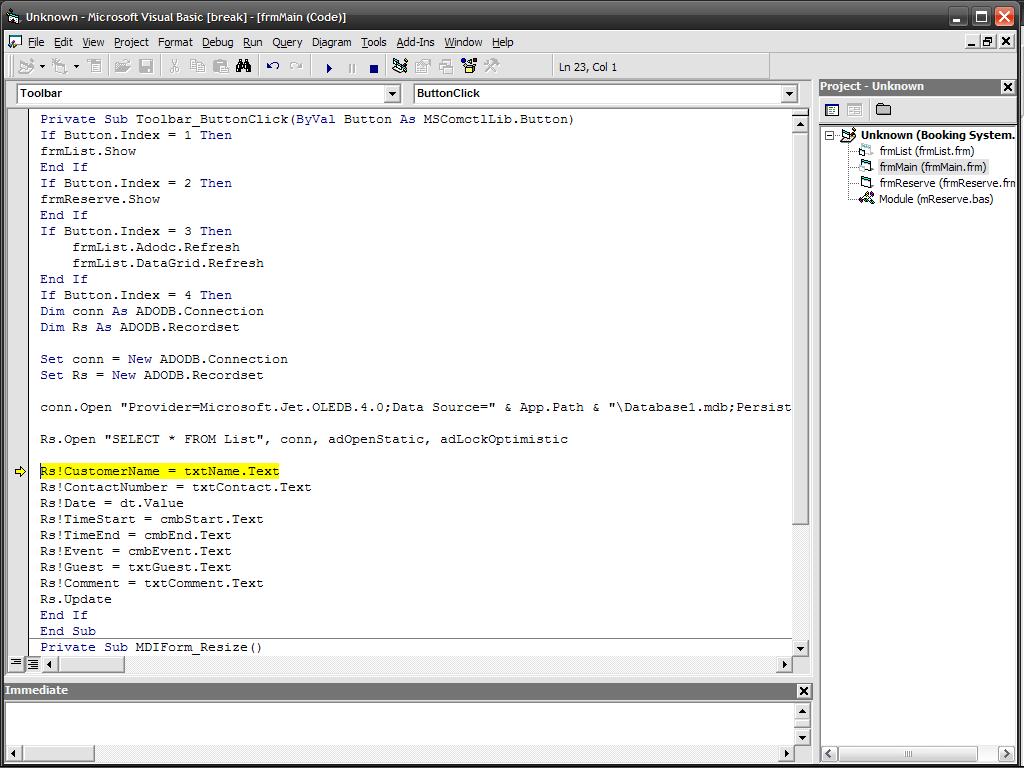
Private Sub Toolbar_ButtonClick(ByVal Button As MSComctlLib.Button)
Attachments wew.JPG 39.85KB
Shodow
Junior Poster
167 posts since Jan 2011
Reputation Points: 14
Solved Threads: 0
Skill Endorsements: 0

What do you mean with "highlighted record"? Where is it highlighted?

The code above will edit an existing record that you have chosen.

AndreRet
Industrious Poster
4,706 posts since Jan 2008
Reputation Points: 391
Solved Threads: 481
Skill Endorsements: 20

I also do not understand your picture, what is it suppose to show?

AndreRet
Industrious Poster
4,706 posts since Jan 2008
Reputation Points: 391
Solved Threads: 481
Skill Endorsements: 20

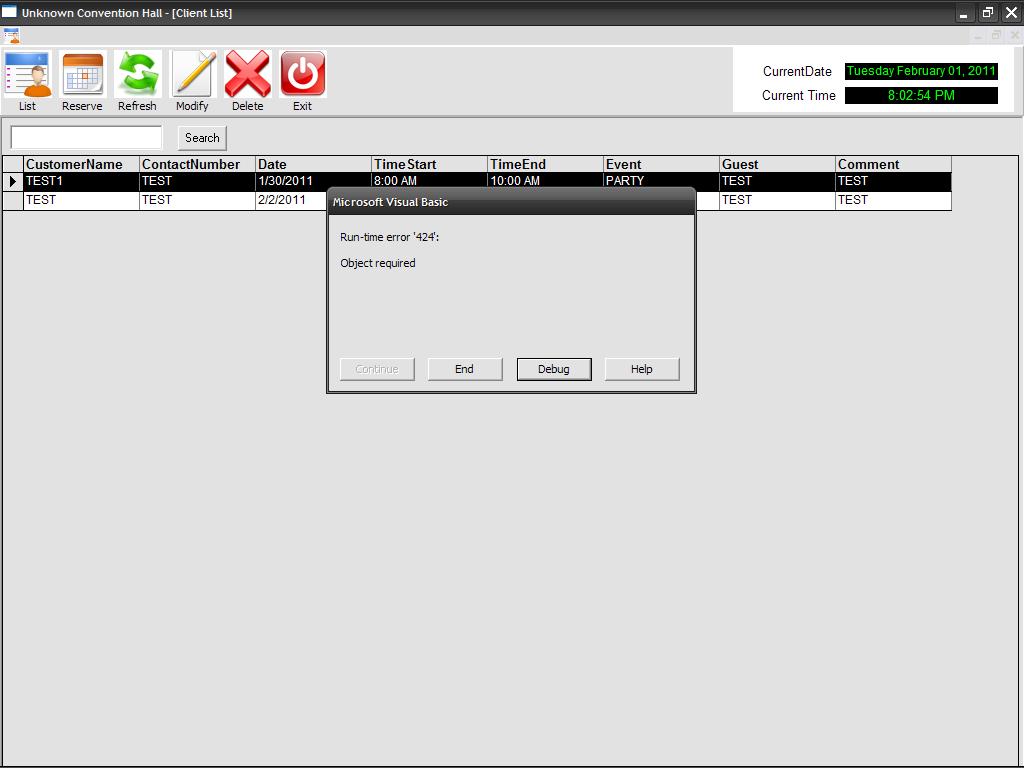
error about this

Private Sub Toolbar_ButtonClick(ByVal Button As MSComctlLib.Button)
Shodow
Junior Poster
167 posts since Jan 2011
Reputation Points: 14
Solved Threads: 0
Skill Endorsements: 0

What is the code under this (below)?

AndreRet
Industrious Poster
4,706 posts since Jan 2008
Reputation Points: 391
Solved Threads: 481
Skill Endorsements: 20
Private Sub Toolbar_ButtonClick(ByVal Button As MSComctlLib.Button)
If Button.Index = 1 Then
frmList.Show
End If
If Button.Index = 2 Then
frmReserve.Show
End If
If Button.Index = 3 Then
    frmList.Adodc.Refresh
    frmList.DataGrid.Refresh
End If
If Button.Index = 4 Then

Dim conn As ADODB.Connection
Dim Rs As ADODB.Recordset

Set conn = New ADODB.Connection
Set Rs = New ADODB.Recordset

conn.Open = "Provider=Microsoft.Jet.OLEDB.4.0;Data Source=" & App.Path & "\Database1.mdb;Persist Security Info=False"

Rs.Open "SELECT * FROM List", conn, adOpenStatic, adLockOptimistic

Rs!CustomerName = txtName.Text
Rs!ContactNumber = txtContact.Text
Rs.Update
End If
End Sub
Shodow
Junior Poster
167 posts since Jan 2011
Reputation Points: 14
Solved Threads: 0
Skill Endorsements: 0

Don't put the the code in the toolbar.

Place it in your command button (cmdUpdate) in your Modify form.

abelingaw
Posting Whiz in Training
227 posts since Jun 2008
Reputation Points: 79
Solved Threads: 31
Skill Endorsements: 2

Your code is porfect. Reference the ms active x data objects.:)

AndreRet
Industrious Poster
4,706 posts since Jan 2008
Reputation Points: 391
Solved Threads: 481
Skill Endorsements: 20

my modify command button is on the toolbar

Shodow
Junior Poster
167 posts since Jan 2011
Reputation Points: 14
Solved Threads: 0
Skill Endorsements: 0

when i click modify

Attachments 1.JPG 59.12KB 2.JPG 109.62KB
Shodow
Junior Poster
167 posts since Jan 2011
Reputation Points: 14
Solved Threads: 0
Skill Endorsements: 0

Do you have a control named txtName on your form?

AndreRet
Industrious Poster
4,706 posts since Jan 2008
Reputation Points: 391
Solved Threads: 481
Skill Endorsements: 20

yes

Shodow
Junior Poster
167 posts since Jan 2011
Reputation Points: 14
Solved Threads: 0
Skill Endorsements: 0

Then your problem lies with the field name CustomerName. Is that spelled correctly. It is not the recordset, that was declared etc. Is your open call correct, in other words the table name List exists?

AndreRet
Industrious Poster
4,706 posts since Jan 2008
Reputation Points: 391
Solved Threads: 481
Skill Endorsements: 20

This question has already been solved: Start a new discussion instead

Post: Markdown Syntax: Formatting Help
 
You
View similar articles that have also been tagged:
 
© 2013 DaniWeb® LLC
Page rendered in 0.1263 seconds using 2.73MB