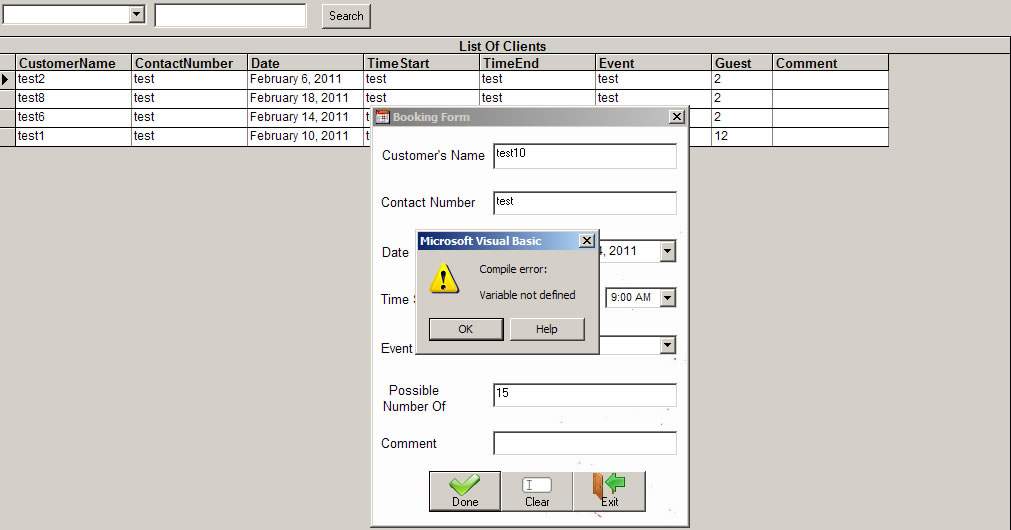
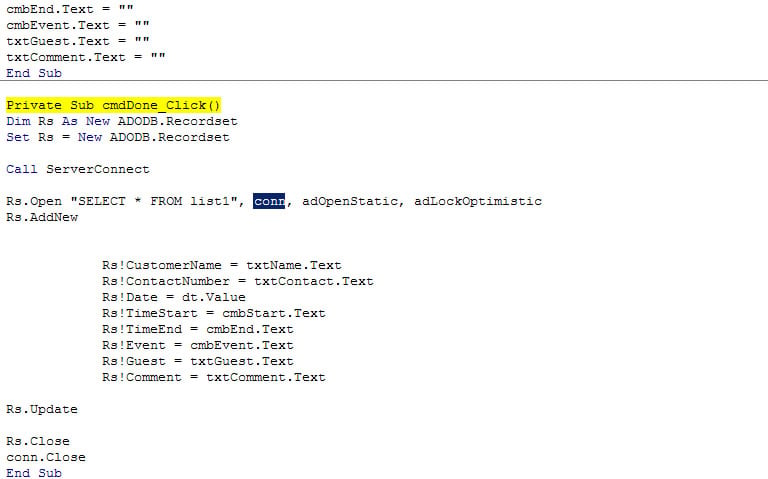
On which line did the error occur?
AndreRet
Senior Poster
3,922 posts since Jan 2008
Reputation Points: 334
Solved Threads: 350
Below the cmd_Done, it will highlight the actual line where the object is not defined. I need to see which object it is. It can only be Rs, ServerConnect, conn.
AndreRet
Senior Poster
3,922 posts since Jan 2008
Reputation Points: 334
Solved Threads: 350
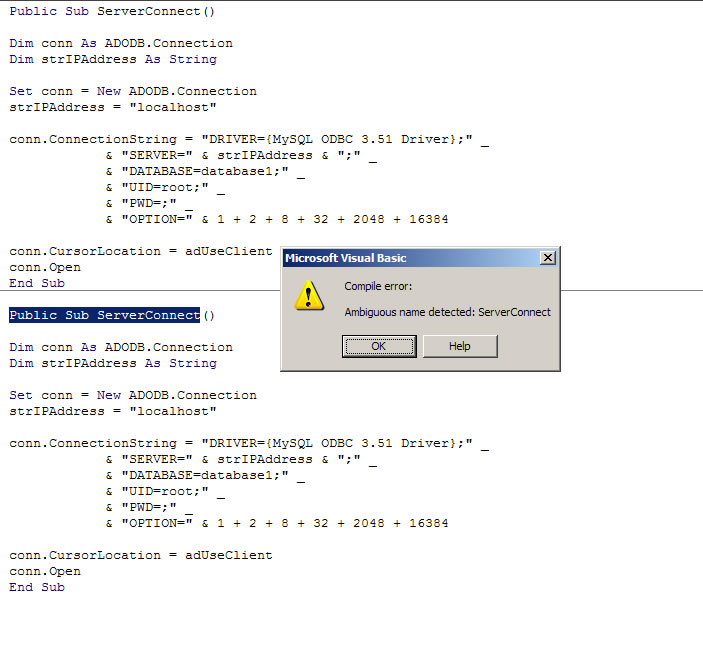
Ahhh, that is because you have two subs with the same name "ServerConnect", both using conn as the connection, hence the ambigitous name detected error. Delete or rename one of the subs.:)
AndreRet
Senior Poster
3,922 posts since Jan 2008
Reputation Points: 334
Solved Threads: 350
No, do not make it private. Change the name of the sub say ServerConnect1 and the other one ServerConnect2. Keep it public and in your module.
When calling the connection, use "Call ServerConnect1" or if you are using 2 "Call ServerConnect2"
AndreRet
Senior Poster
3,922 posts since Jan 2008
Reputation Points: 334
Solved Threads: 350
Your code is perfect. Did you change it in the call statement as well -
'You had...
Call ServerConnect
'Should be....
Call ServerConnect1
AndreRet
Senior Poster
3,922 posts since Jan 2008
Reputation Points: 334
Solved Threads: 350
Try the following so we can see where the error occur. It might be that conn is not connecting to your MySql database. Does your MySql require a password?
Dim Rs As New ADODB.Recordset
Set Rs = New ADODB.Recordset
'Call ServerConnect1
Dim conn As ADODB.Connection
Dim strIPAddress As String
Set conn = New ADODB.Connection
strIPAddress = "localhost"
conn.ConnectionString = "DRIVER={MySQL ODBC 3.51 Driver};" _
& "SERVER=" & strIPAddress & ";" _
& "DATABASE=database1;" _
& "UID=root;" _
& "PWD=;" _
& "OPTION=" & 1 + 2 + 8 + 32 + 2048 + 16384
conn.CursorLocation = adUseClient
conn.Open
Rs.Open "SELECT * FROM list1", conn, adOpenStatic, adLockOptimistic
Rs.AddNew
Rs!CustomerName = txtName.Text
Rs!ContactNumber = txtContact.Text
Rs!Date = dt.Value
Rs!TimeStart = cmbStart.Text
Rs!TimeEnd = cmbEnd.Text
Rs!Event = cmbEvent.Text
Rs!Guest = txtGuest.Text
Rs!Comment = txtComment.Text
Rs.Update
Rs.Close
conn.Close
AndreRet
Senior Poster
3,922 posts since Jan 2008
Reputation Points: 334
Solved Threads: 350
There must be another reason then why it is not opening from the module, Very strange indeed. I think we need to move the "Call ServerConnect" to the first line and all other code after that. Try that and see what happens, unless you want to keep it as it is now, working!;)
If you are happy with the solution, don't forget to mark this as solved, thanks.:)
AndreRet
Senior Poster
3,922 posts since Jan 2008
Reputation Points: 334
Solved Threads: 350
Sorry I missed the second post, yes, that should be fine. Just move the call statement up to the first line of code as per my previous reply.
AndreRet
Senior Poster
3,922 posts since Jan 2008
Reputation Points: 334
Solved Threads: 350